Introduction
This guide describes how to operate and maintain the ChargePoint® Express Plus DC fast charging platform. This section provides an introduction to the ChargePoint®Express Plus DC fast charging platform.
Express Plus Components
Express Plus is a scalable DC fast charging platform. It consists of three components: Power Module, Power Block, and Power Link.

-
Power Module is the power conversion component. It converts the upstream AC power into DC power to output up to 40 kW of power.
-
Power Block contains Power Modules. It can accommodate up to five Power Modules and has two DC outputs, capable of delivering up to 200 kW of power.
-
Power Link is the charger. It receives DC power from Power Blocks. A Power Link can accommodate up to two charging cables to charge two electric vehicles simultaneously.
For full specifications and certifications, refer to the product datasheets at ChargePoint Product Reference Documentation.
Eichrecht Compliance
The Express Plus Power Link 2000 station is Eichrecht compliant. Therefore, it is allowed to invoice for the amount of energy measured in this station.
It is equipped with up to two ports and measures energy with the integrated ChargePoint PLIM2000 meter.
The maximum power is 500 kW per port.
Station receipts appear on the display after charging sessions and can be retrieved from the ChargePoint driver portal.
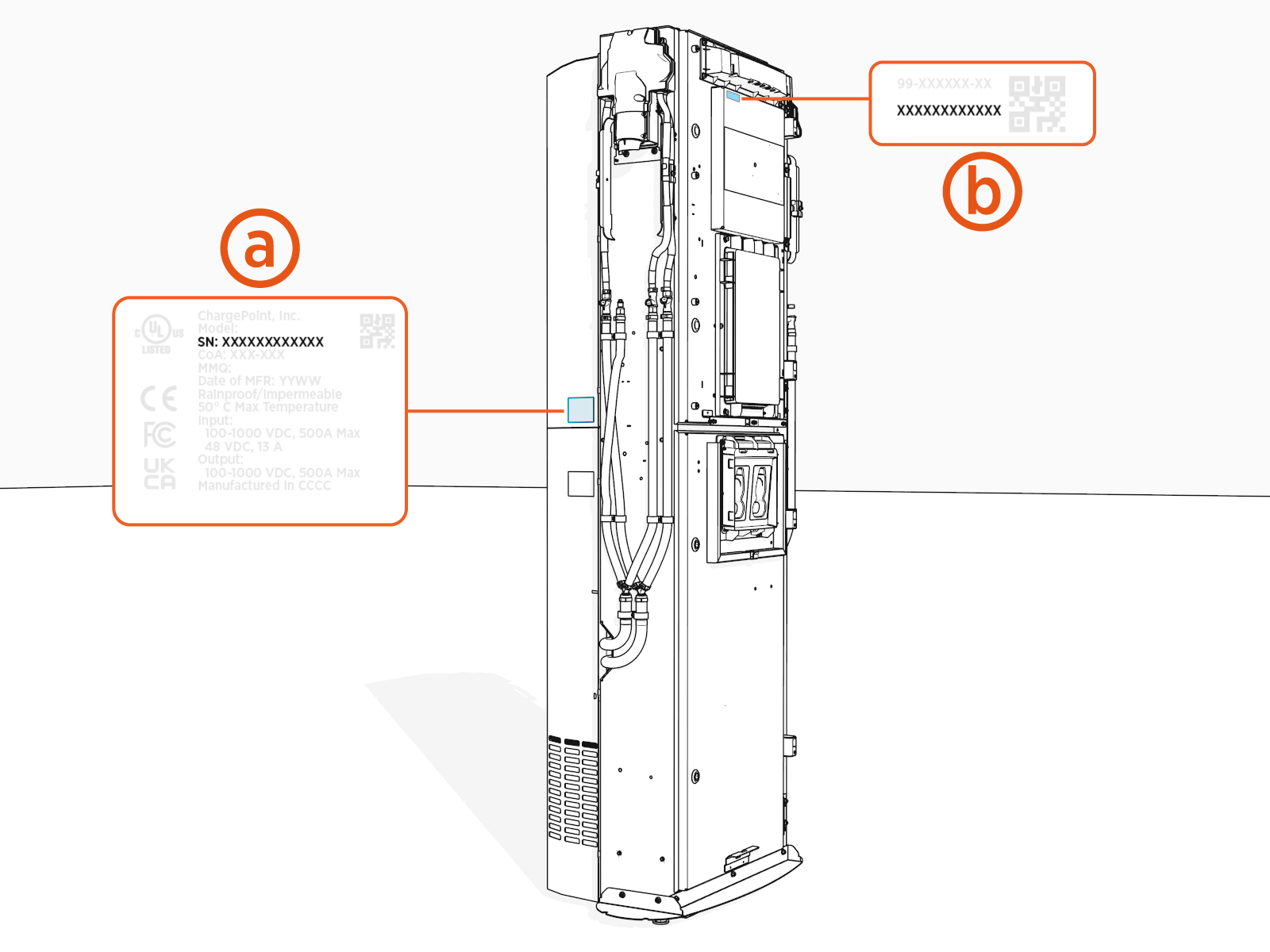
The type label is located on the backplate on the left side (front view).
Serial Number Location
On the Station
The serial number (SN) located on the Eichrecht label on the rear upper cover (a) matches with the SN on Power Link 2000 at the top front (b).
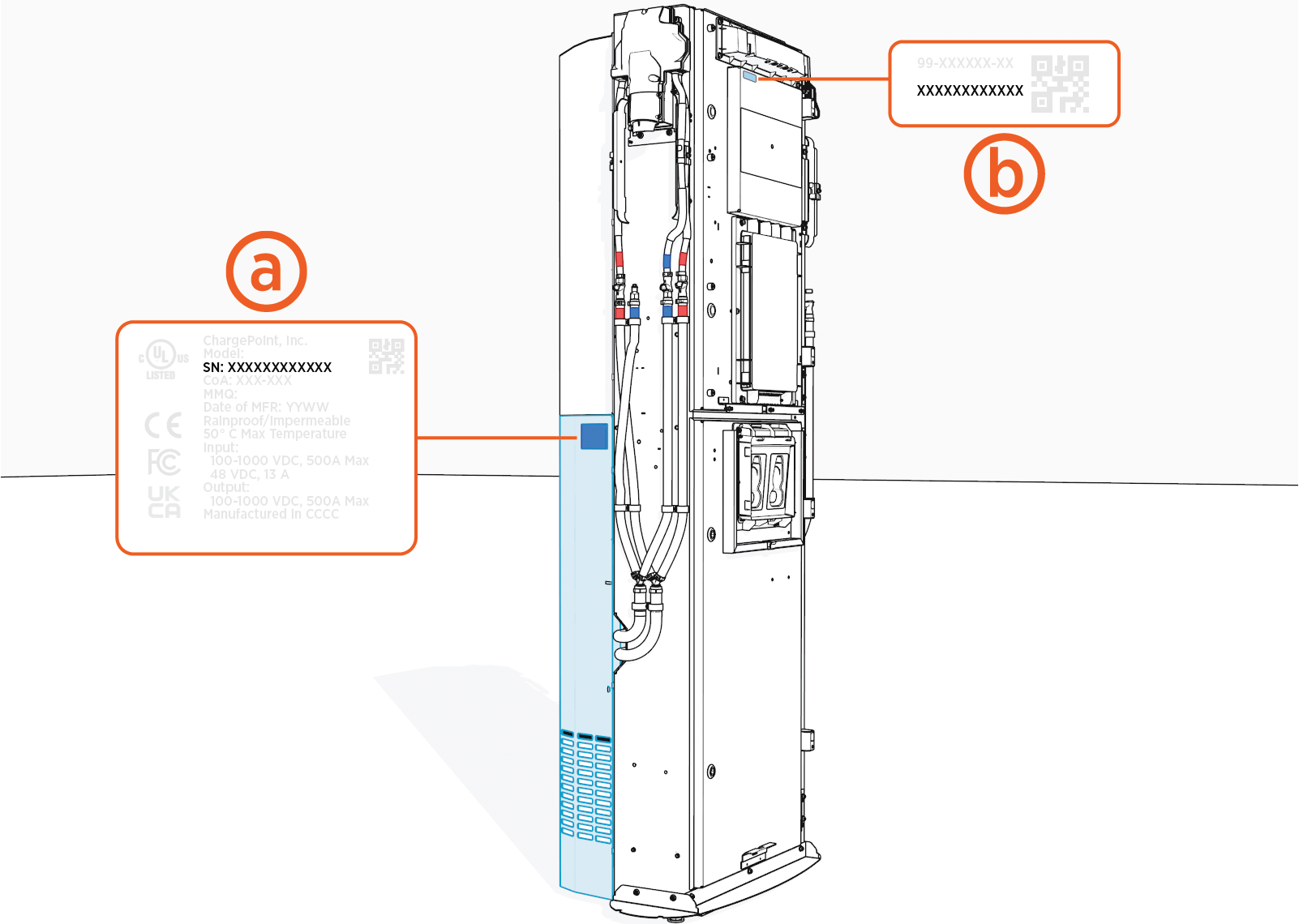
Some older Power Link 2000s may have the Eichrecht label on the rear lower cover, as shown below.
To find the serial number of an Eichrecht-compliant Power Link 2000 charging station, visit Eichrecht Type Label.
From the ChargePoint Platform Dashboard
-
Log in to ChargePoint Platform and navigate to Stations.
-
Find the MAC
 Message Authentication Code address and serial number (System S/N) next to the station name in the Stations Overview table.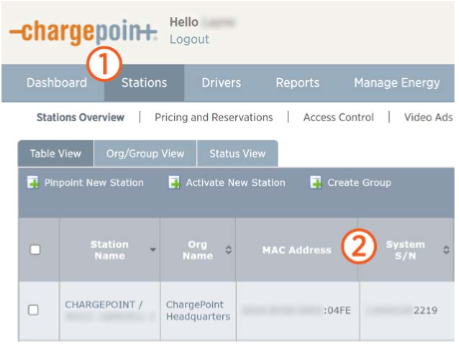
Express Plus Guides
Access ChargePoint documents at ChargePoint Product Reference Documentation.
|
Document |
Content |
Primary Audiences |
|
Datasheet |
Full station specifications |
Site designer, installer, and station owner |
|
Site Design Guide |
Civil, mechanical, and electrical guidelines to scope and construct the site |
Site designer or engineer of record |
|
Concrete Mounting Template Guide |
Instructions to embed the charging station template in a concrete pad with anchor bolts and conduit placement (these may also be included in the Site Design Guide) |
Site construction contractor |
|
Surface Conduit Entry Kit Guide |
Instructions for sites where conduit cannot be run underground |
Installer |
|
Construction Signoff Form |
Checklists used by contractors to ensure the site is correctly completed and ready for product installation |
Site construction contractor |
|
Installation Guide |
Anchoring, wiring, and powering on |
Installer |
|
Operation and Maintenance Guide |
Operation and preventive maintenance information |
Station owner, facility manager, and technician |
|
Service Guide |
Component replacement procedures, including optional components |
Service technician |
|
Declaration of Conformity |
Statement of conformity with directives |
Purchasers and public |
