Introduction
This section provides essential background information for operating and maintaining the ChargePoint® Express Solo and Express Distro Power Block 2000.
About This Guide
This guide describes the routine operational tasks and preventive maintenance activities required to keep the Express Solo and Express Distro Power Block 2000 operating safely and reliably. It is intended for site operators, facility personnel, and qualified maintenance technicians responsible for day‑to‑day station operation and scheduled maintenance.
Express Solo and Express Distro Power Block 2000 share a common underlying mechanical and electrical system design. For this reason, both products are covered within a single Operations and Maintenance Guide. Unless otherwise noted, procedures apply to both products.
Express Solo Overview
Express Solo is a product within the Express DC fast charging platform. Express Solo operates as both a standalone charging station and a power cabinet. It accepts AC input power, converts it to DC, and delivers power to two integrated charging cables. It can also simultaneously supply power to downstream EVSEs such as external Power Link charging dispensers.
For information on Power Link charging dispensers and other modular EVSEs in the ChargePoint Express platform, refer to the Express platform documents at ChargePoint Product Reference Documentation.
Exterior Parts
The following shows an exterior view of the Express Solo.
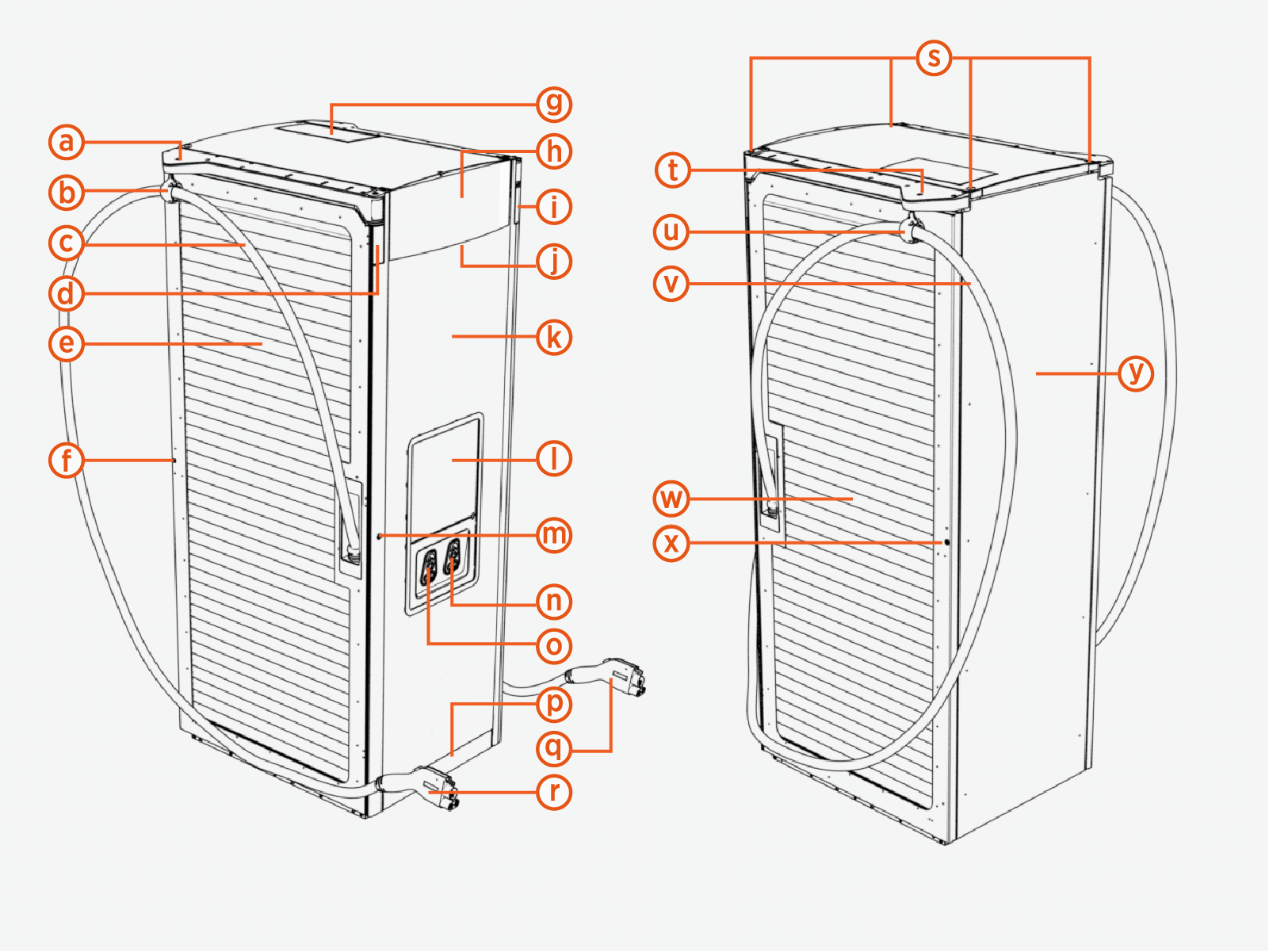
|
Ref |
Part |
Ref | Part |
|---|---|---|---|
| (a) |
Cable management system, left |
(n) |
Holster, right |
| (b) |
Tetherball, left |
(o) |
Holster, left |
| (c) |
Charging cable, left |
(p) |
Bottom plate |
| (d) |
Status LED, left |
(q) |
Charging connector, right |
| (e) |
Exhaust (left) door with airflow vents |
(r) |
Charging connector, left |
| (f) |
Exhaust door lock |
(s) |
Lifting points |
| (g) |
Smart Antenna |
(t) |
Cable management system, right side |
| (h) |
Logo plate (customizable) |
(u) |
Tetherball, right |
| (i) |
Status LED, right |
(v) |
Charging cable, right |
| (j) |
Area downlight (front – illumination side) |
(w) |
Intake (right) door with airflow vents |
| (k) |
Display door (with customizable vinyl) |
(x) |
Intake door lock |
| (l) |
Display/CCOM |
(y) |
Rear panel |
| (m) |
Display door lock |
(*) CCOM Control and Communications Module = Control and Communication Module
Cable Management System
Express Solo is available with several cable management options:
-
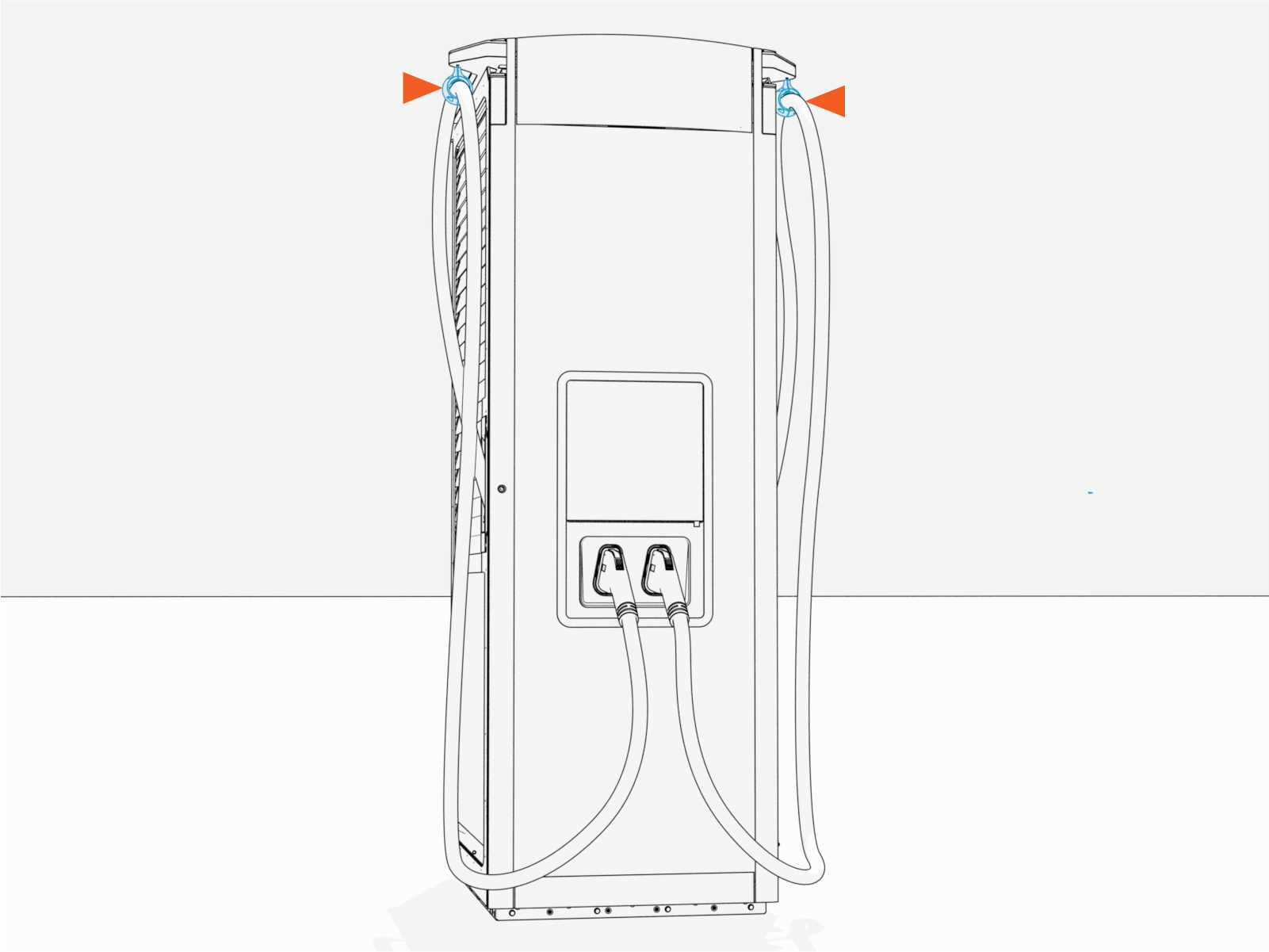
Fixed Tether Point – Charging cables are suspended from fixed points on left and right sides of the charging station.
-
Swingarm Cable Management Kit (CMK
Cable Management Kit) – Moveable arms on left and right sides of the cabinet swing suspended charging cables out and forward for charging and retract cables to rest position between charges.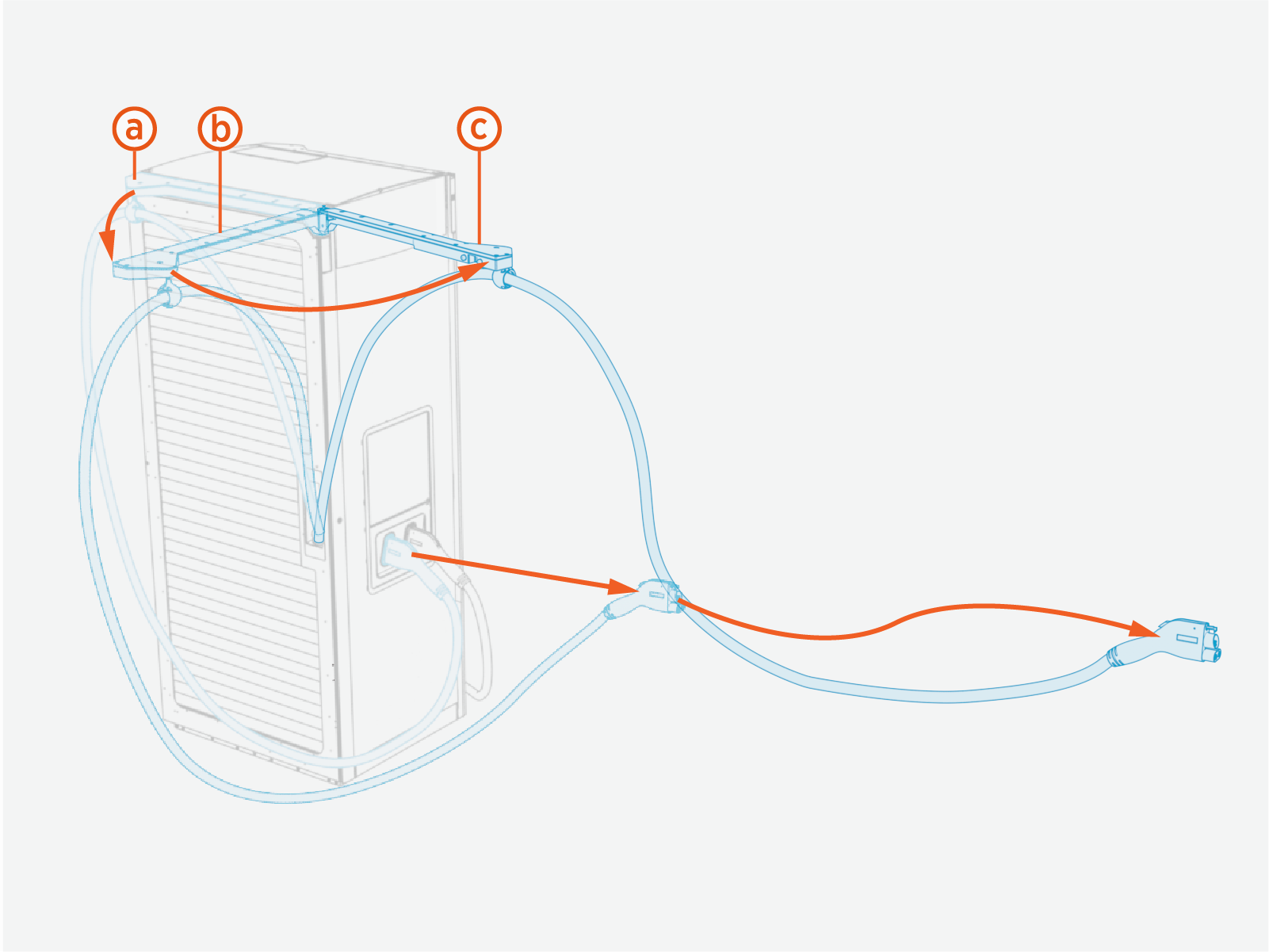
-
CMK
Cable Management Kit retracted position -
CMK
Cable Management Kit half open (maximum side extended) position -
CMK
Cable Management Kit fully open (maximum front extended) position
-
-
Overhead CMK
Cable Management Kit – An extendable/retractable tetherball suspends charging cables on poles (or other vertical structure) positioned to the left and right of the station.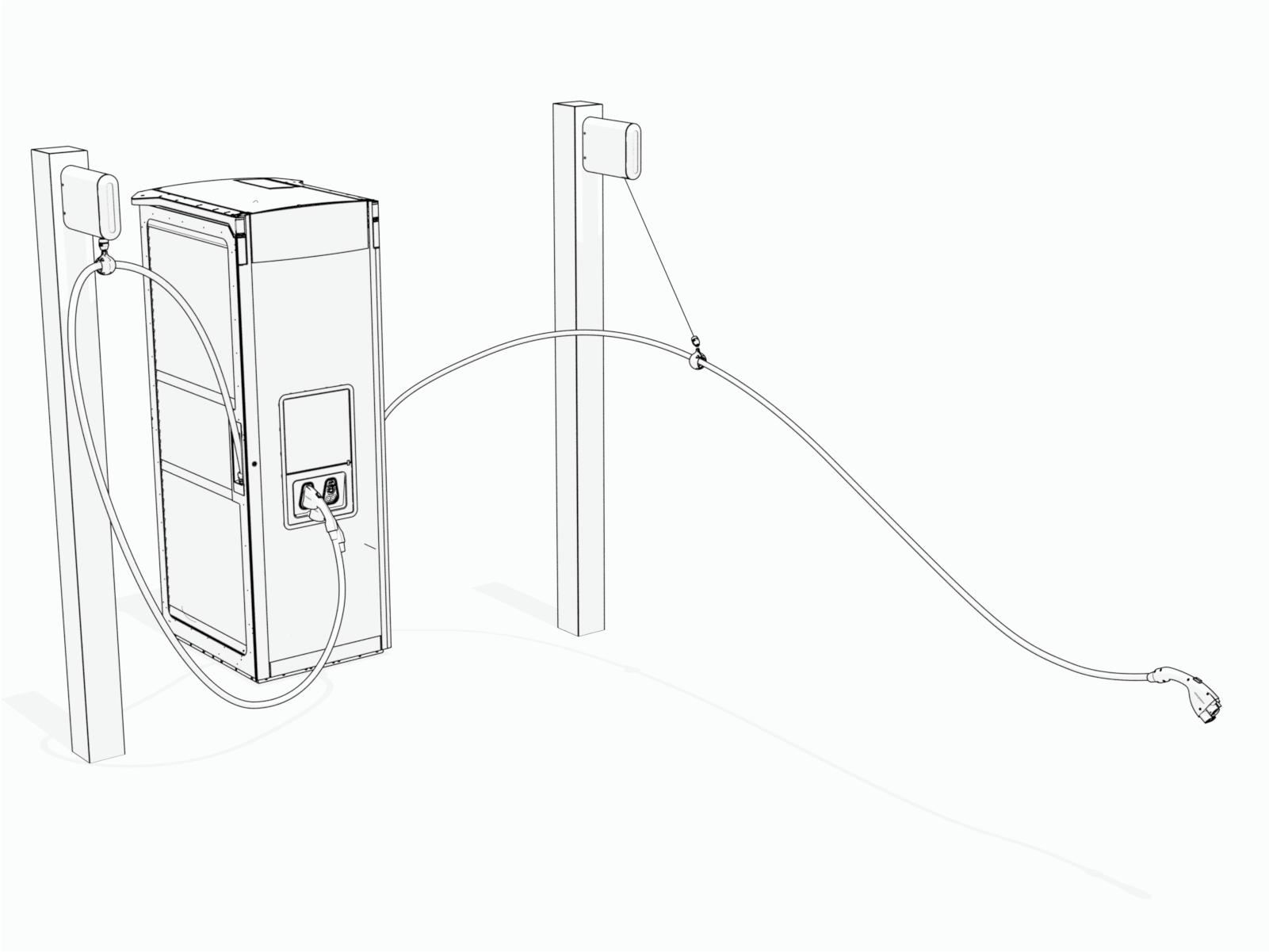
Interior Parts
The following shows a front interior view of the Express Solo.
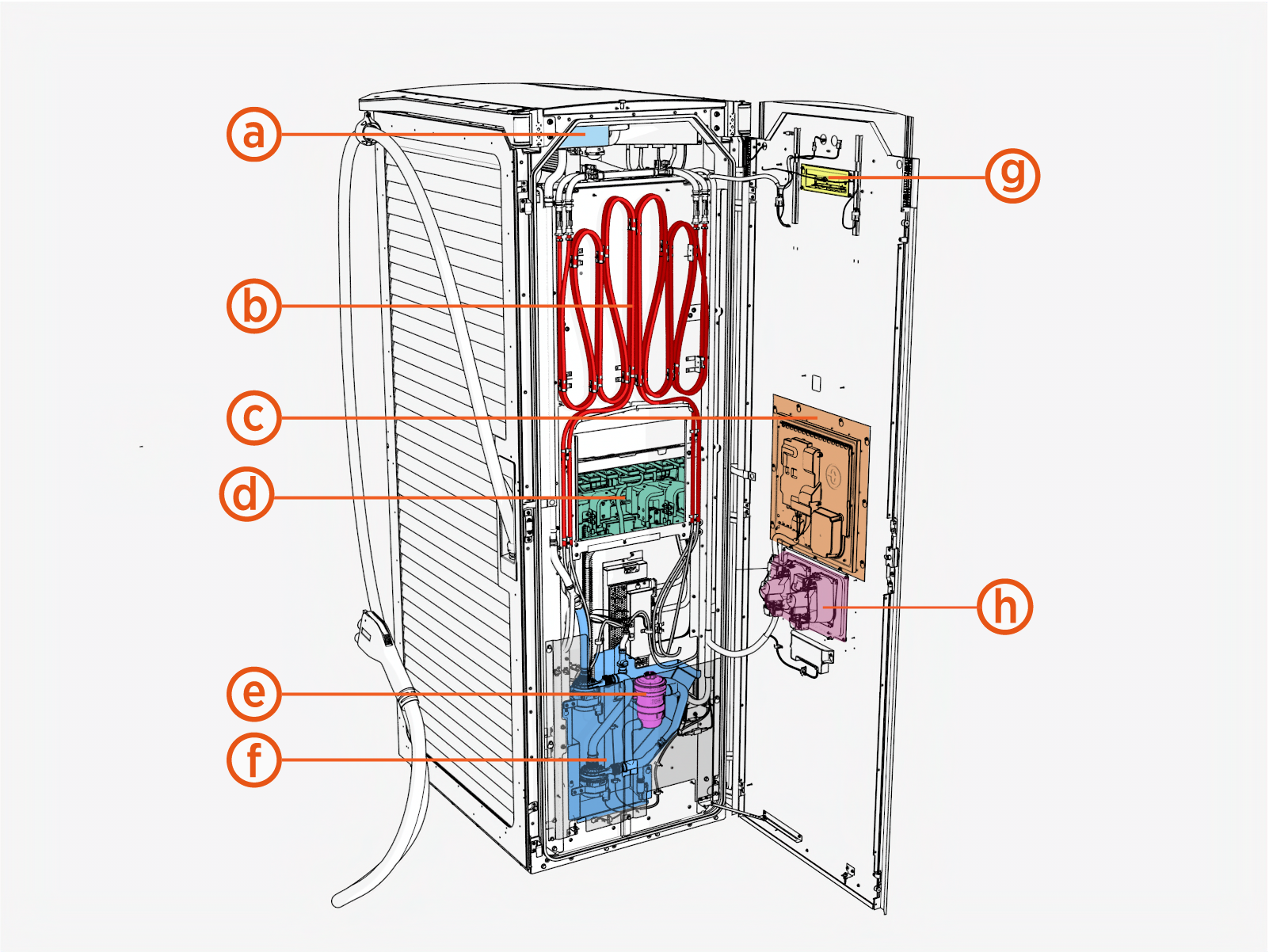
|
Ref |
Part |
|---|---|
| (a) |
Coolant reservoir |
| (b) |
Liquid cooling system |
| (c) |
Display/CCOM |
| (d) |
Neutron modules |
| (e) |
Ion filter |
| (f) |
Coolant circulation pump for liquid cool charging (LCC |
| (g) |
Area downlight (rear housing) |
| (h) | Holsters |
The following shows side interior views of the Express Solo:
|
|
|
| Intake (Right) Side | Exhaust (Left) Side |
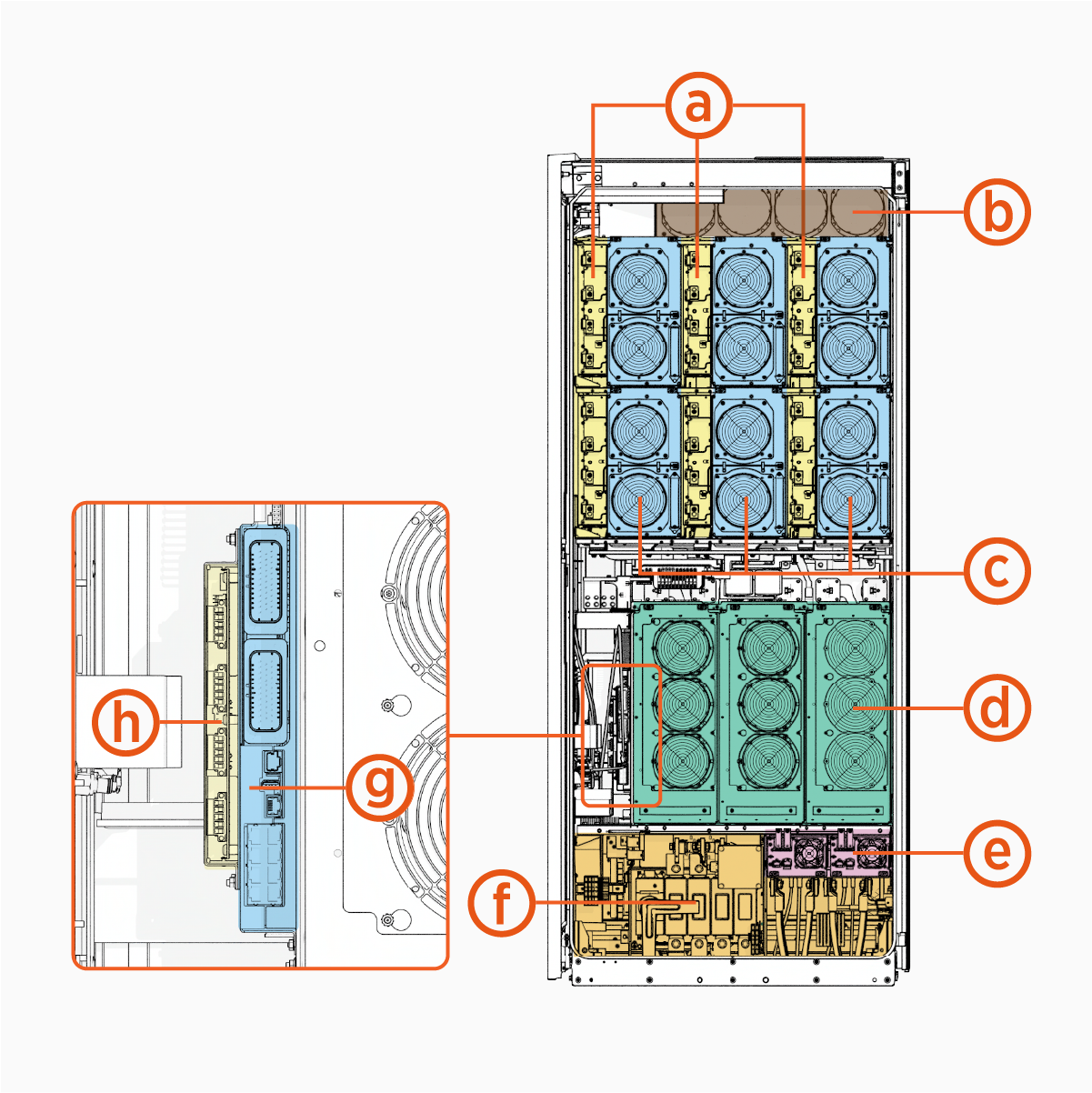
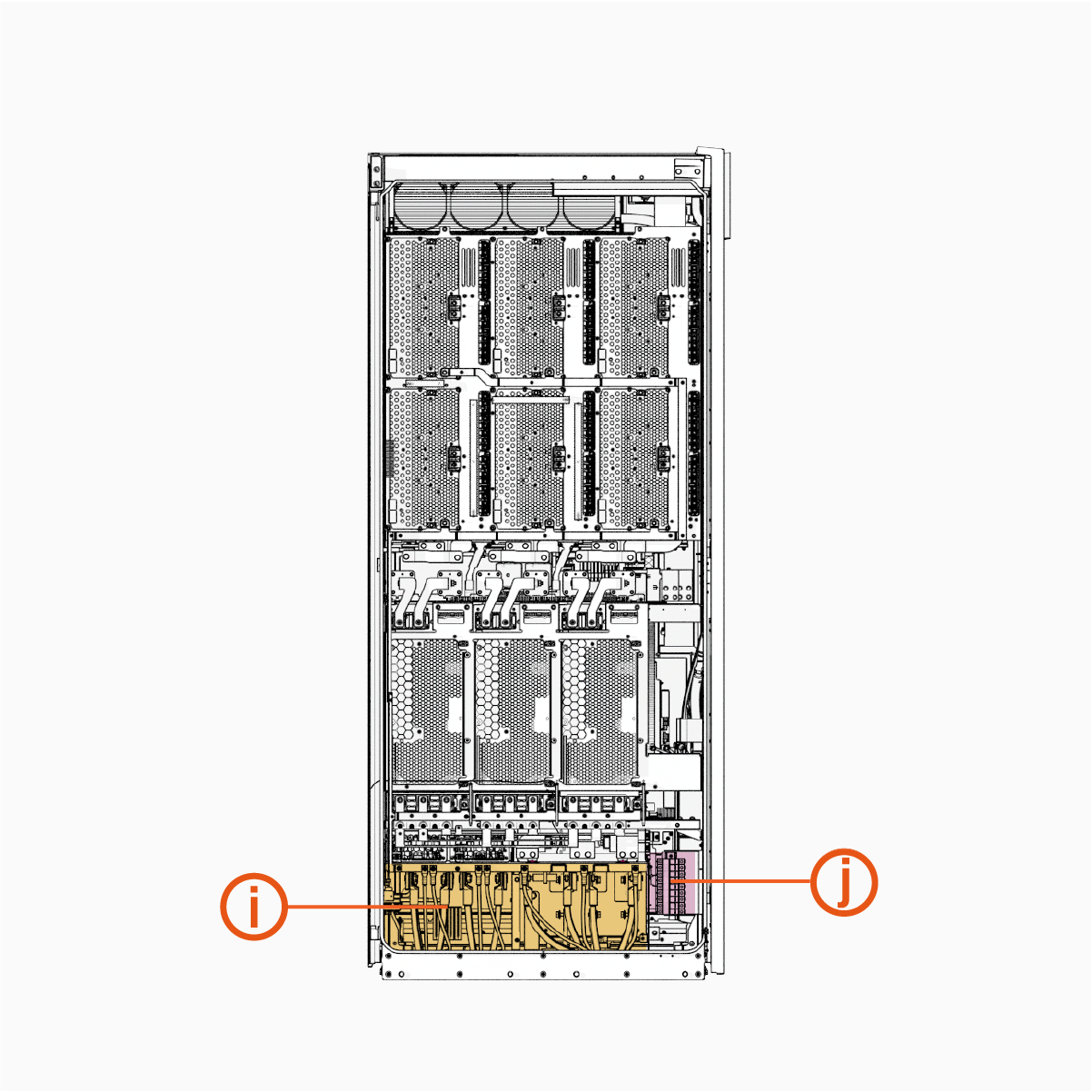
|
Ref |
Part |
Ref | Part |
|---|---|---|---|
| (a) |
Contactor matrix |
(f) |
Wire terminals and bus bars, intake side |
| (b) |
Liquid cooled charging (LCC |
(g) |
Power Management Controller (PMC) |
| (c) |
DC power modules |
(h) |
Safety Hub Board (SHB) |
| (d) |
AC power modules |
(i) |
Wire terminals and bus bars, exhaust side |
| (e) |
Aux power supply (AUX PS |
(j) |
48 V DC fuse block |
Express Distro Power Block 2000 Overview
Power Block 2000 is a product within the ChargePoint Express DC fast charging platform. Power Block 2000 is a power cabinet, responsible for AC grid connection, power conversion, and DC power distribution to downstream EVSEs such as external Power Link charging dispensers.
For information on Power Link charging dispensers and other EVSEs in the ChargePoint Express platform, refer to the Express platform documents at ChargePoint Product Reference Documentation.
Exterior Parts
The following shows an exterior view of a single-cabinet Express Distro Power Block 2000:
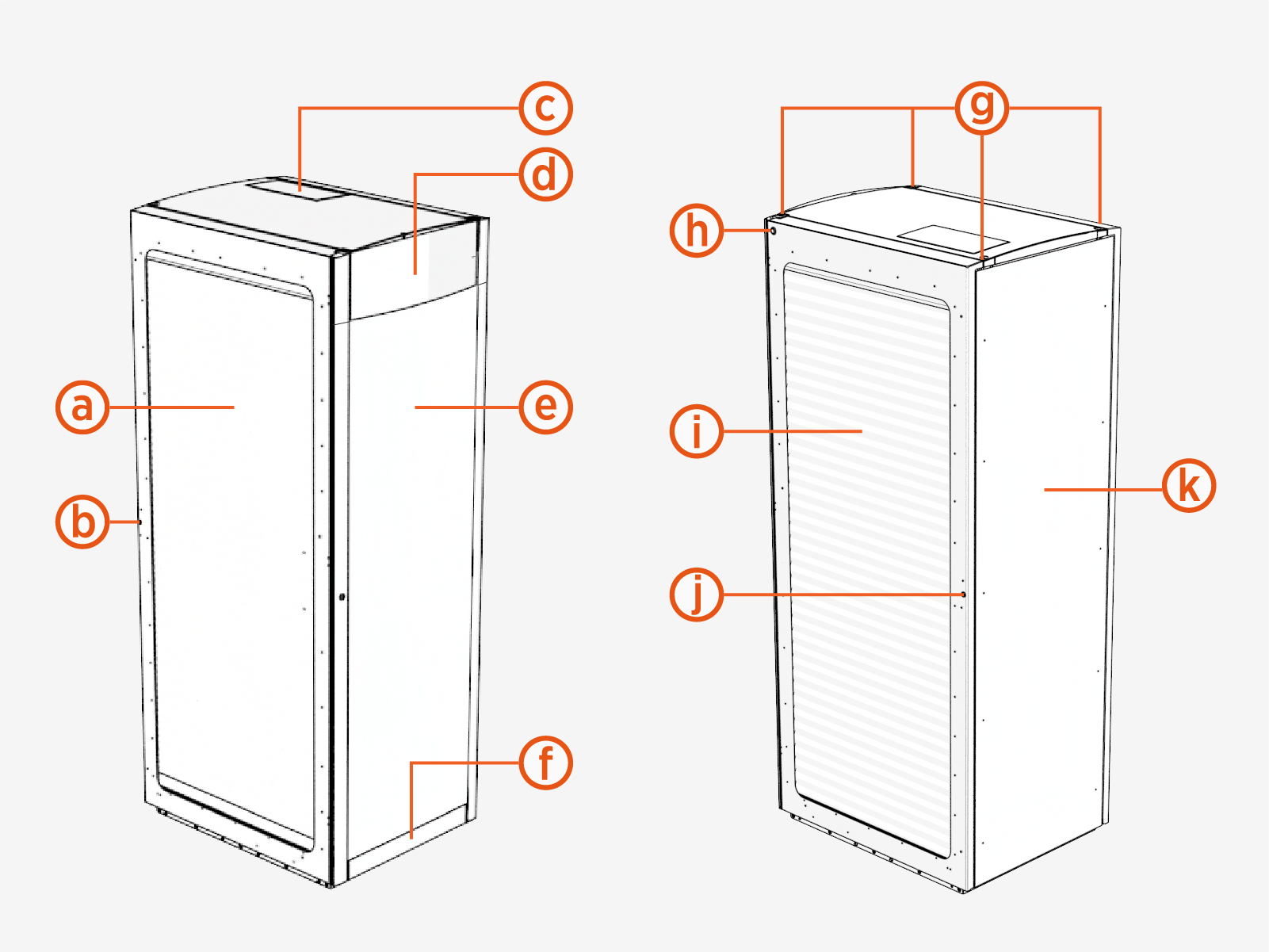
|
Ref |
Part |
Ref | Part |
|---|---|---|---|
| (a) |
Exhaust (left) door with airflow vents |
(g) |
Lifting points |
| (b) |
Exhaust door lock |
(h) |
Status LED |
| (c) | Smart Antenna (optional) | (i) |
Intake (right) door with airflow vents |
| (d) |
Logo plate (customizable) |
(j) |
Intake door lock |
| (e) |
Front panel (with customizable vinyl) |
(k) |
Rear panel |
| (f) |
Front bottom plate |
Cabinet Configurations
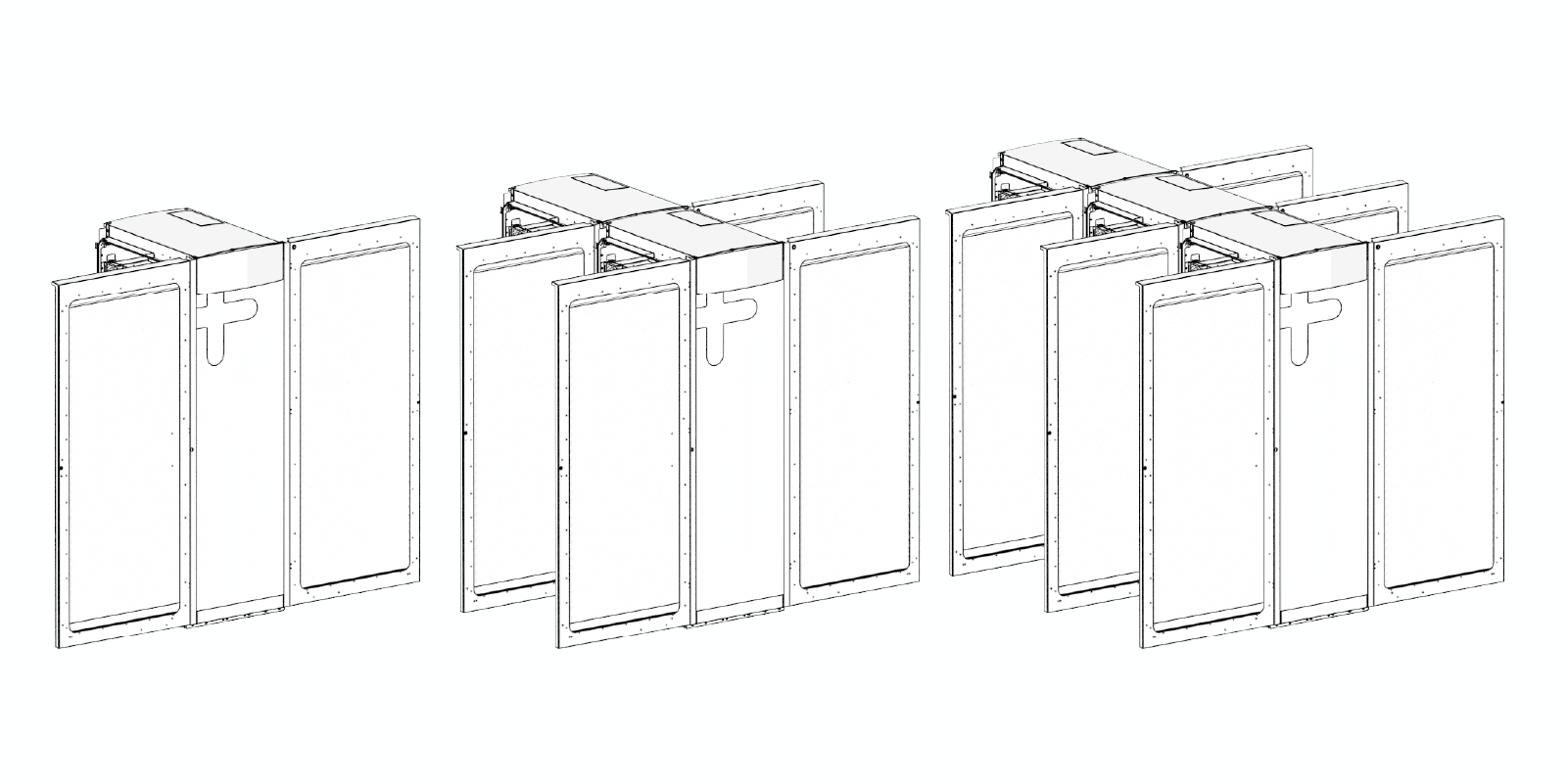
Power Block 2000 is available in single-, double-, or triple-cabinet configurations, as shown below. The double- and triple-cabinet models ship as a single integrated unit, with the cabinets factory‑bolted together.
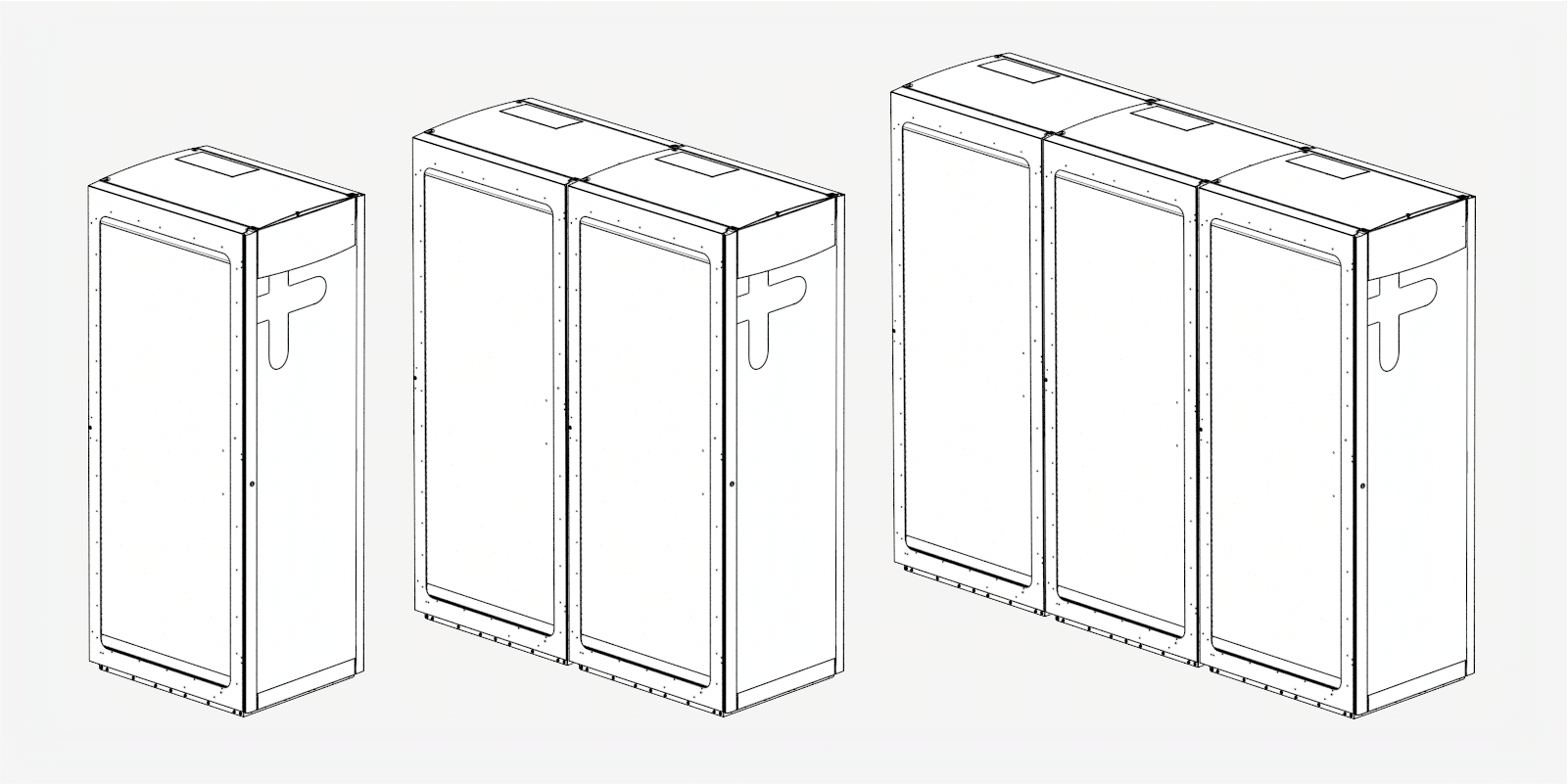
The side doors for each cabinet section swing open towards the front of the unit.
Interior Parts
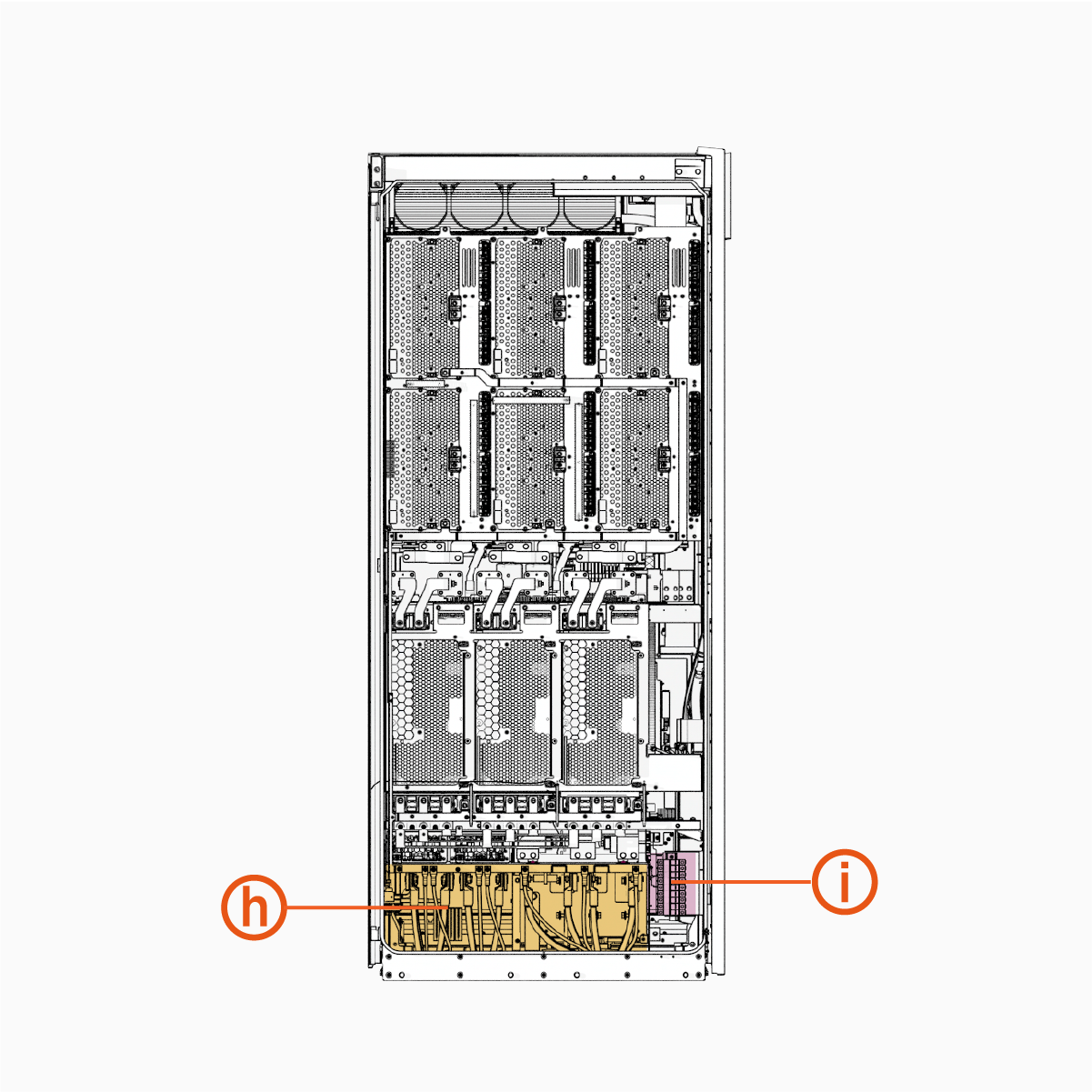
The following shows the interior views of the single-cabinet Power Block 2000:
|
|
|
| Intake (Right) Side | Exhaust (Left) Side |
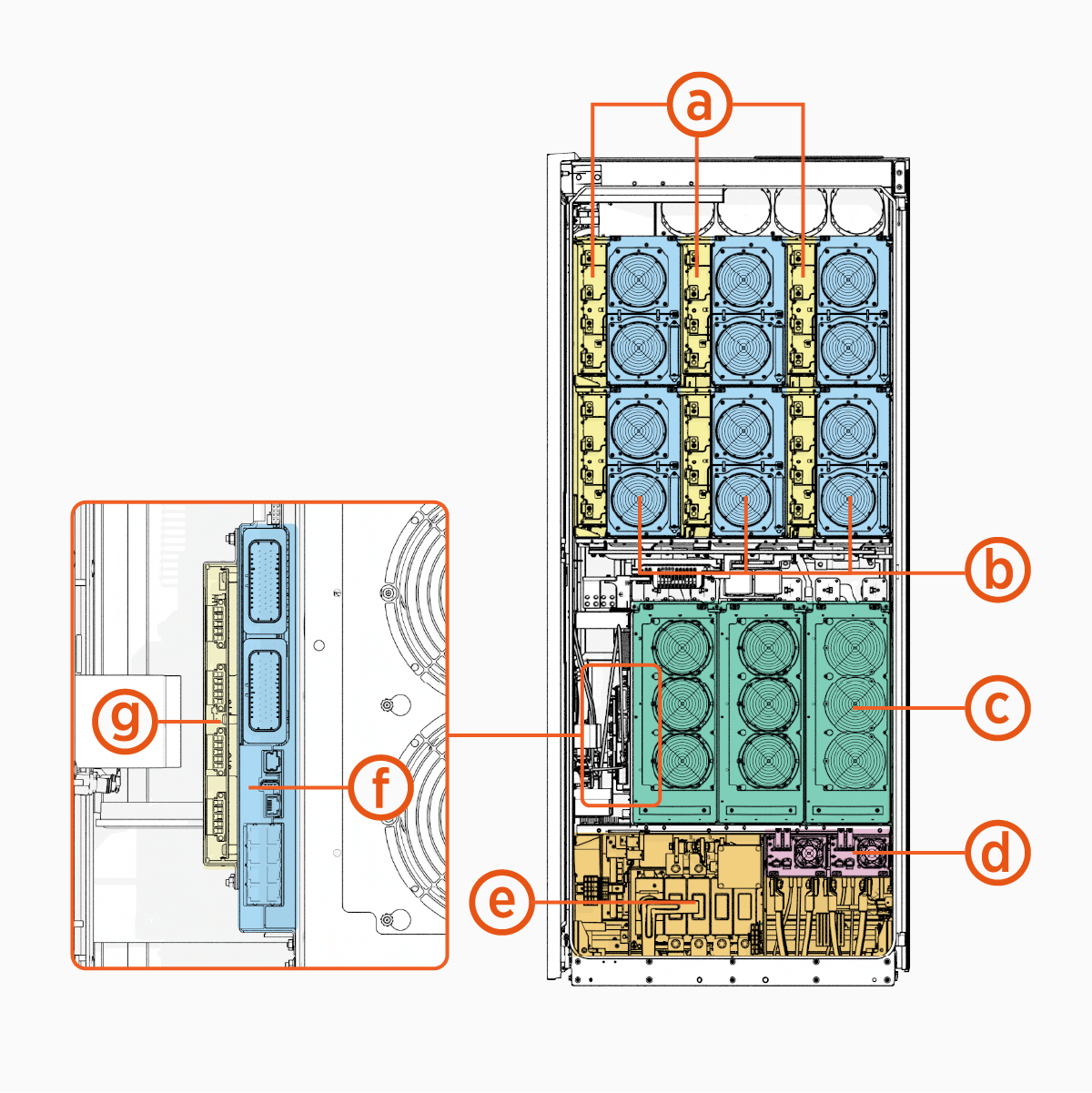
|
Ref |
Part |
Ref | Part |
|---|---|---|---|
| (a) |
Contactor matrix |
(f) |
Power Management Controller (PMC) |
| (b) |
DC power modules |
(g) |
Safety Hub Board (SHB) |
| (c) |
AC power modules |
(h) |
Wire terminals and bus bars, exhaust side |
| (d) |
Auxiliary Power Supply (AUX PS |
(i) |
48 V DC fuse block |
| (e) |
Wire terminals and bus bars, intake side |
|
The interior parts shown above are present in each cabinet of the double- and triple-cabinet Power Block 2000.
Eichrecht Compliance
The Express Solo station is Eichrecht compliant. Therefore, it is allowed to invoice for the amount of energy measured in this station.
It is equipped with up to two ports and measures energy with the integrated ChargePoint CPMW1000 meter.
The maximum power is 525 kW per port.
Station receipts appear on the display after charging sessions and can be retrieved from the ChargePoint driver portal.
The type label is located on the backplate on the left side (front view).
Serial Number Location
The product location can be found in the side of the charger (a) as shown in the figure below:

Product Guides
A full suite of guides is available for Express Solo and Express Distro Power Block 2000, as summarized below.
|
Document |
Content |
Primary Audiences |
|
Datasheet |
Full station specifications |
Site designer, installer, and station owner |
|
Site Design Guide |
Civil, mechanical, and electrical guidelines to scope and construct the site |
Site designer, responsible engineer, contractors, installers |
|
Construction Signoff Form |
Checklists used by contractors to ensure the site is correctly completed and ready for product installation |
Site construction contractor |
|
Installation Guide |
Anchoring, wiring, and powering on |
Installer |
|
Operation and Maintenance Guide |
Operation and preventive maintenance information |
Station owner, facility manager, and technician |
|
Service Guide |
Component replacement procedures, including optional components |
Service technician |
|
Declaration of Conformity |
Statement of conformity with directives |
Purchasers and public |
Access ChargePoint documents at ChargePoint Product Reference Documentation.