Conformity - Metering and Calibration Law (Eichrecht)
Electric Metering Data
This Flex Series electric vehicle charging system conforms with German regulations regarding metering and calibration (MessEG, MessEV). Hardware and software are certified according to the type examination process (Module B and Module F).
The Legally Relevant Software (LRS) versions, along with their checksums, are found in the type examination certificate.
The checksum of the software installed on the charger can be retrieved from the Info menu. The certificate can be provided under request to ChargePoint. The LRS version of the charging station is also included in each digitally signed data set for a charging session (OCMF).
Obligations and Notifications
The operator of the charging device is the user of the measuring device within the meaning of Section 31 of the German Measurement and Verification Act (Mess- und Eichgesetz).
The owner of this product must ensure that the calibration validity period for the components in the charging device and for the charging device itself is not exceeded.
In accordance with §32 Mess- und Eichgesetz (MessEG), the installation and use of a new or renewed measuring instrument must be notified to the competent authority no later than six weeks after commissioning the measuring instrument.
According to the Meausrement and Calibration Ordinance – Mess EV Electric Vehicle – Section 34 and Annex 7, the calibration period of an Electric Vehicle Supply system is eight years. It is responsibility of every Calibration authority to perform the evaluation.
ChargePoint Operators (CPOs) must notify the relevant Calibration Authority within six weeks of commissioning a new or refurbished charging stations.
Click on this link for the contact point for the competent authority for each region within Germany: German authorities.
If the measuring instrument is located in a public area and accessible to the general public, use the following link to notify the Bundesnetzagentur (BNetzA): www.bnetza.de
The ChargePoint operator must notify the BNetzA during the following time frames:
-
No later than two weeks after the commissioning of the measuring device
-
Immediately after the measuring instrument is decommissioned
Logbook and Charging Data Record
The station stores the signed charging data record (CDR Charging Detail Records), the public key, and its metrological logbook locally and uploads it to the charging point operator (CPO ChargePoint Operator) backend.
-
When a charging session starts, the CDR
Charging Detail Records is created and saved on the station by the legally relevant software. Upon completion of charging, this CDR Charging Detail Records for the session is digitally signed by the legally relevant software and the data is transmitted to the charging point operator (CPO ChargePoint Operator) backend. -
The CPO
ChargePoint Operator transmits the signed CDR Charging Detail Records to the e-mobility service provider (eMSP e-Mobility Service Provider). -
The eMSP
e-Mobility Service Provider makes the signed CDR Charging Detail Records available to the driver. -
The driver downloads the signed CDR
Charging Detail Records. -
The driver can check the data by examining it using the industry standard transparency software from the SAFE Initiative (www.safe-ev.de). The driver can also ask the Market Supervision office (Eichbehörde) to investigate the invoice.
-
The Market Supervision office requests the logbook and CDR
Charging Detail Records from the CPO ChargePoint Operator. -
The CPO
ChargePoint Operator downloads the logbook and CDR Charging Detail Records from the CPO ChargePoint Operator backend. -
The CPO
ChargePoint Operator provides the data to the Market Supervision office. -
The Market Supervision office reviews the logbook and CDR
Charging Detail Records.
The metrological logbook has a dedicated storage capacity of 512 MB. Given typical legally relevant events, the metrological logbook will have enough space for more than 8 years. It is periodically uploaded to the cloud for secure and long-term storage. Copies of the legally relevant logbook can be provided by ChargePoint upon request.
The logbook can be accessed on the charging station display via settings (gear wheel symbol). Visit Eichrecht Log Book for an illustrated description. The following events are logged and displayed.
| Event | Description | Metadata |
|---|---|---|
|
EichrechtServiceStarted |
Eichrecht Service Started |
NIL |
|
EichrechtServiceStopped |
Eichrecht Service Stopped |
NIL |
|
MeterTestPassed |
Meter is detected by Chassis-server and has reported signed energy values |
Meter UDID |
|
MeterTestFailed |
Meter is not detected |
NIL |
|
MeterDataCorrupt |
Signed Meter Data authentication fails when received by UCB |
Meter UDID |
|
ClockSync |
NTP |
NIL |
|
ClockUnsync |
NTP |
NIL |
|
ClockChanged |
Time changed on running system |
NIL |
|
FirmwareUpdateRequested |
OTA on station started |
Current LRS version New LRS version |
|
FirmwareDownloaded |
The Firmware package is successfully downloaded |
Current LRS version |
|
FirmwareDownloadFailed |
Happens in cases of network outage |
Current LRS version |
|
FirmwareInstalled |
OTA Completed on station |
Previous LRS Version |
|
FirmwareInstallFailed |
OTA Failed |
Current LRS version |
|
ChargingStarted |
Charging Session Started |
Outlet Number Session ID |
|
ChargingSuspended |
Session is suspended |
Outlet Number Session ID |
|
ChargingResumed |
Session Resumed |
Outlet Number Session ID |
|
ChargingStopped |
Session End |
Outlet Number Session ID |
|
SigningKeyInvalid |
Private is lost or invalid when opened for signing logbook or OCMF Charge Record |
NIL |
|
MeterReplaced |
Device Changed when checked with Dev- pair |
Device UDID expected Device UDID detected |
|
StationActivated |
Station has been activated |
Eichrecht Activation State. True/False |
Time and Clock Synchronization
The Power Link 2000 station uses chrony as the NTS client. This software is responsible for periodically syncing the time of the Power Link 2000 station with a trusted NTS store. ChargePoint supplies an NTS-required endpoint for time services ntseichrecht-npi.chargepointnetwork.net to all ChargePoint Eichrecht compliant stations. This NTS endpoint is only accessible by stations directly and is secured via an internal certificate of trust for ChargePoint station network services. The endpoint is hosted by a cluster of chrony servers upstream to PTB's public NTS endpoints: ptbtime1.ptb.de, ptbtime2.ptb.de, and ptbtime3.ptb.de.
The Falcon module has a Real Time Clock (RTC) that is periodically synchronised with the NTP Network Time Protocol-disciplined clock. On boot up, before the network is available, the clock is restored from the RTC. Once the NTP Network Time Protocol server connectivity is established, the NTP Network Time Protocol server is immediately synchronized. During the boot-up, the clock is read-back from the RTC, and the clock of the falcon is immediately synced with the NTP Network Time Protocol server.
ChargePoint Cloud Service manages the device trust store and certificates. The Falcon uses these certificates for the Transport Layer Security (TLS Transport Layer Security handshake required by NTS to authenticate the NTP Network Time Protocol server. Clock events are logged by the Eichrecht logbook based solely on observable clock state changes/disturbances, regardless of what caused them. The logbook captures the effect, not the cause. In addition, legally relevant software is logging any Root Certification Authority (Root CA) changes for the NTP Network Time Protocol server. If, for any reason, the root CA is rotated or tampered with, logbook will contain an entry with the SHA-256 fingerprint of the root CA. Only the first 10 characters are displayed. Any sync issues with the NTP Network Time Protocol server and clock discipline shift are also logged to the logbook.
The DC MID Measuring Instruments Directive meter PLIM2000 implements an internal RTC and manages its own clock housekeeping. The meter clock is synchronized with the Falcon module via a CAN bus periodically.
The LRS sees every legally relevant clock event, like a loss of sync, regain of sync, any time step. It cannot be "bypassed" from the LRS's perspective because the LRS watches the kernel state directly.
During a charging session, if the Falcon module clock drifts out of discipline, subsequent OCMF files readings will carry a U flag in the TM field. Because the flag is embedded inside the ECDSA Elliptic Curve Digital Signature Algorithm-signed payload, this provides per-reading clock traceability in a tamper-evident sealed record.
Technical data
Power Link 2000 charging stations comply with the following standards:
|
EN 62052-21:2020 |
IEC 61851-1:2017 |
|
EN 50470-4:2020 |
IEC 61851-21-2:2018 |
|
REA-Document 6-A |
IEC 61851-23:2014 |
|
PTB-A 50.7 |
|
The charging station meets the following rated operating conditions. Calibration-law-compliant operation is only possible within the specified properties of Power Link 2000.
|
AC power supply |
48 VDC, 13 A |
|
DC power input |
100-1000 VDC 6 – 600 A 600 kW cos(phi)=0,9–1 |
|
DC power output |
100-1000 VDC 6 – 600 A 600 kW cos(phi)=0,9–1 |
|
Insulation Class |
Class 1 |
|
Mechanical Class |
M1 |
|
Electromagnetic Class |
E2 |
|
Accuracy Class of Measurement at Delivery Point |
A |
|
Protection Rating |
IP56 |
|
Operating Temperature |
-40 °C to 50 °C |
|
Storage Temperature |
-40 °C to 60 °C |
|
Application Area |
Outdoor and indoor use |
|
Humidity During Storage and Operation |
Up to 95% at +50 °C, non-condensing for up to two years |
|
Consumption |
<3 W, <10 VA (per connection, multifunctional measuring device) for measurement function |
|
MMQ |
1 kWh |
Installation
For details about installation, view the Installation Guide at ChargePoint Product Reference Documentation.
Station Logic
After authorization via ChargePoint permitted authorization means, which will be processed on the Power Link 2000 Control and Communication Module (CCOM Control and Communications Module), the session start is triggered there and executed in the relays of the PLIM2000. The PLIM2000 meter measures energy and sends this data to the CCOM Control and Communications Module of the station periodically and at certain events, such as the end of the session. From there on, additional information, such as timestamps and user ID will be added to the dataset and sent to the ChargePoint backend. Cable losses are also designated in the CCOM Control and Communications Module. During and after the charging session, the Eichrecht relevant info appears both on the station display and in the driver portal.
Power Link 2000 Interface Descriptions
No Eichrecht-relevant parameters can be set after production. All interfaces are only used by ChargePoint or its installation and service partners.
Only the energy values of the signed metering datasets must be used for commercial purposes and are covered by the Eichrecht certificate. Other measuring quantities do not meet Eichrecht requirements.
The following instructions can be found in the user manual:
-
Display information and menu navigation
-
Running a charging session
-
Retrieving the public key
-
Logbook
-
Retrieving an Eichrecht-relevant metering dataset
-
Billing/Receipt
-
Tariff information
-
Usage, download and installation of the transparency software
Fault Detection
Via ChargePoint Cloud Dashboard
| ID | Severity | Description | Message Shown on Device |
|---|---|---|---|
|
urn:fault:system:eichrecht- meter-mismatch |
critical |
This fault is raised when the Eichrecht service discovers that the discovered PLIM2000 Meter is not the same as the one which was paired in the factory. |
Station is not available. |
For assistance, go to chargepoint.com/support and contact technical support using the appropriate region-specific number.
Via Station User Interface
| Fault Category | Message Shown on Device |
|---|---|
|
Station faults |
|
|
|
|
| Session fault |
|
| Port fault |
|
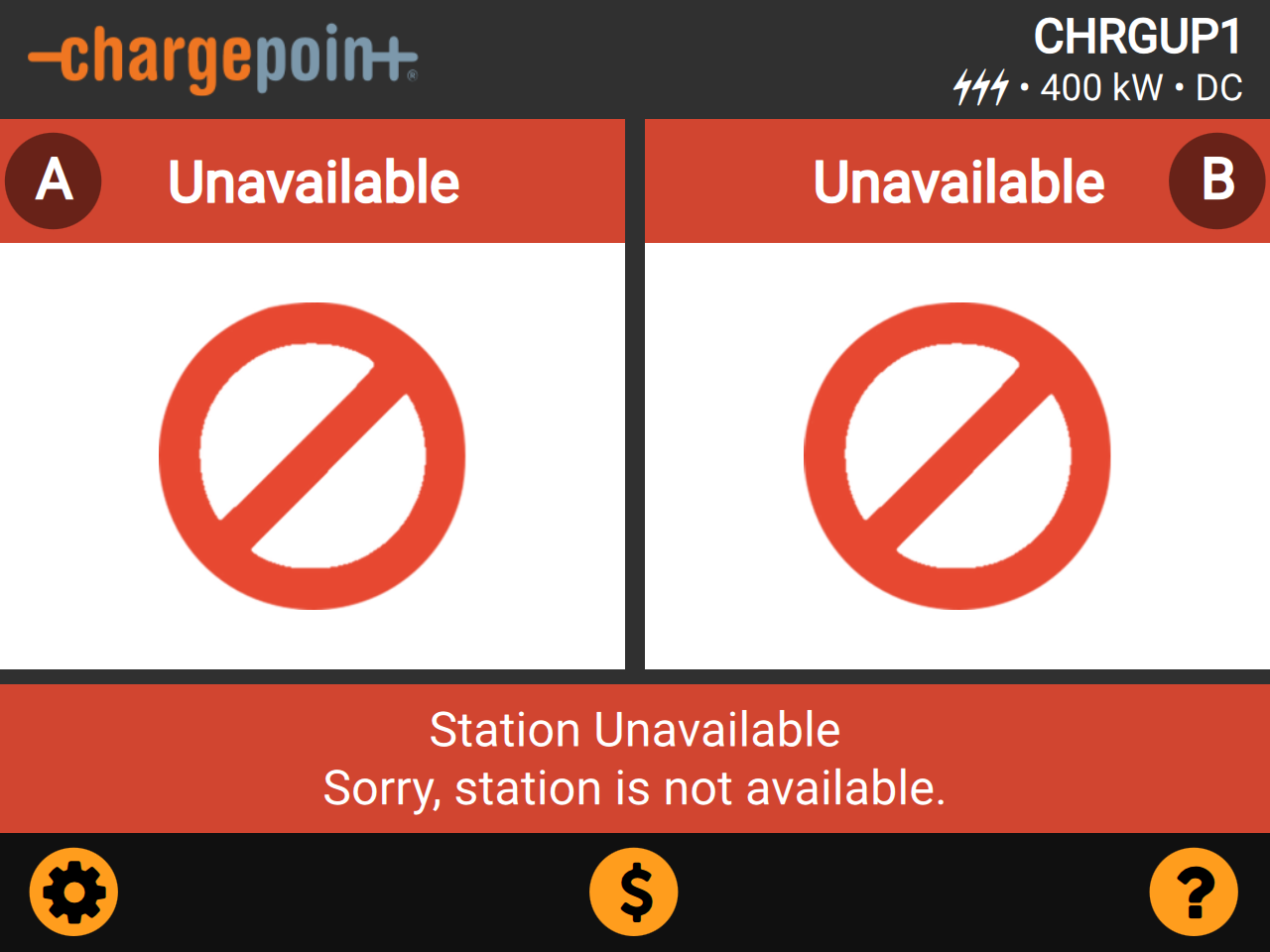
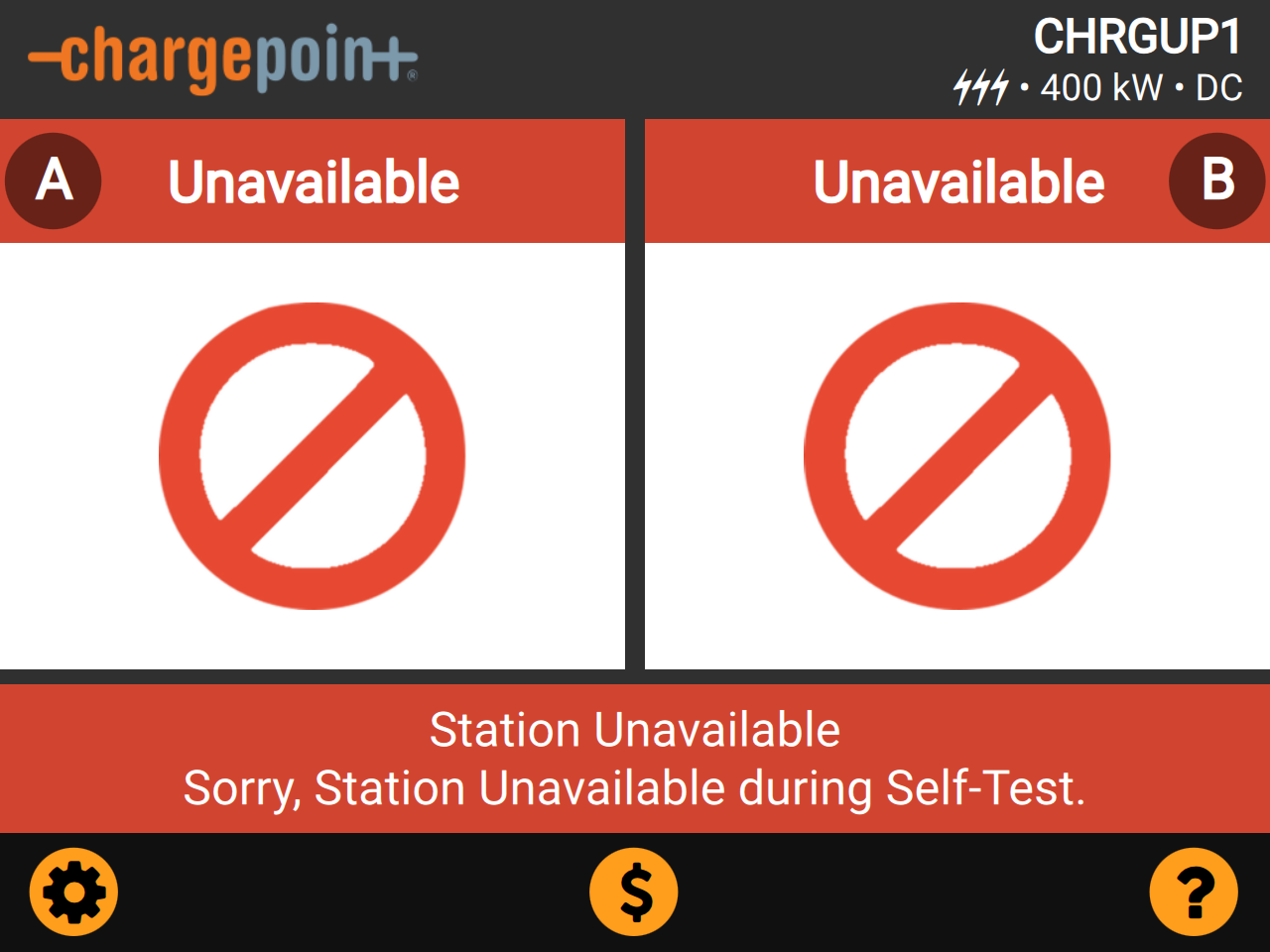
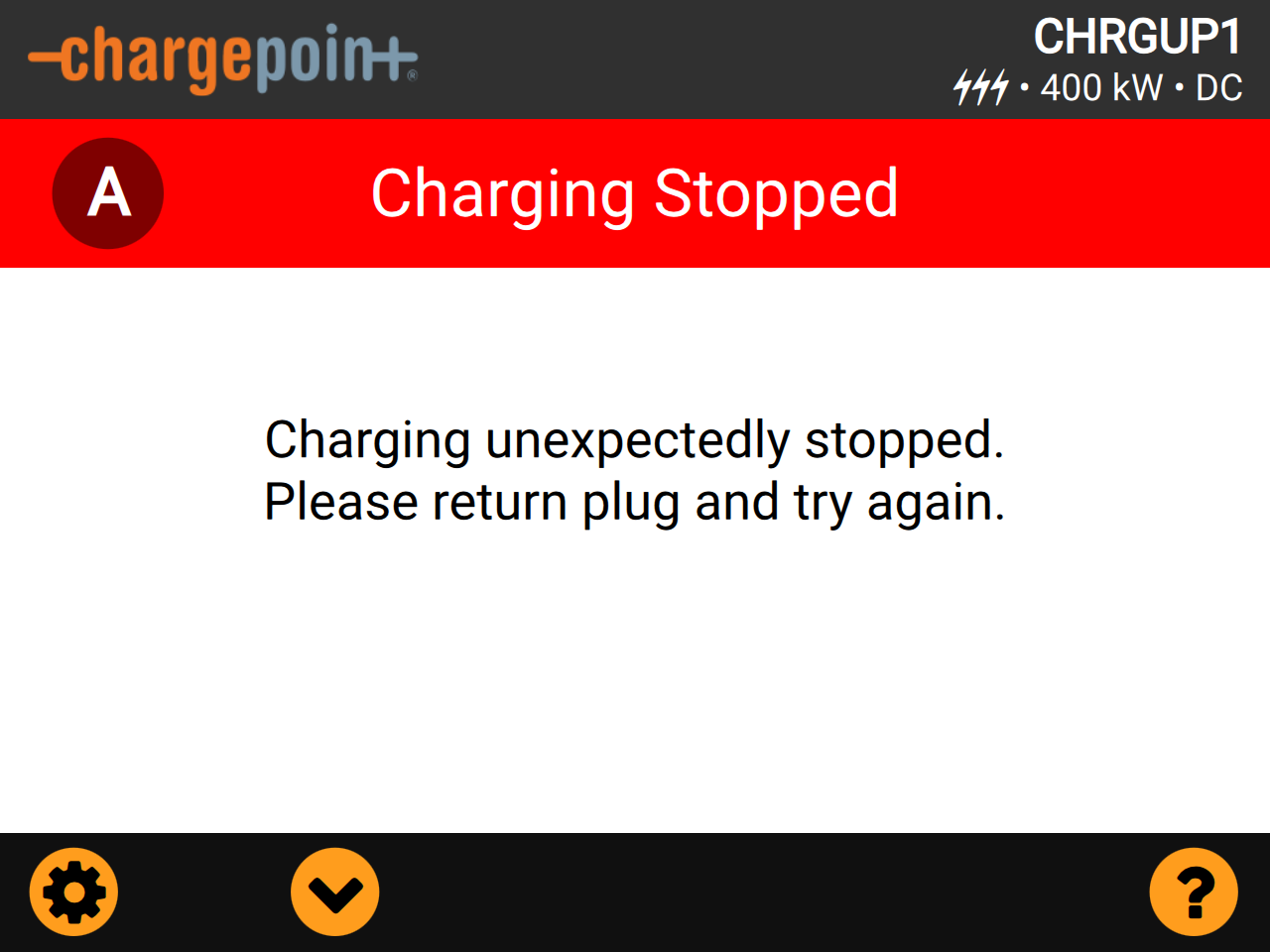
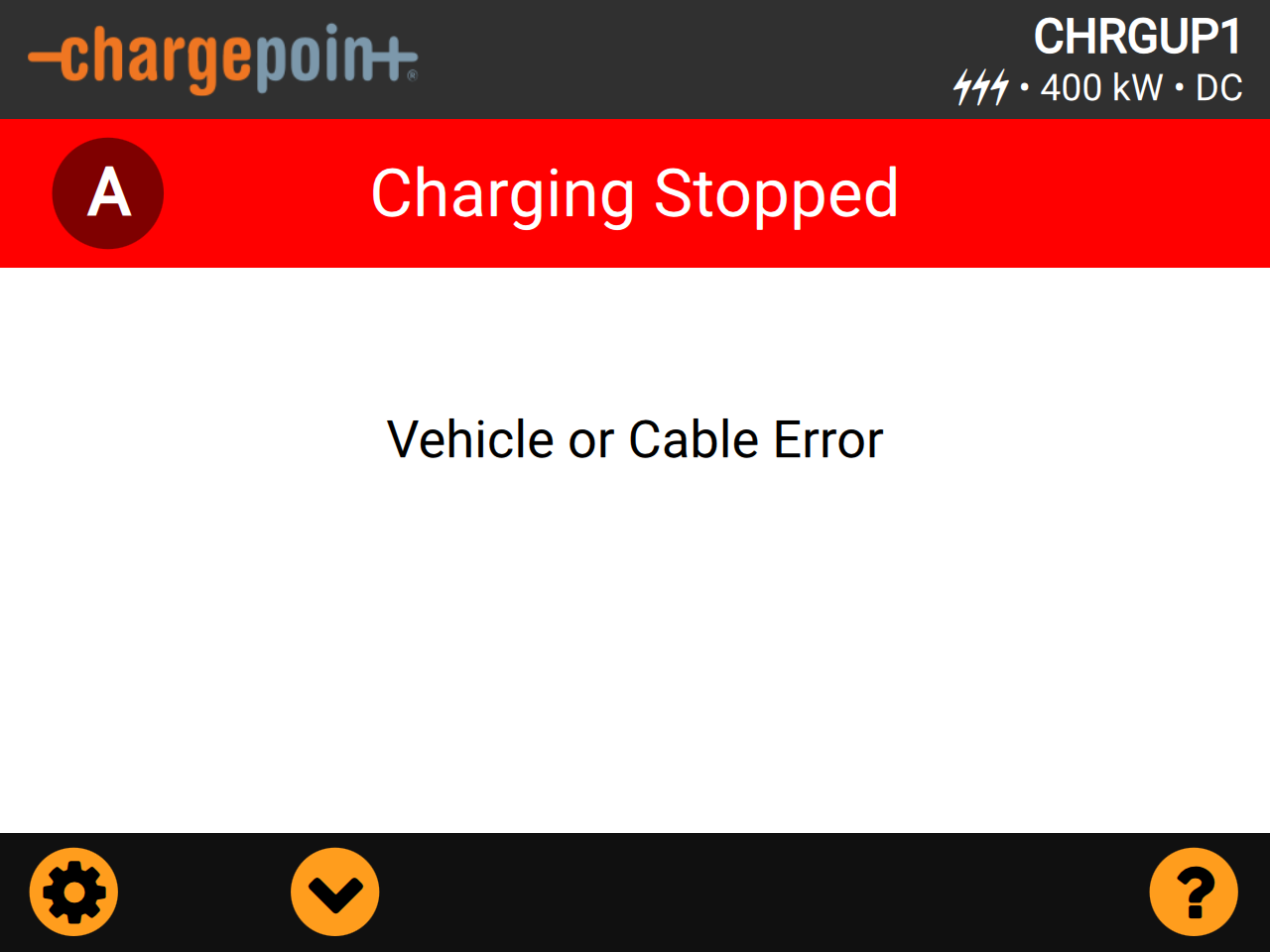
For assistance, go to chargepoint.com/support and contact technical support using the appropriate region-specific number.
Power Link 2000 Station Display
This section lists the screens that contain legally relevant data. Legally relevant data is always rendered on a white paper-like background and is easily identifiable from other non-legally relevant data items.
These are reference screens that illustrate the concept of the display. QR Quick Response codes and serial numbers shown may be invalid.
Due to software-based rounding errors for computing the energy difference value on the Eichrecht receipt on the display, the very last digit can differ by 1 from the real, accurate digit.
Software Digest
To access, click Settings (gear wheel) > Energy Meter > Station on the station display.
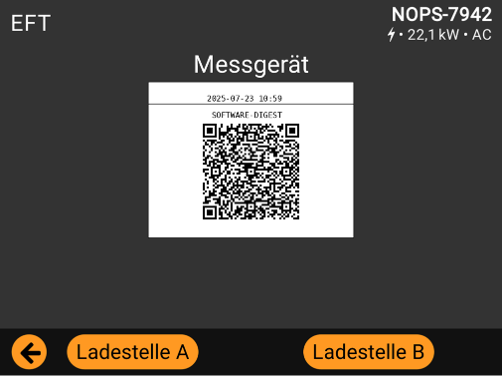
The legally relevant information is in the middle in the framed box. The time stamp appears first followed by the QR Quick Response code for the LRS version of the charging station.
CDR Signing Public Key
To access, click Settings (gear wheel) > Energy Meter.
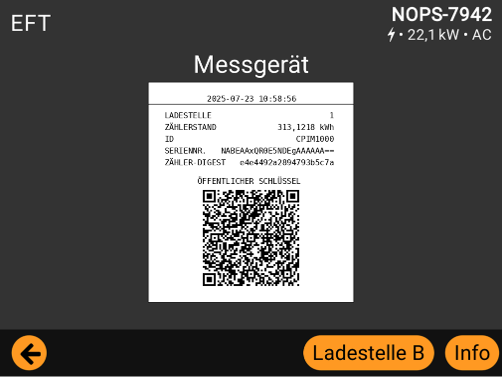
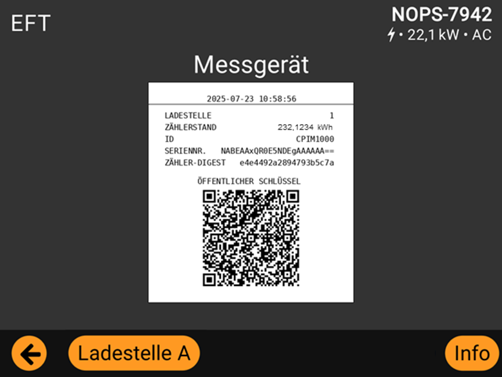
Each charging station has a unique public key. It is displayed as a QR Quick Response code after pressing "Ladestelle A" or "Ladestelle B". It is used for all charging points of a charging station (up to two ports). To identify which charging point was used for a charging session on a charging station with two ports, see the generated OCMF and the field called "CI ChargePoint Identification" (ChargePoint-Identification according to OCMF specification). The letter "A" equals the left charging point, the letter "B" the right one.
The legally relevant information is in the middle in the framed box. The time stamp appears first followed by the information on the selected charging point.
Eichrecht Log Book
-
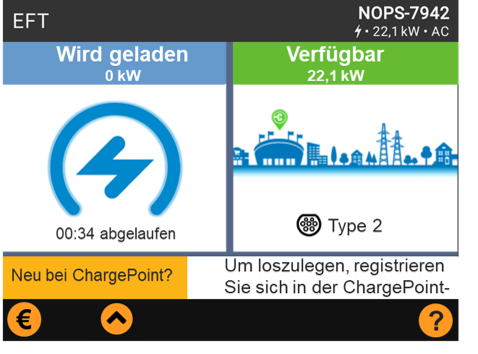
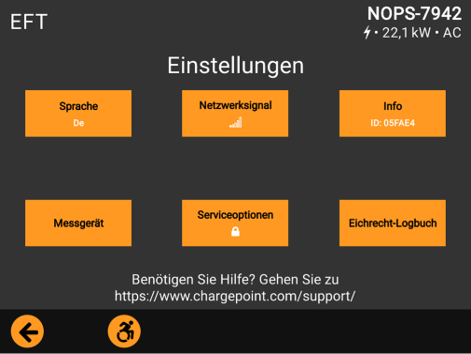
To access, click Settings (gear wheel).
-
Click Eichrecht Log Book.
-
An Eichrecht log similar to the following displays.
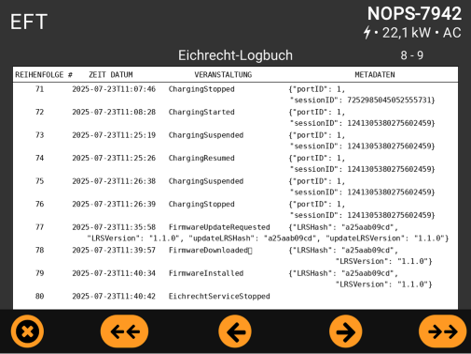
A successful LRS update can be identified by the events "FirmwareUpdateRequested", "FirmwareDownloaded" and "FirmwareInstalled" (in that order).
Metadata for "FirmwareUpdateRequested" shows "LRSHash" (the truncated LRS hash of the current LRS version), "LRSVersion" (the current LRS version), "updateLRSHash" (the truncated LRS hash of the new LRS version) and "updateLRSVersion" (the new LRS version).
Metadata for “FirmwareDownloaded” shows "LRSHash" (the truncated LRS hash of the current LRS version) and "LRSVersion" (the current LRS version) as already described for “FirmwareUpdateRequested”.
Metadata for “FirmwareInstalled” shows "LRSHash" (the truncated LRS hash of the previous and now overridden LRS version) and "LRSVersion" (the previous LRS version).
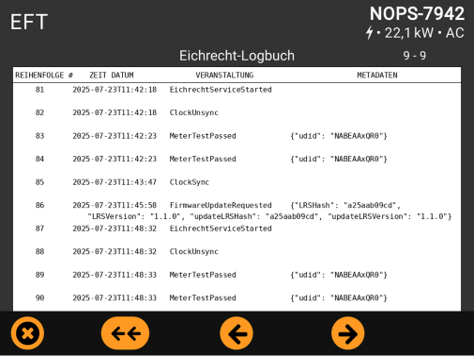
An LRS update attempt can be identified by a single event "FirmwareUpdateRequested". If none of the previous mentioned events, "FirmwareDownloaded" and "FirmwareInstalled" follow, the update was not installed.
Possible Log Book Entries
| Event | Description | Data |
|---|---|---|
|
EichrechtServiceStarted |
Eichrecht Service Started |
— |
|
EichrechtServiceStopped |
Eichrecht Service Stopped |
— |
|
MeterTestPassed |
Meter is detected by Chassis-server and has reported signed energy values |
Meter UDID |
|
MeterTestFailed |
Meter is not detected |
— |
|
MeterDataCorrupt |
Signed Meter Data authentication fails when received by UCB |
Meter UDID |
|
ClockSync |
NTP |
— |
|
ClockUnsync |
NTP |
— |
|
ClockChanged |
Time changed on running system |
— |
|
FirmwareUpdateRequested |
Over-The-Air update on station started |
Current LRS version |
|
FirmwareDownloaded |
The Firmware package is successfully downloaded |
Current LRS version |
|
FirmwareDownloadFailed |
Happens in cases of network outage |
Current LRS version |
|
FirmwareInstalled |
Over-The-Air update completed |
Previous LRS Version |
|
FirmwareInstallFailed |
Over-The-Air update failed |
Current LRS version |
|
ChargingStarted |
Charging session started |
Outlet Number Session ID |
|
ChargingSuspended |
Charging session paused |
Outlet Number Session ID |
|
ChargingResumed |
Charging session resumed |
Outlet Number Session ID |
|
ChargingStopped |
Charging session ended |
Outlet Number Session ID |
|
SigningKeyInvalid |
Private is lost or invalid when opened for signing logbook or OCMF Charge Record |
— |
|
MeterReplaced |
Logs the change of the cable correction parameter (update: cable) |
Old parameter New parameter |
|
StationActivated |
Station has been activated |
Eichrecht Activation State. True/False |
Time Sync Display
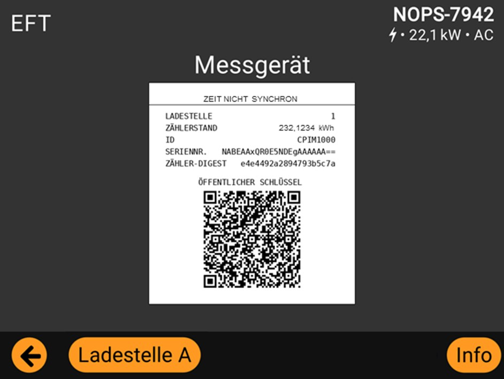
Each LRD (legally relevant display) Bitmap includes a timestamp at the top. On loss of time sync status, a new message “Time Out Of Sync” will be displayed in place of the ISO-formatted timestamp. Here is an example:
How to start a charging session
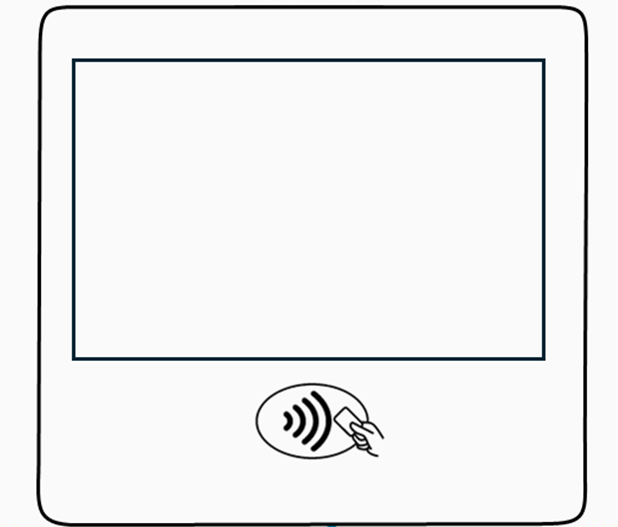
The RFID Radio Frequency IDentification interface is located on the front of the charging station below the display. See the wave icon and the hand with card. Place an RFID Radio Frequency IDentification card, smartphone or credit card in this field for the charging station to read the card.
Live Charging Screen
The Live Charging Screen appears as soon as a charging session starts. If the home screen appears during a session, click “Details” to access the Live Charging Screen.
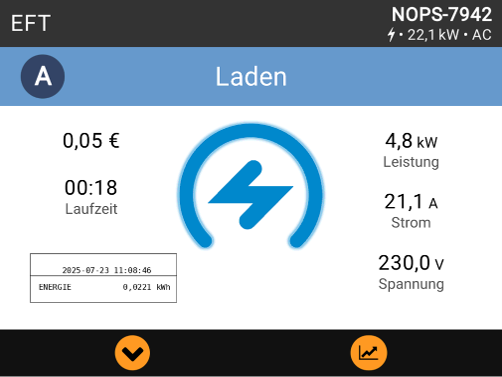
The legally relevant information is in the framed box (refreshing every 5 seconds) on the side of the active and selected charging session (in this case left port). The time stamp appears first, followed by the charged electrical energy in kWh (uncompensated).
Charging Session Summary
This summary screen is shown at the end of a session and is displayed for 20 seconds.
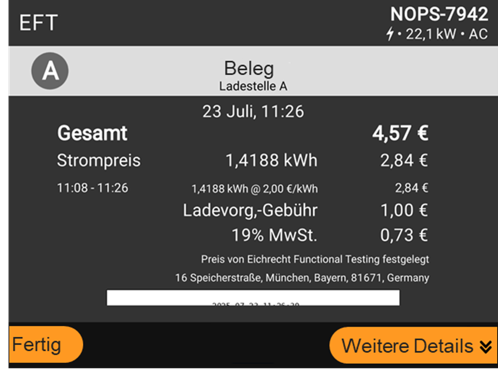
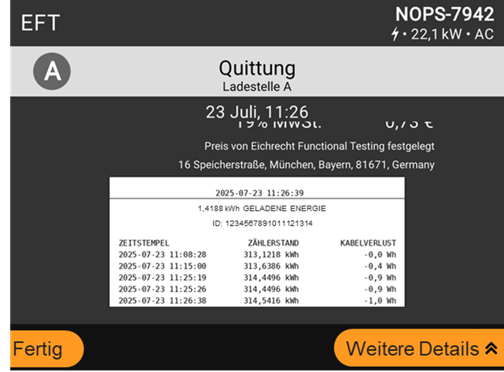
The minimum amount of energy that a charging station needs to transfer to an electric vehicle for a charging session is 0.0001 kWh. The accuracy is ensured for an energy value of at least 1 kWh (MMQ).
The invoice will be based on compensated electrical energy (kWh) shown on the receipt on the display (see energy value and unit before "GELADENE ENERGIE".) This will also be in the corresponding OCMF. Both have the same resolution. For more details on OCMF see the user guide.
The legally relevant information is in the middle in the framed box. The time stamp appears first, followed by the time stamps for metered energy values (uncompensated) during the charging session and the charging session id. Finally, the corresponding cable losses (from left to right). Use the up and down buttons (orange with black arrows) to scroll through all entries.
Price information
In the main menu, select the “€” symbol to see the prices and tarifsf applied to the PL2000:
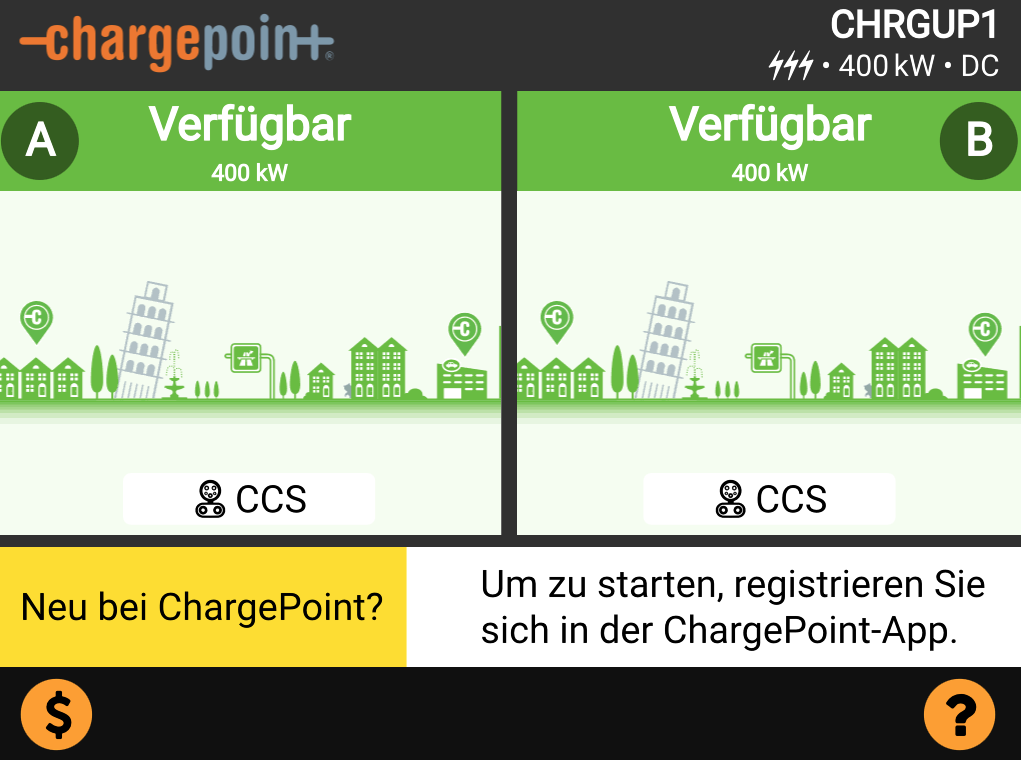
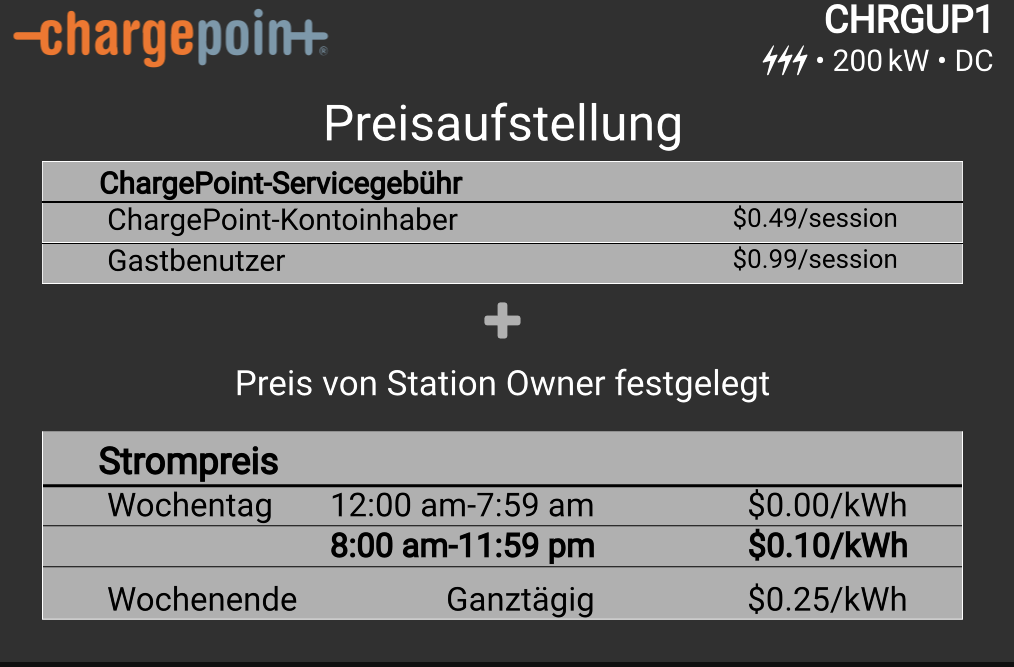
Identification
The following table shows where and in what form the information can be obtained.
|
|
Type plate |
Falcon-Display |
OCMF data package |
Logbook |
|---|---|---|---|---|
|
Serial number of the charging device (=meter) |
Complete and in plain text |
Complete and coded |
Complete and coded |
Form only the first 10 of 24 characters of the coded form |
|
Version of the legal relevant software part of the Falcon (measurement capsule component) |
|
|
Complete and in plain text |
|
|
Hash code of the legal relevant software part of the Falcon (measurement capsule component) |
--- |
Complete via QR |
--- |
Only the first 10 characters of 128 in total |
|
Legal relevant software version of the PLIM2000 (measurement capsule component) |
--- |
(Meter info display) |
Plain text |
--- |
|
Version of the charging controller software (software part of the Falcon not relevant for custody transfer) |
--- |
--- |
Complete and in plain text |
-- |
Decoding can only be performed by the manufacturer (ChargePoint) itself. In this case, ChargePoint must be contacted. Verification of compliance takes place during the end-of-line test.
The two tables below present the software information relevant to legal metrology that is covered by the issuance of the certification.
|
Auxiliary device specifications “Falcon” |
|
|---|---|
|
Software version (legal relevant) |
1.0.0 |
|
Station LRS Hash |
100f0ce580bdc67dff4c90ec8486a2a951cc9556aa0cabe0feb616b857a915842358c0b5f539d66fa6906a214f467a572d2354ec04b859a573f369eea8b1fc04 |
|
Meter specifications PLIM2000 |
|
|---|---|
|
Hash code of the legal relevant software part (LRS) |
cba316e31eb3939fb1b3f7ff0edb3bedcac8590 |
|
Display LRS Hash |
f09b7b57f573554ddec267f75a98842felfd3cf935b668fa016cff87b56e523a4 |
Eichrecht Type Label
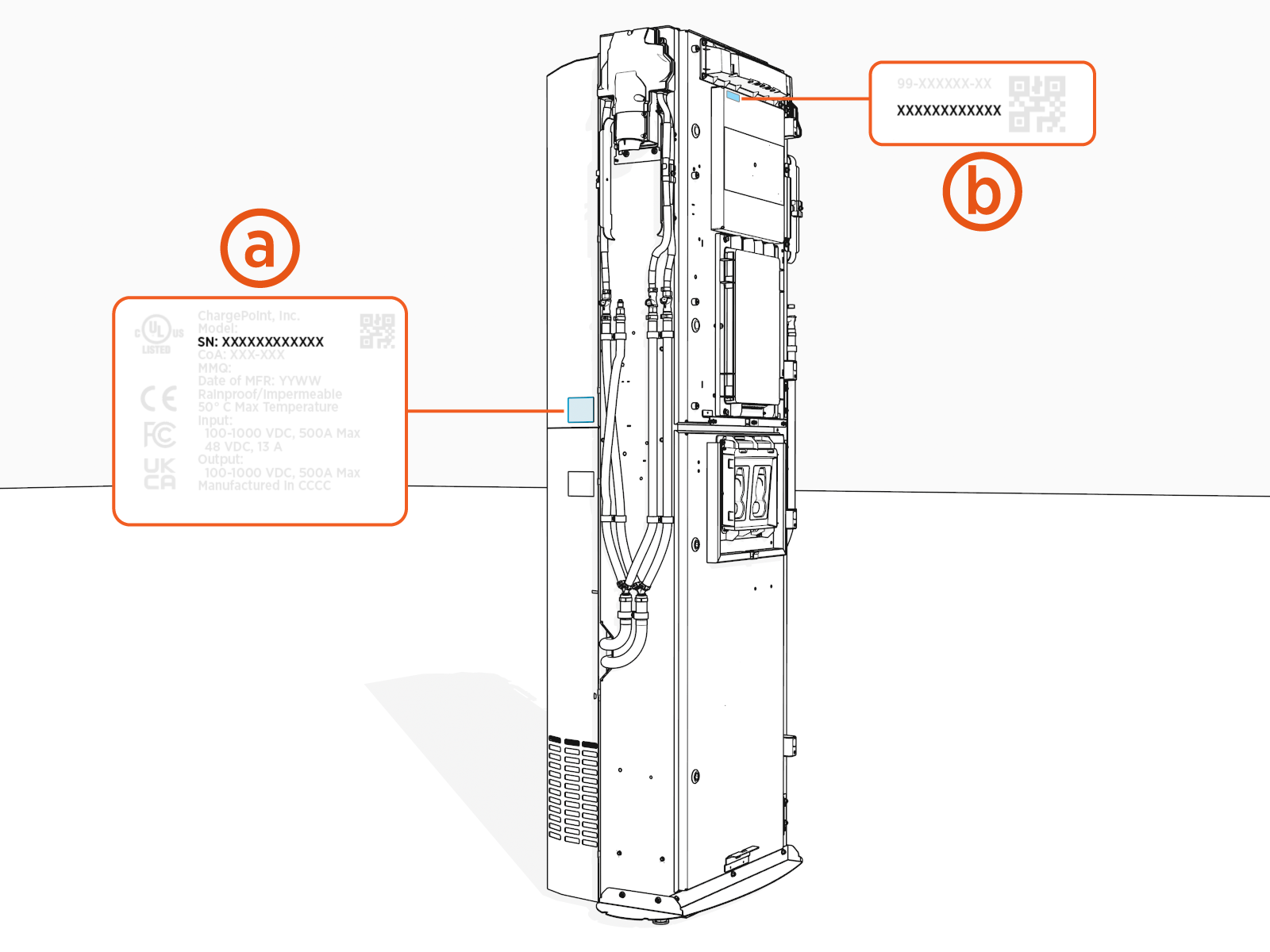
The Eichrecht type label is located on the backplate on the left side (front view).
Eichrecht Type Label: LCC
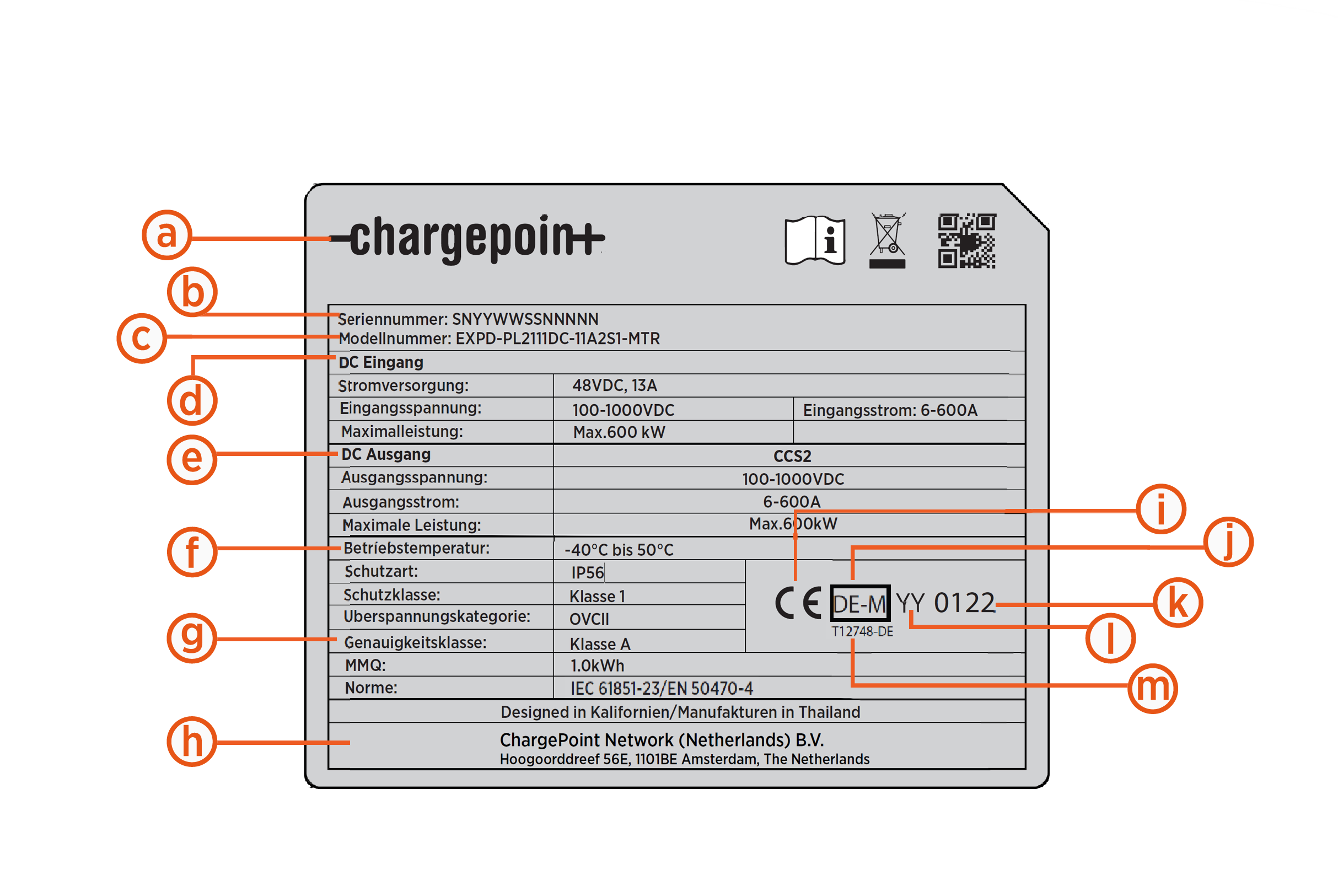
-
Manufacturer logo
-
Type and type designation
-
Serial number
-
Year of manufacture
-
Company address
-
Temperature rating / IP rating
-
Accuracy class
-
Nominal electrical input parameters per port
-
Nominal electrical output parameters per port
-
Eichrecht metrology marking
-
Year of affixion
-
Number of the notified body for Eichrecht
-
Approval number
-
CE marking, 5 mm (0.2 in) height
Eichrecht Type Label: Non-LCC
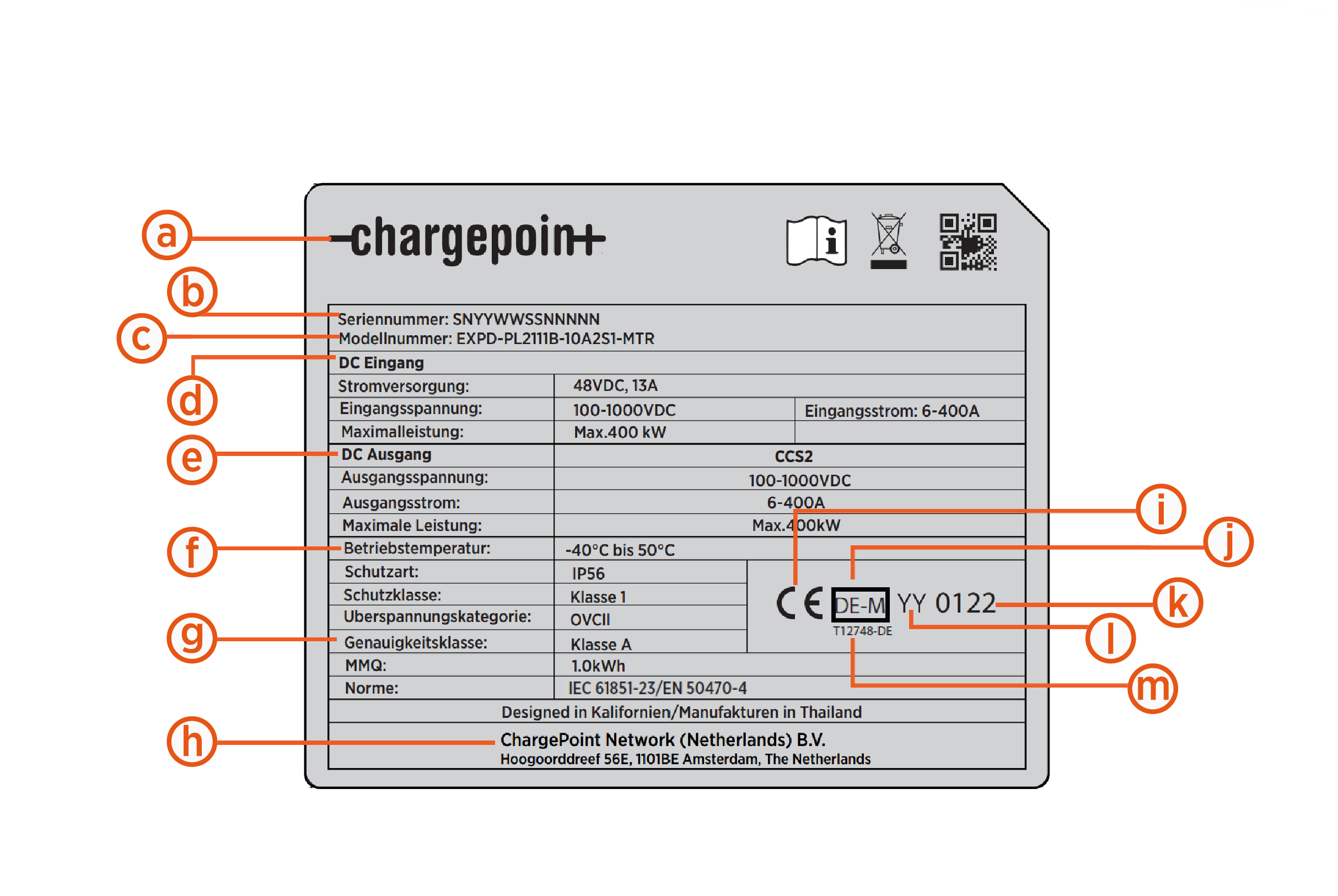
-
Manufacturer logo
-
Type and type designation
-
Serial number
-
Year of manufacture
-
Company address
-
Temperature rating / IP rating
-
Accuracy class
-
Nominal electrical input parameters per port
-
Nominal electrical output parameters per port
-
Eichrecht metrology marking
-
Year of affixion
-
Number of the notified body for Eichrecht
-
Approval number
-
CE marking, 5 mm (0.2 in) height
Eichrecht-Compliant Type Designations
| Pos. | Type Designation | Description |
|---|---|---|
|
1 |
EXPD-PL212X1DC-11A2S1-MTR-ETN |
Express Distro Power Link 2000 series, Europe/UK, DC Station, Simultaneous charging, 2x CCS2 600A liquid cooled 5m cable, 2 Holsters, 2.4m Cable management kit, Pedestal, 380mm (15") Touch Display, ChargePoint-Eaton signage, Contactless credit card and RFID |
|
2 |
EXPD-PL212X1B-10A2S1-MTR-ETN |
Express Distro Power Link 2000 series, Europe/UK, DC Station, Simultaneous charging, 2x CCS2 400A 5.8m cable, 2 Holsters, 2.4m Cable management kit, Pedestal, 200mm (8") Touch Display, ChargePoint-Eaton signage, Contactless credit card and RFID |
|
3 |
EXPD-PL212X1B-10A2M0-MTR-ETN |
Express Distro Power Link 2000 series, Europe/UK, DC Station, Simultaneous charging, 2x CCS2 400A 7.6m cable, 2 Holsters, Pedestal, 200mm (8") Touch Display, ChargePoint-Eaton signage, Contactless credit card and RFID |
|
4 |
EXPD-PL2111DC-11A2S1-MTR-ETN |
Express Distro Power Link 2000 series, Europe/UK, DC Station, single, 1x CCS2 600A liquid cooled 5m cable, 1 Holster, 2.4m Cable management kit, Pedestal, 380mm (15") Touch Display, ChargePoint-Eaton signage, Contactless credit card and RFID |
|
5 |
EXPD-PL2111B-10A2S1-MTR-ETN |
Express Distro Power Link 2000 series, Europe/UK, DC Station, single, 1x CCS2 400A 5.8m cable, 1 Holster, 2.4m Cable management kit, Pedestal, 200mm (8") Touch Display, ChargePoint-Eaton signage, Contactless credit card and RFID |
|
6 |
EXPD-PL211B-10A2M0-MTR-ETN |
Express Distro Power Link 2000 series, Europe/UK, DC Station, single, 1x CCS2 400A 7.6m cable, 1 Holster, Pedestal, 200mm (8") Touch Display, ChargePoint-Eaton signage, Contactless credit card and RFID |
The metrology relevant parts of the Power Link 2000 are the following components:
-
Falcon/Display module
-
Proton/Meter module (up to 2 per charger)
-
Smart Charging cable
These components are digitally sealed each other and they are not exchangeable.
The Falcon + Meter module forms the DC MID Measuring Instruments Directive meter PLIM2000. You can find more information in the chapter Power Link 2000 MID meter.
Label locations
The product location can be found in the side of the charger (a) as shown in the figure below:
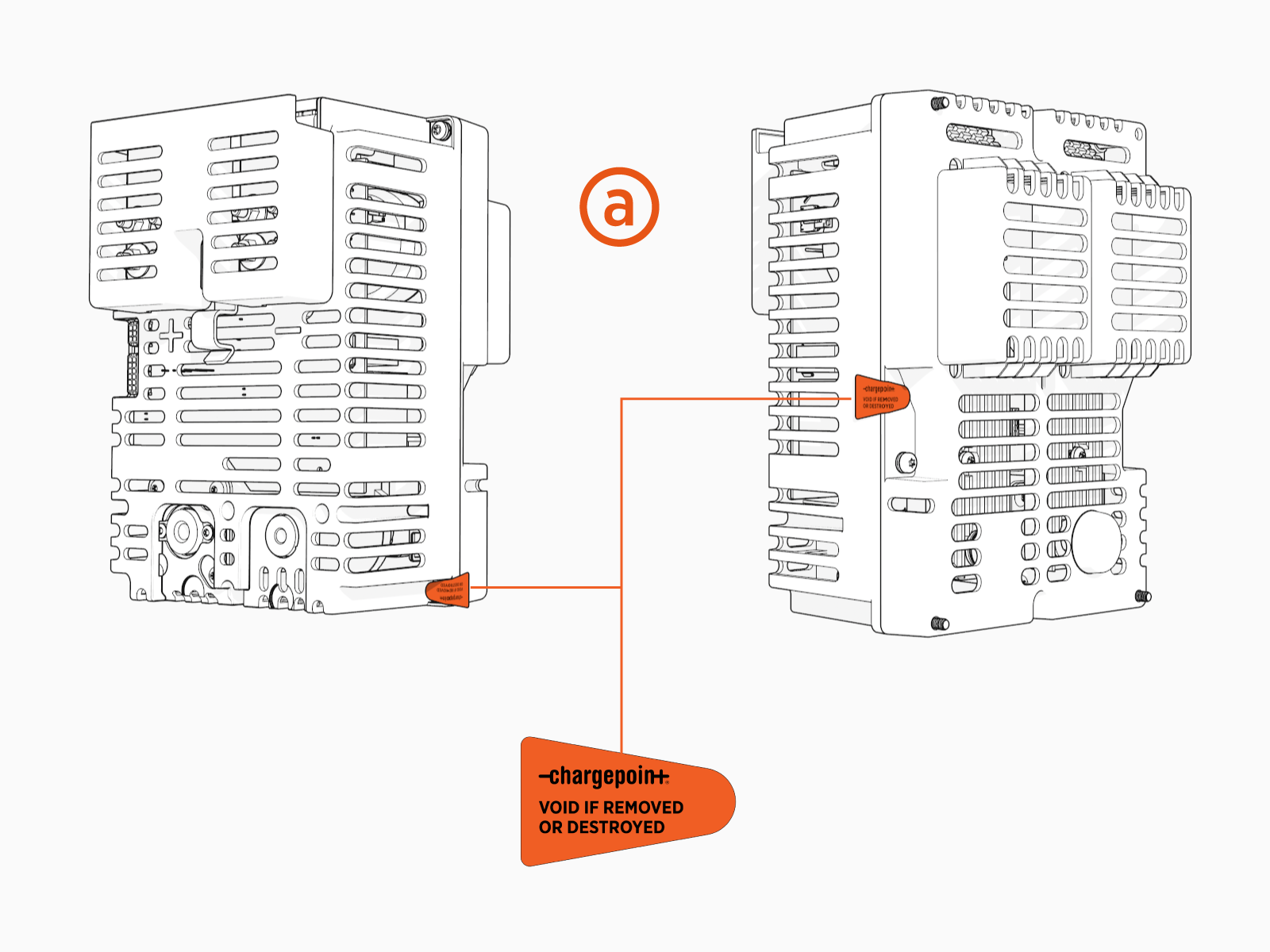
Power Link 2000 Protection Labels
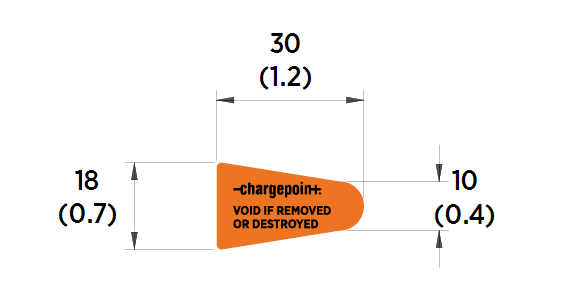
Components of the PLIM2000 have self destructive tamper proof labels applied by the manufacturer in several locations on the Proton (a) and Falcon (b). The label includes the following message:
* VOID IF REMOVED OR DESTROYED

In addition to the physical tamper proof sealing, and the digital pair between display and meter, the door of the Power Link 2000 charging station has a digital user seal which is “broken” when the station front door is opened. A lockout will be triggered and a charging session isn’t possible without interaction of trained personnel (secured by a code).
Power Link 2000 MID meter
The PLIM2000 Integrated Meter is built into Power Link 2000 charging stations. All relevant information regarding the PLIM2000 MID Measuring Instruments Directive meter can be found in the PLIM2000 Integrated Meter Guide available at ChargePoint Product Reference Documentation.
One Power Link 2000 can have up to 2xMID meters, like below:

(a) Proton (meter)
(b) Falcon (display)
MID Meter Label
The MID Measuring Instruments Directive type label can be located in the area marked (a) below.

The label can be located inside the charger, in the back side of the display.
The Power Link 2000 has a tamper proof detection mechanism which will de-activate and prevent any charging session from happening if the door is opened.

-
Customer logo
-
Manufacturer
-
Type Approval Name
-
Technical Specifications
-
Minimum Measured Quantity (kWh)
-
Impulse voltage (kV)
-
Voltage supply (VDC)
-
LED pulse constant (imp/kWh)
-
Meter accuracy Class
-
Manufacturer address
-
Serial Number
-
CE marking, year of manufacturing, MID
Measuring Instruments Directive metrology marking, number of notified body and MID Measuring Instruments Directive certificate number -
Bi-directional symbol
-
Manufacturing QR
Quick Response code -
WEEE recycle symbol
-
Manual symbol
Billing and Receipts
From charging station/display
To retrieve the receipt from your charging session. The charging station gives a QR Quick Response code in the ending session summary.
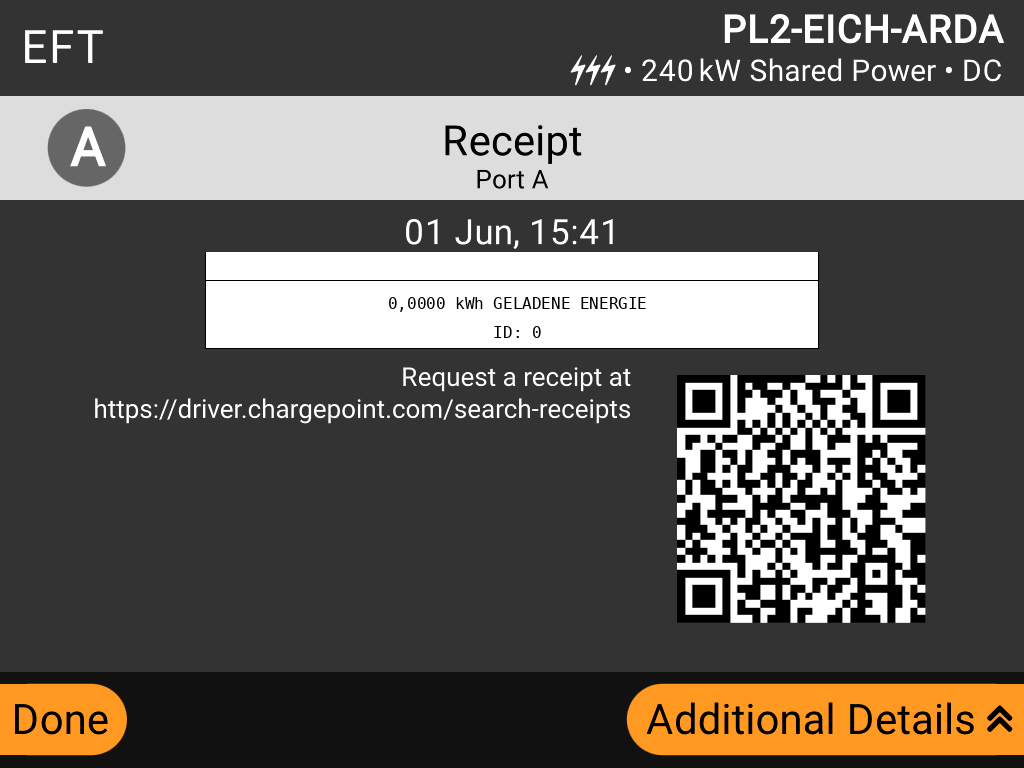
By using your smartphone you can scan the QR Quick Response code and you will be sent to an online portal: https://driver.chargepoint.com/search-receipts
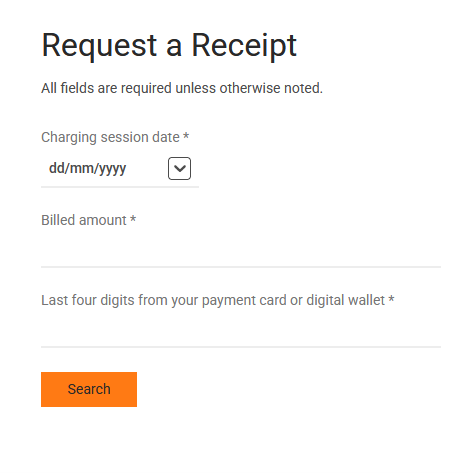
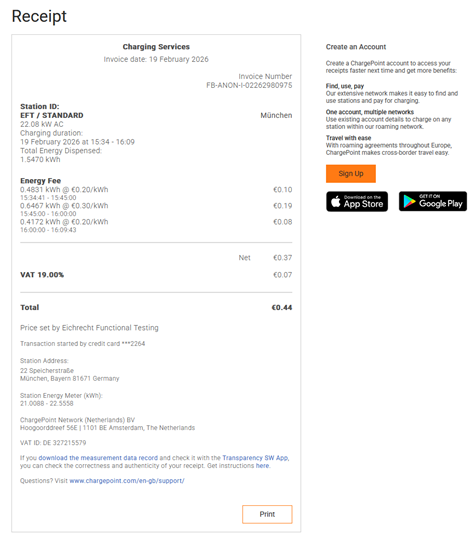
After introducing the details, the receipt is generated:
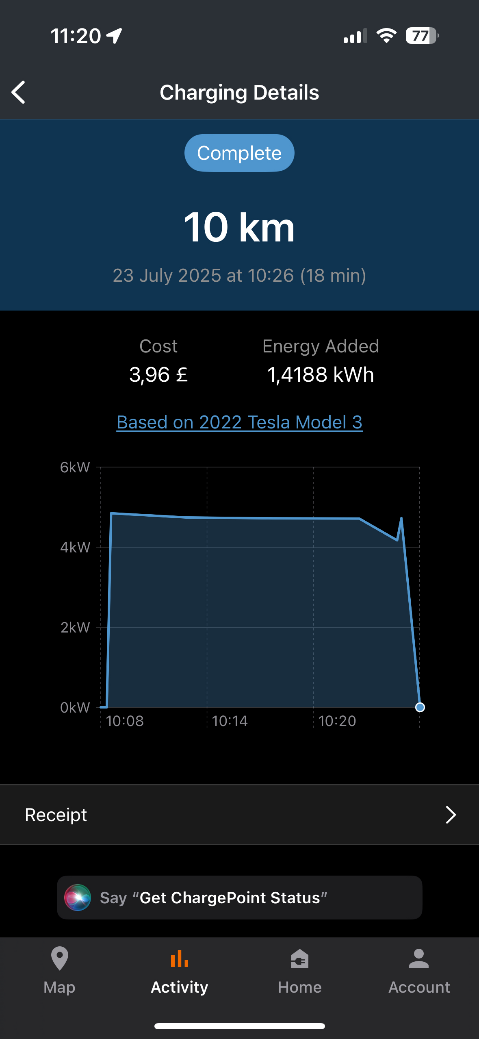
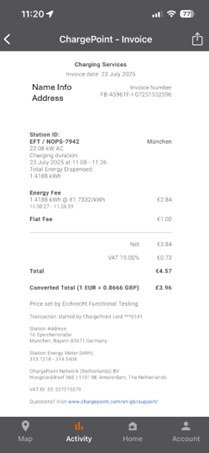
From App
If you used your ChargePoint driver account, RFID Radio Frequency IDentification or associated debit/credit card, you can select a previous and finished charging session, you can get also the receipt:
|
|
|
From Website
Should the user wants to retrieve the receipt later in time, ChargePoint offers a free and accessible website https://driver.chargepoint.com/search-receipts in which the receipt can be downloaded.
To get the receipt, you will need to have:
-
Charging session date. This is the date you were billed.
-
Billed amount: The total amount billed to your card.
-
Last four digits of the card used.
If you cannot remember the details, you can get that information from your banking account. Bellow an example:
|
|
|
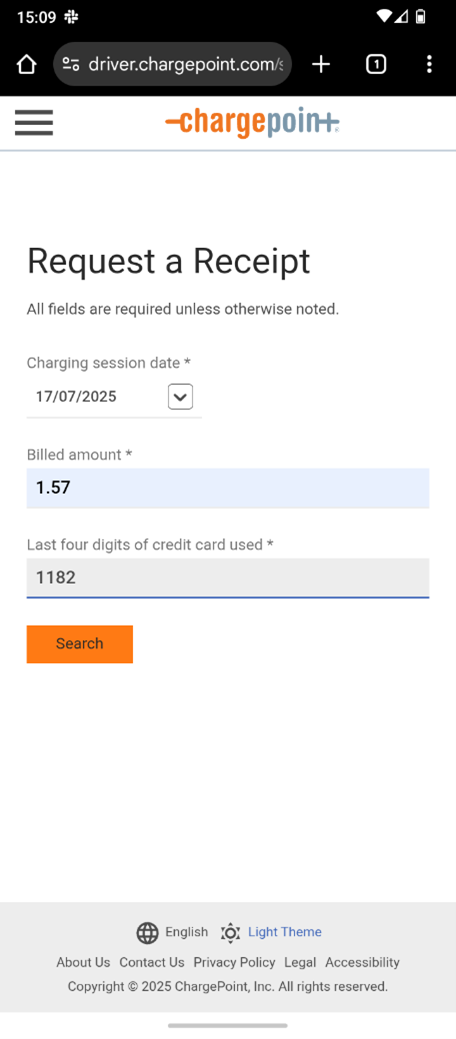
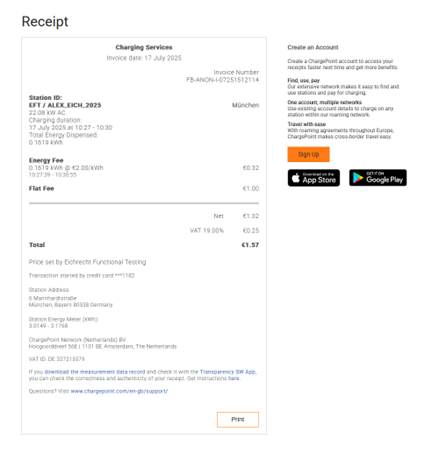
The above information is provided from ChargePoint cloud system and the ChargePoint PL2000 charger station.
Roaming partner RFID card
E-mobility service provider and ChargePoint Operators can define different terms and prices for charging with a PL2000 charging station, which include using their own billing system or application. They are, by law, the main responsible individuals to get you the receipt.
Please contact your service provider if a receipt for your session is needed. More information can be found in the chapter “Responsibilities for ChargePoint Operators (CPOs) and/or E-Mobility Service Providers (EMSP)”.
From Website
ChargePoint provide up to date information about the way an user can retrieve the receipt from a charging session. The best way is to check into our website in here:
1. Can I get an invoice or receipt for my charging session | ChargePoint
And same information in German:
2. Kann ich eine Rechnung oder einen Beleg für meinen Ladevorgang erhalten | ChargePoint
Receipt Information
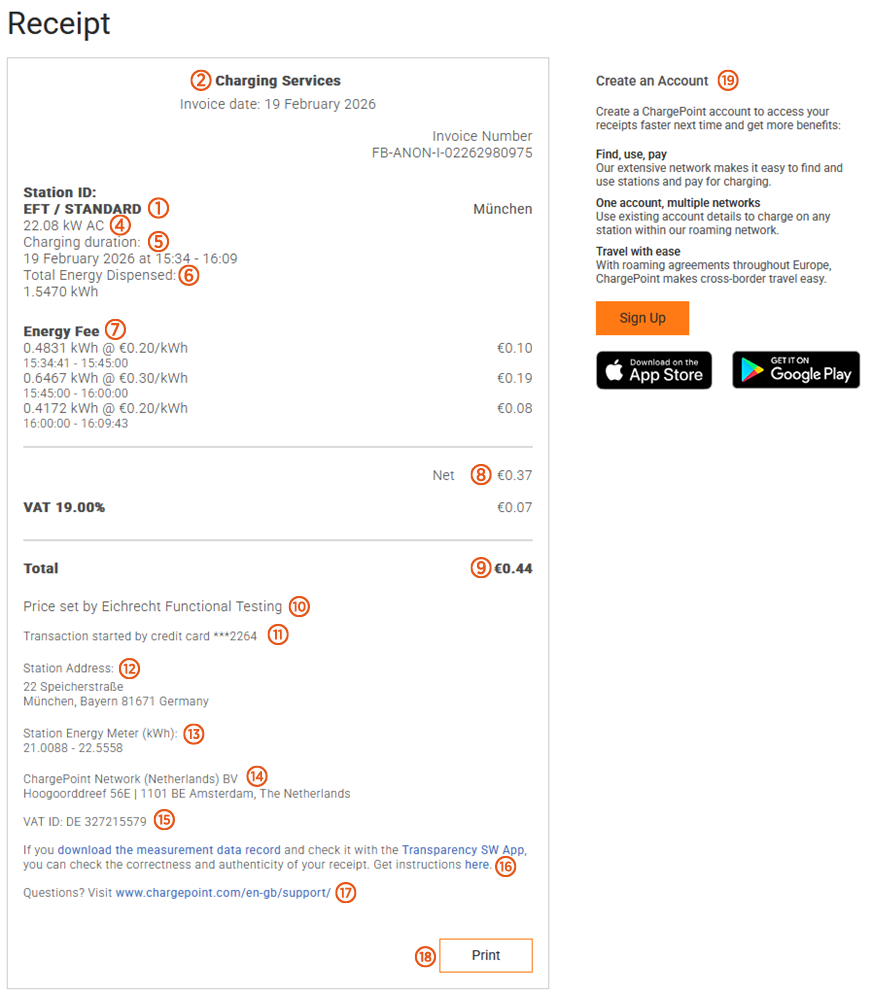
The receipt will contain the following information:
(1) Station ID: This is the ID of the charging station used, which can be found in the display of the charger.
(2) Invoice date: Date in which the charging session and the invoice was performed.
(3) Invoice number: the ID for your invoice.
(4) Rated Power: The maximum theoretical power you can charge your EV Electric Vehicle in the charging station port.
(5) Date and time: Your charging session time.
(6) Total energy dispensed: The total energy compensated and delivered to the EV Electric Vehicle. This is the total energy (in kWh) which will be billed.
(7) Energy fee: the tariff information €/kWh
(8) Net: Net amount (without VAT)
(9) Total: The total bill (including VAT).
(10) Charging group: Include the CPO ChargePoint Operator group who manages the chargers.
(11) Credit card details: Will show the latest 4 digits the credit card was use to perform the charging session.
(12) Address: Location of the charging station.
(13) Station Energy Meter (kWh): Starting and ending Energy Register of the MID Measuring Instruments Directive meter used in the charging station.
(14) Manufacturer address.
(15) VAT ID: Identification of the manufacturer.
(16) OCMF link: Information on how to retrieve and open the OCMF file.
(17) Contact details and FAQ: Link to ChargePoint FAQ website.
(18) Printing: download the file as a pdf (note: downloading the file loses the attached links).
(19) ChargePoint app: To download ChargePoint app.
How to retrieve data packaging (OCMF file)
As a customer and user of a PL2000 charging station in compliance with MessEV and MessEG, you have the right to retrieve the OCMF (Open Charge Metering Format) file, which contains the relevant legal information of your transaction.
The charging data you receive from PL2000 or your e-mobility provider is verified using Transparency
Software, which is developed and distributed by the industry association SAFE e.V.
For PL2000 charging stations, you will need at least transparency software version 1.3.0. This is the only version that has been conformity-assessed in connection with the PLIM2000 and the only one that can provide legally valid verification results. As a ChargePoint customer, you can find the download link directly in the charging receipt.

If you download the measurement data record and check it with Transparency SW App, you can check the correctness and authenticity of your receipt. Get instructions here.
-
By clicking on “Download the measurement data record” you will get the OCMF file.
-
By clicking the “Transparency SW App” you will be re-directed to the free transparency software (Java based) that allows you to open and read the files.
-
By clicking on “here” you will be re-directed to ChargePoint website that includes extra information for payment.
The OCMF file has the following format, used with Transparency Software 1.3.0:
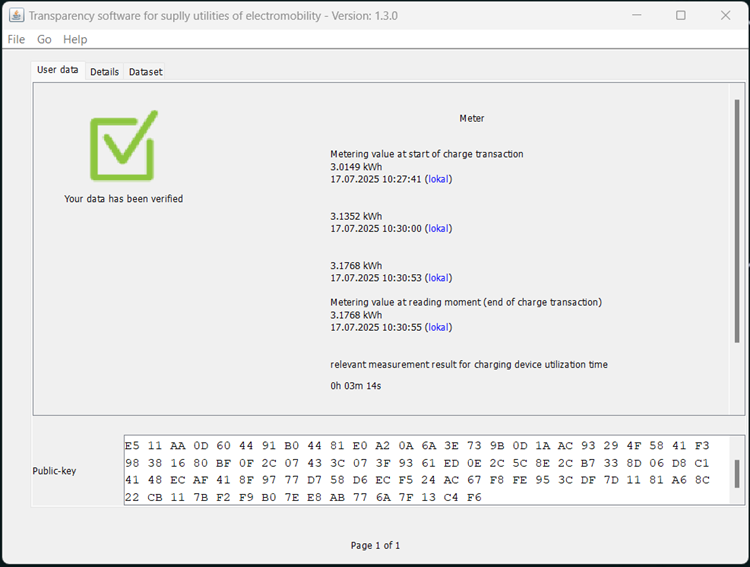
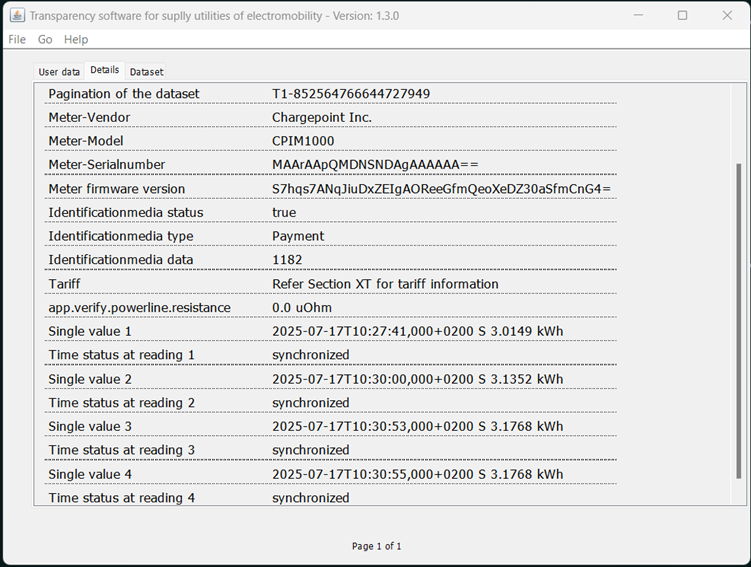
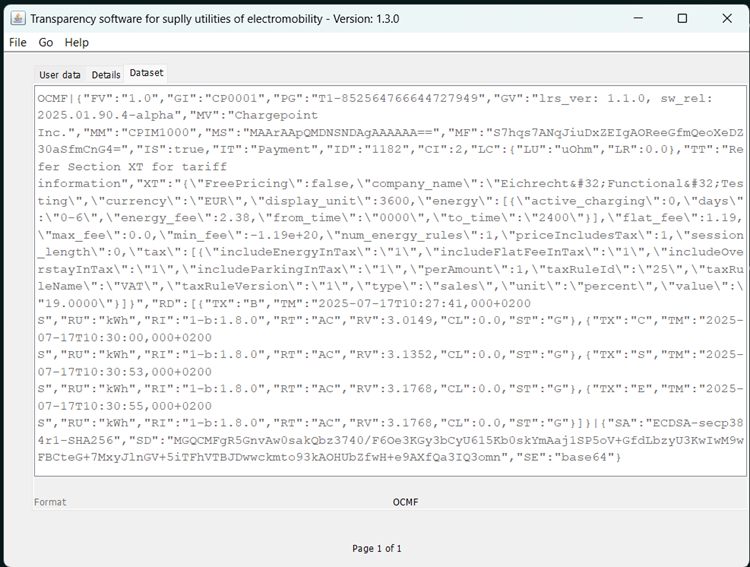
Measurement Dataset
The pagination is ensured via an increasing counter for each measurement. In the OCMF dataset, the counter is placed in the field labeled as “PG” (pagination), following the "T" and preceding the dash, such as “PG”:T5-5333490790308772492. In this example, the number 5 represents the counting number, indicating that this is the fifth session on that station. The port used for that measurement can be identified via the “CI ChargePoint Identification” field in the OCMF dataset. When it equals the integer 1, it signifies the right port (as seen from the front), and if it equals 2, it indicates the left port (as seen from the front).
Transparency Software
Power Link 2000 has been approved with SAFE Transparency software 1.4
|
Name |
S.A.F.E. Transparenzsoftware |
|
Version |
1.4.1 |
|
Checksum |
8aae71e0e6563c05527738deb8524d36a2c260ddd20c8278789869389bcd166f |
|
Operating System |
Windows |
SAFE-Transparency software 1.4.1
All Versions of the Transparency Software Require Java
All versions of the SAFE transparency software require a current Java Development Kit (JDK), which you
can download for free from Oracle:
https://www.oracle.com/java/technologies/downloads/.
For all versions of the SAFE transparency software, you will find the checksums (to verify the authenticity of the software) as well as live images at:
https://www.safe- ev.de/de/transparenzsoftware_versionen.php
Using and Displaying Data in the SAFE Transparency Software 1.3 (Flex Series)
A general guide for using the transparency software can be found via the link provided in the previous section.
Instructions: https://www.safe-ev.de/global/downloads/S.A.F.E._End-Nutzer- Handbuch_Transparenzsoftware_1.2.0-rc1.pdf?m=1651735144&
The data records from the Flex Series can be checked using the standard workflow described in the manual. This manual also provides detailed explanations of all displayed data and fields. Since the transparency software is neither developed nor maintained by ChargePoint, ChargePoint has no influence over the user interface or the presentation.
Device-Specific Notes on the Transparency Software:
-
All displayed values (start, intermediate and end) are compensated values. The “CL” value is subtracted at that point with the actual meter The start value CL is always 0.0 and that coincides with actual reading. For all other values, CL contains the difference between the compensated and uncompensated reading.
-
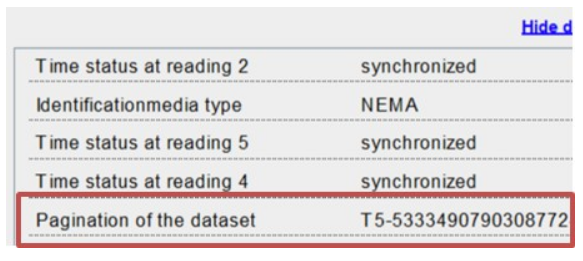
Pagination is ensured by an ascending counter for each measurement. In the OCMF data record, this counter is found in the field with the key "PG" after the letter T and before the hyphen, for example: "PG":T5-5333490790308772492 where the number 5 is the count number, indicating that this is the fifth session at this charging station.
-
The field "CI
ChargePoint Identification" in the OCMF data record indicates which connector was used for a measurement. If the value is 1, it refers to the right connector (when viewed from the front), and if the value is 2, it refers to the left connector (when viewed from the front). -
In case of an error reading the meter value or timestamp, an additional “E” (Energy Error) or “t” (Time Error) is displayed next to the respective meter reading or timestamp.
Cable Compensation factor
ThePower Link 2000 is equipped with one or two permanently attached charging cable connected to the main MID Measuring Instruments Directive merer. It must be ensured that the charger's accuracy at the point of delivery meets Class A standards according to EN 50470-4. Therefore, the Power Link alongside it’s permanently attached charging cables Type CCS2 must be calibrated together.
The following options are permitted for permanently connected mains charging cables:
|
Cable |
Manufacturer |
Length (m) |
Part number |
Cable corrector factor(uOhms) |
|---|---|---|---|---|
|
Amphenol |
5 |
43-001749-01 |
6431 |
|
|
400A Dry |
Amphenol |
5 |
43-001751-01 |
2050 |
|
400A Dry |
Amphenol |
7.6 |
43-001751-11 |
2996 |
To compensate for cable losses, an empirically determined resistance value is stored in every smart board connected to the CCS2 cable. The Falcon module reads this value, which is used to computationally compensate for the losses between the DC meter and the charging plug.
The Falcon is parameterized accordingly by its manufacturer during production. If the parameter (resistance value) is changed after the charging device has been placed on the market, an entry is made in the legally relevant logbook.
The stored resistance value is an adjustment for the connected charging cable, including the Type 2 connector. It is included in the data package (OCMF). The legally relevant display (Falcon module) only shows the energy loss and the compensated charge amount, calculated based on the resistance value, when the charging process is complete.
Multi-Tariff
ChargePoint back end service can be configured to include as many tariffs as the owner wants to. The tariffs have a 15 min clock limitation. That means a charging tariff can start or end at quarter to, half past, quarter for and o’clock times.
Multi-tariff can be implemented through the backend. The PL2000 displays the price information in the price menu.
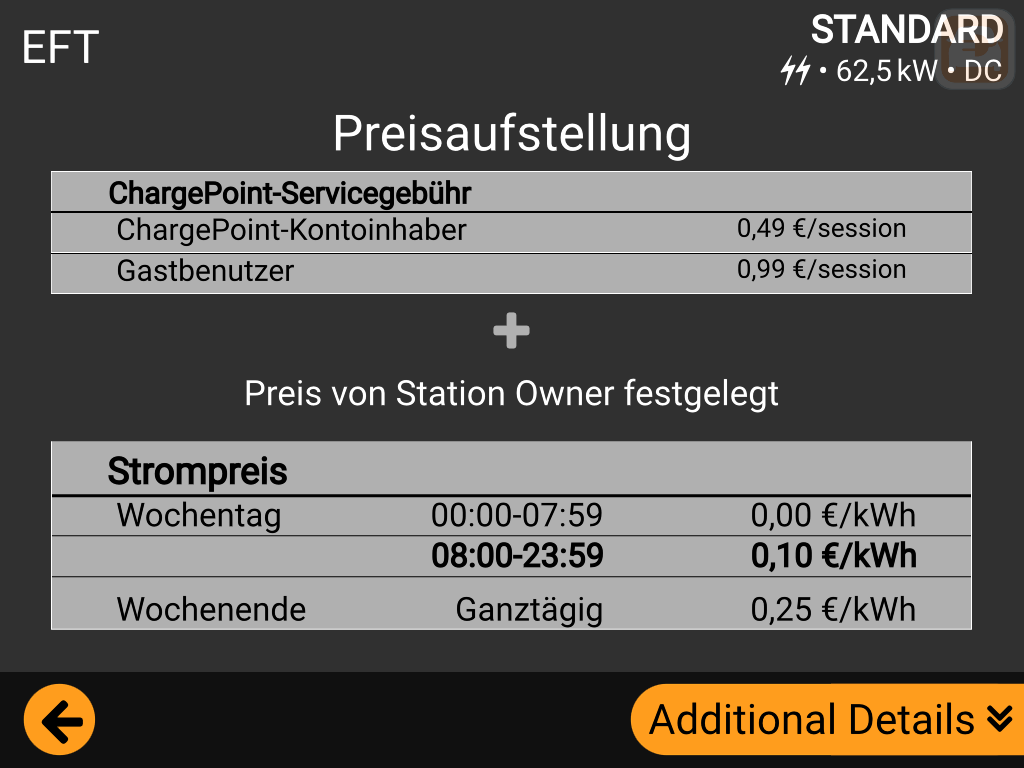
These prices are locked once the charging session begins.
The multi-tariff can only be set at every quarter of the hour. That means a total of 56 different tariffs can be set within the same day (4x 24h).
When the charging session is finished, the receipt will display all energy readings within every tariff time. The same can be seen in the final receipt:
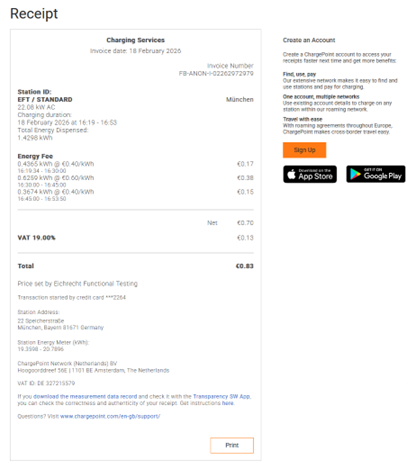
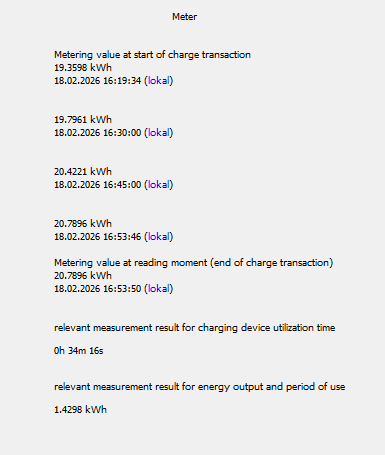
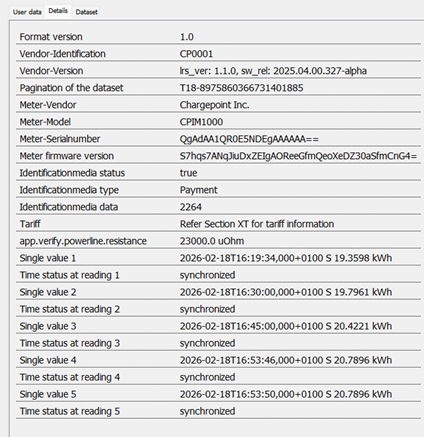
The energy tariff time and price can also be found in the OCMF. See below:
From 9:00 am to 9:14am ⟶ 0.119 €/kWh. This one can be fond below with yellow background
And from 10:45am to 10:59am ⟶ 0.714 €/kWh. This one can be found below with blue background.
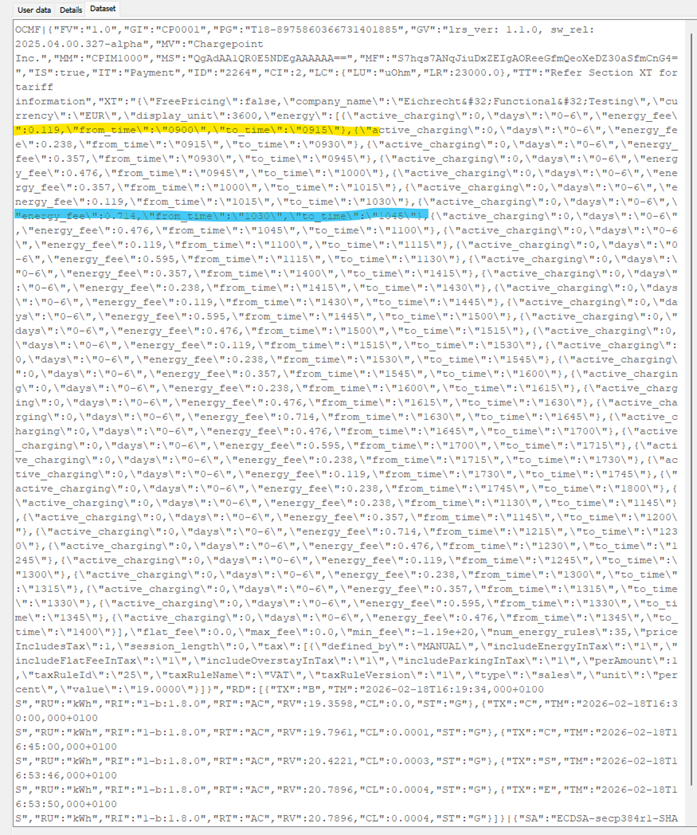
Energiewerte – Abgeschnittene Werte in der OCMF-Datei
Die Power Link 2000-Systembibliotheken verwenden C-Code mit Gleitkommazahlenformatierung. Dies ist Standardverhalten für diese Art der Programmierung. Konkret bedeutet dies, dass bei einem Energiewert von 1,234 kWh automatisch alle Nullen entfernt und nur 1,234 kWh angezeigt werden.
Der endgültige Wert in der OCMF-Datei und der von der Transparenzsoftware angezeigte Wert ist derjenige ohne die nachfolgende Null.
Beispielsweise zeigt der folgende Screenshot 16,9212 kWh – 0,2 kWh = 16,9210 kWh, was in der OCMF-Datei auf 16,921 kWh abgeschnitten wird.
Dennoch bleibt der Wert gleich, da 16,9210 kWh und 16,921 kWh identisch sind.
Energiewerte – Abweichung zwischen Anzeige, OCMF und Rechnung
Die Energiemessung des Power Link 2000 hat eine Auflösung von 0,00001 kWh (5 Dezimalstellen). Die endgültige Anzeige und die OCMF haben jedoch eine Auflösung von 0,0001 kWh (4 Dezimalstellen).
Es ist möglich, dass der auf dem Power Link 2000 angezeigte Wert und der endgültige Wert in der OCMF und auf der Rechnung nicht exakt übereinstimmen. Die Abweichung beträgt 0,0001 kWh.
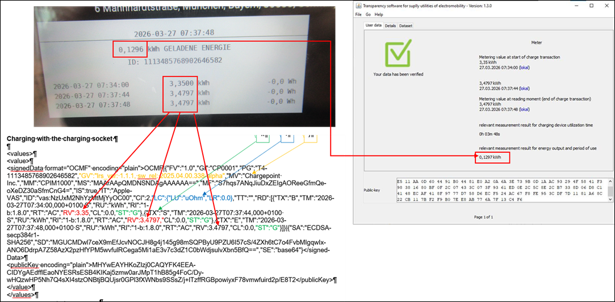
Dies liegt daran, dass der gemessene interne Rohenergiewert knapp unterhalb der Rundungsgrenze liegt. Beispiel: Im folgenden Screenshot:
-
Der Wert auf dem Display beträgt 0,1296 kWh.
-
Der Wert in der OCMF beträgt 0,1297 kWh.
Der Wert in der OCMF ist der tatsächliche Wert. Der Wert auf dem Display ist abgeschnitten.
Der angezeigte interne Zählerstand beträgt nicht 0,1296 kWh, sondern 0,12969 kWh, während der Wert in der abschließenden OCMF-Berechnung und auf der Rechnung 0,1297 kWh beträgt. Daher wird die fünfte Dezimalstelle in der abschließenden OCMF-Berechnung aufgerundet (0,1297 kWh), während sie bei der Anzeige der Auflösungswerte weggelassen wird (0,1296 kWh).
Die Anzeige dient lediglich Informationszwecken; für die Abrechnung wird der Wert aus der OCMF-Berechnung verwendet.
Aus Abrechnungssicht ist dies vernachlässigbar, da die Differenz nur 0,00001 kWh beträgt. Sie ist unbedeutend und bereits in der Fehlertoleranz eines Zählers der Klasse B (1 % Fehler) bzw. eines Ladegeräts der Klasse A (2 % Fehler) berücksichtigt.
Test Instructions for Eichrecht Tests in Field Devices
Inspection of Devices in Operation
This section describes the tests to be performed as part of the inspection of devices in operation. All tests must be performed for each charging point.
The described tests represent a permissible procedure. Appropriate alternatives are permissible at the discretion of the person performing the inspections. The tests essentially comprise the following categories:
-
Physical condition inspections
-
Functional tests including accuracy testing
A. Physical condition inspection
The following list needs to be available before and during the evaluation of the charger on site:
-
Physical structure of the charging device
-
Address/location of the charger
-
Charger Serial number and software version
-
MID
Measuring Instruments Directive meter serial number and software version -
Type plate inscriptions (Product specifications)
-
Tamper proof sealings.
Furthermore, testing in accordance with the Type Approval Certificate, GMP-P-6-1 or PTB test rules volume 6 (third edition, parts B and D) are to be used. Among others, this applies to:
-
Compensation factor (when using the type 2 connected charging cables)
-
Comparing the crypto module public key with the public key displayed on the Flex Pro display
-
Comparing the legal time with the NTS server used
-
Checking functionality of the statutory log book
-
Test Instructions for Eichrecht Tests in Field Devices
-
Checking that the MID
Measuring Instruments Directive meter serial number on the meter menu information matches the MID Measuring Instruments Directive meter serial number in the OCMF data packet (coded) -
Checking the energy register on the charger matches the signed OCMF data record
-
Checking that the accuracy of the MID
Measuring Instruments Directive meter and/or the EV Electric Vehicle Charger matches the Type Certification.
* If needed, The type examination certificate and relevant documentation will be provided to government or government-approved bodies upon request by ChargePoint
B. Functional Tests Including Accuracy Testing
As part of the functional tests, at least one complete charging process per charging point must be carried out with the charging equipment. At least one means of identification within the framework of the ongoing contractual relationship must be used.
The charging device can be connected to the back-end portal for remote display via mobile radio. The type of connection is specified on the hardware side.
Accuracy testing and functional testing can be carried out as follows:
-
Start the charging process by connecting a vehicle or a vehicle simulator and authenticating the customer (tester) at the charging station using a means of identification.
-
Monitor the energy output via the live display. The counter reading increases when current flows
-
End the charging process, either by stopping the charging session by the user or the charger.
The measurement deviation of the charging device is determined by comparing the energy measured by the charging device with a standard calibrated power meter within the same time interval.
A minimum of 1 kWh must be delivered in each charging session to calculate the accuracy of the charging station. The inspector can decide to increase these measurements.
The measurement error of the charging device must not exceed the value specified for Class A meters in MID Measuring Instruments Directive (Annex V, Table 2,) which is 2.5% between Imin ≤ .I < Itr and 2% between Itr ≤ .I < Imax.
When testing and measuring the error of the embedded MID Measuring Instruments Directive electric meter, the error shall not exceed the values specified for Class B meters in MID Measuring Instruments Directive (Annex V, Table 2,) which is 1.5% between Imin ≤ .I < Itr and 1% between Itr ≤ .I < Imax.
Complete these steps to check data authenticity:
-
Obtain the OCMF data record which the EMSP provides to the customer via the EMSP web portal together with the invoice.
-
Retrieve data packets from the email or the portal labelled with the charging device signature.
-
Check the signature using the transparency and display software.
More information is available in the Type Approval Certificate (BMP).
Check MID meter accuracy
ChargePoint Power Link 2.0 provides a pulse LED (a) to measure the accuracy of the installed MID Measuring Instruments Directive meter. You can find the pulse LED at the top of the charger, as bellow:
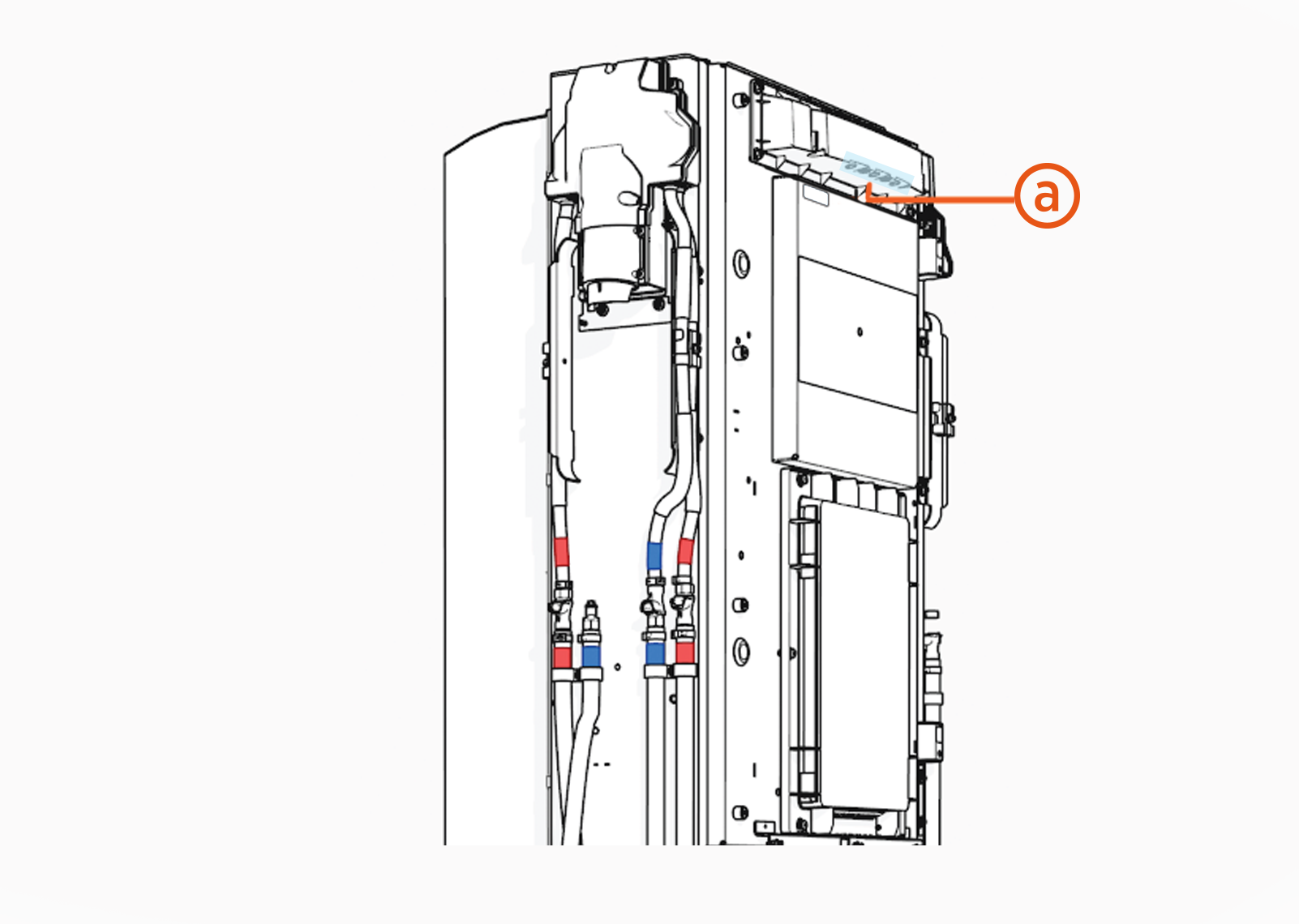
There is one pulse LED per charging port.
Each pulse LED has the same constant value, which is 2000 imp/ kWh.
Special test equipment or test software
The following equipment is necessary to test the equipment:
-
An electrical test load simulating an electric vehicle and that can be used to draw energy from the charging device with at least two different current intensity levels under a three-phase symmetrical load and under a single-phase load with a symmetrical multiphase voltage.
-
A cable adapter simulating an electric vehicle that is plugged into the charging station drop-off point.
-
A standard power measuring device which is connected between the electrical vehicle charging station and the electric emulator or electric vehicle. The standard power measuring device has a traceable metrology in accordance with Section 47 MessEG.
-
A computer connected to the Internet for accessing the portal which the EMSP uses to provide the signed data packets for testing (remote display). In the case of testing devices before they are placed on the market (module D or F), a charging device operator and an EMSP may have to be emulated.
-
The computer must have a Windows operating system that allows the transparency and display software to be used to check the signature of the data packets. It must be ensured that the computer is free of malware and that the operating system is not compromised. This can be done, for example, by booting the test computer with a "live operating system" from a USB
Universal Serial Bus stick, the memory content of which can be reliably assumed to be uncompromised due to its known origins and history. -
The transparency and display or signature check software to visually check the authenticity of transmitted data.
-
Means of identification to be able to initiate a charging process on the charging device
-
The logbook can be reliably read on the Falcon display. To make it easier to read the log book entries, the manufacturer can additionally make the signed log book entries available via the ChargePoint Cloud.
Calibration and Adjustment Procedures
Calibrations and adjustments are not provided in the context of monitoring operational devices.
Zu übernehmende Auflagen für Verwender der Ladeeinrichtungen und Verwender der Messwerte
Auflagen für Verwender der Ladeeinrichtungen (CPO)
Der Verwender der Ladeeinrichtung ist gemäß § 31 MessEG deren Betreiber (CPO ChargePoint Operator) im Sinne der europäischen Alternative Fuel Infrastructure Regulation (AFIR), die die deutsche Ladesäulenverordnung (LSV) ersetzt hat. Der Verwender verwendet die Ladeeinrichtung ausschließlich dann eichrechtkonform und bestimmungsgemäß, wenn er sie entsprechend der an ihn in der Betriebsanleitung gerichteten Auflagen und Bedingungen verwendet.
Für die Ladeeinrichtung gilt § 17 Absatz 4, MessEV. Die gemäß § 17 Absatz 1 und Absatz 2 der MessEV der Ladeeinrichtung als Betriebsanleitung beizufügenden Informationen müssen folgenden Wortlaut aufweisen:
Messrichtigkeitshinweise gemäß Baumusterprüfbescheinigung
Auflagen für den Verwender dieses Produktes, als Betreiber der Ladeeinrichtung oder CPO ChargePoint Operator, die dieser als notwendige Voraussetzung für einen bestimmungsgemäßen Betrieb der Ladeeinrichtung erfüllen muss.
Der Betreiber der Ladeeinrichtung (CPO ChargePoint Operator) ist als Verwender dieses Produktes im Sinne § 31 des Mess- und Eichgesetzes der Verwender des Messgerätes.
Generelle Auflagen
-
Dieses Produkt gilt nur dann als eichrechtlich bestimmungsgemäß und eichrechtkonform verwendet, wenn dieses nicht anderen Umgebungsbedingungen ausgesetzt ist, als denen, für die seine Baumusterprüfbescheinigung erteilt wurde.
-
Dieses Produkt gilt nur dann als eichrechtlich bestimmungsgemäß und eichrechtkonform verwendet, wenn nur die unter Punkt 1.6.2 der aktuell gültigen Baumusterprüfbescheinigung aufgelisteten Authentifizierungsmethoden verwendet werden.
-
Der Verwender dieses Produktes muss bei Anmeldung der Ladepunkte bei der Bundesnetzagentur in deren Anmeldeformular den an diesem Produkt zu den Ladepunkten angegebenen PK mit anmelden! Ohne diese Anmeldung ist ein eichrechtkonformer Betrieb dieses Produktes nicht möglich.
-
Der Verwender dieses Produktes hat sicherzustellen, dass die Eichgültigkeitsdauer für die Komponenten in diesem Produkt und für dieses Produkt selbst nicht überschritten werden.
-
Der Verwender dieses Produktes hat sicherzustellen, dass es zeitnah außer Betrieb genommen wird, wenn wegen Stör- oder Fehleranzeigen im eichrechtlich relevanten Display-Modul ein eichrechtkonformer Betrieb nicht mehr möglich ist. Es ist der Katalog der Stör- und Fehlermeldungen in dieser Betriebsanleitung zu beachten.
-
Der Verwender muss die aus diesem Produkt ausgelesenen, signierten Datenpakete speichern und für berechtigte Dritte verfügbar halten (Betriebspflicht des Speichers).
Die Speicherung muss entsprechend der Paginierung lückenlos dauerhaft (auch) auf hierfür gewidmeter Hardware erfolgen, die sich in seinem Besitz befindet oder – auf Grundlage entsprechender Vereinbarungen – im Besitz des EMSP oder Backend-System-Anbieters („dedizierter Speicher“).
Dauerhaft bedeutet, dass die Daten nicht nur bis zum Abschluss des Geschäftsvorganges gespeichert werden müssen, sondern mindestens bis zum Ablauf möglicher gesetzlicher Rechtsmittelfristen für den Geschäftsvorgang. Für nicht vorhandene Daten dürfen für Abrechnungszwecke keine Ersatzwerte gebildet werden.
-
Der Verwender dieses Produktes hat Messwertverwendern, die Messwerte aus diesem Produkt von ihm erhalten und im geschäftlichen Verkehr nutzen, eine elektronische Form einer Betriebsanleitung zur Verfügung zu stellen. Dabei hat der Verwender dieses Produktes insbesondere auf Nr. II „Auflagen für den Verwender der Messwerte aus der Ladeeinrichtung“ hinzuweisen.
-
Soweit es von berechtigten Behörden als erforderlich angesehen wird, muss vom Verwender dieses Produktes der vollständige Inhalt des dedizierten lokalen Speichers oder des Speichers, der sich in seinem Besitz oder durch entsprechende Vereinbarungen sich im Besitz des EMSP oder Backend-System-Anbieters befindet, mit allen Datenpaketen des Abrechnungszeitraumes zur Verfügung gestellt werden.
-
Spezifische Auflagen bezüglich Ad-hoc-Bezahlsysteme in Verbindung mit diesem Produkt
Beim Einsatz eines Ad-hoc-Bezahlsystems in Verbindung mit diesem Produkt hat der Verwender des Produktes folgende zusätzliche Auflagen zu erfüllen. Sollten diese Auflagen nicht erfüllt werden, werden die Messwerte nicht bestimmungsgemäß verwendet.
Sollte dieses Produkt in Verbindung mit einem Ad-hoc-Bezahlsystems mit eigener Baumusterprüfbescheinigung als Zusatzeinrichtung entsprechend Kategorie 6.8 des REA-Dokumentes „Ermittelte Regeln und Erkenntnisse des Regelermittlungsausschusses nach §46 des Mess- und Eichgesetzes“ verwendet werden, darf der Verwender dieses Produktes von diesen Auflagen nur dann abweichen, wenn die entsprechenden Anforderungen durch das konformitätsbewertete Ad-hoc-Bezahlsystem automatisch erfüllt werden.
-
Spezifische Auflagen bezüglich Ad-hoc-Bezahlsysteme in Verbindung mit diesem Produkt
-
Beim Einsatz eines Ad-hoc-Bezahlsystems in Verbindung mit diesem Produkt hat der Verwender des Produktes folgende zusätzliche Auflagen zu erfüllen. Sollten diese Auflagen nicht erfüllt werden, werden die Messwerte nicht bestimmungsgemäß verwendet.
-
Sollte dieses Produkt in Verbindung mit einem Ad-hoc-Bezahlsystems mit eigener Baumusterprüfbescheinigung als Zusatzeinrichtung entsprechend Kategorie 6.8 des REA-Dokumentes „Ermittelte Regeln und Erkenntnisse des Regelermittlungsausschusses nach §46 des Mess- und Eichgesetzes“ verwendet werden, darf der Verwender dieses Produktes von diesen Auflagen nur dann abweichen, wenn die entsprechenden Anforderungen durch das konformitätsbewertete Ad-hoc-Bezahlsystem automatisch erfüllt werden.
-
Der vom EMSP bereitgestellte, für die einzelne Ladetransaktion geltende Tarif oder die entsprechende Tarifinformation, muss vom Verwender dieses Produktes, gemäß den Vorgaben des Herstellers, an dieses Produkt übermittelt werden, damit eine Verknüpfung mit dem Messergebnis erfolgt.
-
Der Verwender dieses Produktes muss die vom EMSP bereitgestellte URL, gemäß den Vorgaben des Herstellers dieses Produktes, im Ad-hoc-Bezahlsystem einspielen.
-
Der Verwender dieses Produktes muss den vom EMSP bereitgestellten Link zur Website des Belegservers an dieses Produkt, gemäß den Vorgaben des Herstellers, übermitteln, damit dieser auf dem Display dieses Produktes angezeigt wird.
-
Der Verwender dieses Produktes muss die vom Endnutzer eingegebene
-
E-Mail-Adresse
-
Mobilfunknummer** gemäß den Vorgaben des Herstellers dieses Produktes empfangen und diese an den EMSP weiterleiten.*
-
-
Auflagen für Verwender der Messwerte
Verwender der Messwerte aus der Ladeeinrichtung ist gemäß § 33 MessEG derjenige, dem der Kunde die Bezahlung der an der Ladeeinrichtung erhaltenen Lieferung elektrischer Energie schuldet, also der Electro-Mobility Service Provider (EMSP), der Ad-hoc-Payment-Anbieter oder der CPO ChargePoint Operator, wenn sie die Messwerte zwecks Abrechnung verwenden. Der Messwerteverwender verwendet die Messwerte nur eichrechtkonform, wenn er sie entsprechend den an ihn in der Betriebsanleitung gerichteten Auflagen und Bedingungen verwendet.
Für die Ladeeinrichtung gilt § 17 Absatz 4, MessEV. Die gemäß § 17 Absatz 1 und Absatz 2 der MessEV der Ladeeinrichtung als Betriebsanleitung beizufügenden Informationen müssen folgenden Wortlaut aufweisen:
Auflagen für Verwender der Messwerte aus der Ladeeinrichtung
Verwender der Messwerte, die von diesem Produkt erzeugt werden, ist gemäß § 33 MessEG derjenige, dem der Kunde die Bezahlung der an der Ladeeinrichtung erhaltenen Lieferung elektrischer Energie schuldet, also der Electro-Mobility Service Provider (EMSP), der Ad-hoc-Payment-Anbieter oder der CPO ChargePoint Operator, wenn sie die Messwerte zwecks Abrechnung verwenden.
Der Verwender der Messwerte hat den § 33 des MessEG zu beachten:
§ 33 MessEG (Zitat)
§ 33 Anforderungen an die Nutzung von Messwerten
-
Werte für Messgrößen dürfen im geschäftlichen oder amtlichen Verkehr oder bei Messungen im öffentlichen Interesse nur dann angegeben oder verwendet werden, wenn zu ihrer Bestimmung ein Messgerät bestimmungsgemäß verwendet wurde und die Werte auf das jeweilige Messergebnis zurückzuführen sind, soweit in der Rechtsverordnung nach § 41 Nummer 2 nichts anderes bestimmt ist. Andere bundesrechtliche Regelungen, die vergleichbaren Schutzzwecken dienen, sind weiterhin anzuwenden.
-
Wer Messwerte verwendet, hat sich im Rahmen seiner Möglichkeiten zu vergewissern, dass das Messgerät die gesetzlichen Anforderungen erfüllt und muss sich von der Person, die das Messgerät verwendet, bestätigen lassen, dass diese ihren Verpflichtungen nachkommt.
-
Wer Messwerte verwendet, hat
-
dafür zu sorgen, dass Rechnungen, soweit sie auf Messwerten beruhen, von demjenigen, für den die Rechnungen bestimmt sind, in einfacher Weise zur Überprüfung angegebener Messwerte nachvollzogen werden können und
-
für die in Nummer 1 genannten Zwecke gegebenenfalls geeignete Hilfsmittel bereitzustellen.
-
Für den Verwender der Messwerte entstehen aus dieser Regelung konkret folgende Pflichten einer eichrechtkonformen Messwertverwendung:
Generelle Auflagen
-
Der Vertrag zwischen dem Verwender der Messwerte und Kunden muss unmissverständlich regeln, dass
-
Ausschließlich die Lieferung elektrischer Energie und nicht die Ladeeinrichtungsnutzungsdauer Gegenstand des Vertrages ist.
-
Ausschließlich die Lieferung elektrischer Energie und, wenn zutreffend, die Ladeeinrichtungsnutzungsdauer Gegenstand des Vertrages sind.* Eine zusätzliches, pauschales Entgelt je Ladevorgang ist von dieser Regelung nicht betroffen, da es nicht auf Messwerten basiert.
-
-
Die Zeitstempel an den Messwerten stammen von einer Uhr in diesem Produkt, die nicht nach dem Mess- und Eichrecht zertifiziert ist. Sie dürfen deshalb nicht für eine Tarifierung der Messwerte verwendet werden. Das heißt, der auf den Messwerten basierende, zu zahlender Preis darf nicht von der Uhrzeit abhängen.
-
Die Zeitstempel an den Messwerten stammen von einer Uhr in diesem Produkt, die konformitätsbewertet ist und mit der gesetzlichen Zeit synchronisiert wird. Sie dürfen deshalb für dynamische Tarife verwendet werden. Das heißt, der zu zahlender Preis darf von der Uhrzeit abhängen.*
-
Der Verwender der Messwerte muss dem Kunden die abrechnungsrelevanten Datenpakete automatisch nach Abschluss der Messung und spätestens zum Zeitpunkt der Rechnungsstellung einschließlich der Signatur als Datenfile in einer Weise zur Verfügung stellen, dass diese mittels der Transparenz- und Display-Software ohne Konvertierung eingelesen und auf Unverfälschtheit überprüft werden können. Die Bereitstellung und der Erhalt dieser Daten kann über eichrechtlich nicht geprüfte Kanäle erfolgen, beim Laden mit Dauerschuldverhältnis beispielsweise über eine E-Mail oder Zugang zu einem Belegserver. Der Verwender der Messwerte hat dafür zu sorgen, dass dem Kunden alle notwendigen Informationen zugestellt werden, die er für den Erhalt der o.g. Daten benötigt.
-
Der Verwender der Messwerte muss dem Kunden die zu diesem Produkt gehörige Transparenz- und Display-Software zur Prüfung der Datenpakete auf Unverfälschtheit verfügbar machen.
-
Der Verwender der Messwerte muss beweissicher prüfbar zeigen können, welches Identifizierungsmittel genutzt wurde, um den zu einem bestimmten Messwert gehörenden Ladevorgang zu initiieren. Das heißt, er muss für jeden Geschäftsvorgang und in Rechnung gestellten Messwert beweisen können, dass er diesen die Personenidentifizierungsdaten zutreffend zugeordnet hat. Der Verwender der Messwerte hat seine Kunden über diese Pflicht in angemessener Form zu informieren.
-
Der Verwender der Messwerte darf nur Werte für Abrechnungszwecke verwenden, die in einem gegebenenfalls vorhandenen dedizierten Speicher in diesem Produkt and/oder in dem Speicher beim Verwender dieses Produktes (CPO
ChargePoint Operator) und/oder dem Speicher beim Backend-System-Anbieter, gemäß entsprechender Vereinbarungen zwischen ihm und dem Verwender dieses Produktes, vorhanden sind. Ersatzwerte dürfen für Abrechnungszwecke nicht gebildet werden. -
Der Verwender der Messwerte darf keine Messwerte aus diesem Produkt für Abrechnungszwecken verwenden, die als fehlerhaft oder ungültig von diesem Produkt gekennzeichnet sind.
-
Der Verwender der Messwerte muss durch entsprechende Vereinbarungen mit dem Verwender dieses Produktes(CPO
ChargePoint Operator) sicherstellen, dass bei diesem die für Abrechnungszwecke genutzten Datenpakete ausreichend lange gespeichert werden, um die zugehörigen Geschäftsvorgänge vollständig abschließen zu können. -
Der Verwender der Messwerte hat bei begründeter Bedarfsmeldung zum Zwecke der Durchführung von Eichungen, Befundprüfungen und Verwendungsüberwachungsmaßnahmen durch Bereitstellung geeigneter Authentifizierungsmittel die Authentifizierung an den von ihm genutzten Exemplaren des zu dieser Betriebsanleitung gehörenden Produktes zu ermöglichen.
-
Alle vorgenannten Pflichten gelten für den Verwender der Messwerte im Sinne von § 33 MessEG auch dann, wenn er die Messwerte aus diesem Produkt über einen Roaming-Dienstleister bezieht.
Spezifische Auflagen bezüglich Ad-hoc-Bezahlsysteme in Verbindung mit diesem Produkt
-
Beim Einsatz eines Ad-hoc-Bezahlsystems in Verbindung mit diesem Produkt hat der Verwender der Messwerte folgende zusätzliche Auflagen zu erfüllen. Sollten diese Auflagen nicht erfüllt werden, werden die Messwerte nicht bestimmungsgemäß verwendet.
-
Sollte dieses Produkt in Verbindung mit einem Ad-hoc-Bezahlsystems mit eigener Baumusterprüfbescheinigung als Zusatzeinrichtung entsprechend Kategorie 6.8 des REA-Dokumentes „Ermittelte Regeln und Erkenntnisse des Regelermittlungsausschusses nach §46 des Mess- und Eichgesetzes“ verwendet werden, darf der Verwender der Messwerte von diesen Auflagen nur dann abweichen, wenn die entsprechenden Anforderungen durch das konformitätsbewertete Ad-hoc-Bezahlsystem automatisch erfüllt werden.
-
Der Verwender der Messwerte muss dem CPO
ChargePoint Operator für jede Ladetransaktion-
Den geltenden Tarif bereitstellen.
-
Die geltende Tarifkennung bereitstellen.
-
Die geltende Ladetransaktions-ID bereitstellen.
-
Den Zeitstempel und die Zuordnung des Zeitstempels zu dem für den Ladevorgang geltenden Tarif auf Grundlage einer vertrauenswürdigen öffentlichen Quelle dem Endnutzer bereitstellen. Die URL zu der vertrauenswürdigen öffentlichen Quelle, die von einer unabhängigen Organisation bereitgestellt werden muss, muss vom Verwender der Messwerte dem Endnutzer vor Beginn des Ladevorgangs bereitgestellt werden.*
-
-
Der Verwender der Messwerte muss dem Endnutzer die URL eines dedizierten Belegserver bereitstellen (die auf dem Kontoauszug des Endnutzers angezeigt wird), auf dem das Datenpaket (dauerhafter Nachweis) in einer einfachen und vertraulichen Weise verfügbar gemacht werden, einschließlich der URL zur Transparenzsoftware zur Überprüfung der Datenauthentizität.
Der Verwender der Messwerte muss diese URL dem CPO
ChargePoint Operator übermitteln, damit sie im Ad-hoc-Bezahlsystem eingespielt werden kann. -
Der Verwender der Messwerte muss dem Endnutzer einen Belegserver bereitstellen, über den das Datenpacket (dauerhafter Nachweis) in einer einfachen und vertraulichen Weise verfügbar gemacht werden, einschließlich des Links zur Transparenzsoftware zur Überprüfung der Datenauthentizität.
Der Verwender der Messwerte muss diesen Link dem CPO
ChargePoint Operator übermitteln, damit er auf dem Display der Ladestation angezeigt wird. -
Der Verwender der Messwerte muss die vom Endnutzer eingegebene und vom CPO
ChargePoint Operator bereitgestellte -
E-Mail-Adresse
-
Mobilfunknummer** empfangen. Der Verwender der Messwerte muss dem Endnutzer per
-
E-Mail
-
SMS** den Link zur Website des Belegservers bereitstellen, auf dem das Datenpacket (dauerhafter Nachweis) in einer einfachen und vertraulichen Weise verfügbar gemacht werden, einschließlich des Links zur Transparenzsoftware zur Überprüfung der Datenauthentizität.
-
-
-
(4 Der Verwender der Messwerte muss die vom Endnutzer eingegebene und vom CPO
ChargePoint Operator bereitgestellte -
E-Mail-Adresse
-
Mobilfunknummer** empfangen. Der Verwender der Messwerte muss dem Endnutzer per
-
E-Mail
-
SMS** das Datenpacket (dauerhafter Nachweis) in einer einfachen und vertraulichen Weise bereitstellen, einschließlich des Links zur Transparenzsoftware zur Überprüfung der Datenauthentizität.*
-
-