Removing a Stuck EV Connector
Most often a ChargePoint connector releases when the charging session ends, and you press the latch on the handle. If the connector feels stuck go through the scenarios listed below to release the connector.
DISCLAIMER: ChargePoint strongly recommends that you follow the instructions in your EV Electric Vehicle owner’s manual. Third-party videos or instructions not from your vehicle manufacturer or ChargePoint may not apply to your EV Electric Vehicle or connector type and could cause damage.
Never force the connector or use tools to remove it. Forcing the connector can damage the charging port or cable. Always follow manufacturer instructions and use the emergency release if necessary.
Charging Session is still Active
Fault Description
-
Connector does not release
-
Station display shows Charging or In Progress
-
Vehicle charge indicator light is ON
Possible Cause
-
Charging session not properly ended
-
Communication delay between the vehicle and the charger
Troubleshooting
Check the ChargePoint station display for Session Complete or Charging Stopped.
End the session using one of the following options:
-
The ChargePoint station screen
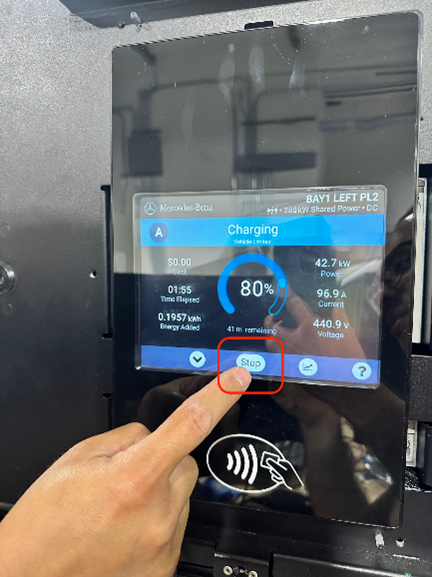
-
The ChargePoint mobile app or an RFID
Radio Frequency IDentification card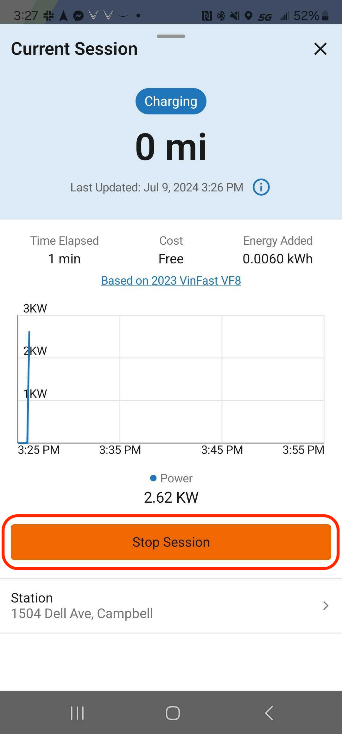
-
The vehicle infotainment system
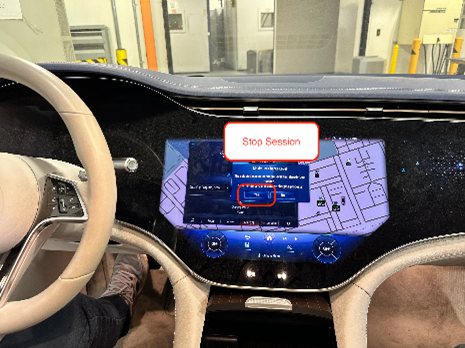
Wait a few seconds after stopping the session before attempting to unplug.
Vehicle is Locked
Fault Description
-
Connector latch feels stuck or rigid
-
Vehicle doors are locked
Possible Cause
-
Some vehicles lock the charging connector when the vehicle is locked
Troubleshooting
-
Unlock the vehicle using the key fob or vehicle app.
-
Using the customer's vehicle key fob, press the unlock button five times in a row.
-
Using the customer's vehicle key fob, switch between lock and unlock modes three times.
-
-
If the vehicle has a separate charge port lock, ensure it is unlocked.
-
Support the cable with one hand while unlocking to relieve tension on the latch.
Charging-port Lock is Engaged
Fault Description
-
Connector button or latch does not move
-
Vehicle display shows Charge Port Locked
Possible Cause
-
Dedicated charge port lock still engaged
Troubleshooting
-
Unlock the charge port using the infotainment screen, nearby unlock button, or vehicle controls.
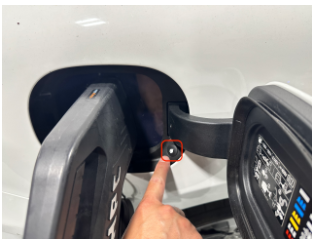
-
Refer to the EV
Electric Vehicle owner’s manual for the correct unlocking method.
Cable Tension or Weight Applied
Fault Description
-
Connector partially releases but feels heavy or stuck
-
Latch does not fully disengage
Possible Cause
-
Cable tension from a heavy or liquid-cooled cable
Troubleshooting
-
Gently push the connector toward the vehicle to relieve tension.
-
Press and hold the latch or release button while pulling the connector straight out.
-
Support the cable with the other hand to reduce strain.
Connector Release Button is Rigid
Fault Description
-
Button does not depress
-
Connector will not release even after unlocking
Possible Cause
-
Locking pin still engaged
-
Charging session not fully terminated
Troubleshooting
-
Confirm that charging has stopped on both the station and vehicle.
-
Ensure the vehicle and charge port are unlocked.
-
Wait a few seconds for the locking mechanism to disengage.
-
If the button remains rigid, do not force the connector. Proceed to the next step.
Emergency Release Required
Fault Description
-
Connector remains locked after all previous steps
-
Button or latch does not move
Possible Cause
-
Mechanical fault in the vehicle’s locking mechanism
Troubleshooting
-
Locate the vehicle’s emergency release (usually a pull cable or lever near the charge port or inside the trunk).
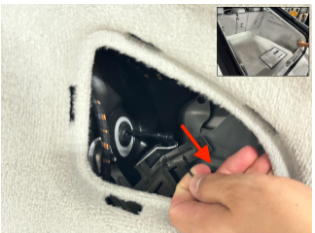
-
Follow the EV
Electric Vehicle owner’s manual for instructions on using the emergency release. -
After released, remove the connector carefully.
Persistent Connector Issues
Fault Description
-
Connector repeatedly sticks
-
Locking mechanism fails to disengage even after multiple sessions
Possible Cause
-
Faulty charge port or connector latch
-
Software or firmware issue
Troubleshooting
-
Restart the vehicle and charging station.
-
Check for any available software updates for the vehicle or charging system.
-
Contact chargepoint.com/support or the vehicle manufacturer for further assistance.
Get Support
If the connector is not releasing from the vehicle, even after performing the Manual release then contact chargepoint.com/support or call Support at 877-850-4562 for further assistance.
