Cellular Signal Reading
This topic describes how to set up, survey and review the site before installing a charging station. A Snyper LTE Long Term Evolution GraphyteTM is used to survey the site for cellular connectivity.
Cellular Connectivity: Using a Snyper LTE Graphyte™ for Site Survey
A site survey for cellular connectivity is a key requirement for every ChargePoint charging station installation. Cellular connectivity is required for key features such as:
-
User authentication, access control, and billing for charging sessions
-
Station utilization, energy usage, and session details for retporting
-
Power management
-
Notification to drivers for waitlists, end of charging session, and pricing increases for overstay
-
Station diagnostics
-
Software updates
This document explains how to complete a site survey using a Siretta Snyper LTE Graphyte™ in the North American region.
This Siretta Snyper LTE Long Term Evolution Graphyte™ device is a high performance, multi-language, network signal analyser and cellular signal logger. It is used for surveying and analyzing the 4G/LTE Long Term Evolution (USA) and the 3G/UMTS North American Networks. You can leave this unit in a fixed location for conducting sequential surveys and automatically saving them. The tool can be purchased online from Newark, Digi-Key, and other suppliers.
-
You must use a device that will give RSRP/RSRQ for LTE
Long Term Evolution like the Siretta Snyper LTE Long Term Evolution Graphyte™ device that ChargePoint has recommended for taking your cellular signal readings. Do not use other meters that will not give RSRP/RSRQ for LTE Long Term Evolution. -
If a meter reads out only a single value for an operator or band, or the reading type is not labelled, it isn't acceptable.
-
Attach your values and an image to Your Site Values for LTE (4G) Table or Your Site Values for UMTS (3G) Table and send your values back to ChargePoint.
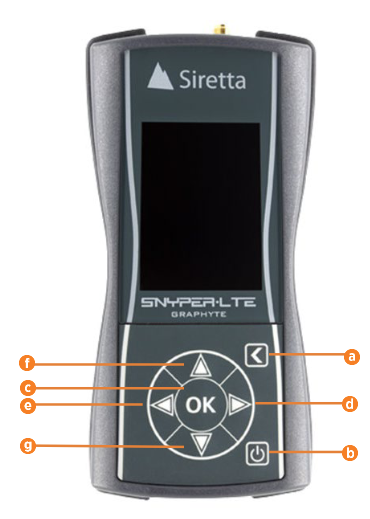
Orientation
-
Back
-
Power
-
OK/Select
-
Right
-
Left
-
Up
-
Down
Setting up the device
A one time setup of the device is required before beginning the site survey. Check and update each of these settings as needed.
-
Hold the Power button 3 seconds to power up the device.
-
Use the Down button to navigate to Setup. Press OK.
-
Use the Down button to navigate to Document. Press OK.
-
Update the Document settings to:
-
HTML: On
-
CSV: On
-
Auto-Save: On
-
-
Press OK.
-
Use the Down button to navigate to System. Press OK.
-
Update the Document settings to:
-
Mode: Advanced
-
ITU Region: AMER
-
Debug Log: Off
-
-
Press OK.
-
Use the Down button to navigate to Set Time. Press OK.
-
Verify that the date and time are correct. Otherwise, update it to be correct for your location.
Surveying a Station Location
- The survey must be conducted for each station (or, for each Gateway for CPF stations, if applicable).
- Surveying the general area is insufficient. Each individual station must be checked for connectivity.
To survey a station:
-
To power up the device, hold the Power button for 3 seconds.
-
Use the Down button to navigate to Survey. Press OK.
-
Navigate to select Full Survey. Press OK.
-
Select the number of cycles.
- You must do at least one cycle per station.
- But, if cellular service seems problematic or fluctuates, then you may want to run more than one survey per location.
-
Press OK.
The device will say "Please wait". Each survey cycle takes approximately 2 minutes. It may take slightly longer if the signal is weak or noisy.
If the display dims during a survey, you can presss OK to wake it.When complete, the device displays the results.
-
Record the file names for the .csv and .htm files and the associated charging station location for these results..
-
Repeat the surveying process for each charging location at the sit.
Downloading and Reviewing the Files
Use a Windows or Mac computer to review the files.
To review the files:
-
Hold the Power button for 3 seconds to power up the device.
-
Use the Down button to navigate to PC Connect. Press OK.
-
Use the Right button to select On.
The device will say "PC Enabled".
-
Use a USB
Universal Serial Bus cable to connect the device to your computer. -
Go to Windows Explorer or Finder (Mac) and find the GRAPHYTE drive or location.
-
Copy the files from the device to a preferred location on your computer.
-
Open the .htm file for the station location you wish to review.
Understanding Your Results
-
Results display separately for UMTS (3G) and LTE Long Term Evolution (4G).
-
Verify what type of modem is in the charging station or Gateway (if applicable) being installed.
- All modems sold by ChargePoint in North America from 2020 are 4G modems with 3G for backup for Canada or Mexico.
- Older modems were 3G only, but, all major United States carriers no longer offer 3G service.
-
Results display in three Network Signal strengths.
-
Green: Good
-
Orange: Marginal to poor
-
Red: Extremely weak or barely detectable
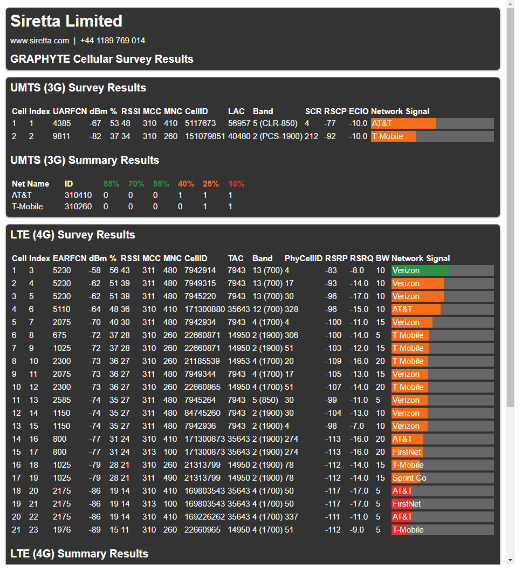 Cellular carriers often appear multiple times using different bands. Some bands are more commonly used than others.
-
-
Review additional details from the graphs below on signal strength where:
-
RSRP (LTE
Long Term Evolution) stands for Reference Signal Received Power -
RSRQ (LTE
Long Term Evolution) stands for Reference Signal Received Quality -
RSSI (UMTS) stands for Received Signal Strength Indication
-
EC/IO (UMTS) stands for Downlink carrier-to-interference ratio
A consistently strong cellular signal is needed before installers can activate the vehicle charging station. Weak or sporadic signal can affect crucial aspects of the charging station, including:
-
Accuracy in reporting
-
Ability for drivers to use the mobile app
-
Ability for customer support to troubleshoot problems
-
Support for advanced features such as Power Management or Waitlist
A strong signal is also required for the ChargePoint Assure maintenance and management programs.
ChargePoint stations use cellular data connections to reach ChargePoint Cloud Services. This allows secure, PCI-compliant data connections without requiring any other form of internet connectivity at an install site or imposing additional network management responsibilities on a site host.
Each station has its own cellular connection.
Signal Strength and Quality
You must use a cellular signal detection device (such as a Siretta Snyper LTE
Long Term Evolution or equivalent) to take signal strength readings at the exact proposed mounting location of the charging station. If the charging station does not have its own cellular connection, take the signal strength reading at the proposed mounting location of the gateway station.If the location doesn't have consistently strong LTE
Long Term Evolution signal strength, test the 3G or 2G signal strength at the proposed mounting location of every gateway station and ensure it meets the minimum -85 dBm RSSI.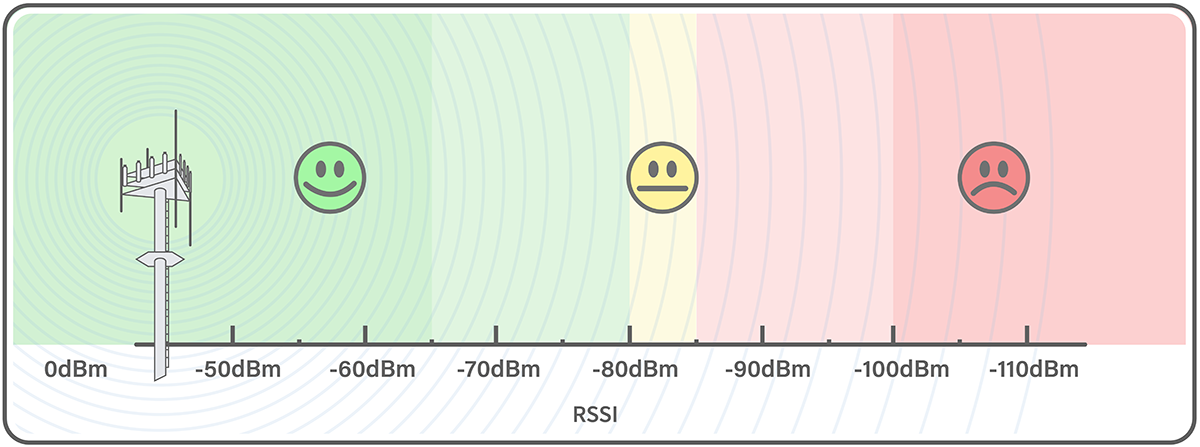
You must test the LTE
Long Term Evolution signal strength at the proposed mounting location of every station and ensure the location meets the minimum RSRQ at -12.5 dB or better, for RSRP measured at -90 dBm or better. Refer to the graph for acceptable combinations.Cellular signal strength is measured in dBm, a logarithmic unit expressed as a negative number. Because dBm values are negative, a value closer to zero indicates a stronger signal. For example, -70 dBm represents a stronger signal than -85 dBm, while -90 dBm indicates a weaker signal than both.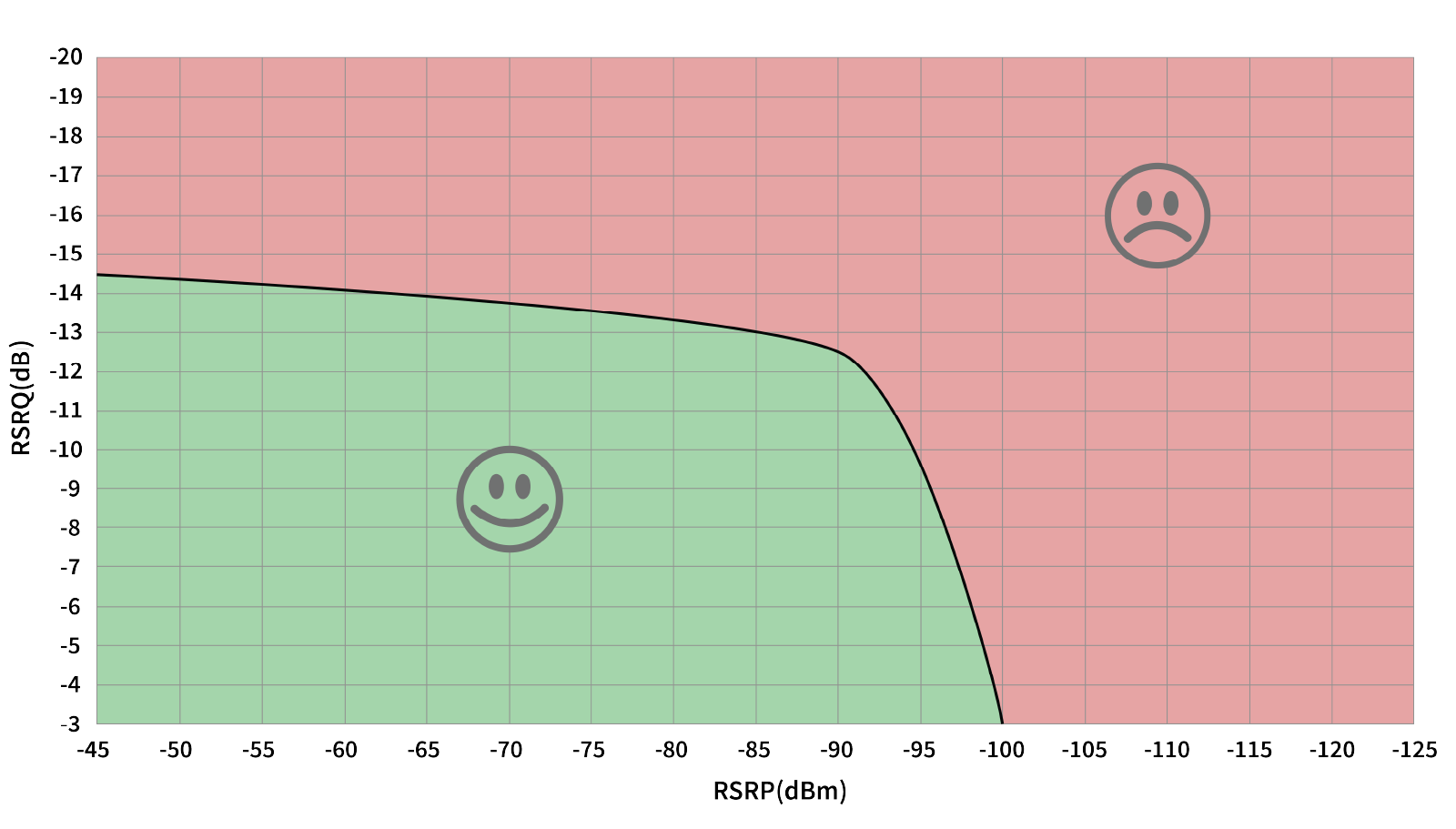
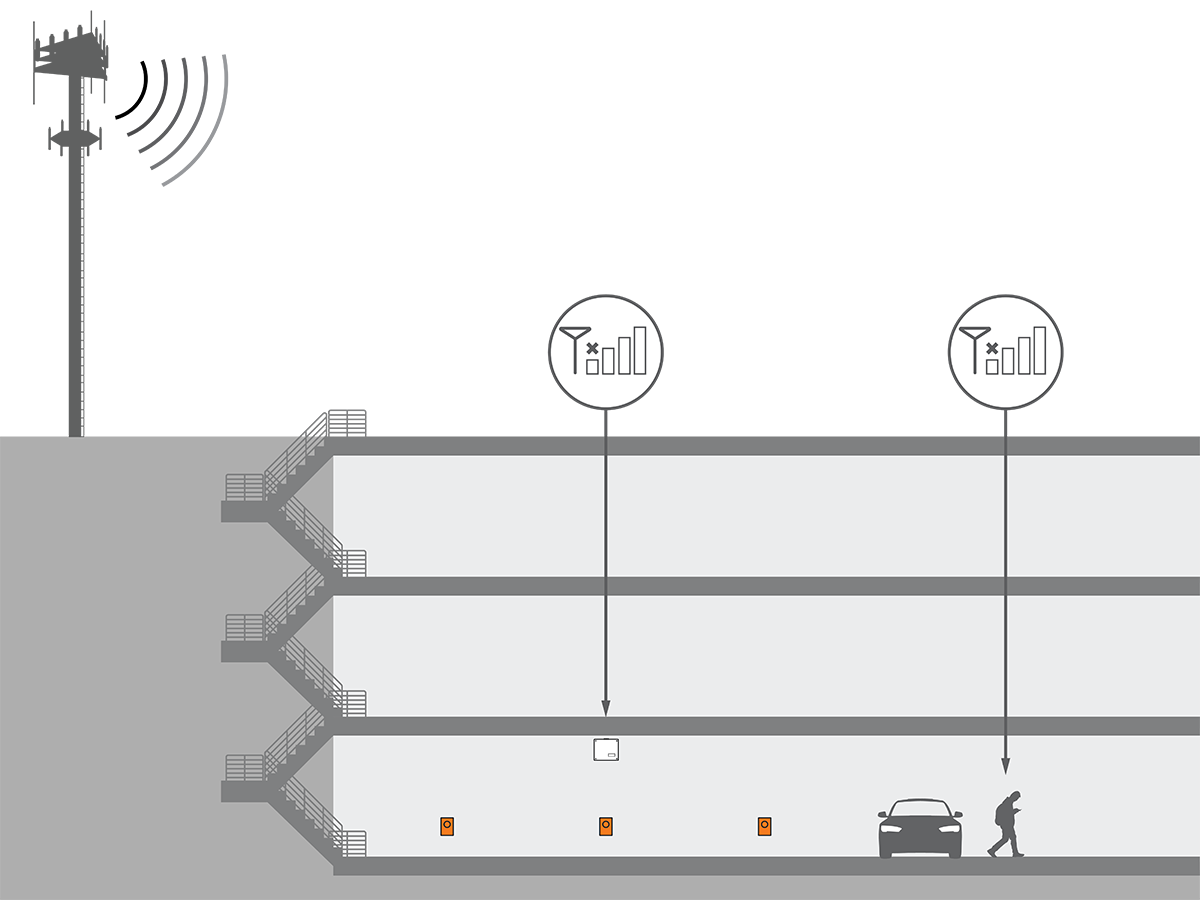
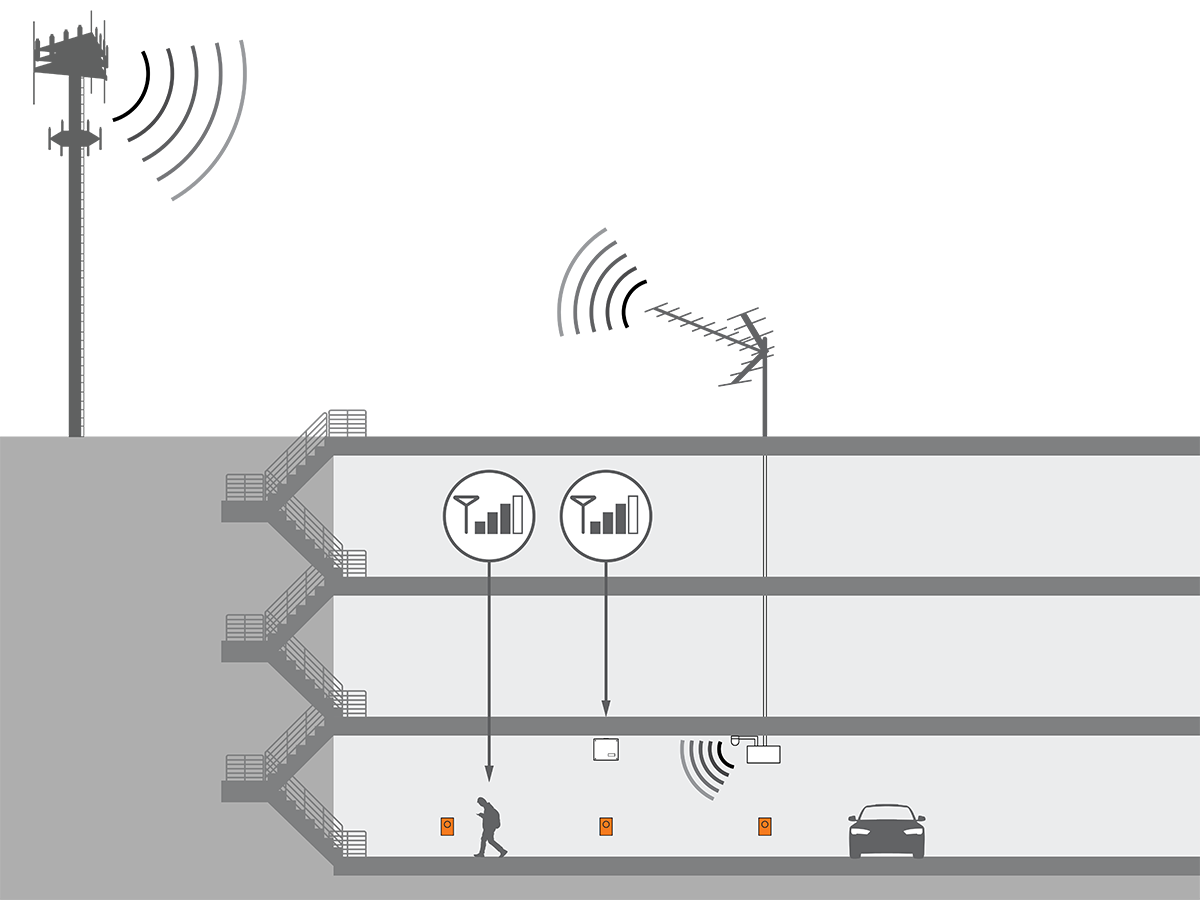
If the signal strength is weaker than this, take cellular readings at the location where any cellular signal booster antennas will be installed. Ensure enough signal exists for that repeater model. Install repeaters to boost the strength of the cellular signals. Repeaters are often required when installing charging stations in an underground garage or enclosed parking structure.
In North America, ChargePoint products all support LTE
Long Term Evolution bands 2, 4, and 5. The most commonly supported carriers to check during site evaluation are:-
US: AT&T, T-Mobile, and Verizon
-
Canada: Rogers, Telus, and Bell
For other regions, or if the site does not have strong signal on these bands, contact your ChargePoint representative for additional solutions.
ChargePoint strongly recommends a consultation with a cellular connectivity specialist before all installations. A consultation can verify:
-
Service with a supported carrier on a supported LTE
Long Term Evolution band -
Available signal and local noise levels on applicable bands
-
Site changes to correctly meet your needs, both for station bandwidth and other phone coverage for customer or tenant satisfaction
Repeaters
Some sites require repeaters to ensure strong signal to all stations. If a repeater is required, look for a model with these features:
-
Specifically LTE
Long Term Evolution-compatible on the listed bands -
Multi-carrier
-
Multi-band
-
Not already dedicated to FirstNet or other first responder-specific networks
-
Auto-gain recommended
Do not rely on readings taken with a cell phone when conducting site surveys. Many signal boosters and network extenders may not be compatible with ChargePoint hardware, including certain types of Distributed Antenna Systems (DAS Distributed Antenna System), micro/nano/pico/femto-cells, and carrier- or band-specific signal boosters.
Repeaters are not allowed in France. Contact the French service provider for more information.
Expected Values for LTE (4G)
Expected LTE Long Term Evolution (4G) Values
RSRP RSRQ Signal Strength
-90 dBm or better
-12.5 dB or better
Excellent
NOTE: As the numbers are negative so, the word 'better' means that the RSRP value has to be a number that is lower than -90 dBm or the RSRQ value has to be a number that is lower than -12.5 dB and only then the values indicate that the cellular signal reading has excellent cellular strength.
Your Site Values for LTE (4G)
In the Table below, for each station (or, for each Gateway for CPF stations, if applicable) at your site, do the following:
-
Note down your LTE
Long Term Evolution (4G) value readings in the Carrier Column. -
Attach an image of each cellular reading taken at your site under the Images Column
Your LTE Long Term Evolution (4G) Values
Station or Gateway Name RSRP RSRQ Carrier
Images 

Expected Values for UMTS (3G)
Expected UMTS (3G) Values RSSI EC/IO Signal Strength
-65 dBm or better
-3 to -10 dB or better
Excellent
NOTE: As the numbers are negative so, the word 'better' means that the value has to be a number that is lower than -65 dBm for RSSI or lower than -3 dB for EC/IO and only then it indicates that the cellular signal reading has excellent cellular strength.
Your Site Values for UMTS (3G)
In the Table below, for each station (or, for each Gateway for CPF stations, if applicable) at your site, do the following:
-
Note down your UMTS (3G) value readings in the Carrier Column.
-
Attach an image of each cellular reading taken at your site under the Images Column
Your UMTS (3G) Values Station or Gateway Name RSSI EC/IO Carrier
Images
Actions to take
Depending on the results, take these actions:
-
If the results show Green results across several carriers and bands, then no action is needed and that station is good to go.
-
If the results show any of these:
-
Connectivity is Orange or Red
-
Connectivity is only available across one or two bands
-
Connectivity is only available via a single carrier
Action to take:
-
You most likely need to install a repeater or a distributed antenna system (DAS
Distributed Antenna System), but since your DAS Distributed Antenna System has to be compatible with ChargePoint hardware, take the following action: -
Contact ChargePoint Solutions Engineering at solutionsengineering@chargepoint.com for additional guidance.
-
- For sites with complex conditions, a cellular specialist may be required to survey and remediate the site.
-
