For Drivers
Drivers receive a Connection invite from their organisation either as a QR code or as a link.
To create an account using ChargePoint connections, complete the following steps:
-
Click or scan the invitation link or QR code you received from your employer, fleet programme, or ChargePoint Operator (CPO). Complete the registration steps in your web browser.
The ChargePoint app must not be installed on the diver's device before signing up for a new connection. If the app is already installed, please uninstall it first and then follow the sign-up steps below. You will be prompted to download the app after completing your registration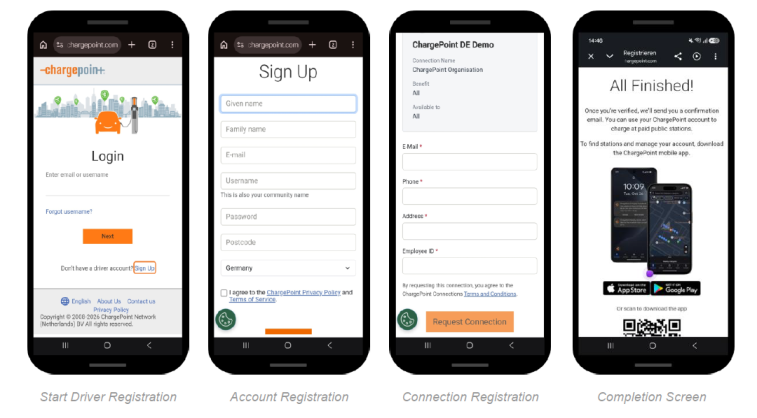
Click here for an interactive demo walk through the registration process
-
Download the ChargePoint Driver App from the Apple Store or Google Play and sign in with the credentials you created during registration.
-
Await approval and set up payment.
You will be notified once your connection request has been approved. You can check the status at any time under Account > Connections in the app. Your connection will be shown as Active or Pending.
A payment source is required to use charging stations that have pricing enabled. Payment can only be added once your connection has been approved. Navigate to Account > Payment to set up your payment method. If a business payment method is already on file, no personal payment method is required.
