Connectivity
A reliable network connection is required before installers can activate the charging station. ChargePoint stations support three connectivity options, allowing site hosts to select the best solution for their installation environment:
-
Cellular (Default): Every ChargePoint station includes a built-in cellular connection. Cellular connectivity does not require any customer-provided network infrastructure.
-
Ethernet: A wired LAN
 Local Area Network connection can be established using a USB Universal Serial Bus to Ethernet module. Ethernet requires customer-provided network infrastructure, including cabling and network equipment. Ethernet is recommended for underground parking structures, enclosed facilities, or other locations where cellular signal strength is weak or unreliable.
 -
Wi-Fi
Wireless Fidelity: A wireless LAN Local Area Network connection can be used when customer-provided Wi-Fi Wireless Fidelity infrastructure is available. Wi-Fi Wireless Fidelity is a practical alternative in situations where installing Ethernet cabling is not feasible.
Regardless of the connectivity method used, a stable and reliable connection is essential for proper charging station operation. Weak, intermittent, or unreliable connectivity can affect critical station functions, including:
-
Accuracy of station status and usage reporting
-
Driver access to mobile app features
-
Customer Support's ability to remotely diagnose and troubleshoot issues
-
Advanced features such as Power Management and Waitlist
ChargePoint stations communicate with ChargePoint Cloud Services through the configured network connection, enabling secure, PCI-compliant data communications for station management, monitoring, reporting, and driver services.
Wireless Fidelity deployments. The site host is responsible for providing, configuring, securing, and maintaining all required network equipment and services, including switches, routers, wireless access points, cabling, internet connectivity, and any associated network management. Wireless Fidelity network qualification requirements, configuration procedures, firewall and port requirements, and troubleshooting guidance, refer to the Network Readiness Guide available at ChargePoint Product Reference Documentation. Cellular Signal Strength and Quality
You must use a cellular signal detection device (such as a Siretta Snyper LTE Long Term Evolution or equivalent) to take signal strength readings at the exact proposed mounting location of the charging station. If the charging station does not have its own cellular connection, take the signal strength reading at the proposed mounting location of the gateway station.
In North America, ChargePoint products all support LTE Long Term Evolution bands 2, 4, and 5. The most commonly supported carriers to check during site evaluation are:
-
US: AT&T, T-Mobile, and Verizon
-
Canada: Rogers, Telus, and Bell
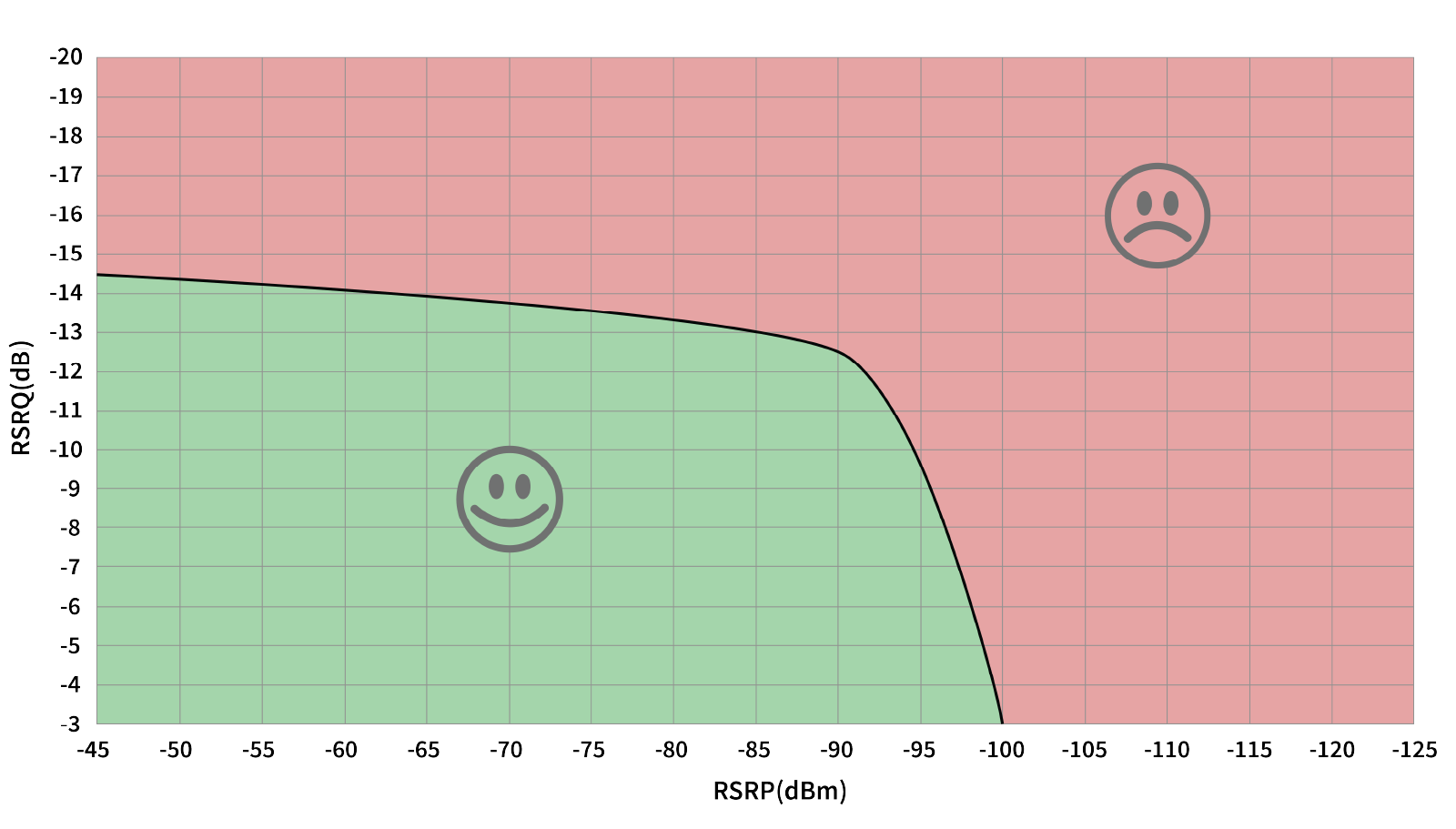
You must test the LTE Long Term Evolution signal strength at the proposed mounting location of every station and ensure the location meets the minimum RSRQ at -12.5 dB or better, for RSRP measured at -90 dBm or better. Refer to the graph for acceptable combinations.
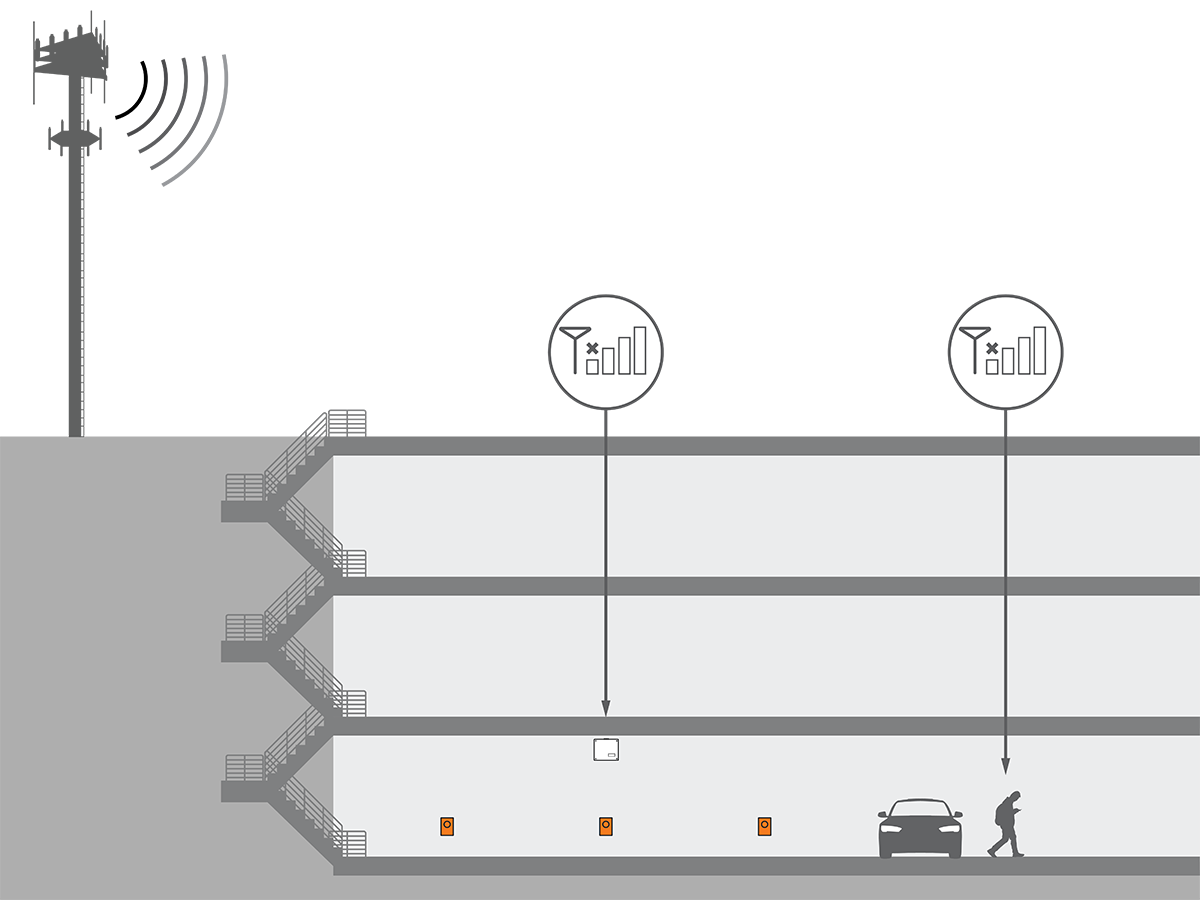
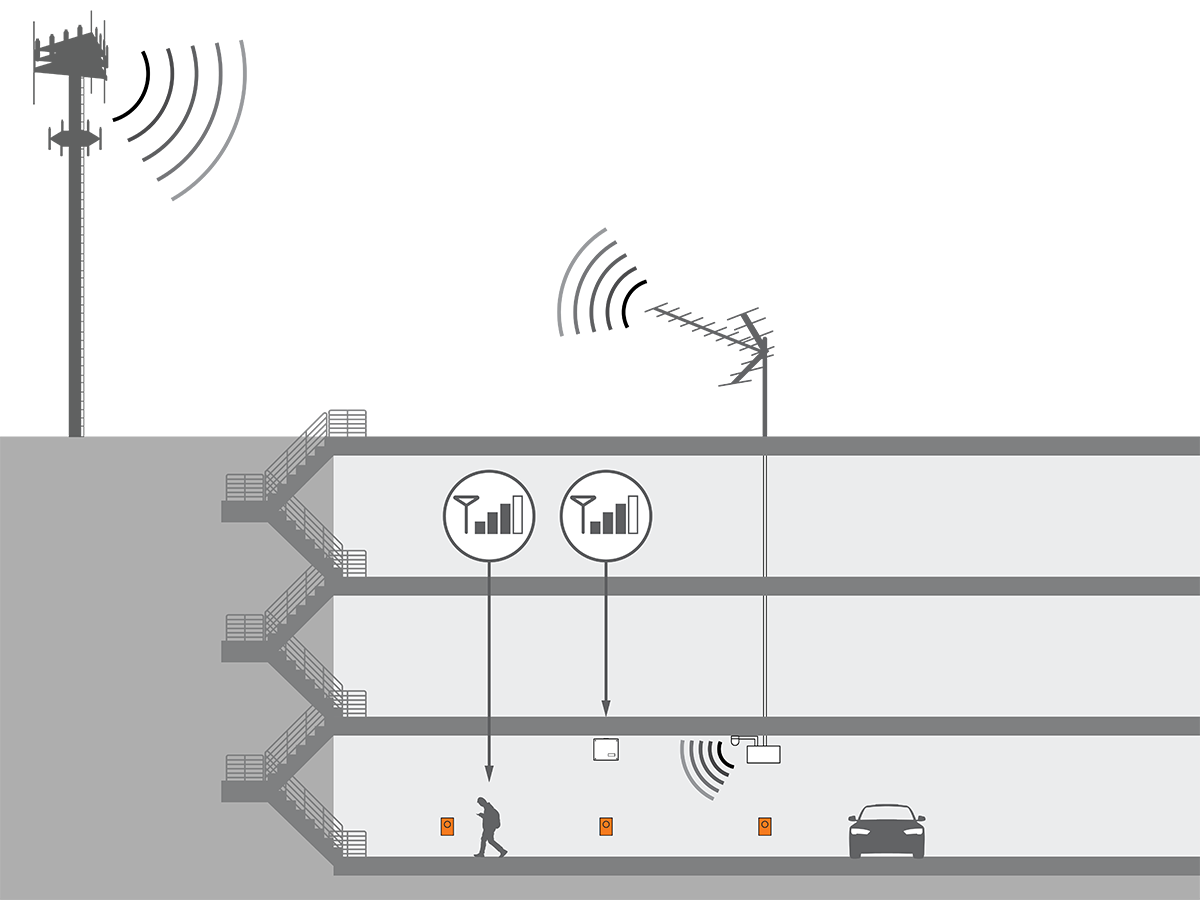
If the signal strength is weaker than this, take cellular readings at the location where any cellular signal booster antennas will be installed. Ensure enough signal exists for that repeater model. Install repeaters to boost the strength of the cellular signals. Repeaters are often required when installing charging stations in an underground garage or enclosed parking structure.
For other regions, or if the site does not have strong signal on these bands, contact your ChargePoint representative for additional solutions.
ChargePoint strongly recommends a consultation with a cellular connectivity specialist before all installations. A consultation can verify:
-
Service with a supported carrier on a supported LTE
Long Term Evolution band -
Available signal and local noise levels on applicable bands
-
Site changes to correctly meet your needs, both for station bandwidth and other phone coverage for customer or tenant satisfaction
Repeaters
Some sites require repeaters to ensure strong signal to all stations. If a repeater is required, look for a model with these features:
-
Specifically LTE
Long Term Evolution-compatible on the listed bands -
Multi-carrier
-
Multi-band
-
Not already dedicated to FirstNet or other first responder-specific networks
-
Auto-gain recommended
Distributed Antenna System), micro/nano/pico/femto-cells, and carrier- or band-specific signal boosters.
Repeaters are not allowed in France. Contact the French service provider for more information.
Wi-Fi Design Requirements
Signal Strength
Verify Wi-Fi Wireless Fidelity signal strength at the proposed mounting location of each charging station before installation. Perform measurements at the actual charger mounting location, not at a desk, building entrance, or other location.
-
Minimum required signal strength: –65 dBm or stronger at the charger mounting location.
-
Use a Wi-Fi
Wireless Fidelity analyzer or site survey tool to measure signal strength. -
Do not use signal bars displayed on a mobile device, as they do not provide an accurate indication of signal quality.
-
If signal strength is below –65 dBm at any charging station location, improve coverage by repositioning existing access points or installing additional access points before proceeding with the installation.
Access Point Placement
Position access points to provide adequate Wi-Fi Wireless Fidelity coverage at each charging station mounting location.
-
For outdoor installations, use outdoor-rated access points or install access points in weatherproof enclosures.
-
For underground parking garages or enclosed parking structures, install access points within the structure. Wi-Fi
Wireless Fidelity signals originating outside the structure may not provide adequate coverage.
Band Selection
ChargePoint charging stations support both 2.4 GHz and 5 GHz Wi-Fi Wireless Fidelity networks.
-
Use 2.4 GHz where walls, pillars, long distances, or other physical obstacles may reduce signal strength.
-
Use 5 GHz where higher throughput is required and adequate signal coverage can be maintained.
Select the frequency band that provides the most reliable connectivity at the charging station location.
Network Configuration
ChargePoint recommends using a isolated network segment for charging stations.
-
Configure a dedicated SSID
Set Service Identifier or a VLAN that is separated from corporate, guest, or public network traffic. This limits exposure of the charging station to other network devices and reduces the risk of management policies (proxy, captive portal, MAC Message Authentication Code filtering) blocking connectivity. -
Ensure that the SSID
Set Service Identifier is broadcast and not configured as a hidden network.
Interference Considerations
Evaluate the installation environment for potential sources of wireless interference before finalizing access point locations.
-
Common sources of 2.4 GHz interference include nearby Wi-Fi
Wireless Fidelity networks, Bluetooth devices, microwave equipment, and industrial wireless systems. -
In dense deployment environments or multi-tenant facilities, channel congestion on 2.4 GHz may affect performance.
-
When interference or congestion is present, consider using the 5 GHz band or assigning non-overlapping channels in coordination with the customer's IT team.
Network Qualification
Before deploying a Wi-Fi Wireless Fidelity connectivity solution, the customer's IT administrator must complete the Wi-Fi Wireless Fidelity Site Qualification Checklist provided in the Network Readiness Guide available at ChargePoint Product Reference Documentation.
Ethernet Requirements
-
ChargePoint recommends using a isolated network segment for charging stations. Configure a dedicated switch port on a segmented VLAN or a network segment separate from corporate, guest, or public network traffic. This limits exposure of the charging station to other network devices and reduces the risk of management policies (proxy, captive portal, MAC
Message Authentication Code filtering) blocking connectivity. -
For Ethernet communications to an external network connection:
-
Outdoor rated Cat 6 and above cables (Cat 6a, Cat 7, Cat 7a, Cat 8) must be used for runs less than 100m (300 feet). Runs between 100m and 200m may use an extended-reach cable such as the PAIGE OSP Shielded cable, but this is done at the customer's own risk and is not a ChargePoint-qualified configuration. Runs over 200m are not permitted.
-
-
The cable shield must be grounded.
-
Review the Network Readiness Guide available at ChargePoint Product Reference Documentation for all network qualification and configuration requirements.