Introduction
This topic describes how to design an installation site for the ChargePoint® Express 280 DC fast charging station and install the Concrete Mounting Template, before station installation. An Express 280 station can be installed to operate by itself (called Standalone) or to share power with one other Express 280 station for higher throughput (called Paired).
- If the charging station is not installed, commissioned, or serviced by a ChargePoint certified technician using a ChargePoint-approved method, it is excluded from all ChargePoint and other warranties and ChargePoint is not responsible.
- You must be a licensed electrician and complete training at https://www.chargepoint.com/partners/training-certification to become ChargePoint certified and to access ChargePoint's web-based installer tools or ChargePoint Installer app.
Access documents at ChargePoint Product Reference Documentation.
|
Document |
Content |
Primary Audiences |
|
Datasheet |
Full station specifications |
Site designer, installer, and station owner |
|
Site Design Guide |
Civil, mechanical, and electrical guidelines to scope and construct the site |
Site designer or engineer of record |
|
Concrete Mounting Template Guide |
Instructions to embed the charging station template in a concrete pad with anchor bolts and conduit placement (these may also be included in the Site Design Guide) |
Site construction contractor |
|
Surface Conduit Entry Kit Guide |
Instructions for sites where conduit cannot be run underground |
Installer |
|
Construction Signoff Form |
Checklists used by contractors to ensure the site is correctly completed and ready for product installation |
Site construction contractor |
|
Installation Guide |
Anchoring, wiring, and powering on |
Installer |
|
Operation and Maintenance Guide |
Operation and preventive maintenance information |
Station owner, facility manager, and technician |
|
Service Guide |
Component replacement procedures, including optional components |
Service technician |
|
Declaration of Conformity |
Statement of conformity with directives |
Purchasers and public |
Installing an Express 280 requires two people and takes approximately 3-4 hours. This time estimate does not include the time needed to pull DC and Ethernet cable for a Paired installation if it is not already done. Paired installation also requires contacting a ChargePoint support technician to perform any required software updates and configuration.
Check Express 280 Shipping Crates
Each Express 280 ships in between five and seven crates. Ensure you have all crates at the installation site.
|
Contents |
Max. Shipped Dimensions |
Max. Shipped Weight* |
|---|---|---|
|
Express 280 charging station |
2387.6 x 1054.1 x 806.45 mm (94 x 41-1/2 x 31-3/4 in) |
310 kg (685 lbs) |
|
Power module crate with 1 power module |
901.7 x 571.5 x 368.3 mm (35-1/2 x 22-1/2 x 14-1/2 in) |
50 kg (110 lbs) |
|
Power module crate with 2 power modules |
901.7 x 571.5 x 676.40 mm (35-1/2 x 22-1/2 x 26-1/2 in) |
98 kg (215 lbs) |
|
Cable Management Kit (standard) |
1121 x 654 x 241-1/3.3 mm |
25 kg (55 lbs) |
|
Cable Management Kit (tall, optional)
|
1372 x 381 x 407 mm (54 x 15 x 16 in) |
45 kg (100 lbs) |
|
Holster and cable 6 m |
600 x 600 x 150 mm |
24 kg (53 lbs) |
|
Holster and cable 9 m |
600 x 600 x 150 mm |
33 kg (73 lbs) |
|
Concrete Mounting Template |
1117.6 x 838.2 x 914.4 mm (44 x 33 x 36 in) |
9.5 kg (21 lbs) |
|
*Includes the weight of the crate; see the Express 280 Datasheet for the weight of the component. |
||
Pairing Two Express 280s
The Express 280 can be installed either as a standalone system, or paired with another Express 280 using a DC connection to more flexibly share load. The two Power Modules in the base of each charging station can be shared in any combination according to charging need. This allows high power output in sites with space constraints.
To pair two charging stations, all of the following are required:
-
Additional conduit or ducting correctly installed between the two charging stations for DC conductors and Ethernet wiring
-
Both stations must be provisioned for full power back to the panel (not allowed on “power select” stations)
Initial Site Guidelines
An onsite evaluation is needed to determine conduit and wiring requirements from the panel to the proposed parking spaces, as well as to measure cellular signal levels and identify suitable locations for any necessary cellular signal booster equipment.
If you have pre-existing infrastructure or are using your own preferred electrical contractor to prepare your site, you must complete a Construction Signoff Form to certify compliance with electrical specification requirements and to ensure everything was prepared to ChargePoint specifications.
Always check local codes or consult an engineer to ensure the site is prepared in compliance with all applicable regulations. Local authorities might not allow a unit to operate if it is not installed to code.
Plan for Future Charging Capacity
ChargePoint recommends planning to install charging stations for 5-10% of parking spaces, or 10-15% for high electric vehicle (EV Electric Vehicle) adoption areas like California. Designing electrical infrastructure to support current and future needs for EV Electric Vehicle charging helps avoid costly modifications later as demand for EV Electric Vehicle charging grows.
Consider these methods to prepare a site for future charging stations in a later phase of work:
-
Add extra capacity if electrical panels are being upgraded now
-
Use sub-panels as a way to shorten electrical paths
-
Oversize the conduit between the main electrical panel and future stations
-
Install pull or junction boxes at the end of an existing row of charging stations, to ease cable pulls for future stations
-
If a junction box or disconnect will be installed between rows of stations, oversize the wiring between the main panel and the junction box to prevent needing to re-pull wire later
Charging Station Placement
To help minimize costs, choose station locations that are as close as possible to the available electrical infrastructure. Selecting these types of locations helps minimize long conduit and wire runs, as well as any trenching work.
The charging station must be installed on a level concrete base. Asphalt cannot support the full weight of the charging station. Failure to install on a level concrete base may cause the station to tip over, resulting in death, personal injury, or property damage.
Layout considerations:
-
Determine appropriate ground anchoring locations where concrete exists or can be installed (no asphalt surfaces).
-
Consider locations where it will be easy to add future stations.
-
Determine the best conduit layout to minimize linear conduit costs to multiple parking spaces. If possible, avoid or minimize trenching requirements, especially more costly trenching to run conduit under asphalt surfaces.
-
Determine if the existing utility service and electrical panel capacity is sufficient. Identify costs for any necessary upgrades and/or a new dedicated electrical panel. ChargePoint recommends using a certified electrician to evaluate available capacity and identify any upgrades that may be required.
-
If a dedicated EV
Electric Vehicle electrical panel is required, choose a panel located close to the existing electrical supply. -
Measure cellular signal levels to ensure adequate cellular coverage at the station locations. To ensure adequate signal strength in underground or enclosed parking structures, cellular repeaters may be required.
-
ChargePoint recommends avoiding locations under trees where sap, pollen, or leaves would fall on the charging station and increase the station owner’s site maintenance workload.
Guidelines for Different Parking Arrangements
-
Choose adjacent parking spaces in an area with adequate lighting.
-
Consider how easily drivers can find the stations they need to access.
-
Check local requirements for accessibility and pathway width, sometimes called path of travel, to ensure that station placement does not restrict sidewalk use.
-
The maximum reach from the station to charge port on a typical vehicle is approximately 3.76 m (12 ft 4 in) (a) at a height of 0.6 m (2 ft) (b) above the ground.
-
Building a pad into the head of a parking space (instead of on the sidewalk) is permited if local code allows it compared to the minimum parking space length and the pad meets all pad requirements listed in this document.
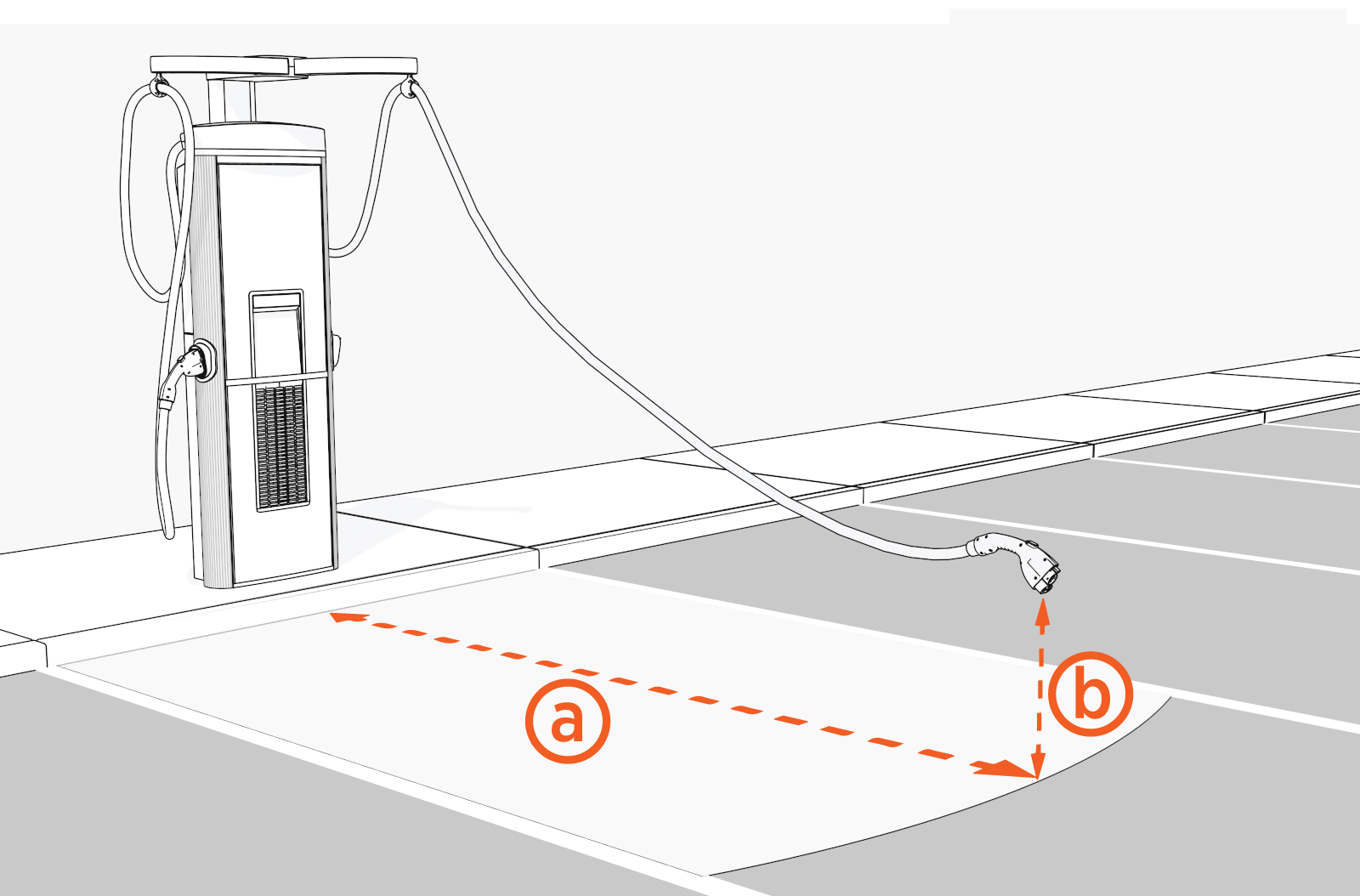
-
The Express 280 can have different charging cable types (CCS1 and CHAdeMO) to offer flexibility, or it can have two of the same cable type. The cables cannot both charge at the same time.
-
Two cable lengths are available:
-
Standard length cables are 5.4 m (17 ft 8-1/2 in) long and are used with standard Cable Management Kits (CMK
Cable Management Kit) -
Medium length cables are 7.6 m (24 ft 11-1/4 in) long and are used with longer cable management systems
-
Place each charging station to maximize cable reach for the varied charge port locations on different EVs.
Commercial or Public Station Placement, Single or Dual Cable
For stall parking, ChargePoint recommends using perpendicular parking stalls that allow a vehicle to enter either front-first or rear-first, to better accommodate the varied locations of EV Electric Vehicle charge ports.
While ChargePoint tests charging stations with a majority of upcoming vehicles, ChargePoint cannot guarantee the port locations of future vehicles and cannot warrant the configurations proposed will work for all vehicles.
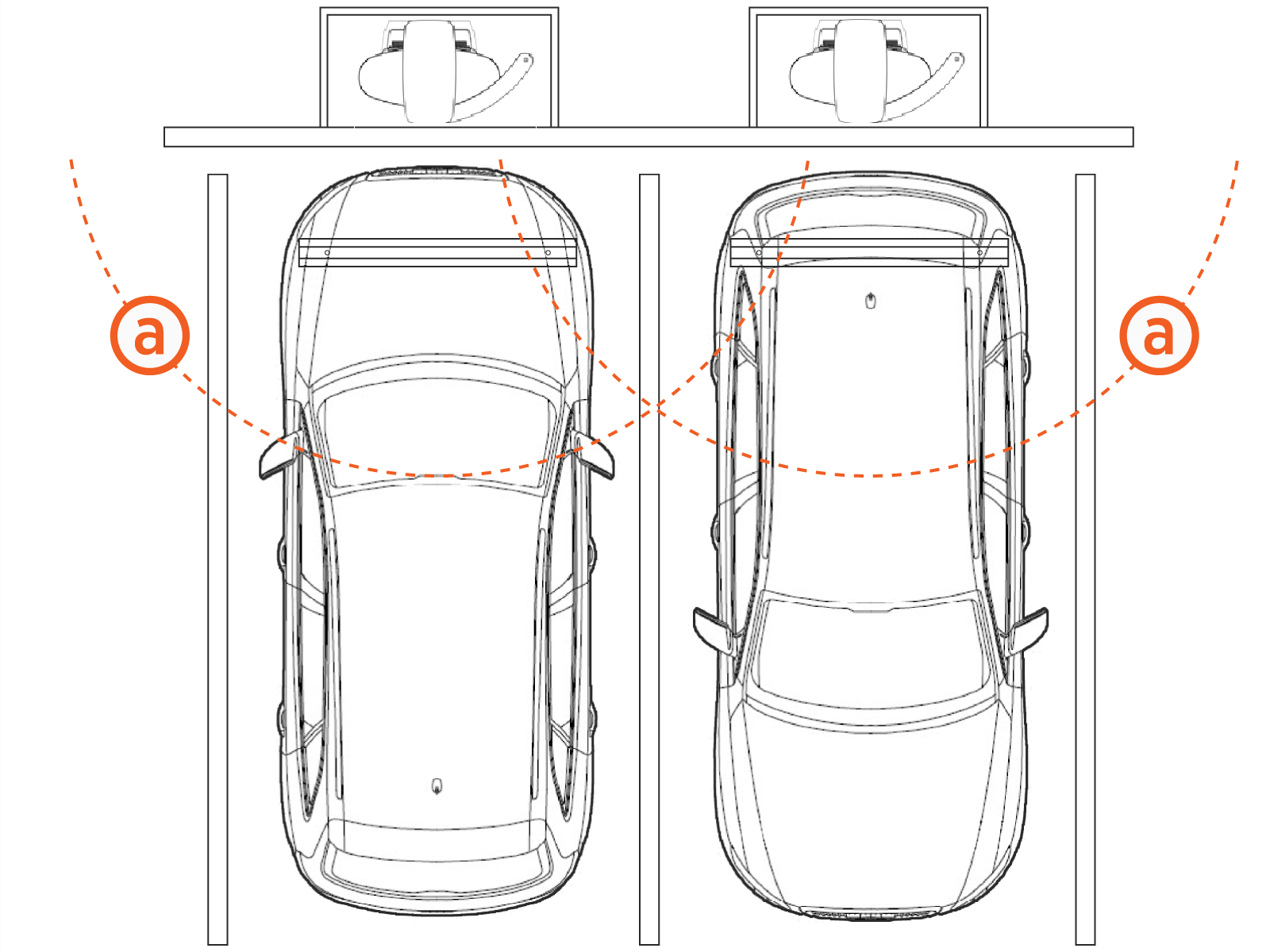
(a) Cable reach radius: 3.76 m (12 ft 4 in)
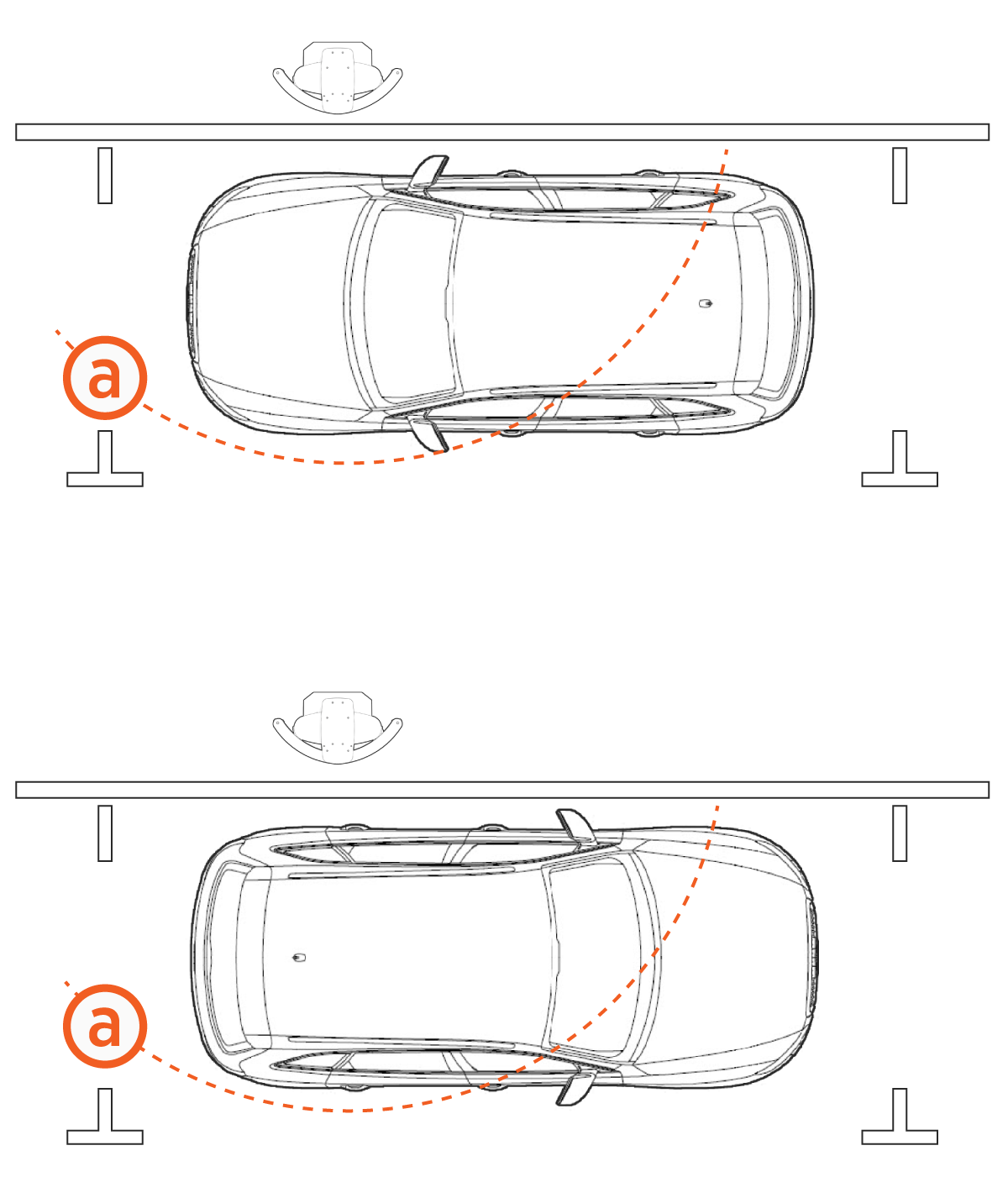
(a) Cable reach radius: 3.76 m (12 ft 4 in)
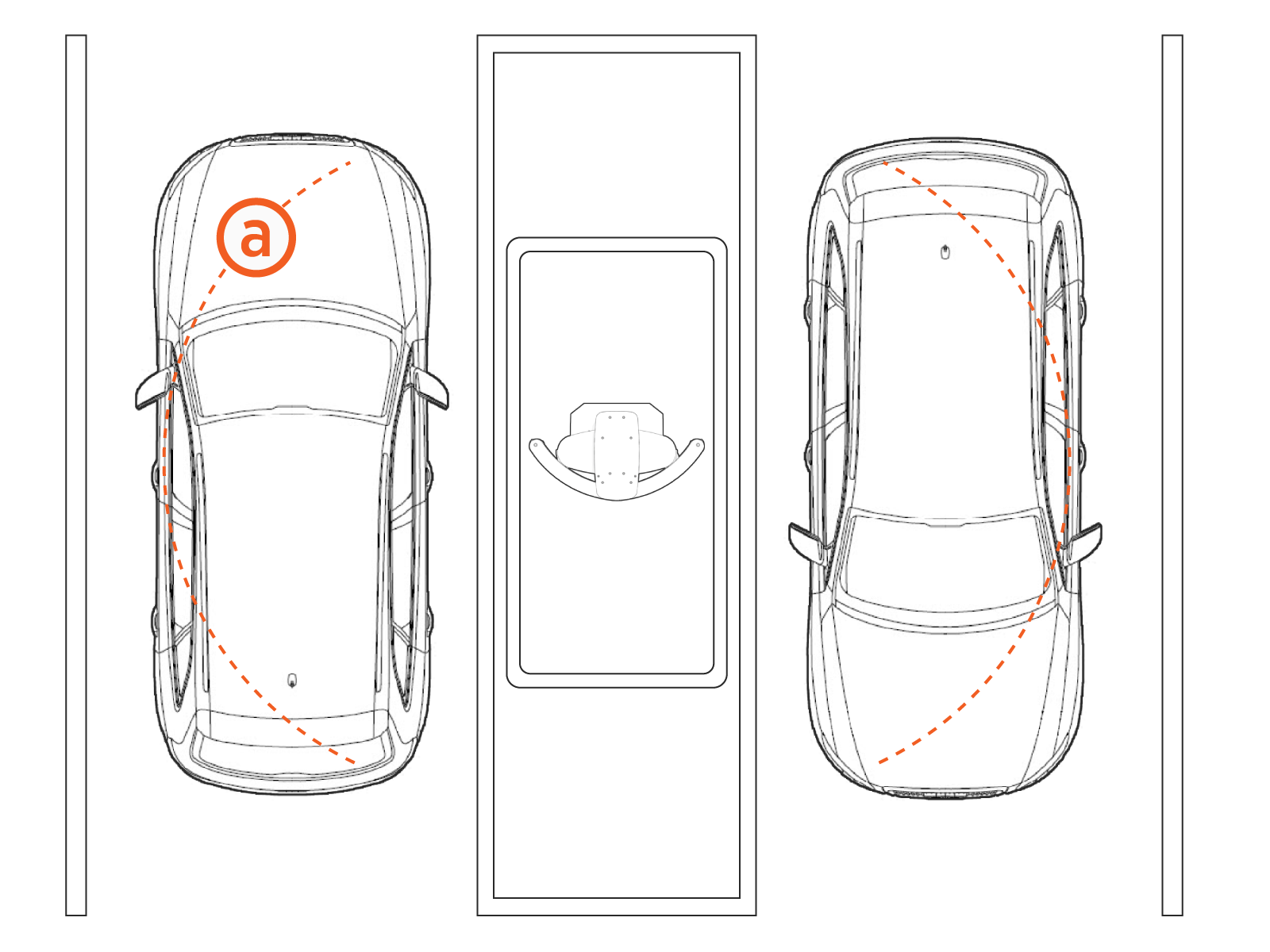
(a) Cable reach radius: 3.76 m (12 ft 4 in)
Fleet Station Placement, Dual Cable
Center single stations with dual CCS1 cables between two parking spaces so that the cable runs down either side of the parking space.
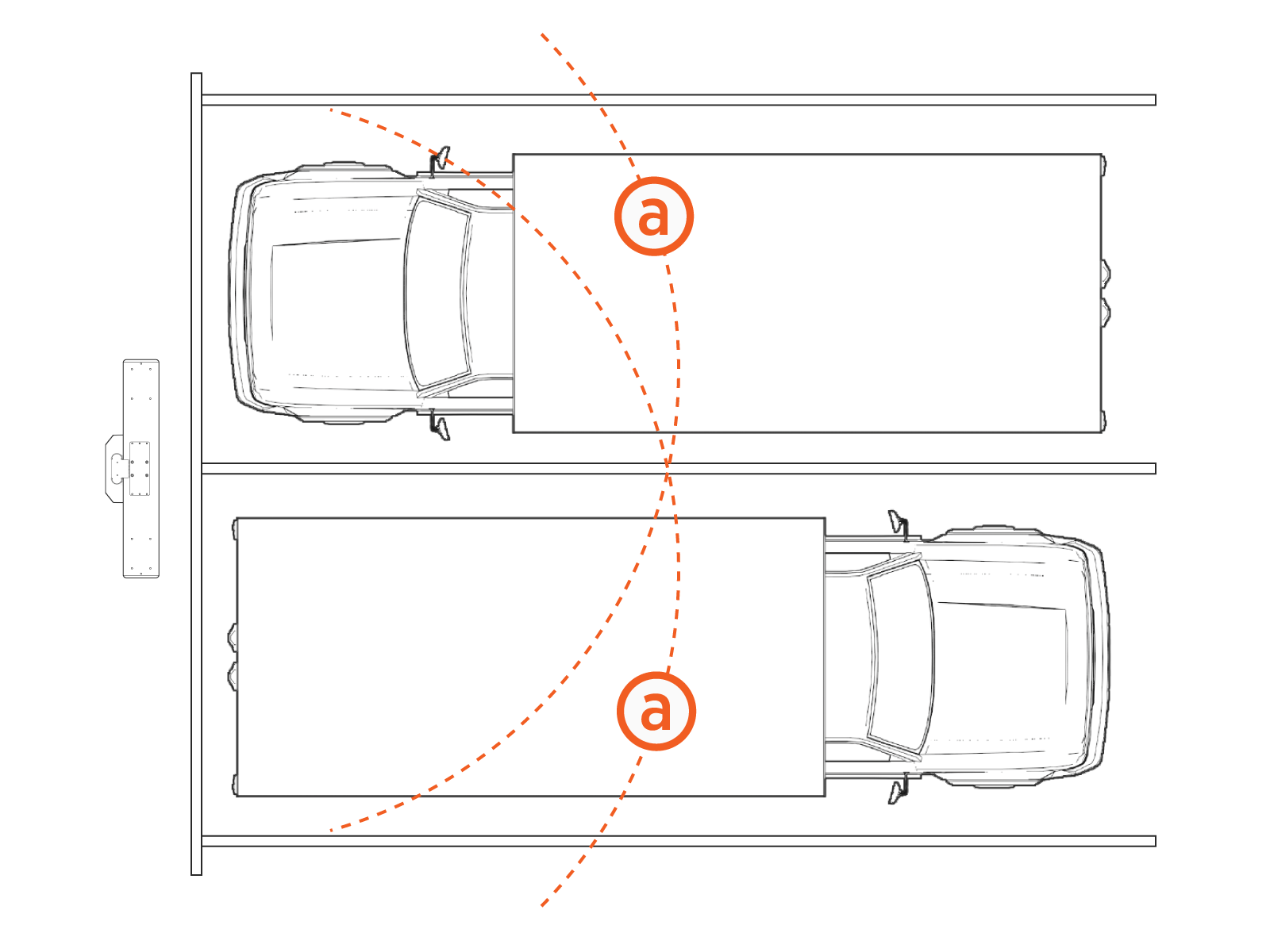
(a) Cable reach radius: Approximately 5.49 m (18 ft), depending on longer cable management system location
Island Station Placement with Longer Cable Management System
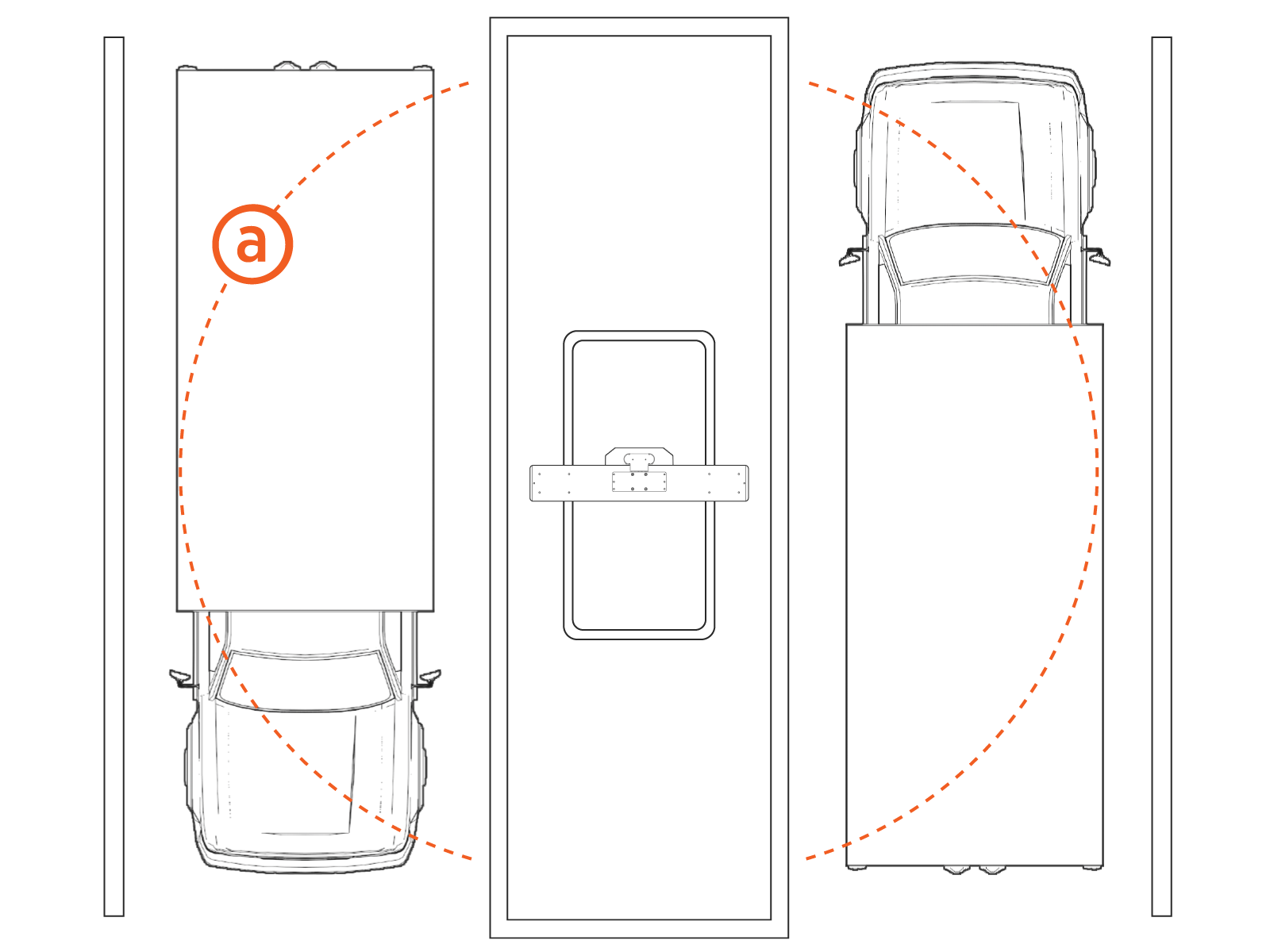
(a) Cable reach radius: Approximately 5.49 m (18 ft), depending on longer cable management system location
