Civil and Mechanical Design
Use the guidance below to design the civil and mechanical aspects of the site.
The station can be installed attached to a wall or on a concrete pedestal. The pedestal can be a newly poured pad or an existing concrete surface.
Wall Mount Stations
For wall mounted stations, the wall must be smooth, stable, plumb and sturdy. The minimum height of the wall must be 1250 mm. Place wheel stops (a) 900 mm from the wall. The arc shows the usable reach of the charging cable for cable-attached stations (b). This can be used to estimate reach for shuttered sockets as well.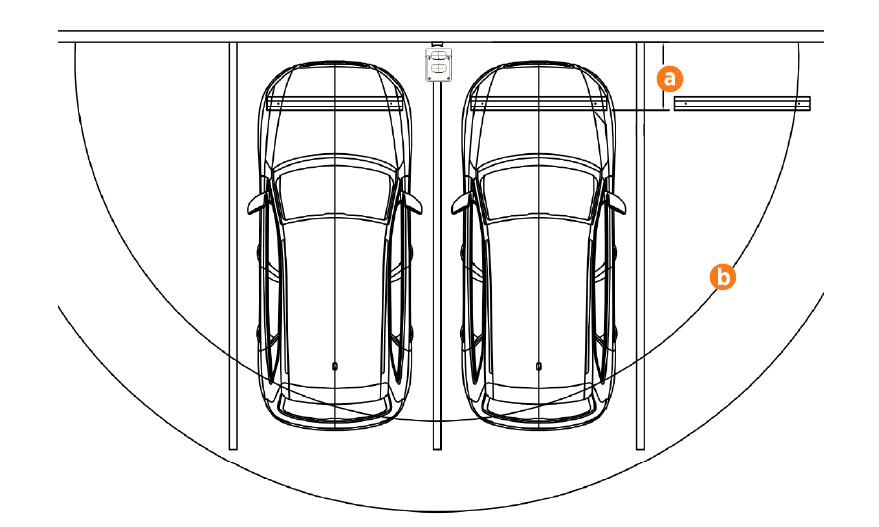
Pedestal Mount Stations
For newly poured pedestal mounted installations, the mounting surface must be smooth and cannot exceed a slope of 6 mm per 300 mm. The concrete base must measure at least 600 mm on all sides, including underground. For installations in existing concrete, epoxy anchors can be used. Consult a civil engineer to ensure sufficient volume and strength of concrete.
There are three basic pedestal base designs:
-
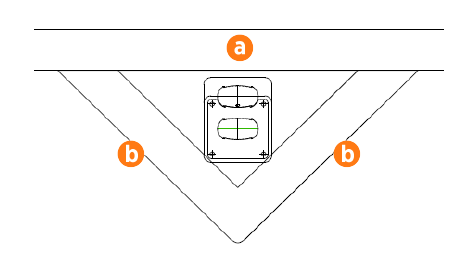
In front of a curb (a) 900 mm x 2 (b)
Area: 0.42 m2
Volume: 0.26 m3
-
Behind a curb (a) in a planter or berm 600 mm on each side
Area: 0.37 m2
Volume: 0.23 m3
Use a retaining wall as needed to prevent dirt from accumulating on the pad.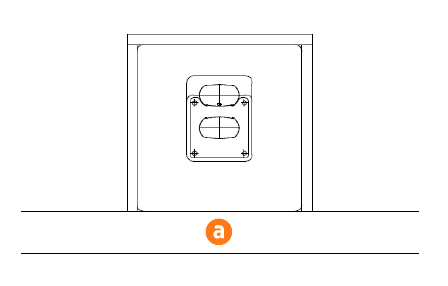
-
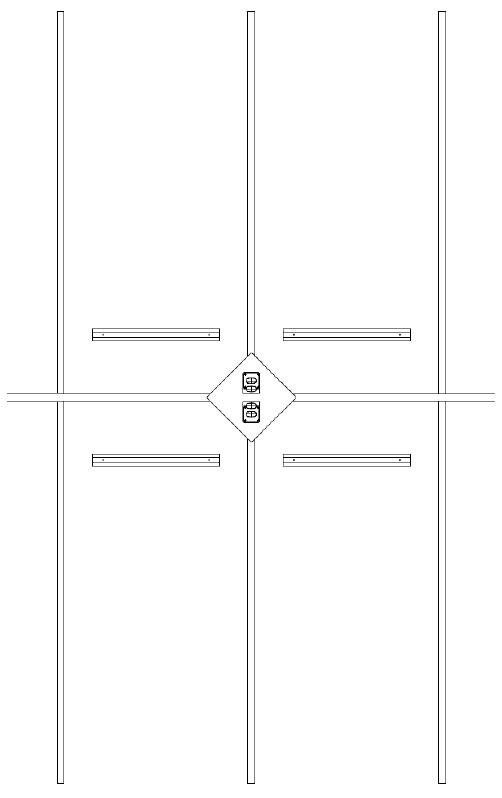
Two stations back to back, centered between four spaces 900 mm on each side.
Area: 0.84 m2
Volume: 0.51 m3
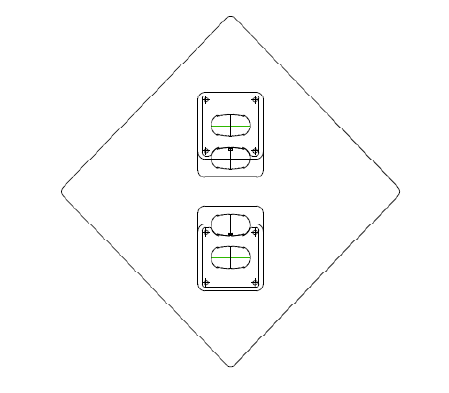
The pedestal base design can be configured in a variety of ways to serve different parking arrangements. Ensure a sufficient volume of concrete to provide anchoring for the charging station.
-
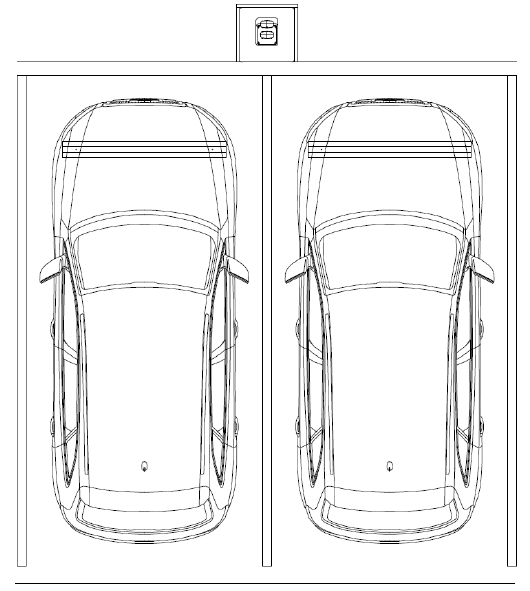
Place the station behind the curb in a planter or berm between spaces with wheel stops 900 mm from the front of each stall.
-
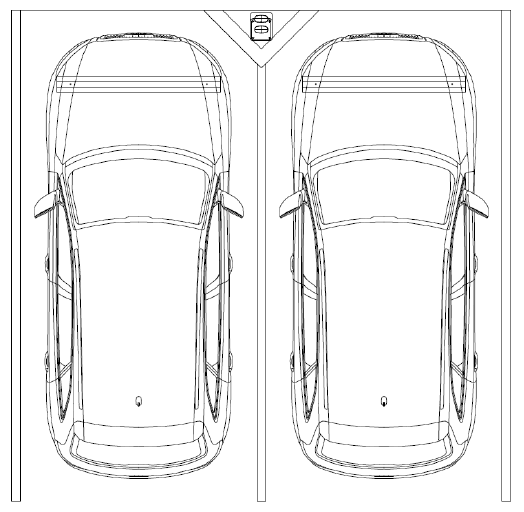
Place the station in front of the curb between spaces with wheel stops 900 mm from the front of each stall. The base of the charging station can be flush with the parking spaces or at curb level.
-
Place two stations back to back centered on four spaces with wheel stops 900 mm from the front of each stall. The base of the charging station can be flush with the parking spaces or at curb level.
-
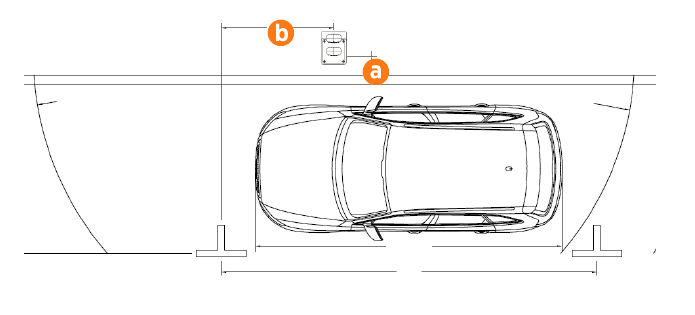
Place a single port station for a single parallel parking space 6 m long. Place the station (a) 450 mm from the curb, and 1.8 m from the front of the parking space (b). The arc shows the usable reach of the charging cable for cable-attached stations (b). This can be used to estimate reach for shuttered sockets as well.
Drainage
Ensure any site slopes, walls, or fencing do not trap water around the charging station installation site. The system is only built to withstand water to the height of the conduit stub-up.
The charging station complies with the IP54 enclosure standard. It is protected against water splashes and sprays. However, do not install the station in close proximity to running water, sprinklers, water jets, or irrigation systems.
Clearances
For pedestal installations, the conduit stub-up must be a minimum of 230 mm (9 in) from any obstructions to the rear. This includes other charging stations. Check applicable codes for any additional clearance requirements.
Accessibility
To meet the accessibility requirements, the product charging cables are no more than 1220 mm (48 in) above ground and no more than 254 mm (10 in) away.
This complies with American Disability Act (ADA) requirements, if the station is installed at grade. If your installation must comply with ADA standards, or the disability access regulations for other regions, consider this when designing the height of the pad or when planning a wall-mounted installation.
This complies with Europe disability requirements, if the station is installed at grade. If your installation must comply with disability access regulations, consider this when designing the height of the pad or when planning a wall-mounted installation.
Also consider site design factors such as placement of bollards, wheel stops, or other vehicle obstacles when planning charging station access for disabled parking stalls. Check disability access regulations for guidance on the clearances needed for wheelchair access to charging cables and user interfaces.
