FDC Faults Board Location (Power Link 1000)
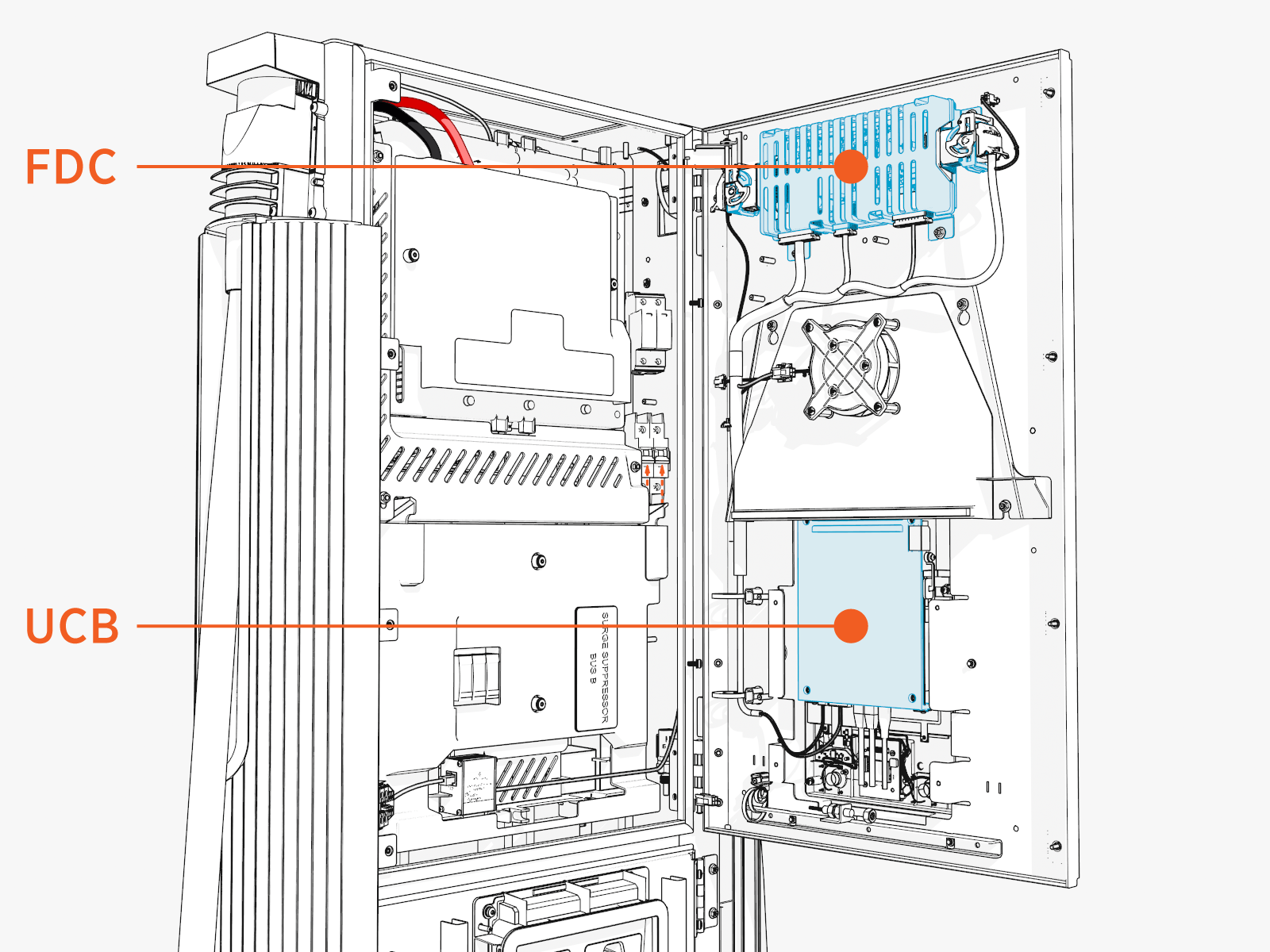
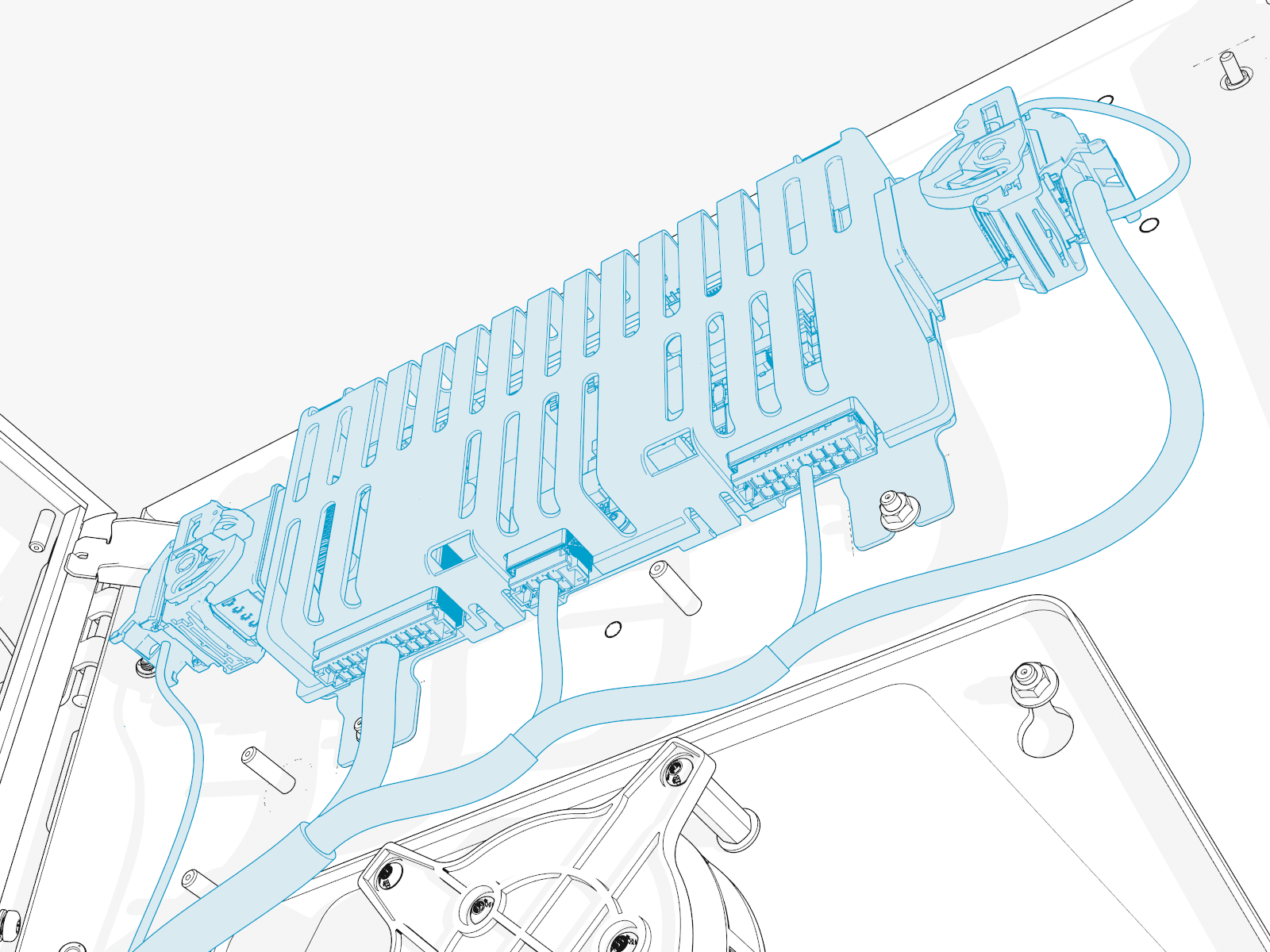
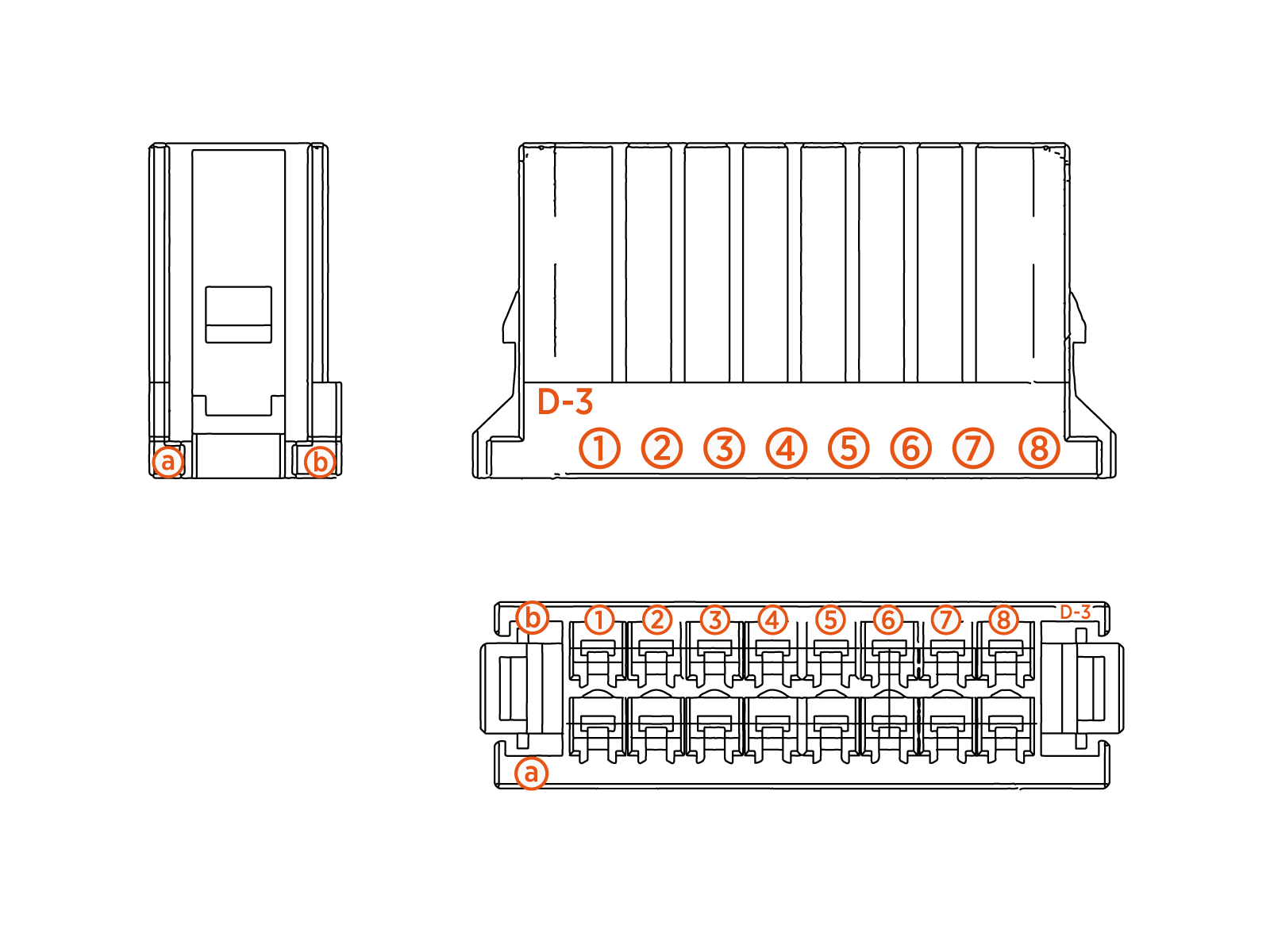
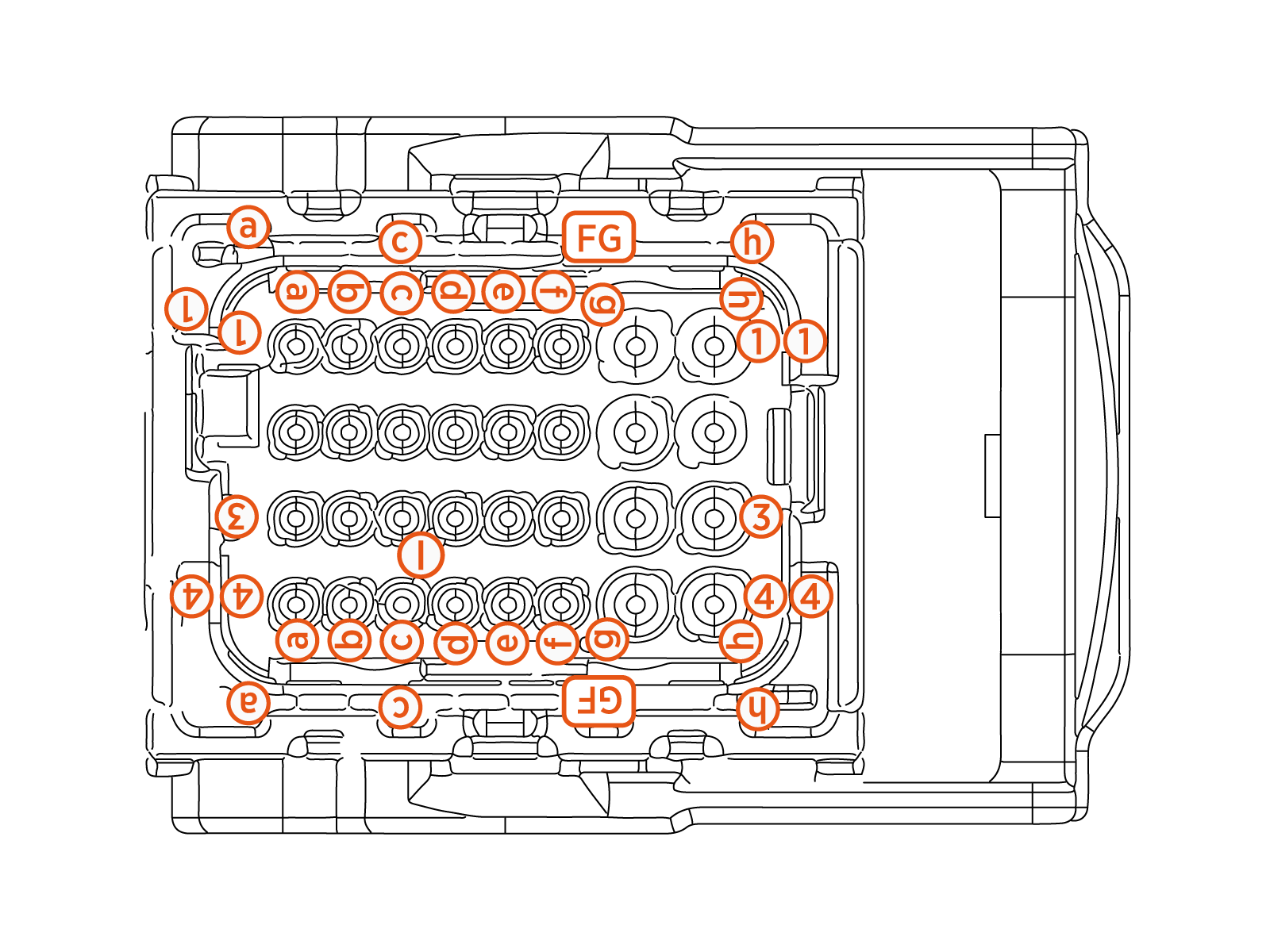
The illustrations below show the Power Link 1000 FDC faults board location, key cable connections, and cable connector pin maps used during troubleshooting.
Front View
Close-up View
FDC-P249-05
FDC-P249-04
FDC-P-249-03
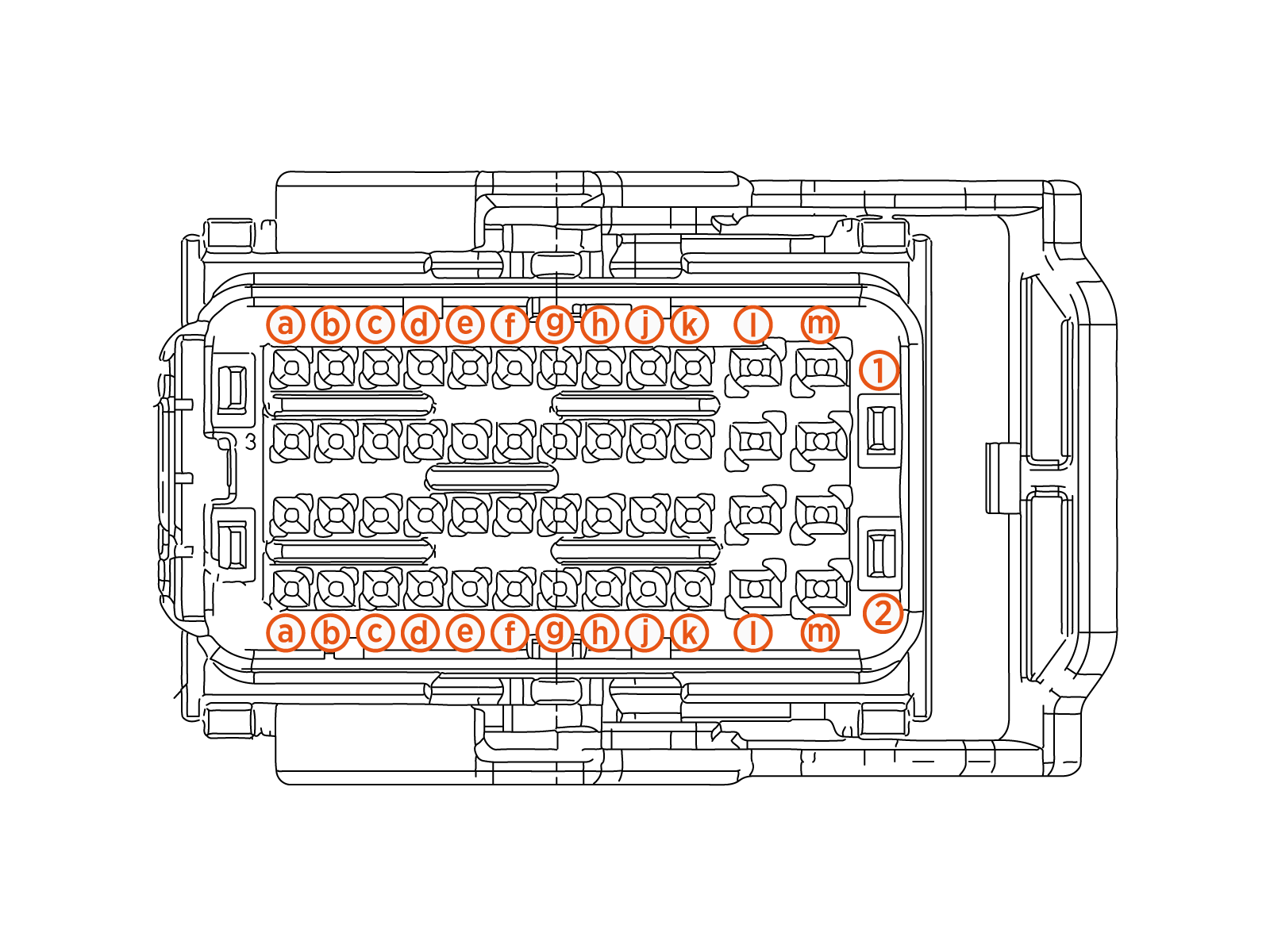
FDC Faults
This section provides information on Power Link 1000 FDC faults, including fault characteristics, possible causes, and recommended troubleshooting steps.
Loss of Comms with UCB
|
Category |
Fault Source |
Fault Type |
Criticality |
|
FDC communication |
FDC |
Hardware/Software |
Emergency |
Fault Description
If UCB Universal Controller Board loses communication with FDC for more than 5 seconds, this fault is declared. It does clear if the communication is back and stays up for 60 seconds. FDC will continue to run in the same state that it was at prior to the loss of communication. Any ongoing sessions will be stopped if the communication is not reestablished within 60 seconds and Power Link will be locked out of service. Snapshot of critical parameters from the last 10 seconds prior to failure is captured.
Possible Causes
If UCB Universal Controller Board is locked out due to a loss of communications:
-
Issue with CAN harness - connector, CAN termination etc.
-
FDC board failure
Troubleshooting
-
Look for CAN harness going to the FDC for proper seating: P-249-05 is the connector going to FDC which carries CAN signals.
-
If no connector seating issue is found, then measure continuity between CAN_OUT_H_J (Pin B1) and CAN_OUT_L_J (Pin B2). Check if there is a short between CAN H and CAN L lines, if yes then the harness will need to be replaced.
-
Confirm if the CAN termination is good - measure resistance across CAN_TERM (Pin A4) and CAN_TERM (Pin B4).
-
If no issues are found with the connector and the harness, then replace the FDC board due to possible board issues.
-
Contact ChargePoint for further debugging steps.
FDC Checksum Failure
|
Category |
Fault Source |
Fault Type |
Criticality |
|
FDC Firmware |
FDC |
Firmware |
Critical |
Fault Description
This fault is declared if FDC firmware version and checksum don't match the expected version after 2 attempts to reflash.
Ideally seen during a new installation or when the software is updated on the system. However, if this is seen during an ongoing session, then the session is immediately terminated and Power Link is locked out of service.
Possible Causes
-
Bad FDC firmware flash at factory
-
Interruption during software update
-
Board firmware getting corrupted
Troubleshooting
-
If the UCB
Universal Controller Board board had an issue during the Finalizer step, then it is possible it is pushing a bad FDC firmware, so login to chassis-shell and confirm if FDC is reading the correct firmware version. -
If the above is true, then try to flash the UCB
Universal Controller Board again to see if it pushes FDC to recover. -
If this happened during software update in the field, try to power cycle and see if it recovers.
-
If power cycle does not help, then replace the FDC board.
FDC Vicor OverTemperature Warning
|
Category |
Fault Source |
Fault Type |
Criticality |
|
FDC Board |
FDC |
Hardware |
Warning |
Fault Description
The warning is declared when one of the module on FDC board reports 90 °C for 10 s.
The fault is cleared if the temperature goes below 100 °C for more than 60 s.
Possible Causes
-
FDC board failure
Troubleshooting
-
No steps need as the system is allowed to operate normally with this warning.
FDC Vicor OverTemperature Shutdown
| Category | Fault Source | Fault Type | Criticality |
| FDC Board | FDC | Hardware | Critical |
Fault Description
The fault is declared when one of the module on the FDC board reports 100 °C for 10 s.
The fault is cleared if the temperature goes below 100 °C for more than 60 s.
Power Link locked out if this fault is seen thrice within 24 hours. UCB Universal Controller Board will record critical parameters as part of the snapshot feature.
Possible Causes
-
FDC board failure
Troubleshooting
-
Replace the FDC board if the unit is locked out.
-
Contact ChargePoint if replacing the FDC board does not resolve the issue.
FDC Board OverTemperature Warning
|
Category |
Fault Source |
Fault Type |
Criticality |
|
FDC Board |
FDC |
Hardware |
Warning |
Fault Description
The warning is declared when the FDC board temperature exceeds 90 °C for 10 s.
The fault is cleared if the temperature goes below 90 °C for more than 60 s.
Possible Causes
-
FDC board failure
Troubleshooting
-
No steps needed as the system is allowed to operate normally with this warning.
FDC Board OverTemperature Shutdown
| Category | Fault Source | Fault Type | Criticality |
| FDC Board | FDC | Hardware | Critical |
Fault Description
The fault is declared when one of the modules on the FDC board reports 100 °C for 10 s.
The fault is cleared if the temperature goes below 100 °C for more than 60 s.
Power Link is locked out if this fault is seen thrice within 24 hours. UCB Universal Controller Board will record critical parameters as part of the snapshot feature.
Possible Causes
-
FDC Board failure
Troubleshooting
-
Replace the FDC board if the unit is locked out.
-
Contact ChargePoint if replacing the FDC board does not resolve the issue.
Top RTD OverTemperature Warning
|
Category |
Fault Source |
Fault Type |
Criticality |
|
Bus Bar RTD |
FDC |
Hardware |
Warning |
Fault Description
The warning is declared when TOP RTD temperature exceeds 85 °C for 10 s.
The warning is cleared if the temperature goes below 85 °C for more than 60 s.
Troubleshooting
-
No steps needed as the system is allowed to operate normally with this warning.
-
Replace the FDC board if the unit is locked out.
-
Contact ChargePoint if replacing the FDC board does not resolve the issue.
Top RTD Overtemperature Shutdown
|
Category |
Fault Source |
Fault Type |
Criticality |
|
Bus Bar RTD |
FDC |
Hardware |
Critical |
Fault Description
This overtemperature shutdown is declared when the Top RTD exceeds 95 °C for 10 s. If the session is going on, then it is emergency stopped. The fault is cleared if temperature goes below threshold for 60 s.
Power Link is locked out if this fault is seen thrice within 24 hours. UCB Universal Controller Board will record critical parameters as part of snapshot feature.
Possible Causes
-
Issue with the harness
-
Failure of Top RTD (located above MDS - back plane)
Troubleshooting
-
Verify if the wires E1 and F1 on P249-04 are pulled out of connector with basic pull test.
-
Confirm if the harness between RTD and FDC is good by measuring resistance across Pins E1 and F1 on connector P249-04. We should measure 100 Ω if the switch is good.
-
If the switch reads bad, then replace the RTD to resolve the issue.
-
Once harness is considered good and if it also reads 100 Ω, then replace FDC to resolve the issue..
MDS RTD OverTemperature Warning
|
Category |
Fault Source |
Fault Type |
Criticality |
|
MDS RTD |
FDC |
Hardware |
Critical |
Fault Description
The warning is declared when TOP RTD temperature exceeds 90 °C for 10 s.
The warning is cleared if the temperature goes below 90 °C for more than 60 s.
Possible Causes
-
Issue with the harness
-
Failure of Top RTD (located above MDS - back plane)
Troubleshooting
-
No steps needed as the system is allowed to operate normally with this warning.
MDS RTD Overtemperature Shutdown
|
Category |
Fault Source |
Fault Type |
Criticality |
|
MDS RTD |
FDC |
Hardware |
Critical |
Fault Description
This overtemperature shutdown is declared when the MDS RTD exceeds 90 °C for 10 s. If the session is going on, then it is emergency stopped. The fault is cleared if temperature goes below threshold for 60 s.
Power Link is locked out if this fault is seen thrice within 24 hours. UCB Universal Controller Board will record critical parameters as part of snapshot feature.
Possible Causes
-
Issue with the harness
-
Failure of MDS RTD (located behind MDS)
-
FDC board
Troubleshooting
-
Verify if the wires C1 and D1 on P249-04 are pulled out of connector with basic pull test.
-
Confirm if the harness between RTD and FDC is good by measuring resistance across pins C1 and D1 on connector P249-04. We should measure 100 Ω if the switch is good.
-
If the switch reads bad, then replace the RTD to resolve the issue.
-
Once harness is considered good and if it also reads 100 Ω, then replace FDC to resolve the issue.
Bottom RTD OverTemperature Warning
|
Category |
Fault Source |
Fault Type |
Criticality |
|
Bus Bar RTD |
FDC |
Hardware |
Warning |
Fault Description
The warning is declared when Bottom RTD temperature exceeds 80 °C for 10 s.
The warning is cleared if the temperature goes below 80 °C for more than 60 s.
Troubleshooting
-
No steps need as the system is allowed to operate normally with this warning.
Bottom RTD OverTemperature Shutdown
|
Category |
Fault Source |
Fault Type |
Criticality |
|
Bus Bar RTD |
FDC |
Hardware |
Critical |
Fault Description
This overtemperature shutdown is declared when the Bottom RTD exceeds 90 °C for 10 s. If the session is going on, then it is emergency stopped. The fault is cleared if temperature goes below threshold for 60 s.
Power Link is locked out if this fault is seen thrice within 24 hours. UCB Universal Controller Board will record critical parameters as part of the snapshot feature.
Possible Causes
-
Issue with the harness
-
Failure of Bottom RTD (located on power plate)
-
FDC board
Troubleshooting
-
Verify if the wires A1 and B1 on P249-04 are pulled out of connector with basic pull test.
-
Confirm if the harness between RTD and FDC is good by measuring resistance across Pins A1 and B1 on connector P249-04. We should measure 100 Ω if the switch is good.
-
If the switch reads bad, then replace the RTD to resolve the issue.
-
Once harness is considered good and if it also reads 100 Ω, then replace FDC to resolve the issue.
Mixing Fan Overcurrent
|
Category |
Fault Source |
Fault Type |
Criticality |
|
Door Fan |
FDC |
Hardware |
Major |
Fault Description
If the stirring fan current consumption exceeds 1 A for 100 ms, then we declare this fault. The fault is cleared if the current is <1 A for 1 s. Sampling done at 10 ms.
If this fault is seen thrice in 24 hours, then unit is locked out till service.
Possible Causes
-
Issue with the harness
-
Fan rotor stuck (debris stuck?)
-
Fan failure
-
FDC board
Troubleshooting
-
Visually confirm if there is anything blocking the fan blades. If yes, clear the debris/block and verify if the fault goes away.
-
Possible short in the harness. Check the continuity between A6 (V48VP0_Fan_1_J) and B6 (V48P0_Fan_1_RTN) on P249-02 connector. If there is a short, then we need to locate the short and replace the harness accordingly.
-
If no short found, then possible issue with fan circuitry internally. Replace the fan to resolve the issue.
-
If the issue persists, then replace the FDC board to resolve any issue with board circuitry that measures this parameter.
-
Contact ChargePoint if the issue persists.
MDS Fan Overcurrent
|
Category |
Fault Source |
Fault Type |
Criticality |
|
Door Fan |
FDC |
Hardware |
Critical |
Fault Description
If the MDS fan current consumption exceeds 1 A for 4 ms, then we declare this fault. The fault is cleared if the current is <1 A for 1 s. Sampling done at 4 ms.
If this fault is seen thrice in 24 hours, then the unit is locked out till service.
Possible Causes
-
Issue with harness
-
Fan rotor stuck (debris stuck?)
-
Fan failure
-
FDC board
Troubleshooting
-
Visually confirm if there is anything blocking the fan bladed. If yes, clear the debris/block and verify if the fault goes away.
-
Possible short in the harness. Check the continuity between A9 (V48VP0_Fan_2_J) and B9 (V48P0_Fan_2_RTN) on P249-02 connector. If there is a short, then we need to locate the short and replace the harness accordingly.
-
If no short found, then possible issue with fan circuitry internally. Replace the fan to resolve the issue.
-
If the issue persists, then replace the FDC board to resolve any issue with board circuitry that measures this parameter.
-
Contact ChargePoint if the issue persists.
Mixing Fan Open Circuit
|
Category |
Fault Source |
Fault Type |
Criticality |
|
Door Fan |
FDC |
Hardware |
Critical |
Fault Description
If the mixing fan current consumption goes below 0.1 A for 100 ms, then we declare this fault. The fault is cleared if the current is >0.1 A for 1 s. Sampling done at 10 ms.
If this fault is seen thrice in 24 hours, then the unit is locked out till service.
Possible Causes
-
Issue with harness
-
Fan failure
-
FDC board
Troubleshooting
-
Confirm if the connector going to fan is seated correctly. If yes, seat it firmly and verify if the fault goes away.
-
Possible break in the harness. Confirm if the wires carrying 4 8 V (A6) and 48 V RTN (B6) is continuous from FDC connector to connector at the fan. Measure the continuity from A6 on P249-02 to pin 4 on -Fan1 (-A4); And, measure the continuity from B6 to Pin 3 on -Fan1 (-A4).
If there is no continuity, then we need to locate the location of the break and replace the harness accordingly.
-
If no harness issue found, then possible issue with fan circuitry internally. Replace the fan to resolve the issue.
-
If the issue persists, then replace the FDC board to resolve the issue.
-
Contact ChargePoint if the issue persists.
MDS Fan Open Circuit
|
Category |
Fault Source |
Fault Type |
Criticality |
|
Door Fan |
FDC |
Hardware |
Critical |
Fault Description
If the MDS fan current consumption goes below 0.1 A for 100 ms, then we declare this fault. The fault is cleared if the current is >0.1 A for 1 s. Sampling done at 10 ms.
If this fault is seen thrice in 24 hours, then the unit is locked out until service.
Possible Causes
-
Issue with harness
-
Fan failure
-
FDC board
Troubleshooting
-
Confirm if the connector going to fan is seated correctly. If yes, seat it firmly and verify if the fault goes away.
-
Possible break in the harness. Confirm if the wires carrying 48 V (A9) and 48 V RTN (B9) is continuous from FDC connector to connector at the fan. Measure continuity from A9 on P249-02 to Pin 4 on -Fan2 (-A5); And, continuity from B9 to Pin 3 on -Fan2 (-A5).
If there is no continuity, then we need to locate the location of the break and replace the harness accordingly.
-
If no harness issue found, then possible issue with fan circuitry internally. Replace the fan to resolve the issue.
-
If the issue persists, then replace the FDC board to resolve the issue
-
Contact ChargePoint if the issue persists.
Low Mixing Fan Speed
|
Category |
Fault Source |
Fault Type |
Criticality |
|
Door Fan |
FDC |
Hardware |
Major |
Fault Description
If the mixing fan RPM goes below 500 for 10 s, then this fault is declared.
The fault clears if the RPM goes above 500 for 60 s.
If this fault is seen thrice in 24 hours, then the system is locked out for service.
Possible Causes
-
Issue with harness
-
Fan failure
-
FDC board
Troubleshooting
-
Confirm if the connector going to fan is seated correctly. If yes, seat it firmly and verify if the fault goes away.
-
Possible break in the harness. Measure continuity from B7 on P249-02 to Pin 1 on -Fan1 (-A4);
If there is no continuity, then we need to locate the location of the break and replace the harness accordingly.
-
If no harness issue found, then possible issue with fan circuitry internally. Replace the fan to resolve the issue.
-
If the issue persists, then replace the FDC board to resolve the issue
-
Contact ChargePoint if the issue persists.
Low MDS Fan Speed
|
Category |
Fault Source |
Fault Type |
Criticality |
|
Door Fan |
FDC |
Hardware |
Major |
Fault Description
If the MDS fan RPM goes below 500 for 10 s, then this fault is declared.
The fault clears if the RPM goes above 500 for 60 s.
If this fault is seen thrice in 24 hours, then the system is locked out for service.
Possible Causes
-
Issue with harness
-
Fan failure
-
FDC board
Troubleshooting
-
Confirm if the connector going to fan is seated correctly. If yes, seat it firmly and verify if the fault goes away.
-
Possible break in the harness. Measure continuity from B10 on P249-02 to Pin 1 on -Fan2 (-A5);
If there is no continuity, then we need to locate the location of the break and replace the harness accordingly.
-
If no harness issue found, then possible issue with fan circuitry internally. Replace the Fan to resolve the issue.
-
If the issue persists, then replace the FDC board to resolve the issue
-
Contact ChargePoint if the issue persists.
FDC:Thermal-Switch-Open
|
Category |
Fault Source |
Fault Type |
Criticality |
|
Thermal Switch |
FDC |
Hardware |
Critical |
Fault Description
This fault is declared when the thermal switch opens indicating a thermal event. The system is locked out for further inspection.
Possible Causes
-
Issue with harness
-
Failed thermal switch
-
Actual thermal event
Troubleshooting
-
Confirm if there are any overtemp faults reported by other FRUs around the time of this failure. If yes, then report to ChargePoint for further log debugging and possible issues internal to the system.
-
If no other thermal faults seen, then confirm continuity across Pins G4 and H4 of the P249-04 connector going to FDC. If there is a short measured, then switch is good. Move to the next step. If the continuity test reads an Open, then the point of failure could be either harness or the switch. Since this switch is not easily accessible - reach out to ChargePoint for further steps.
-
Reach out to ChargePoint after confirming that the harness and switch are good.
