CCB Location (Power Link 2000)
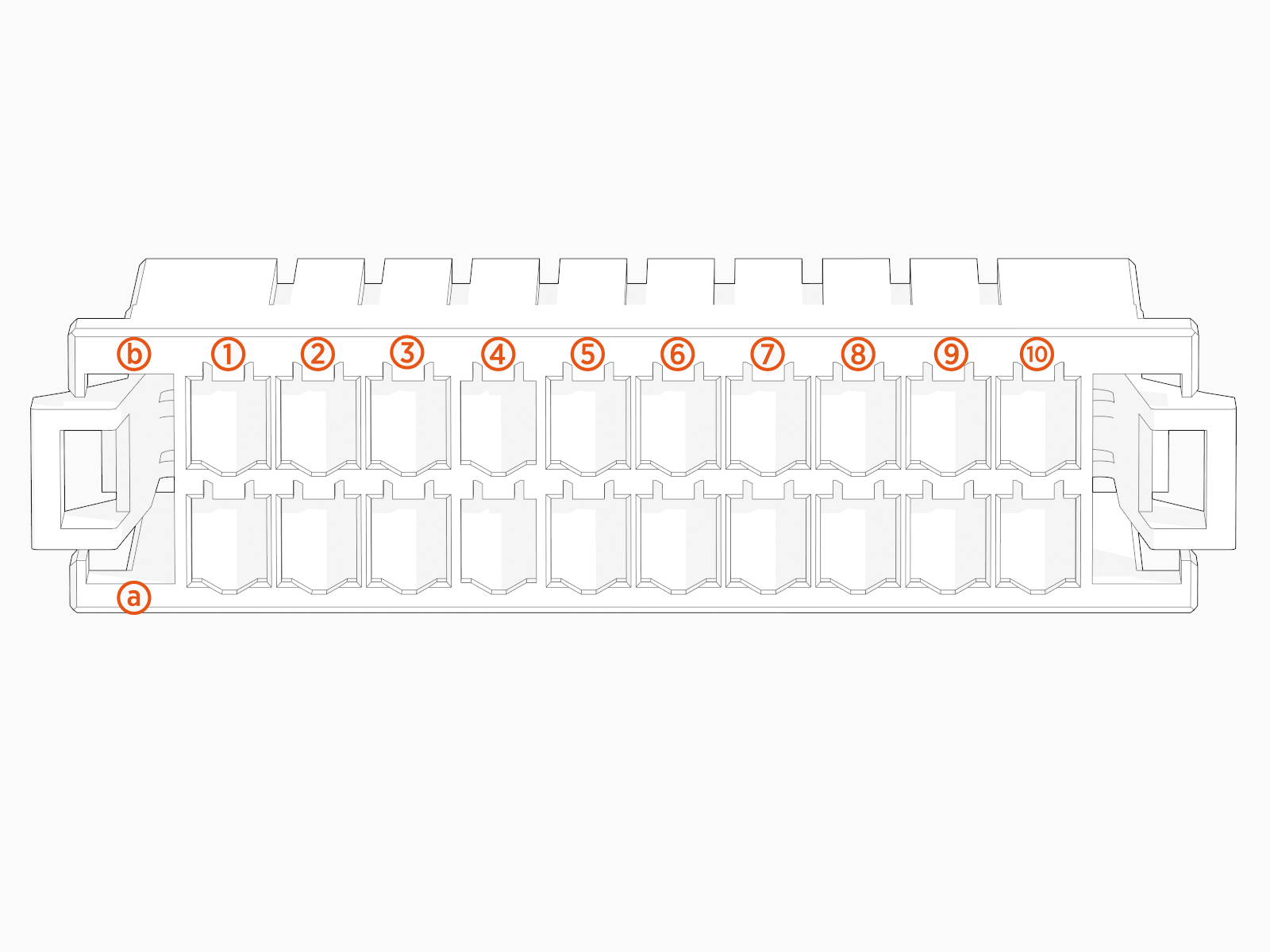
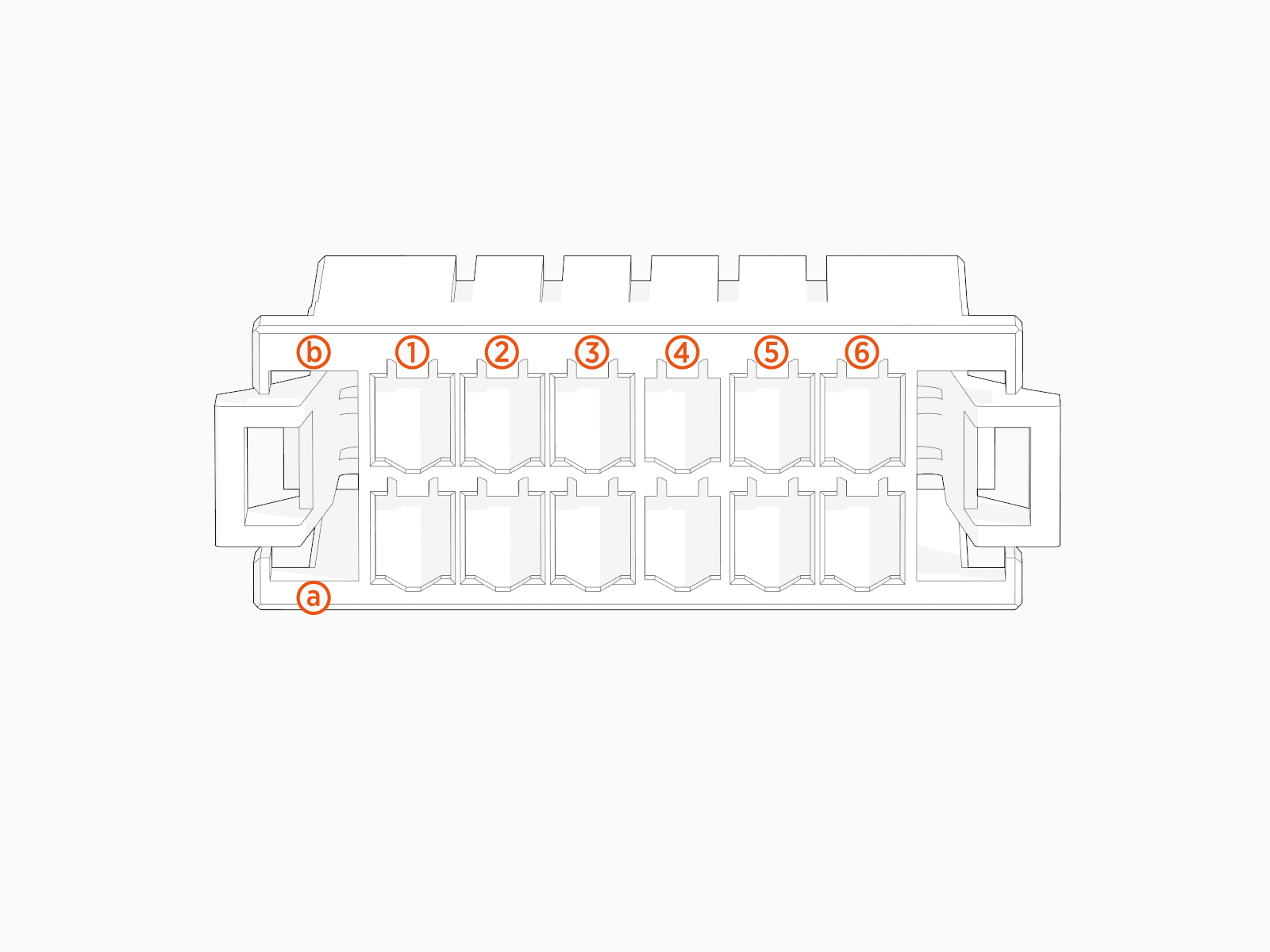
The illustrations below show the Power Link 2000 CCB faults board location, key cable connections, and cable connector pin maps used during troubleshooting.
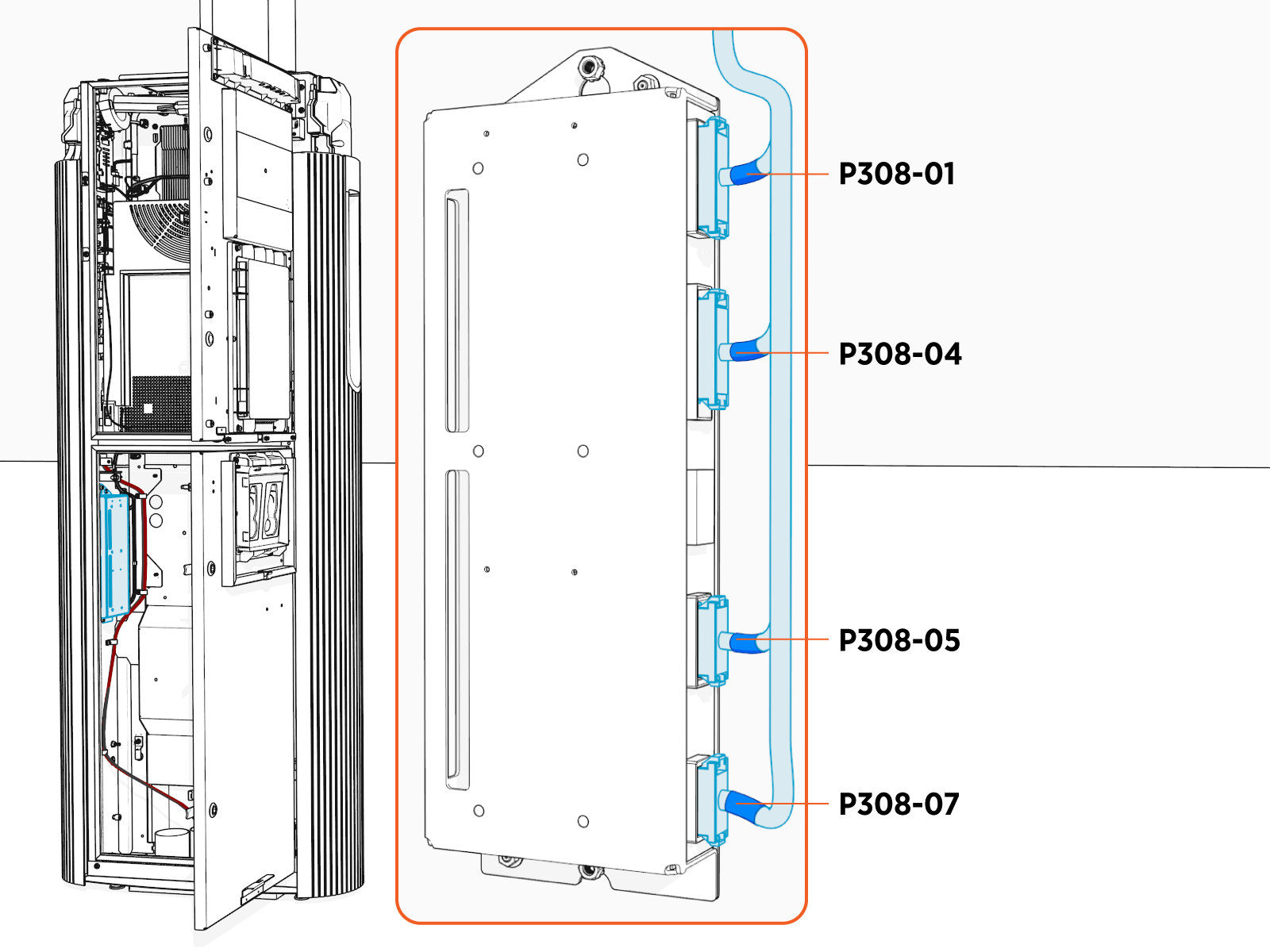
CCB Connectors' Pin Configuration
P308-04
P308-05
CCB Faults
This section provides information on Power Link 1000 CCB faults, including fault characteristics, possible causes, and recommended troubleshooting steps.
urn:fault:coolcntl:fan-tray1-overcurrent
|
Category |
Fault Source |
Fault Type |
Criticality |
|
PL_CCB |
PL_Fan1 |
Hardware |
Critical |
Fault Description
This fault triggers when the fan tray current exceeds 8 A for more than 100 ms.
Possible Causes
-
Break in harness.
-
Fan failure.
-
CCB failure.
Troubleshooting
-
Check if there is anything blocking the fan blades from spinning.
-
Check the continuity between B1 and A1 on the P308-04 connector (connecting to the CCB). If there is a short, continue to the next step.
-
If there are no issues in the continuity test, replace the fan tray. Also, re-enable fan tray 1 from EEPROM
 Electrically Erasable Programmable Read-Only Memory register.
 -
If the issue persists, replace CCB.
-
Contact engineering for further debugging.
urn:fault:coolcntl:fan-tray2-overcurrent
|
Category |
Fault Source |
Fault Type |
Criticality |
|
PL_CCB |
PL_Fan2 |
Hardware |
Critical |
Fault Description
This fault triggers when the fan tray current exceeds 8 A for more than 100 ms.
Possible Causes
-
Break in harness.
-
Fan failure.
-
CCB failure.
Troubleshooting
-
Check if there is anything blocking the fan blades from spinning.
-
Check the continuity between B6 and A6 on the P308-04 connector (connecting to the CCB). If there is a short, continue to the next step.
-
If there are no issues in the continuity test, replace the fan tray. Also, re-enable fan tray 2 from EEPROM
Electrically Erasable Programmable Read-Only Memory register. -
If the issue persists, replace CCB.
-
Contact engineering for further debugging.
urn:fault:coolcntl:fan-tray1-opencircuit
|
Category |
Fault Source |
Fault Type |
Criticality |
|
PL_CCB |
PL_Fan1 |
Hardware |
Critical |
Fault Description
This fault triggers when the fan is running at >10% speed, but the fan current is <0.3 A for more than 10s. This is a warning, not a fault. The system operates until a self-test failure triggers a service call for the fan tray replacement.
Possible Causes
-
Break in harness.
-
Fan failure.
-
CCB failure.
Troubleshooting
-
Check if all connectors are seated correctly on the CCB and the fan tray.
-
Check if there is a break in the wire carrying 48 V to the fans. Check if the fan voltage on the CCB (chassis shell) reads 48 V.
-
Measure continuity from:
-
Pin B1 on the P308-04 connector (on the CCB) to red wire 48 V on the fan tray 1 connector.
-
Pin A1 on the P4 connector (on CCB) to black wire 48 V RTN on the fan tray 1 connector
-
-
If there is a break in continuity, then replace the harness to clear the fault.
-
If the fault exists with no failure in continuity, then replace the fan tray 1 to fix the issue.
-
If the issue persists after fan tray replacement, then contact engineering for further debugging.
urn:fault:coolcntl:fan-tray2-opencircuit
|
Category |
Fault Source |
Fault Type |
Criticality |
|
PL_CCB |
PL_Fan2 |
Hardware |
Critical |
Fault Description
This fault triggers when the fan is running at >10% speed, but the fan current is <0.3 A for more than 10s. This is a warning, not a fault. The system operates until a self-test failure triggers a service call for the fan tray replacement.
Possible Causes
-
Break in harness.
-
Fan failure.
-
CCB failure.
Troubleshooting
-
Check if all connectors are seated correctly on the CCB and the fan tray.
-
Check if there is a break in the wire carrying 48 V to the fans. Check if the fan voltage on the CCB (chassis shell) reads 48 V.
-
Measure continuity from:
-
Pin B1 on the P308-04 connector (on the CCB) to red wire 48 V on the fan tray 2 connector.
-
Pin A1 on the P4 connector (on CCB) to black wire 48 V RTN on the fan tray 2 connector
-
-
If there is a break in continuity, then replace the harness to clear the fault.
-
If the fault exists with no failure in continuity, then replace the fan tray 2 to fix the issue.
-
If the issue persists after fan tray replacement, then contact engineering for further debugging.
urn:fault:coolcntl:fan-tray1-fan1-no-rpm-feedback
|
Category |
Fault Source |
Fault Type |
Criticality |
|
PL_CCB |
PL_Fan1 |
Hardware |
Alarm |
Fault Description
This fault triggers when the fan is running at >30% speed but the fan RPM feedback is <2000 for more than 10s. This is a warning, not a fault.
Troubleshooting
No action is required.
urn:fault:coolcntl:fan-tray2-fan1-no-rpm-feedback
|
Category |
Fault Source |
Fault Type |
Criticality |
|
PL_CCB |
PL_Fan2 |
Hardware |
Alarm |
Fault Description
This fault triggers when the fan is running at >30% speed but the fan RPM feedback is <2000 for more than 10s. This is a warning, not a fault.
Troubleshooting
No action is required.
urn:fault:coolcntl:pump-overcurrent
|
Category |
Fault Source |
Fault Type |
Criticality |
|
PL_CCB |
PL_Pump |
Hardware |
Critical |
Fault Description
This fault triggers when the pump current exceeds 8 A for more than 100 ms.
The average and maximum current values are noted and saved on the PBC Power Block Controller. Relevant derating conditions are applied based on these faults.
The pump is disabled in EEPROM Electrically Erasable Programmable Read-Only Memory and needs intervention from an advanced user to re-enable the pump after inspection or replacement.
Possible Causes
-
Shorting in the pump harness.
-
Shorting in the motor winding or locked rotor.
-
Issue with CCB.
Troubleshooting
-
Check the voltage on the pump through the CCB node (chassis shell) and confirm if it's reading 48 V. If there is no 48 V, then go to step 2. If 48V is present, then go to step 3.
-
Confirm if there is a short in the CCB harness. Measure continuity across A1 (P_DC_PUMP_RET) and B1 (P_DC_PUMP_POWER) on the P5 connector going to the CCB. If there is a short, then replace the harness.
-
If the continuity test is good, measure continuity between Pin 1 and Pin 4 on the P120 harness. If it shorted there, it is possible that the pump has failed. Replace the pump and confirm if the issue exists.
-
If pump replacement does not fix the issue, then the CCB board might have the fault-shorted pins (that feed connector) or short on the traces carrying this voltage. Replace CCB to resolve the issue.
-
If none of the above steps work, contact engineering.
urn:fault:coolcntl:pump-opencircuit
|
Category |
Fault Source |
Fault Type |
Criticality |
|
PL_CCB |
PL_Pump |
Hardware |
Critical |
Fault Description
This fault triggers when the fan is running at >10% speed but the fan current is <0.5 A for more than 5s. The fault clears if the pump runs a self-test and clears it. If the fault repeats three times in 24 hours, then the station is marked offline until the pump is replaced.
Possible Causes
-
Break in harness.
-
Pump failure.
-
CCB failure.
Troubleshooting
-
Check if all connectors are seated correctly on the CCB and the pump. Particularly, connectors P308-05 on the CCB and P:CCBTOPUMP on the pump controller.
-
Check if there is a break in the wire carrying 48 V to the fans. Check if the pump voltage on the CCB (chassis shell) reads 48 V.
-
If 48 V is not present, it is possible that there is a break in the wire carrying 48 V. Measure continuity from:
-
Pin B1 on the P308-05 connector (on the CCB) to Pin 6 on the pump PCBA
Printed Circuit Board Assembly connector. -
Pin A1 on P308-05 connector (on the CCB) to Pin 5 on the pump PCBA
Printed Circuit Board Assembly connector. -
If there is a break in continuity, replace the harness to clear the fault.
-
If the fault exists with no break in continuity, replace the HEX
Heat Exchanger to fix the issue. -
If the issue persists after the fan tray replacement, reach out to engineering for further debugging.
urn:fault:coolcntl:pump-dryrun
|
Category |
Fault Source |
Fault Type |
Criticality |
|
PL_CCB |
PL_Pump |
Hardware |
Critical |
Fault Description
This falt triggers when the pump is running at >10% speed but the fan RPM feedback is >10000 for more than 5s.
Possible Causes
-
Coolant level low.
-
Pump internal failure.
Troubleshooting
-
Check the coolant level and top it up if it is less than the low level.
-
There may be air bubbles in the reservoir, so try to run the pump priming subroutine to clear them. Check if the fault clears. Also, monitor the pump RPM feedback in the CCB node of the chassis shell.
-
Check if there is a coolant leak in the system.
-
If issue persists, replace the HEX
Heat Exchanger. -
Contact engineering for further debugging.
urn:fault:coolcntl:pump-no-rpm-feedback
|
Category |
Fault Source |
Fault Type |
Criticality |
|
PL_CCB |
PL_Pump |
Hardware |
Major |
Fault Description
This fault triggers when the fan is running at >30% speed but the fan RPM feedback is <2000 for more than 10s. This is a warning, not a fault.
Possible Causes
-
Break in harness.
-
Pump failure.
Troubleshooting
-
Action required only if it starts failing self-tests and system functionality.
-
Contact engineering for debugging steps.
urn:fault:coolcntl:pump-internal-dry-run
|
Category |
Fault Source |
Fault Type |
Criticality |
|
PL_CCB |
PL_Pump |
Hardware |
Critical |
Fault Description
The pump's internal controller triggers this fault. It detects any dry run condition and triggers the faults. Also, this results in pump open circuit as the internal controller opens the 48 V relay.
Possible Causes
-
Coolant level low.
-
Pump internal failure.
Troubleshooting
-
Check the coolant level and top it up if it is less than the low level.
-
There may be air bubbles in the reservoir, so try to run the pump priming subroutine to clear them. Check if the fault clears. Also, monitor the pump RPM feedback in the CCB node of the chassis shell.
-
Check if there is a coolant leak in the system.
-
If issue persists, replace the HEX
Heat Exchanger. -
Contact engineering for further debugging.
urn:fault:coolcntl:pump-internal-start-failure
|
Category |
Fault Source |
Fault Type |
Criticality |
|
PL_CCB |
PL_Pump |
Hardware |
Critical |
Fault Description
The pump's internal controller triggers this fault. Also, this results in pump open circuit as the internal controller opens the 48 V relay.
Possible Causes
-
Pump Internal failure.
Troubleshooting
-
Check if the pump is receiving 48 V power on the CCB node.
-
If yes, then replace HEX
Heat Exchanger to resolve the issue. -
If the fault persists after HEX
Heat Exchanger replacement, then reach out to engineering for further debugging steps.
urn:fault:coolcntl:pump-internal-overcurrent
|
Category |
Fault Source |
Fault Type |
Criticality |
|
PL_CCB |
PL_Pump |
Hardware |
Critical |
Fault Description
The pump's internal controller triggers this fault. Also, this results in pump open circuit as the internal controller opens the 48 V relay.
Possible Causes
-
Pump Internal failure.
Troubleshooting
-
Check if the pump is receiving 48 V power on the CCB node.
-
If yes, then replace HEX
Heat Exchanger to resolve the issue. -
If the fault persists after HEX
Heat Exchanger replacement, then reach out to engineering for further debugging steps.
urn:fault:coolcntl:pump-internal-locked-rotor
|
Category |
Fault Source |
Fault Type |
Criticality |
|
PL_CCB |
PL_Pump |
Hardware |
Critical |
Fault Description
The pump's internal controller triggers this fault. Also, this results in pump open circuit as the internal controller opens the 48 V relay.
Possible Causes
-
Pump Internal failure.
Troubleshooting
-
Check if the pump is receiving 48 V power on the CCB node.
-
If yes, then replace HEX
Heat Exchanger to resolve the issue. -
If the fault persists after HEX
Heat Exchanger replacement, then reach out to engineering for further debugging steps.
urn:fault:coolcntl:level-sensor-disconnected
|
Category |
Fault Source |
Fault Type |
Criticality |
|
PL_CCB |
PL_reservior |
Hardware |
Major |
Fault Description
This fault triggers when the coolant level sensor goes undetected for 10 seconds. The system is derated for the ongoing session but is not allowed to operate until the fault is cleared.
Possible Causes
-
Break in harness.
-
Sensor failure.
-
CCB failure.
Troubleshooting
-
Check if the P-308-07 connector is seated correctly on the CCB. Also, the level sensor connected to the reservoir is seated properly. If not, then fix them to resolve the issue.
-
If the issue persists, then there could be a break in harness. Measure continuity between:
-
Pin A1 on P-308-07 and Pin 1 on the P:LVSPMT connector on the reservoir side.
-
Pin A2 on P-308-07 and Pin 2 on the P:LVSPMT connector on the reservoir side.
-
Pin A3 on P-308-07 and Pin 3 on the P:LVSPMT connector on the reservoir side.
-
-
Replace the harness if any of the continuity checks fail from the above tests.
-
Replace the sensor if the issue persists.
-
If the issue persists, reach out to engineering for further steps.
urn:fault:coolcntl:level-low
|
Category |
Fault Source |
Fault Type |
Criticality |
|
PL_CCB |
PL_reservior |
Hardware |
Critical |
Fault Description
This fault triggers when the coolant level sensor detects that the coolant level is lower than its low level for 10s. This is a warning and does not affect the system's operation. The service call automatically triggers when it fails during the self-test.
Possible Causes
-
Coolant level is low.
-
Coolant sensor failure.
-
CCB failure.
Troubleshooting
-
Check the coolant level in the reservoir and make sure it is topped up (if low).
-
If the coolant level is high and the system is still showing the fault, then make sure the sensor is still in its place and aligned the right way. Instances where the actual level sensing plate is wrongly fitted, resulting in this error, have been seen in the past.
-
Harness breaking and CCB failure should not result in this failure, which is highly unlikely but cannot be ruled out. Contact engineering for further debugging.
urn:fault:coolcntl:level-overfill
|
Category |
Fault Source |
Fault Type |
Criticality |
|
PL_CCB |
PL_reservior |
Hardware |
Minor |
Fault Description
This fault triggers when the coolant level is at its max. possible level. No action is required.
urn:fault:coolcntl:fan-tray1-disabled
|
Category |
Fault Source |
Fault Type |
Criticality |
|
PL_CCB |
PL_Fan1 |
Hardware |
Alarm |
Fault Description
This fault triggers when the fan is disabled in EEPROM Electrically Erasable Programmable Read-Only Memory due to the fan's overcurrent fault.
Possible Causes
-
Break in harness.
-
Fan failure.
-
CCB failure.
Troubleshooting
-
Check if there is anything blocking the fan blades from spinning.
-
Check the continuity between B1 and A1 on the P308-04 connector (connecting to the CCB). If there is a short, continue to the next step.
-
If there are no issues in the continuity test, replace the fan tray. Also, re-enable fan tray 1 from EEPROM
Electrically Erasable Programmable Read-Only Memory register. -
If the issue persists, replace CCB.
-
Re-enable the fan after each step to let it run. Since it is disabled, it won't run. Reach out to engineering for an EEPROM
Electrically Erasable Programmable Read-Only Memory address to enable. -
Contact engineering for further debugging.
urn:fault:coolcntl:fan-tray2-disabled
|
Category |
Fault Source |
Fault Type |
Criticality |
|
PL_CCB |
PL_Fan2 |
Hardware |
Alarm |
Fault Description
This fault triggers when the fan is disabled in EEPROM Electrically Erasable Programmable Read-Only Memory due to the fan's overcurrent fault.
Possible Causes
-
Break in harness.
-
Fan failure.
-
CCB failure.
Troubleshooting
-
Check if there is anything blocking the fan blades from spinning.
-
Check the continuity between B6 and A6 on the P308-04 connector (connecting to the CCB). If there is a short, continue to the next step.
-
If there are no issues in the continuity test, replace the fan tray. Also, re-enable fan tray 1 from EEPROM
Electrically Erasable Programmable Read-Only Memory register. -
If the issue persists, replace CCB.
-
Re-enable the fan after each step to let it run. Since it is disabled, it won't run. Reach out to engineering for an EEPROM
Electrically Erasable Programmable Read-Only Memory address to enable. -
Contact engineering for further debugging.
