Introduction
The ChargePoint CP6000 is an all-purpose charging station for property owners, businesses, and municipalities. The CP6000 charging station can be mounted on a pedestal or a wall.
CP6000 charging stations are alternating current (AC) supply equipment. Once they are installed and activated, they are connected to the AC network.
- If the charging station is not installed, commissioned, or serviced by a ChargePoint certified technician using a ChargePoint-approved method, it is excluded from all ChargePoint and other warranties and ChargePoint is not responsible.
- You must be a licensed electrician and complete training at https://www.chargepoint.com/partners/training-certification to become ChargePoint certified and to access ChargePoint's web-based installer tools or ChargePoint Installer app.
Accessing Complete Documentation
Access documents at ChargePoint Product Reference Documentation.
|
Document |
Content |
Primary Audiences |
|
Datasheet |
Full station specifications |
Site designer, installer, and station owner |
|
Site Design Guide |
Civil, mechanical, and electrical guidelines to scope and construct the site |
Site designer or engineer of record |
|
Construction Signoff Form |
Checklists used by contractors to ensure the site is correctly completed and ready for product installation |
Site construction contractor |
|
Installation Guide |
Anchoring, wiring, and powering on |
Installer |
|
Network Readiness Guide |
Network qualification, configuration, and troubleshooting for Ethernet and Wi-Fi |
IT Administrator, Installer, and Site Designer |
|
Operation and Maintenance Guide |
Operation and preventive maintenance information |
Station owner, facility manager, and technician |
|
Service Guide |
Component replacement procedures, including optional components |
Service technician |
|
Declaration of Conformity |
Statement of conformity with directives |
Purchasers and public |
Power Management
Using ChargePoint Power Management technology, sites can install more stations than would otherwise be supported by the available electrical service. A maximum aggregate load is defined for a group of charging stations. ChargePoint cloud-based services manage the individual power output of each station (or port) to ensure the maximum load is never exceeded.
A CP6000 charging station provides up to 80 A of output current to each charging port.
Site Requirements
Ensure that the appropriate wiring, circuit protection, and metering are in place at the installation location by reviewing the Site Design Guide, the Datasheet, and the wiring diagrams and grounding requirements in the chapter titled Connect Wiring.
Required Tools and Materials
To install CP6000 charging stations, you need the following tools:
|
|
T20 and T25 torx-end wrenches |
|
Wire stripper |
|
|
Mini-ratchet wrench |
|
Torx screwdriver (T25) |
|
|
Adjustable torque wrench nut size 4 mm and 24 mm |
|
8 mm hex wrench |
|
|
4 mm ball-end hex wrench L wrench included, combined with T25 Torx
|
|
#3 Philips screwdriver |
|
|
Multimeter (solenoid type voltmeter preferred) |
|
Protective cut-proof gloves |
|
|
Diagonal wire cutter |
|
Level |
|
|
Drill and tap for appropriate wall attachment hardware (wall mount stations only) |
|
10 mm wrench |
|
|
CMK Cable Management Kit ball tool (included) Cable Management Kit ball tool (included) |
|













Wall mounting hardware requirements vary based on surfaces:
-
Masonry anchors rated for at least 318 kg (700 lb) of pull-out force.
-
Attachment hardware appropriate for mounting surface. For example, use
10 x 75 mm (3/8 x 3 in) lag bolts if mounting on a wooden wall.
Inspect the Box for Contents
The CP6000 ships in multiple boxes. Check to make sure you have all of the following parts before beginning work.
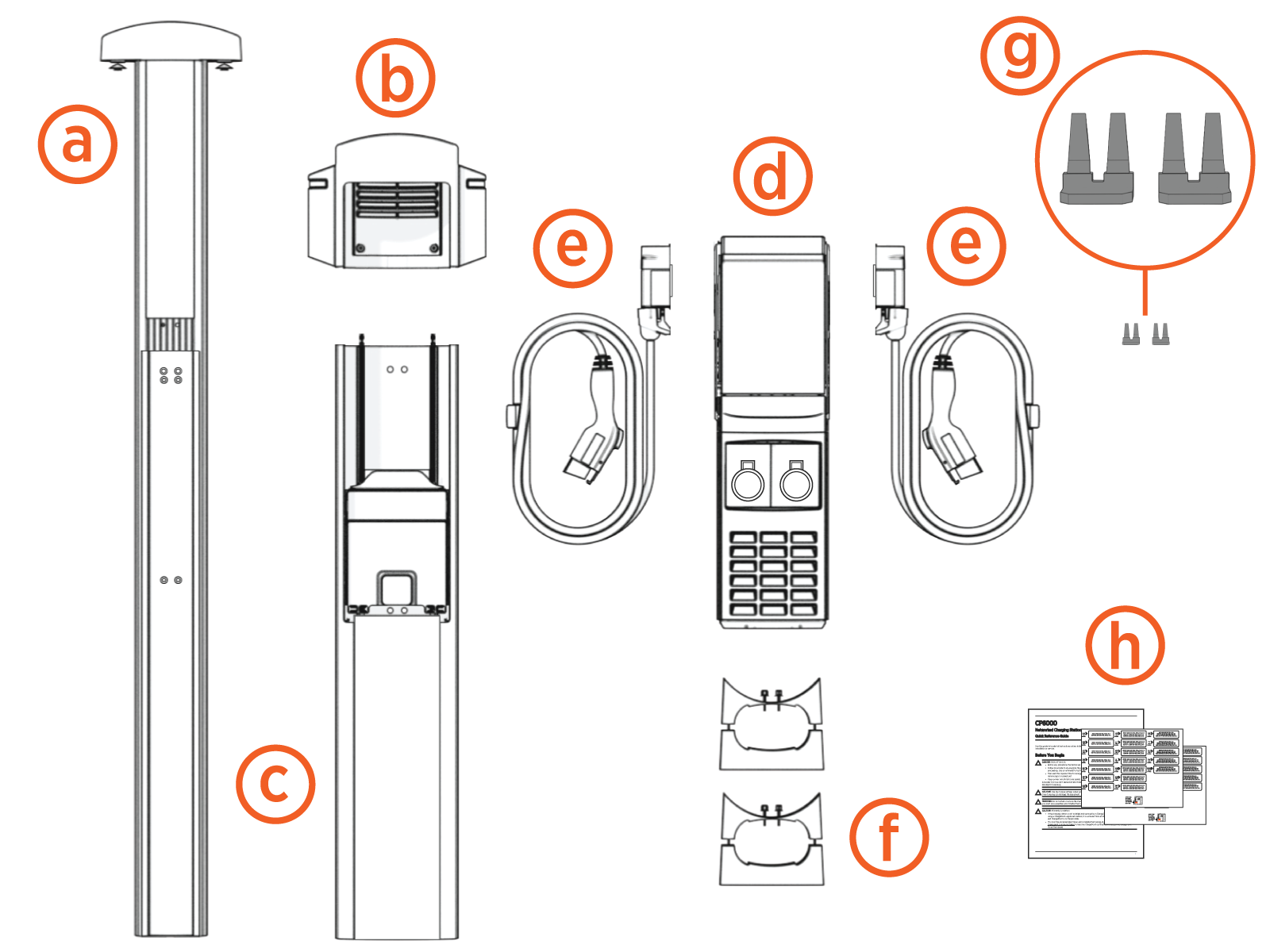
(a) Cable Management Kit (CMK Cable Management Kit)
(b) Top cap
(c) Pedestal or wall mount enclosure
(d) Head unit assembly
(e) Charging cables
(f) Mounting adapter (only wall mount stations)
(g) Circuit share jumper kit
(h) Quick Reference Guide, rating labels
The CP6000 ships with an Ethernet kit (purchased separately). If you purchased an Ethernet kit, make sure the kit has the following parts:
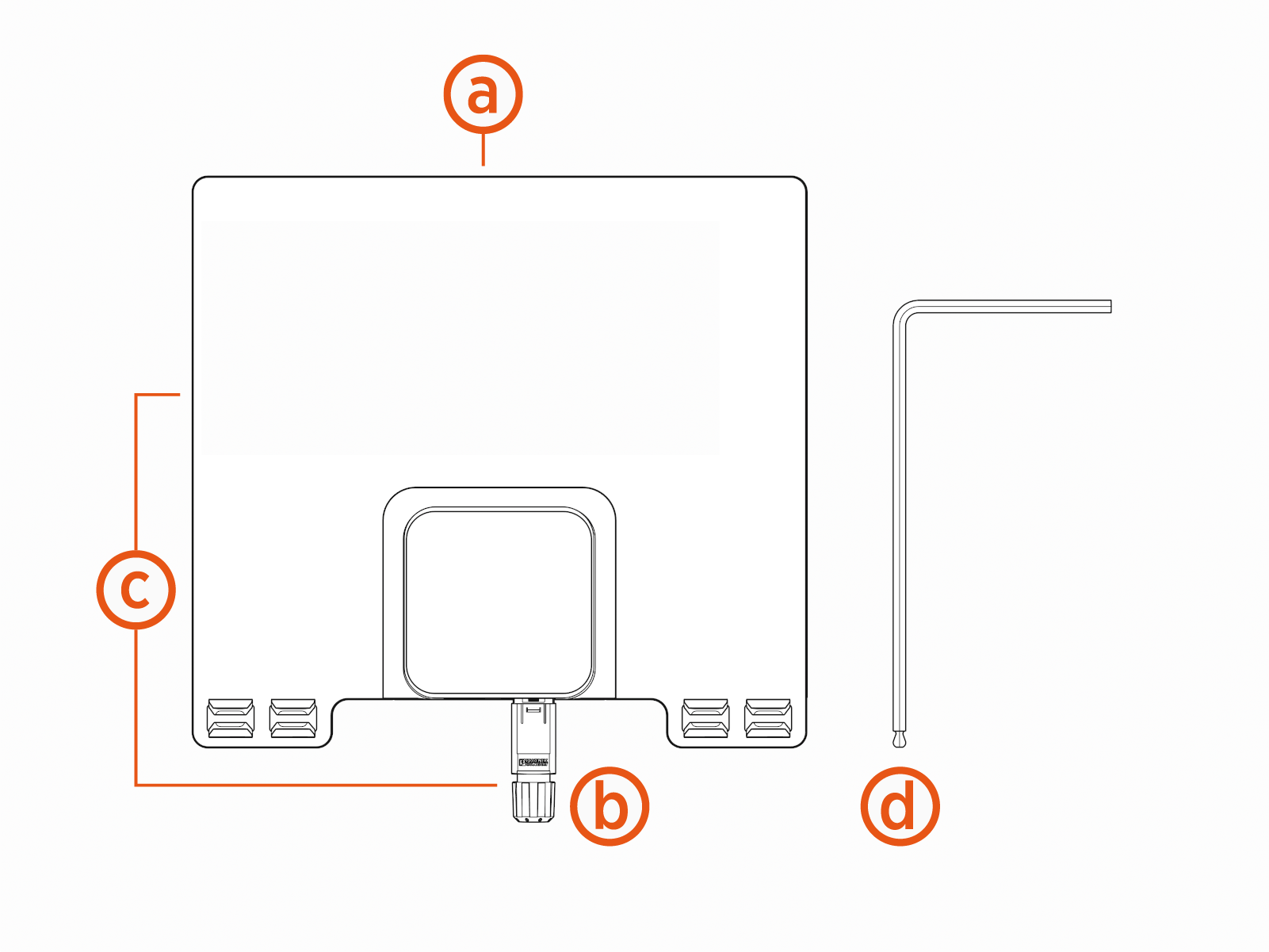
(a) Ethernet Module
(b) Accessory (the Ethernet connector)
(d) L-wrench
