Civil and Mechanical Design
This section provides civil and mechanical site design information for Power Block and Power Link 1000.
Weights
| Component | Weight |
|---|---|
|
Power Module |
45 kg (98.5 lbs) |
|
Power Block - fully loaded with five Power Modules
|
680 kg (1500 lbs) |
|
Power Link 1000 - pedestal-mount (excludes charging cables and CMK |
200 kg |
|
Power Link 1000 - overhead-mount (non-LCC (excludes charging cables and CMK |
120 kg |
|
Charging cable |
16 - 37 kg |
|
Standard CMK |
20 kg (44 lbs) |
|
Tall CMK |
38.5 kg (85 lbs) |
|
Overhead CMK |
10 kg (22 lbs) |
|
Packaging excluded from weights listed above |
45 - 90 kg |
Dimensions
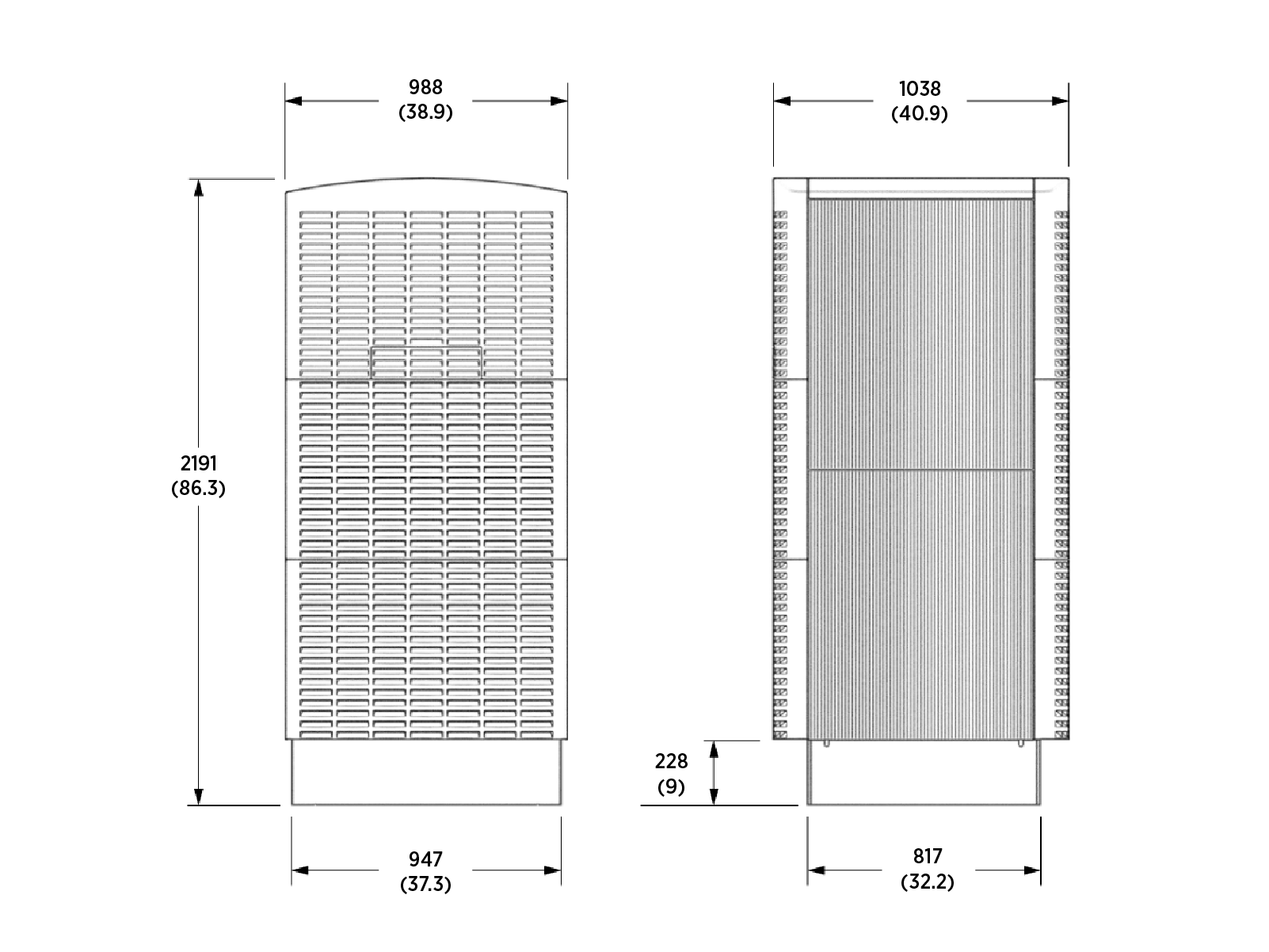
This section provides the dimensions of the Power Block and Power Link 1000.
Power Block
Power Link 1000
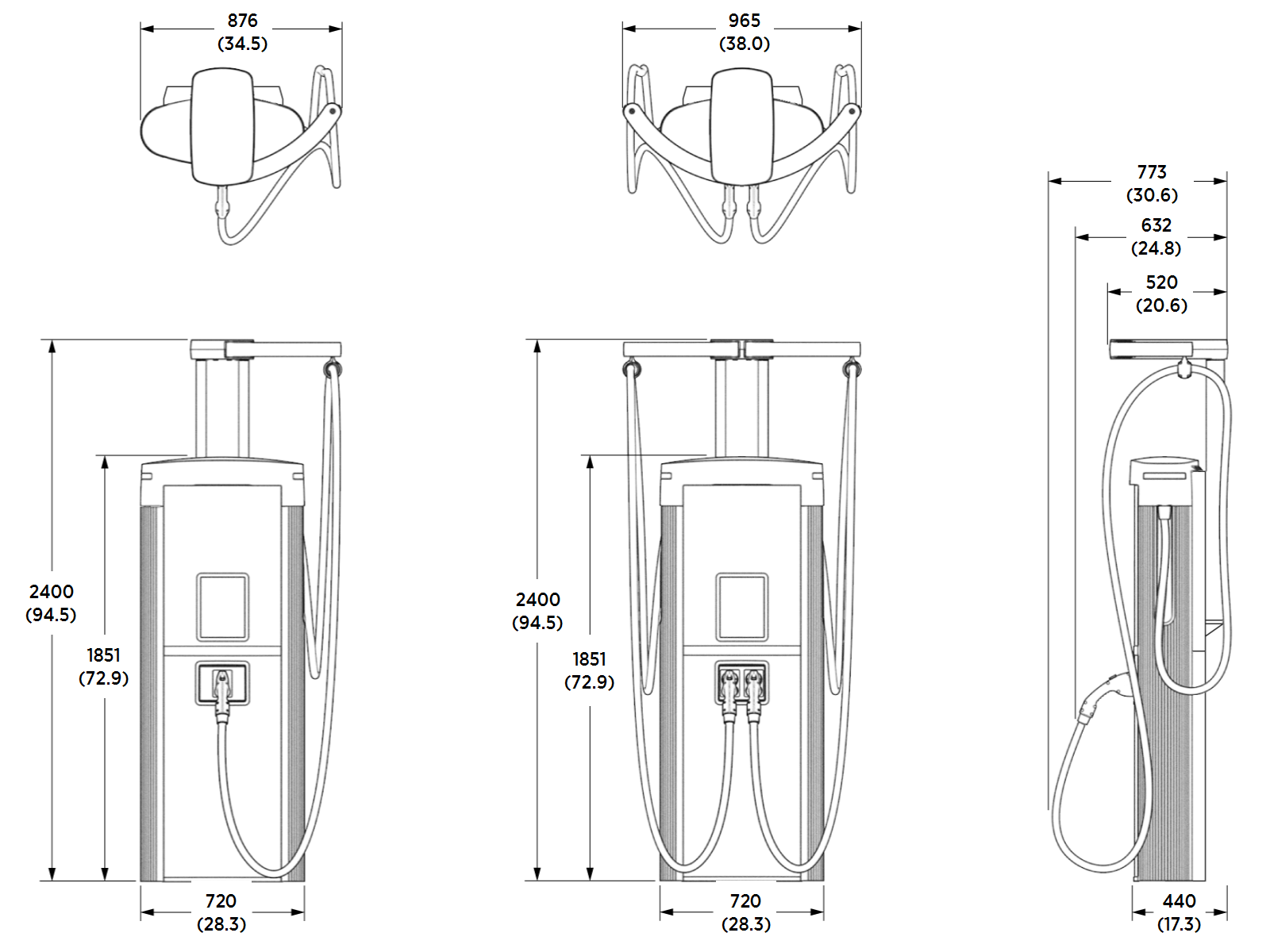
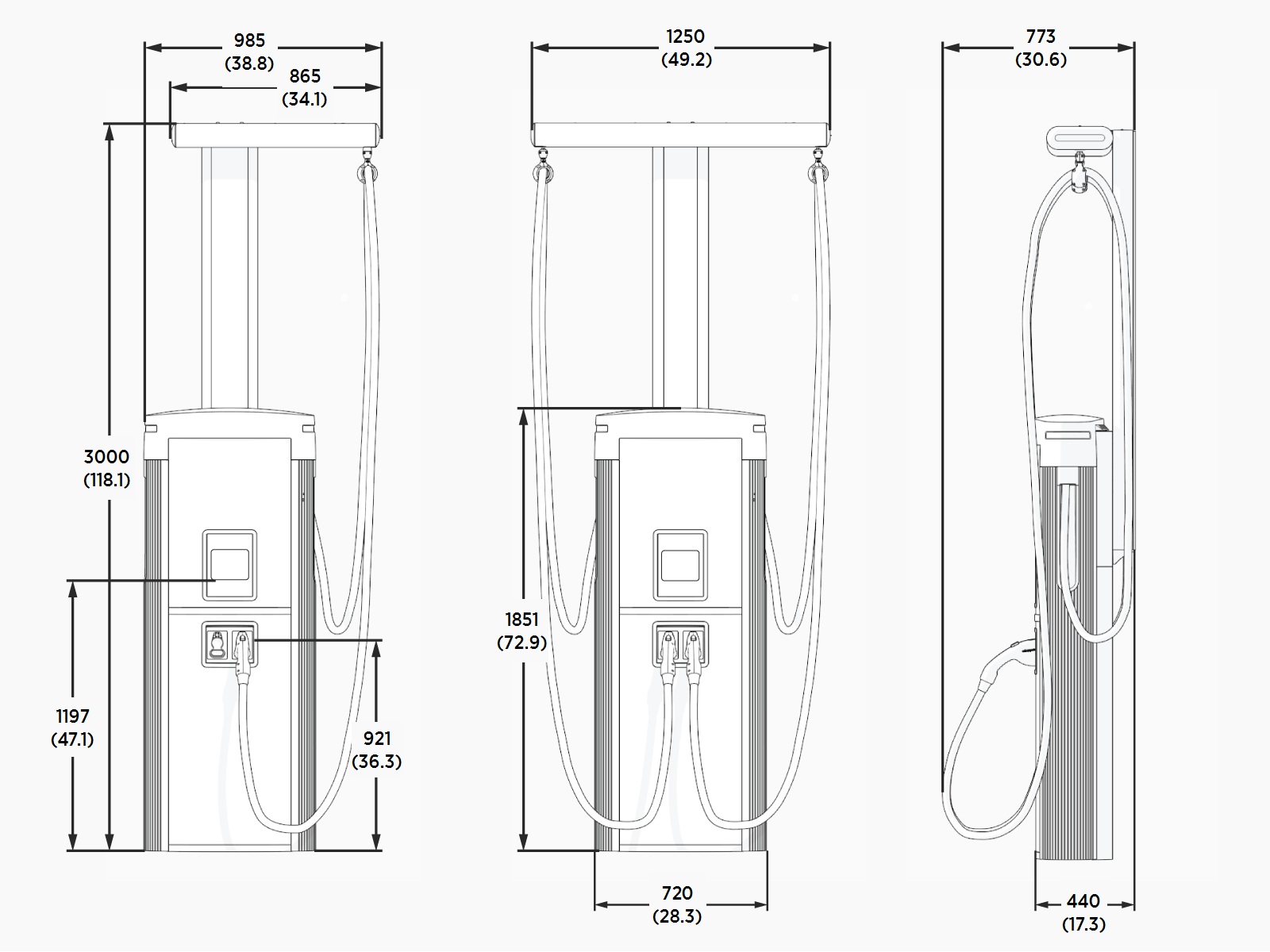
The Power Link 1000 is a vertical enclosure that can be mounted on a pedestal or overhead. Stations can be configured with one or two charge cables, available in multiple lengths. The Power Link 1000 can have different charging cable types (such as one CCS Combined Charging System and one CHAdeMO) to offer flexibility, or it can have the same cable type (in cases such as commercial fleets). The cables cannot both charge at the same time.
The Power Link 1000 can be configured with a Cable Management Kit (CMK Cable Management Kit), a rear mast with arms that swing forward to extend cable reach.
Pedestal-Mount Power Link 1000, Single or Dual Cable, and Standard CMK
Pedestal-Mount Power Link 1000, Single or Dual Cable, and Tall CMK
Pedestal-Mount Power Link 1000, Single or Dual Cable, and Overhead CMK
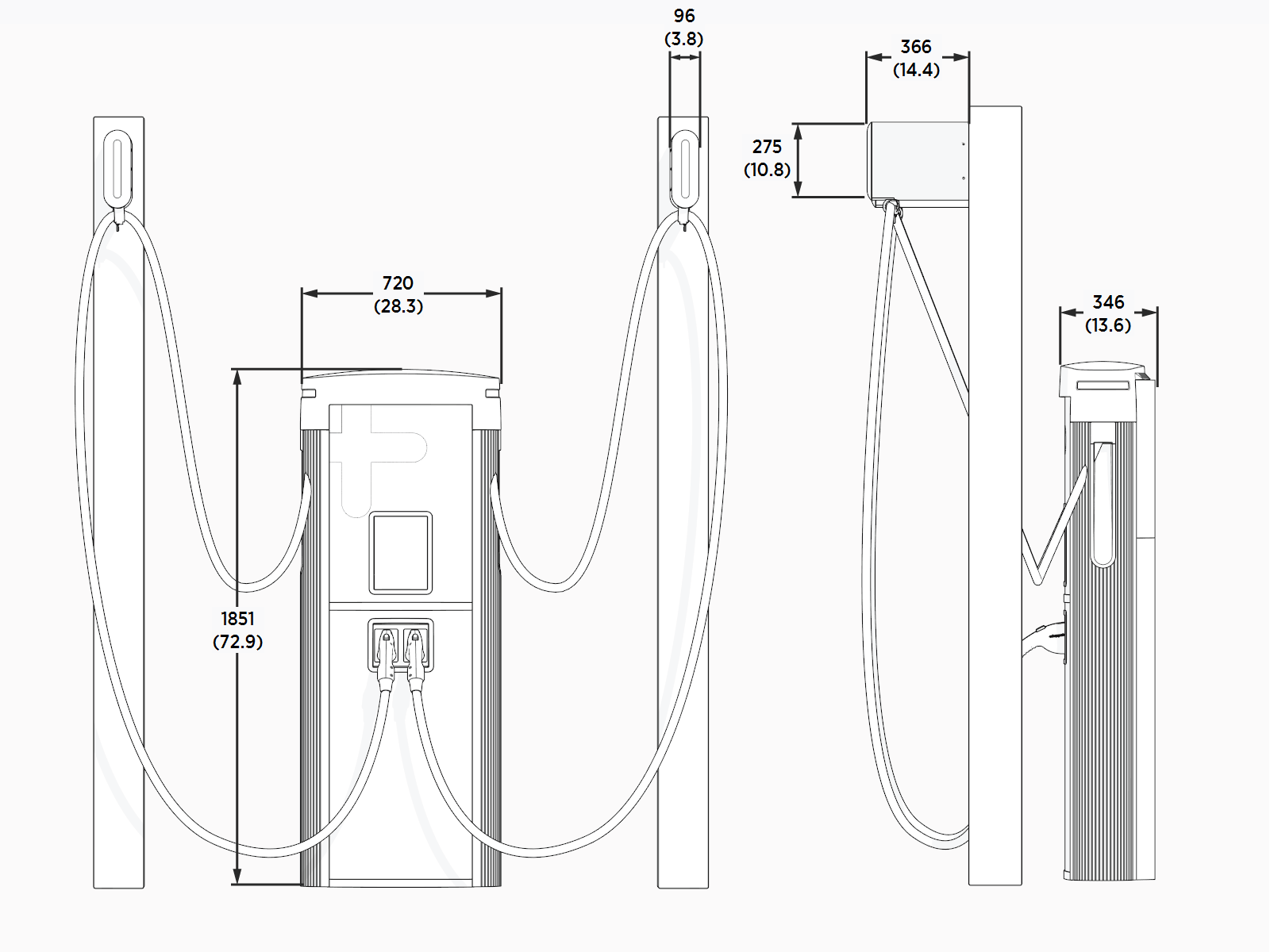
The customer must provide the poles at the site for installing pedestal-mount (single or dual cable) Power Link 1000 enclosures with overhead CMK Cable Management Kit and tether ball extension. These are not provided by ChargePoint.
Overhead-Mount Power Link 1000 With Single or Dual Cable and Overhead CMK
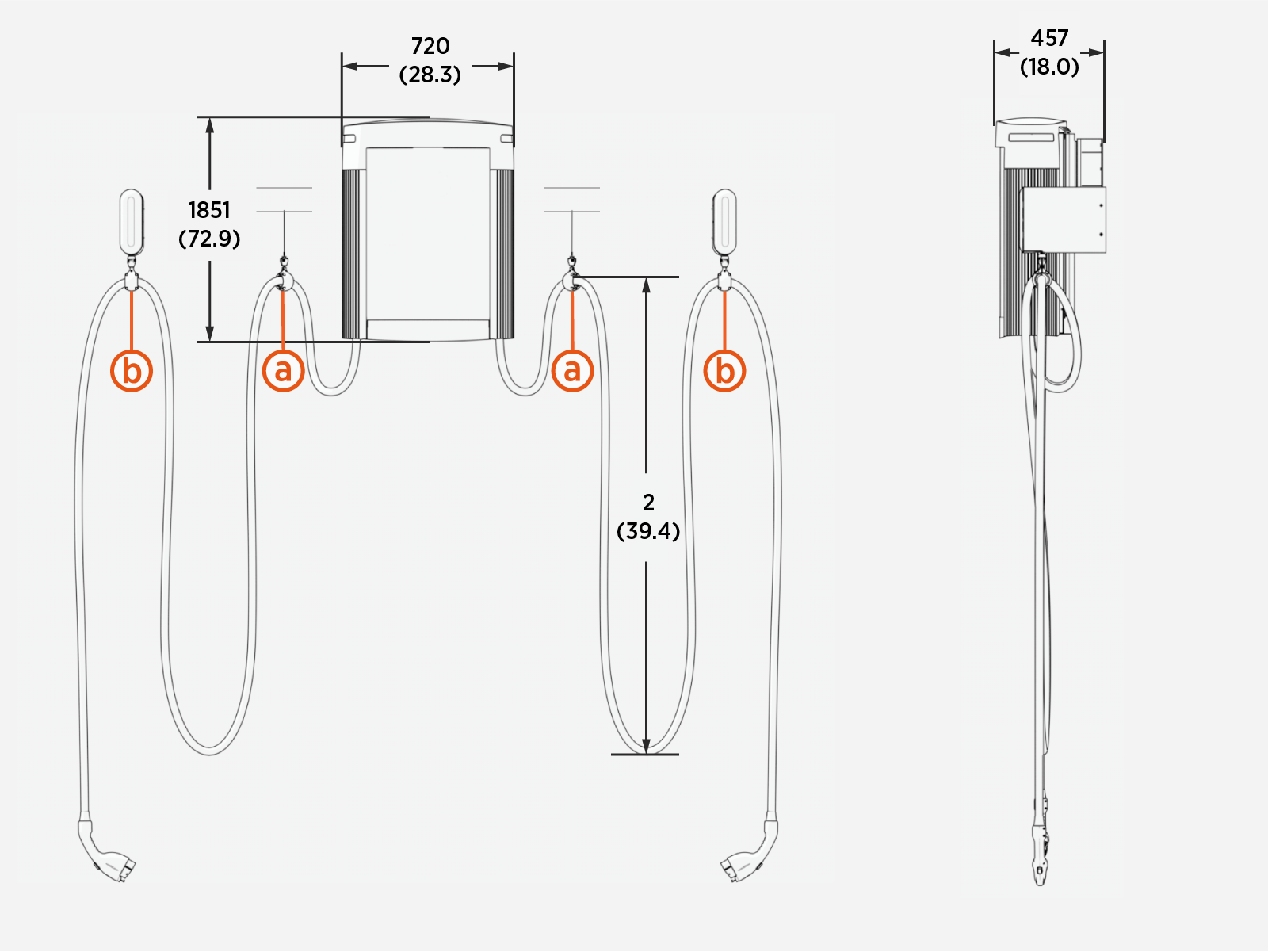
The CMK Cable Management Kit might not fully retract certain charging cables due to their heavier weight. Adding a tether point and a tether hook kit reduces cable weight on the CMK Cable Management Kit, allowing the cable to retract fully.
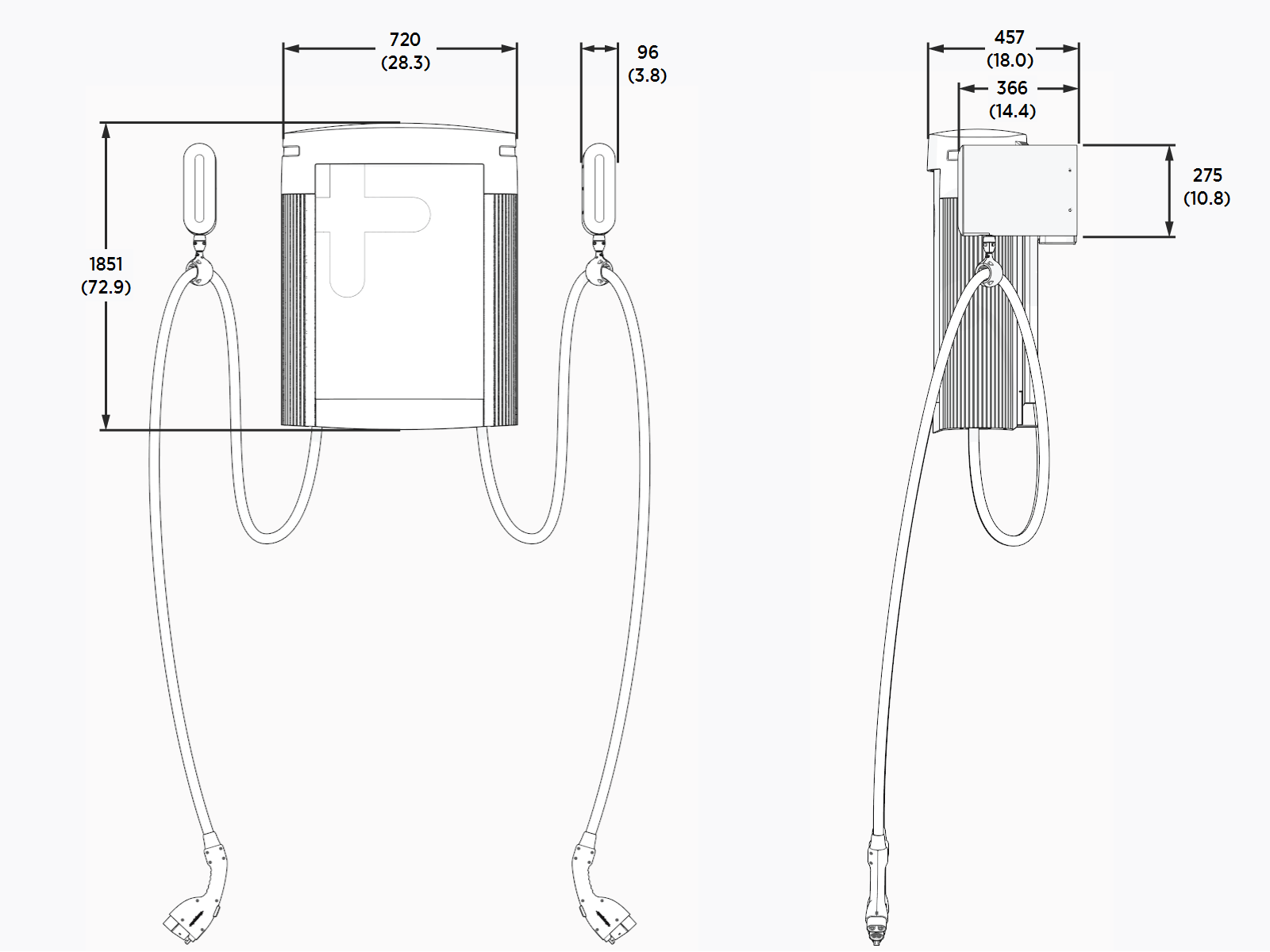
Overhead-Mount Power Link 1000 With Tether Hook
Use tether hooks as additional support for overhead CMKs or to enable the use of third party hoist or cable management solutions.
The tether hook (a) can be attached to either a fixed point or to an alternate cable management mechanism (b) such as a winch.
In the following image, the charge cable is held with a fixed tether hook (a) and a tool balancer (b). Adjust the tether hook or tool balancer location as necessary for site requirements.
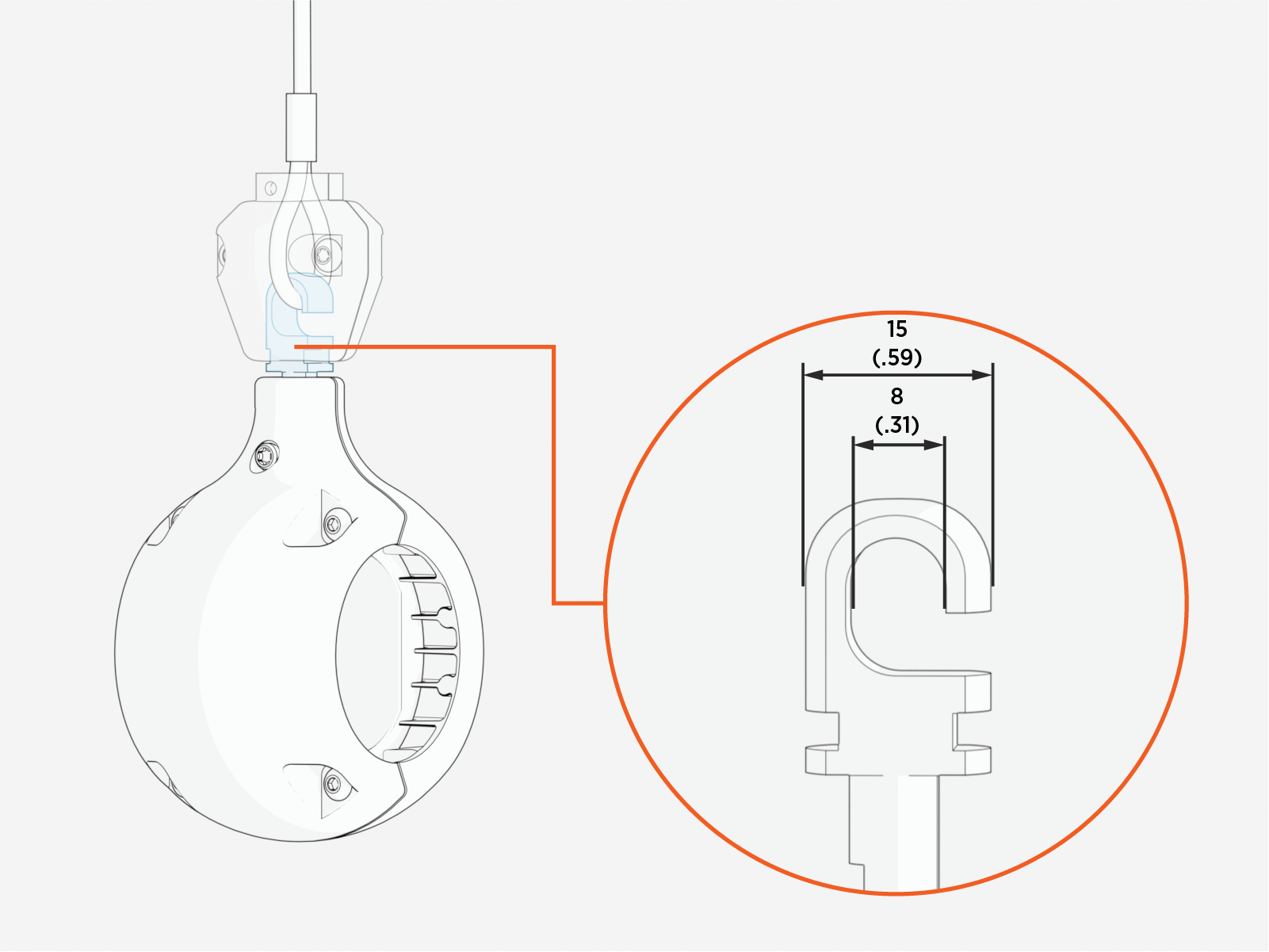
Tether hook dimensions appear in the following image.
Pedestal-Mount Specifications
The Power Block and pedestal-mount Power Link 1000 must be installed on either a newly poured concrete pad embedded with the Concrete Mounting Template (CMT) or on an existing concrete surface using the Surface Conduit Entry (SCE Surface Conduit Entry) kit.
Another option available through a third party is precast concrete blocks. For more details, contact ChargePoint.
Stub-up entry of wires laid underground is the most common installation method. Surface entry of wires laid above ground is allowed only at sites where the wires cannot be laid underground such as in a parking garage. Contact ChargePoint for the Surface Conduit Entry (SCE Surface Conduit Entry) kit, which includes the hardware needed to install on an existing concrete surface.
Concrete Pad Specifications
The concrete surface must be smooth and cannot exceed a slope of 20 mm per meter (1/4 inch per foot). If an existing concrete surface does not meet the slope requirement, a localized concrete pad must be poured and leveled to meet the slope requirement.
The concrete pad for the Power Block and Power Link 1000 must either be designed to be site-specific or must meet the specifications provided below. In some extreme conditions, a larger pad may be required. For sites with less stringent seismic, soil, or wind conditions, a smaller pad might be possible.
Conservative stability specifications for the Power Block and Power Link 1000 are listed below for the following design scenarios:
-
170 mph wind, high seismic, Class 3 Soil
-
170 mph wind, high seismic, Class 4 Soil
-
170 mph wind, high seismic, Class 5 Soil
-
140 mph wind, lower seismic, Class 3 Soil
-
140 mph wind, lower seismic, Class 4 Soil
-
140 mph wind, lower seismic, Class 5 Soil
All scenarios assume:
-
Minimum concrete rating of 2500 PSI.
-
All-threaded M16 anchor bolts are embedded 229 mm (9 in) into the concrete pad and are made of ASTM F1554 Grade 55 carbon steel and hot dip galvanized (HDG
Hot Dipped Galvanized). -
The anchor bolts placement is centered within the designed stability area.
Power Block
|
Design Scenarios |
Pad Width |
Pad |
#N1 @ S1” O.C. |
#N2 @ S2” O.C. |
|
|---|---|---|---|---|---|
|
1 |
1753 mm |
1753 mm |
457 mm |
#4 @ 305 mm (12 in) O.C. |
#4 @ 305 mm (12 in) O.C. |
|
2 |
1753 mm |
1753 mm |
686 mm |
#4 @ 152 mm (6 in) O.C. |
#4 @ 152 mm (6 in) O.C. |
|
3 |
1524 mm |
1524 mm |
457 mm |
#4 @ 305 mm (12 in) O.C. |
#4 @ 305 mm (12 in) O.C. |
|
4 |
1524 mm |
1524 mm |
457 mm |
#4 @ 305 mm (12 in) O.C. |
#4 @ 305 mm (12 in) O.C. |
|
5 |
1524 mm |
1524 mm |
457 mm |
#4 @ 305 mm (12 in) O.C. |
#4 @ 305 mm (12 in) O.C. |
|
6 |
1524 mm |
1524 mm |
457 mm |
#4 @ 305 mm (12 in) O.C. |
#4 @ 305 mm (12 in) O.C. |
Power Link 1000
|
Design Scenarios |
Pad Width |
Pad |
#N1 @ S1” O.C. Top Rebar |
#N2 @ S2” O.C. Bottom Rebar |
|
|---|---|---|---|---|---|
|
1 |
1499 mm (59 in) |
1499 mm (59 in) |
432 mm (17 in) |
#4 @ 305 mm (12 in) O.C. |
#4 @ 305 mm (12 in) O.C. |
|
2 |
1499 mm (59 in) |
1499 mm (59 in) |
610 mm (24 in) |
#5 @ 305 mm (12 in) O.C. |
#5 @305 mm (12 in) O.C. |
|
3 |
1499 mm (59 in) |
1499 mm (59 in) |
610 mm (24 in) |
#5 @ 305 mm (12 in) O.C. |
#5 @ 305 mm (12 in) O.C. |
|
4 |
1219 mm (48 in) |
1219 mm (48 in) |
330 mm (13 in) |
#4 @ 305 mm (12 in) O.C. |
#4 @ 305 mm (12 in) O.C. |
|
5 |
1219 mm (48 in) |
1219 mm (48 in) |
483 mm (19 in) |
#5 @ 305 mm (12 in) O.C. |
#5 @ 305 mm (12 in) O.C. |
|
6 |
1219 mm (48 in) |
1219 mm (48 in) |
483 mm (19 in) |
#5 @ 305 mm (12 in) O.C. |
#5 @ 305 mm (12 in) O.C. |
In the case of using an existing pad, the pad must either meet one of the above specifications or it must be inspected and approved by a structural engineer for the specifications given below:
|
Specification |
Power Block |
Power Link 1000 |
|---|---|---|
|
Weight |
See Weights |
See Weights |
|
Height x width |
See Dimensions |
See Dimensions |
|
Frontal area |
Height * width |
Height * width |
|
CG height |
1000 mm (39.4 in) |
1524 mm (60 in) |
|
Anchor bolts size and quantity |
M16 (x4) |
|
|
Anchor bolts embedment |
229 mm (9 in) |
|
|
Anchor bolts placement |
||
Anchor Bolts Placement
The Power Block and Power Link 1000 enclosures mount over four anchor bolts embedded in the concrete pad. The anchor bolt patterns are shown below.
|
Power Block |
Power Link 1000 |
|---|---|
|
|
|
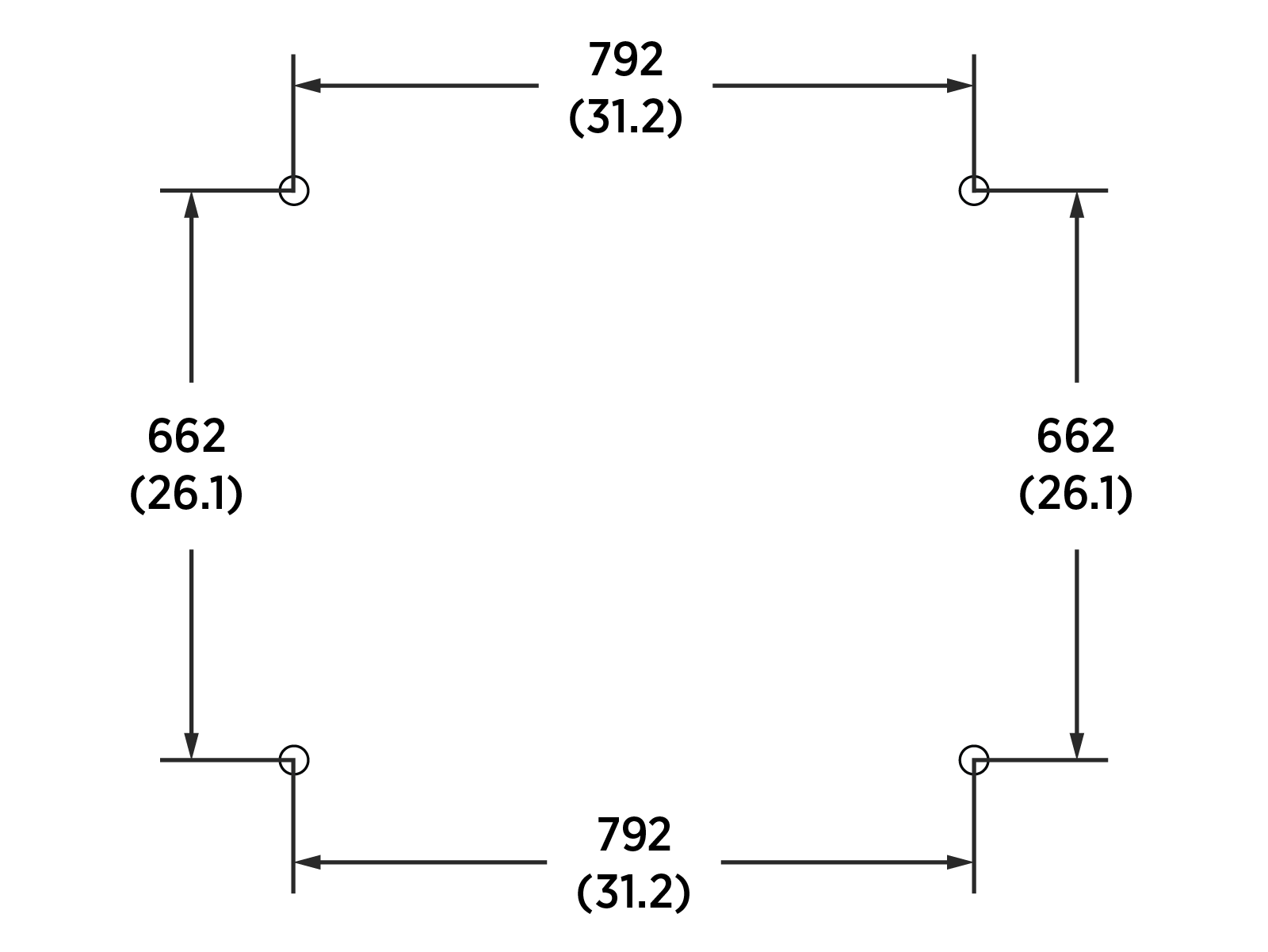
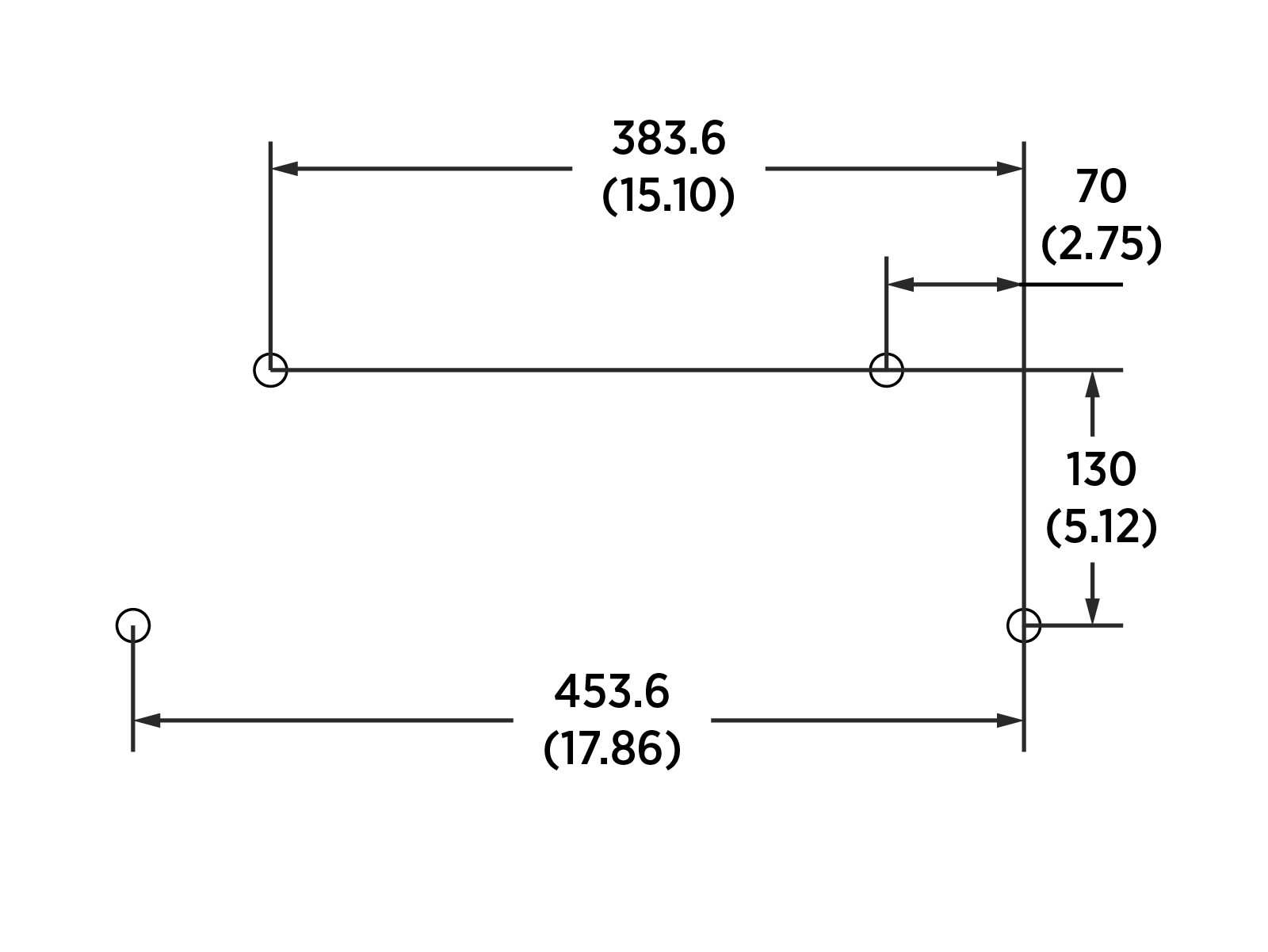
Wires Entry - Stub-up
The most common mounting method for the Power Block and Power Link 1000 is new pad installation using a Concrete Mount Template (CMT) with stub-up wire entry.
-
The Power Block and Power Link 1000 pedestals must each mount onto four M16 anchor bolts exposed 76 mm (3 in) above the concrete pad.
The Concrete Mounting Template (CMT) of Power Block and Power Link 1000 is embedded into a newly poured concrete pad to align anchor bolts and underground run stub-up wiring conduits or armored cables.
The CMT of Power Block and Power Link 1000 are shipped separately and they must be assembled onsite before pouring the concrete pad (refer to the Concrete Mounting Template Guide for more information).
-
In regions that use conduits, the conduits must not have bell ends. Conduits with bell ends may interfere with tolerances inside the Power Block and Power Link 1000.
-
Conduits must have stub-ups to the following height from the concrete pad surface:
-
Power Block: 559–914 mm (22–36 in)
-
Power Link 1000: 102–160 mm (4–6.25 in)
-
Power Block Concrete Mounting Template (CMT)
The Power Block CMT positions the anchor bolts and wire conduits as shown below.
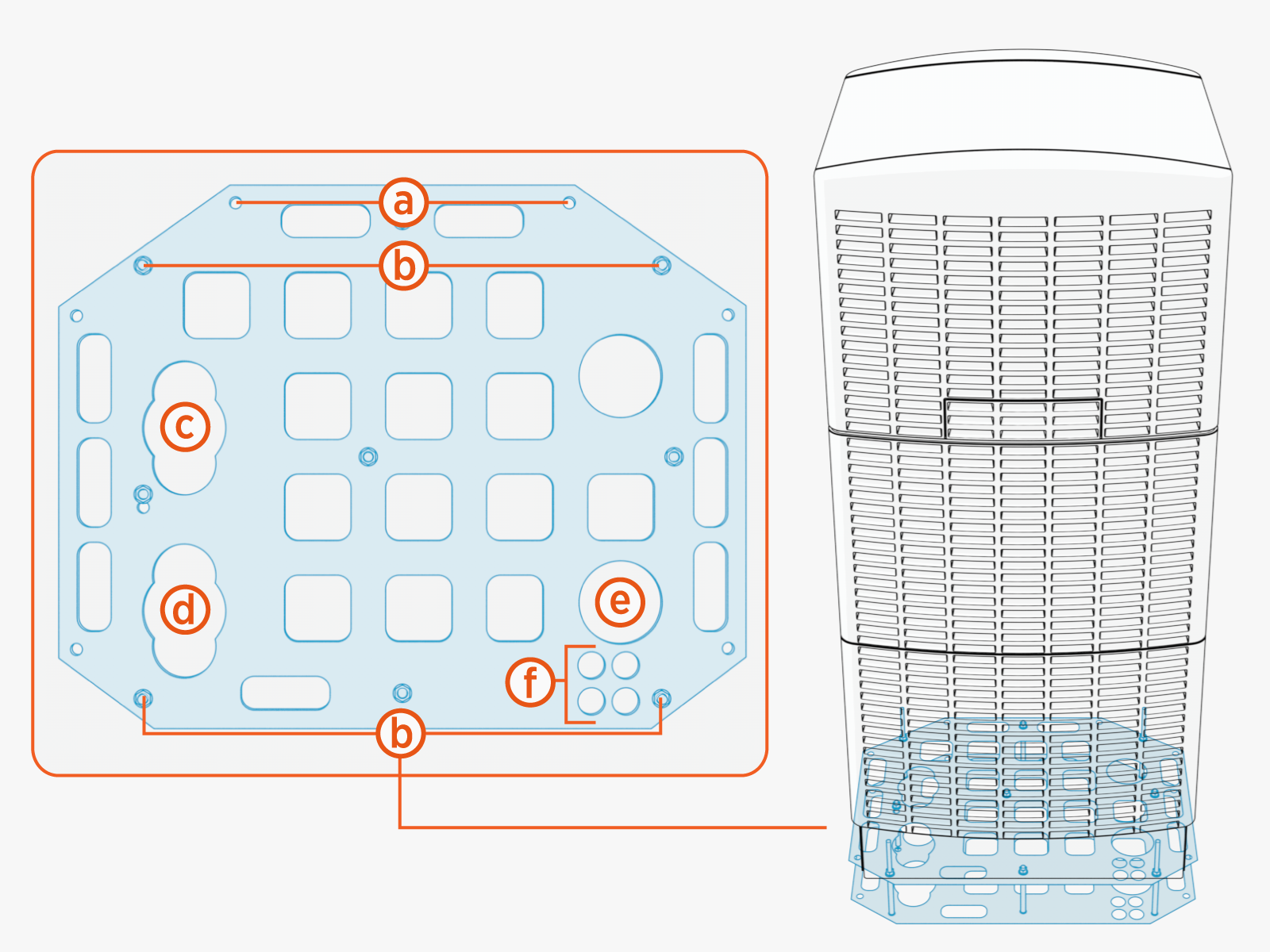
-
M16 anchor bolt (x2) locations for mounting SCE
Surface Conduit Entry gland plate (applicable only for surface entry of wires). -
M16 anchor bolt (x4) locations 76 mm (3 in) above concrete for mounting Power Block.
-
HV DC
High Voltage Direct Current output B wires exit. -
HV DC
High Voltage Direct Current output A wires exit.The DC output of Power Block is the DC input for Power Link 1000.
-
AC input wires entry.
-
LV DC
Low Voltage Direct Current output, shunt trip wires, and Ethernet cable exit.-
One for shunt trip (if used).
-
Three for LV
Low Voltage wires and Ethernet cable.
-
The Concrete Mounting Template CMT must be embedded with its top panel positioned 51 mm (2 in) below the concrete surface.
The following table provides the maximum size and quantity of conduits that can be installed on Power Block:
|
Conduits For |
Conduit Quantity x Trade Size |
|
|---|---|---|
|
North America |
Europe |
|
|
HV DC |
2 x 4 inch max. |
2 x 110 mm max. |
|
AC input wires |
1 x 4 inch max. |
1 x 110 mm max. |
|
LV |
4 x 1 inch max. |
4 x 25 mm max. |
Power Link 1000 Concrete Mounting Template (CMT)
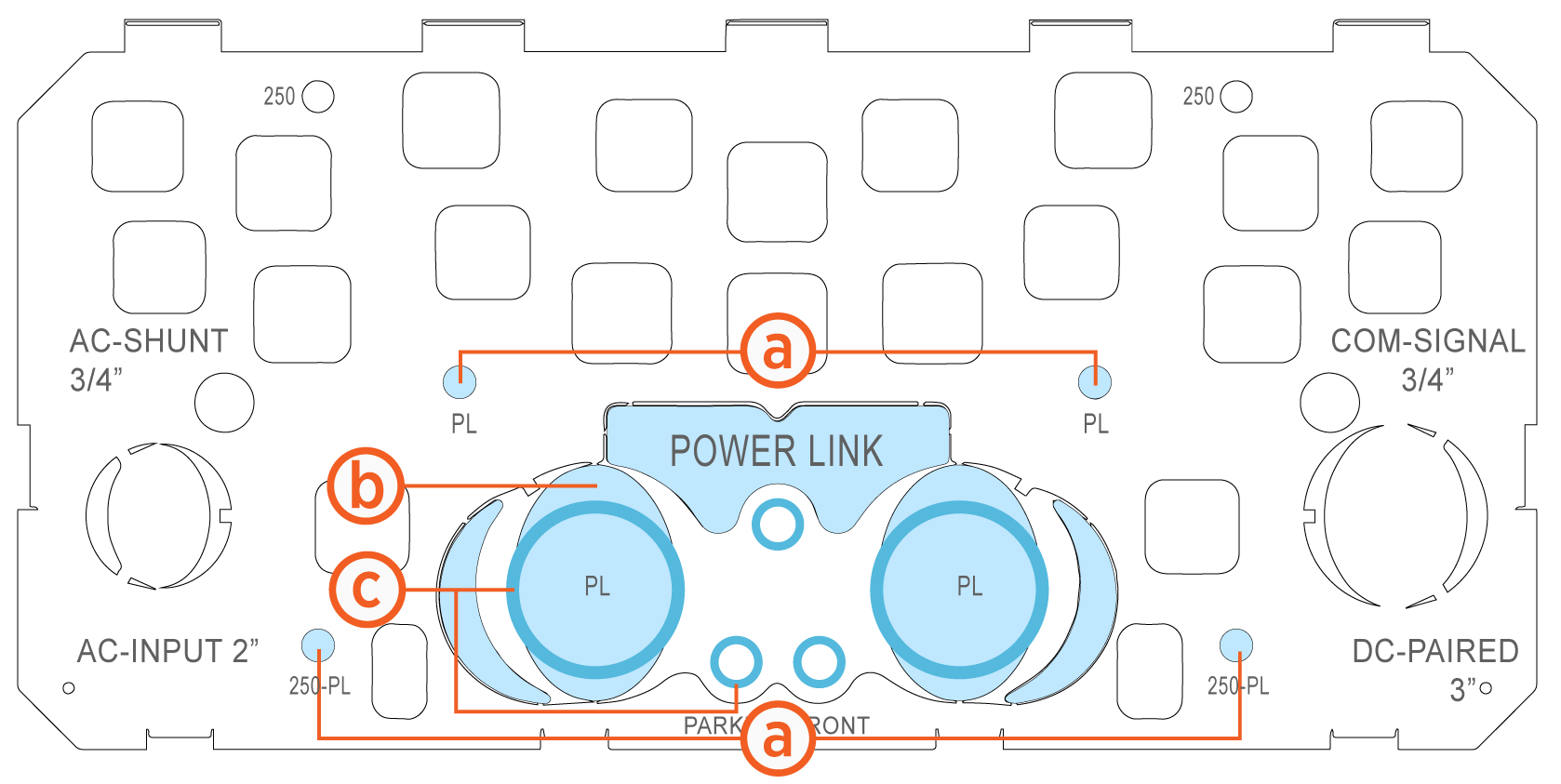
-
M16 anchor bolt (x4) locations for mounting Power Link 1000 (see Anchor Bolts Placement).
-
Breakaway tabs for entry of wires through conduits (c) or armored cables.
In regions that use conduits, the conduits must be laid per the conduit layout specified by the Concrete Mounting Template (CMT) and the outer diameter of conduits must not exceed the trade sizes listed below. If the conduits are not used, the cables may be laid per the conduit layout specified by the CMT.
The CMT must be embedded with its top panel positioned 51 mm (2 in) below the concrete surface.
The following table provides the maximum size and quantity of conduits that can be installed on Power Link 1000 by removing the breakaway tabs (b):
|
Conduits For |
Conduit Quantity x Trade Size |
|
|---|---|---|
|
North America |
Europe |
|
|
HV DC |
2 x 3-1/2 inch max. |
2 x 91 mm max. |
|
LV |
3 x 3/4 inch max. |
3 x 21 mm max. |
|
Optional feature (Ethernet-to-USB |
1 x 3/4 inch max. |
1 x 21 mm max. |
The actual conduit size and quantity must be chosen based on site-specific wiring requirements. The maximum conduit sizes listed are based on maximum quantity the Power Link 1000 can accommodate. For wire specifications, see Wiring Requirements.
Surface Mount
The Power Block and Power Link 1000 may be installed on an existing concrete surface in accordance with the following guidelines:
-
The concrete surface must be inspected and approved by a structural engineer as described in Concrete Pad Specifications.
-
The anchor bolts must be installed in the concrete surface as follows:
-
Anchor holes are drilled into the concrete using the anchor bolt pattern given in Anchor Bolts Placement. The holes are drilled to a depth so that 76 mm (3 in) of each anchor bolt is exposed above the concrete pad.
-
Anchor bolts are epoxied into the holes. Use an epoxy with a minimum bonding strength of 11.7 MPa, compressive strength of 82.7 MPa minimum, and tensile strength of 49.3 MPa minimum. For example, Hilti HIT-RE 500 V3 (normal cure) or Hilti HIT-HY 200-A (fast cure).
Different epoxy types have different cure times at various temperatures. Check local temperatures for the site in advance to help choose an appropriate epoxy.
-
-
Use the provided hot-dip galvanized M16 anchor bolts.
-
Wires must enter the enclosures using Surface Wire Entry.
Wires Entry - Surface
Power Block and Power Link 1000 support wiring that is run above ground in protected wireways for locations where no underground wiring access exists (parking garages, etc.) or where underground junction boxes are not permitted.
If wires or cables are run above ground:
-
They must be housed in wireways that conform to local code.
-
Ensure the plans for the concrete pad and access area allow full service access to all components. Surface wires entry might require larger clearance areas than embedded installations. A minimum of 610 mm (2 ft) clearance at rear side is required.
-
Use flexible wires and conduits, or armored cables.
-
Use LB conduit bodies to route wires into Power Link 1000 from rear left or rear right, and they must fit within the rear clearance of 610 mm or 2 ft.
-
Use suitable conduit fittings to secure and seal the conduits and/or conduit bodies.
-
Prepare the concrete surface where the components will be anchored so that the concrete surface is solid, smooth, and level with no old hardware or stub-ups extending above ground.
Surface wires must enter the Power Block and the pedestal-mount Power Link 1000 using a SCE Surface Conduit Entry kit. These kits offer the following benefits:
-
Support of the weight of conduits or armored cables without compromising cover panel integrity
-
Ensure all terminations meet ingress requirements where they meet the component
-
Ensure no obstructions to ventilation, which is required during operation
The SCE Surface Conduit Entry kit is used for surface wire entry for only the Power Block and pedestal-mount Power Link 1000. It can not be used with a wall or overhead-mount Power Link 1000.
Power Block Surface Conduit Entry (SCE)
Surface-run wires must enter Power Block from the rear side through conduits or armored cables. The Power Block kit provides a sturdy pedestal cover panel onto which surface conduits may be fastened at the rear side of the Power Block.

The following table provides the maximum size and quantity of conduits that can be installed on Power Block using the Power Block SCE Surface Conduit Entry kit:
| Conduits For | Conduit Quantity x Trade Size | |
|---|---|---|
|
North America |
Europe |
|
|
AC input wires |
1 x 4 inch max. |
1 x 110 mm max. |
|
HV DC |
2 x 4 inch max. |
2 x 110 mm max. |
|
LV |
4 x 1 inch max. |
4 x 25 mm max. |
For more information, refer to the Power Block and Power Link 1000 Surface Conduit Entry Kit Guide.
Pedestal-Mount Power Link 1000 Surface Conduit Entry (SCE)
The surface-run wires must enter the pedestal-mount Power Link 1000 from the rear side through conduits or armored cables. The Power Link 1000 kit provides a sturdy pedestal cover panel onto which surface conduits may be fastened at the rear side of the Power Link 1000.
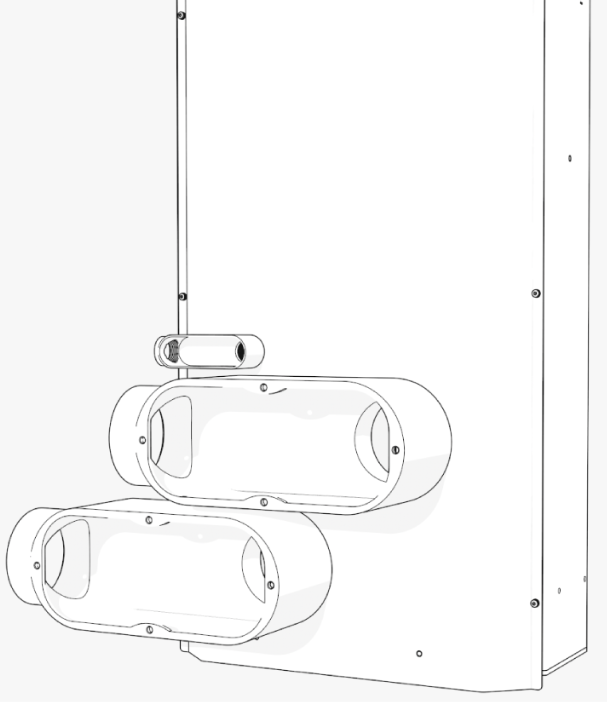
The following table provides the maximum size and quantity of conduits that can be installed on Power Link 1000 using the Power Link 1000 SCE Surface Conduit Entry kit:
|
Conduits For |
Conduit Quantity x Trade Size |
|
|---|---|---|
|
North America |
Europe |
|
|
HV DC |
2 x 4 inch max. |
2 x 103 mm max. |
|
LV |
2 x 3/4 inch max. |
2 x 21 mm max. |
|
Optional feature (Ethernet-to-USB |
1 x 3/4 inch max. |
1 x 21 mm max. |
For more information, refer to the Power Block and Power Link 1000 Surface Conduit Entry Kit Guide.
Wall or Overhead-Mount Specifications
The Power Link 1000 mounts onto a wall or an overhead structure (such as a gantry) using a bracket that attaches to its back. The bracket has six mounting holes sized for M8 bolts.
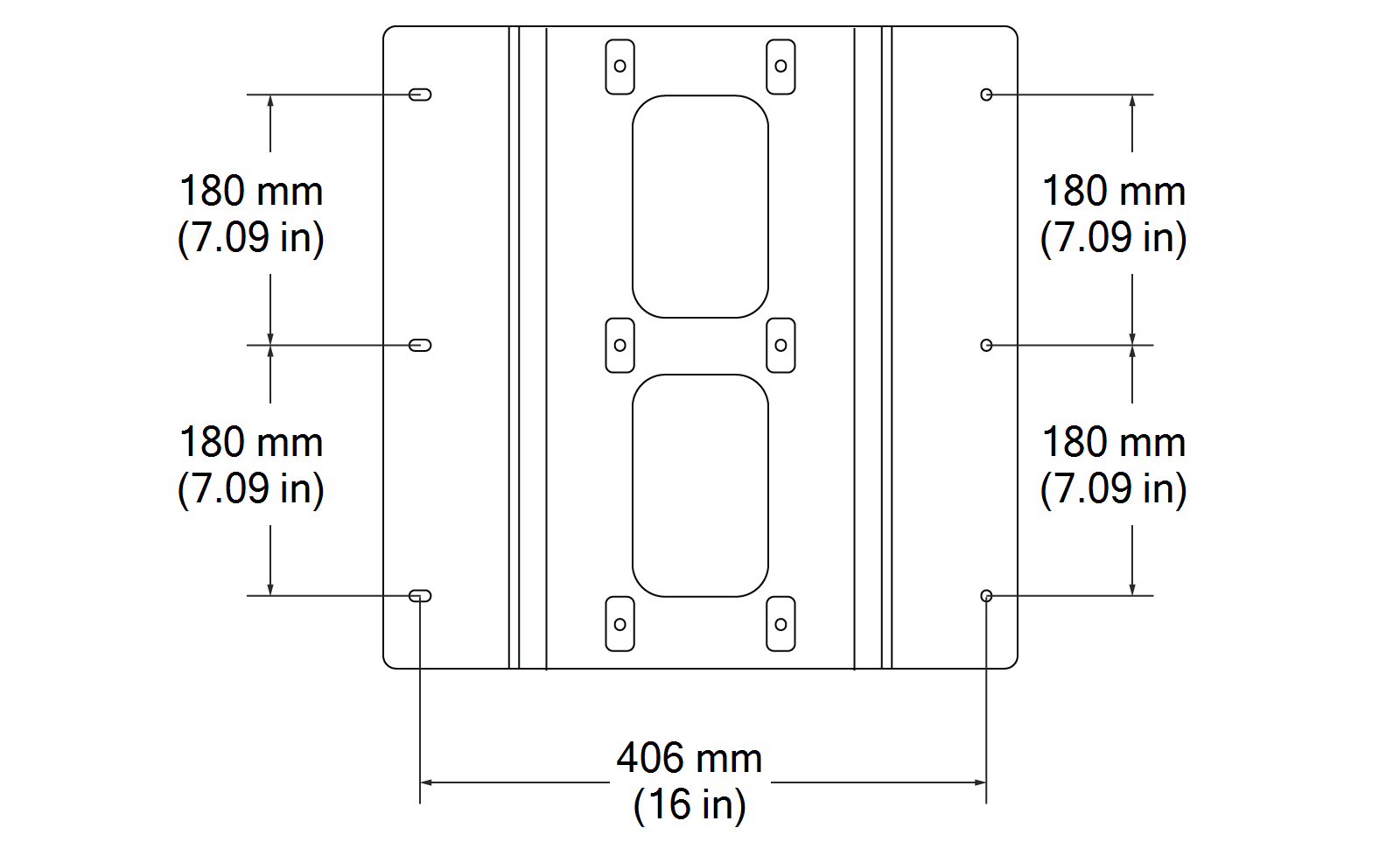
For wall or overhead mounted stations:
-
The Power Link 1000 must be mounted upright. Do not mount it in any other orientation.
-
The wall must be smooth and plumb.
-
The wall or overhead structure must have a structural capacity of 1780 N (400 lbf) in addition to the Power Link 1000 weight. The structure must also be designed or verified by a structural engineer per local codes. In the event of a vehicle drive away incident, this structural strength is required to withstand the pull-out force of the vehicle.
For surface run wiring to the wall or overhead-mount Power Link 1000:
-
All wires must be housed in wireways that conform to local code.
-
Use flexible wires.
-
Use suitable conduit fittings to secure and seal the conduits to the enclosure.
Wall and overhead-mount height specifications are given below:
-
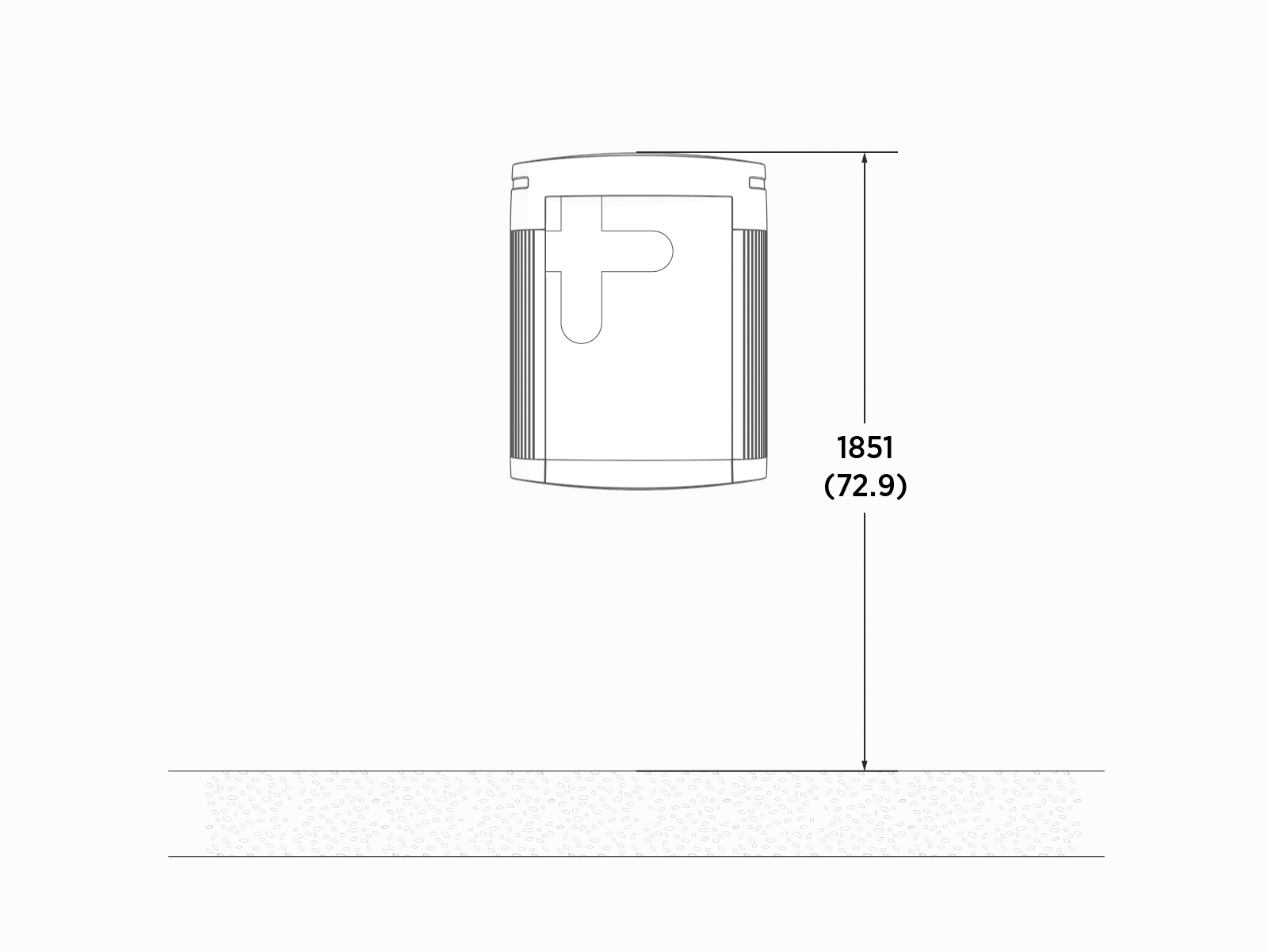
The maximum height of the Power Link 1000 must be 1851 mm (72.9 in) above a finished floor.
-
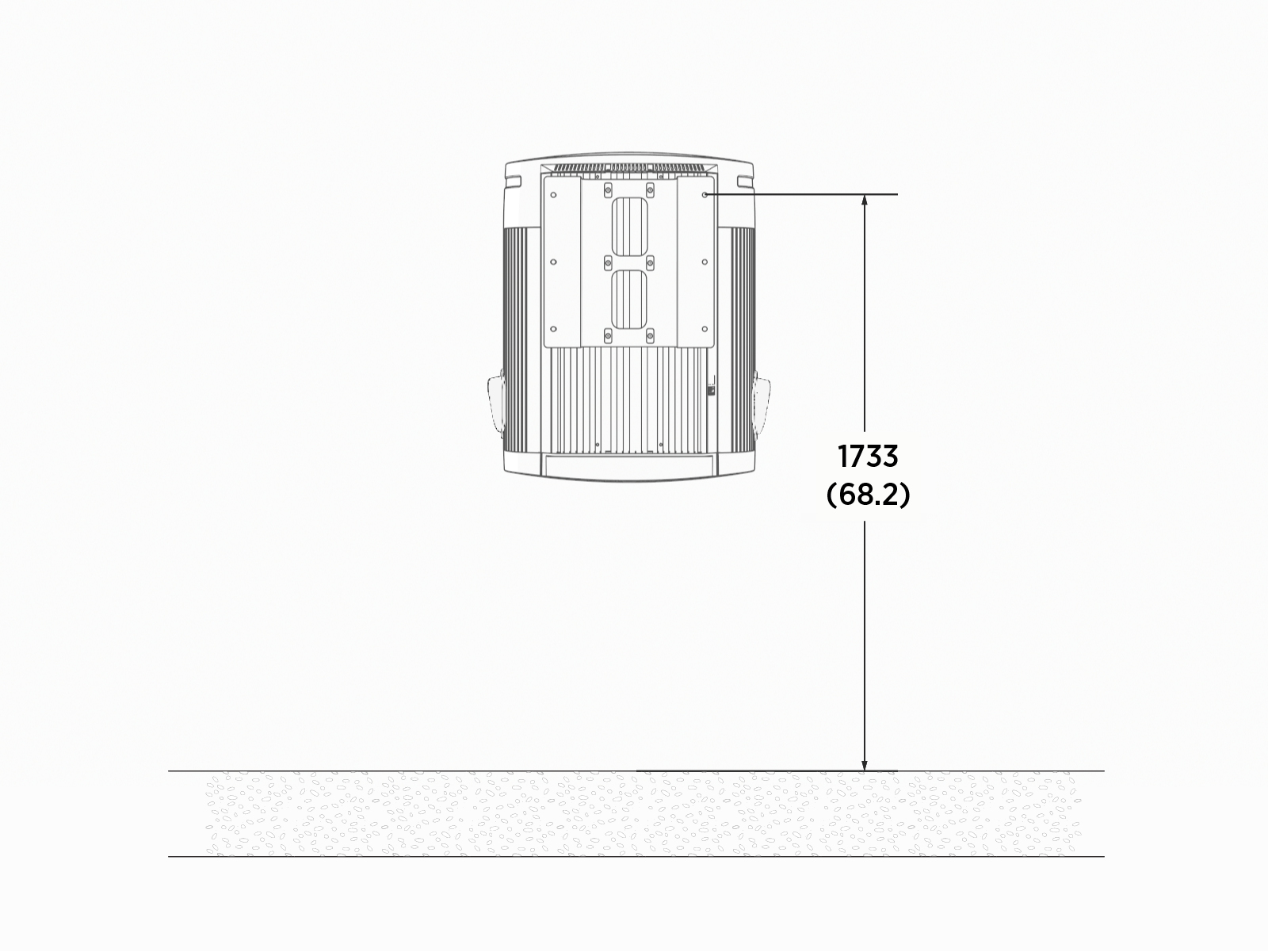
The maximum height of the mounting bracket is 1733.17 mm (68.24 in) above a finished floor.
Drainage
Ensure any site slopes, walls, or fencing do not trap water around the installation site.
Flood Plane
Power Block is designed with a 457 mm (18 in) flood plane. If site conditions show a higher than 457 mm (18 in) flood plane for a 100-year flood event, consider installing the Power Block on a raised concrete pad.
Exposing the Power Block to over 457 mm (18 in) of standing water could create an electrocution, shock, or fire hazard.
If the Power Block has been exposed to standing water exceeding this threshold, cut power to the Power Block and contact ChargePoint before powering on the Power Block.
Clearances
Clearance requirements for Power Block and Power Link 1000 are given below.
Power Block
| Two Power Blocks laid side-to-side | Two Power Blocks laid back-to-back |
|
|
|
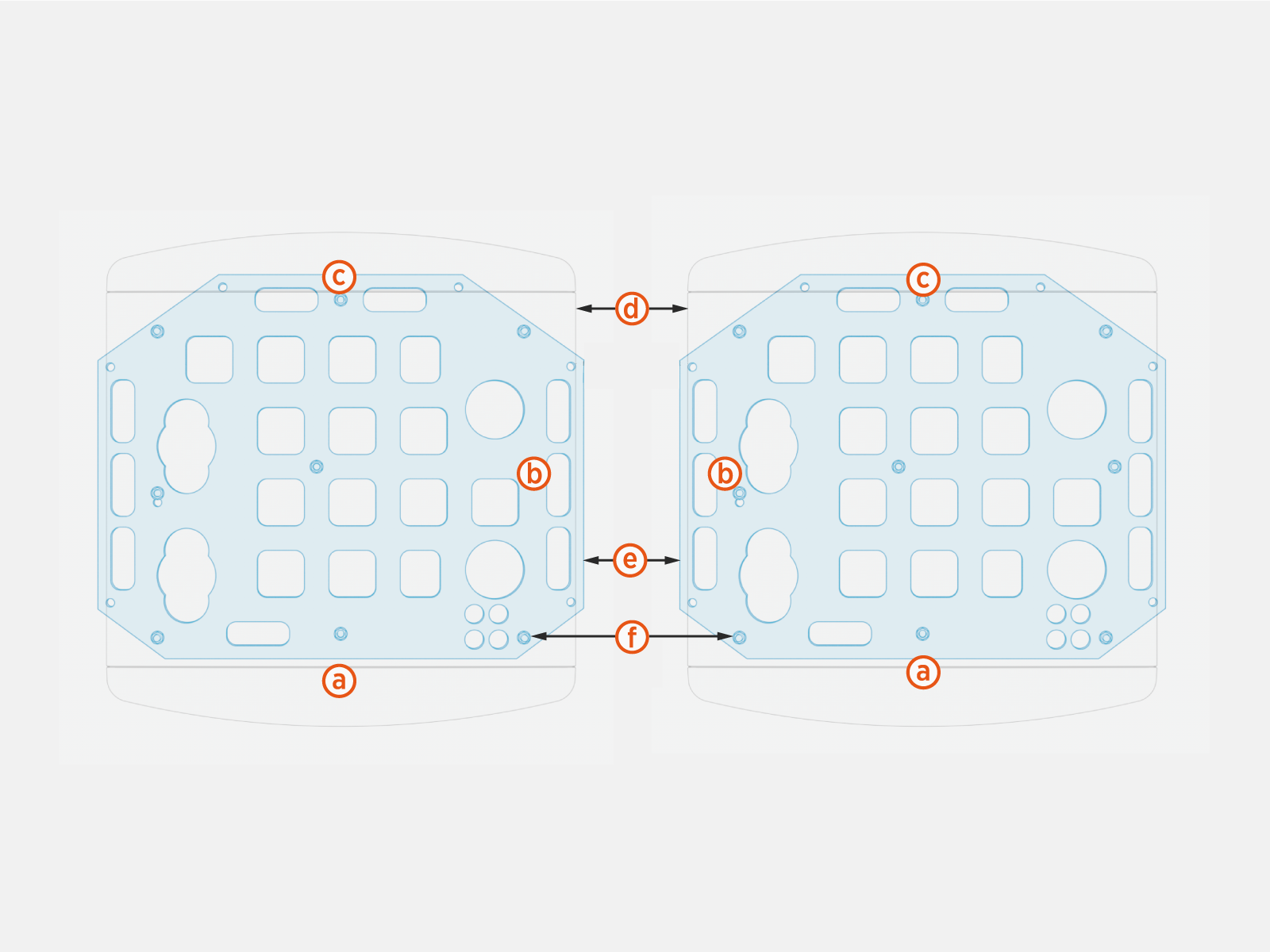
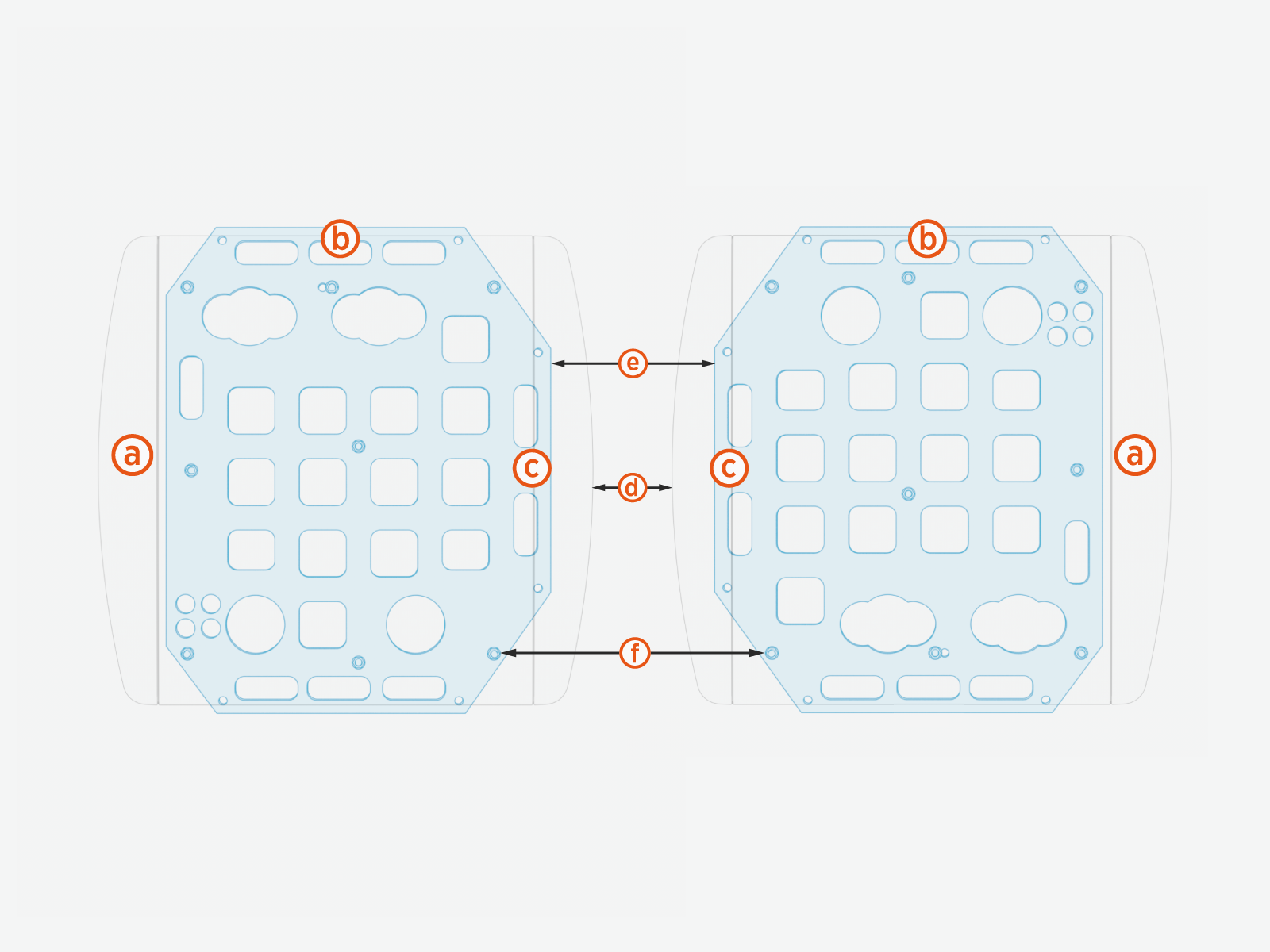
The following table provides the clearances required for service and ventilation around the Power Block (PB):
|
Side |
Power Blocks Layout |
Clearance |
||
|---|---|---|---|---|
|
(a) Front |
— |
— |
Minimum 1000 mm (39.4 in) |
|
|
(b) Sides
|
PBs laid side-to-side |
Minimum
|
(d) PB to PB |
51 mm (2 in) |
|
(f) Center of anchor bolt to center of anchor bolt |
245 mm (9.6 in) |
|||
|
Recommended
|
(d) PB to PB |
152 - 203 mm (6 - 8 in) |
||
|
(e) CMT to CMT |
116 - 167 mm (3.4 - 5.4 in) |
|||
|
(f) Center of anchor bolt to center of anchor bolt |
376 - 427 mm (14.8 - 16.8 in) |
|||
|
(c) Rear |
PBs laid back-to-back |
|
(d) PB to PB |
457 - 609 mm (18 - 24 in) |
|
(e) CMT to CMT |
609 - 761 mm (24 - 30 in) |
|||
|
(f) Center of anchor bolt to center of anchor bolt |
376 - 427 mm (14.8 - 16.8 in) |
|||
Additionally, follow the clearance guidelines below:
-
Front and rear clearances must be at grade level +/- 13 mm (0.5 in).
-
The interior of the Power Block is accessed from both the front and rear cover panels, which lift off. No separate door swing clearance is required.
-
Fencing, bollards, or wheel stops must not encroach upon the clearances listed above, if present. These barriers are not explicitly required by ChargePoint.
-
Power Blocks can be laid side-to-side with minimal spacing for service and ventilation. If laid side-to-side, wiring can enter using either stub-up entry (recommended) or using surface entry at the rear side. When laid side-to-side, wiring for the row cannot pass through one Power Block into another.
-
Side clearances can be shared between Power Blocks as long as:
-
At least 51 mm (2 in) of clearance is maintained between each Power Block.
-
Required service clearance is maintained at the front and rear sides.
-
At least 457 mm (18 in) of clearance is available at each end of a row of Power Blocks.
-
For any questions about allowable layouts, contact ChargePoint.
CAUTION: Each Power Module weighs 45 kg (98.5 lbs). At least two people are required to replace a Power Module. The front clearance must be spacious enough to accommodate at least two people.
IMPORTANT: Check local and regional codes for any additional clearance requirements regarding safety, high voltage equipment, and accessibility requirements.
Power Link 1000
The Power Link 1000 requires minimum site and service clearances listed below.
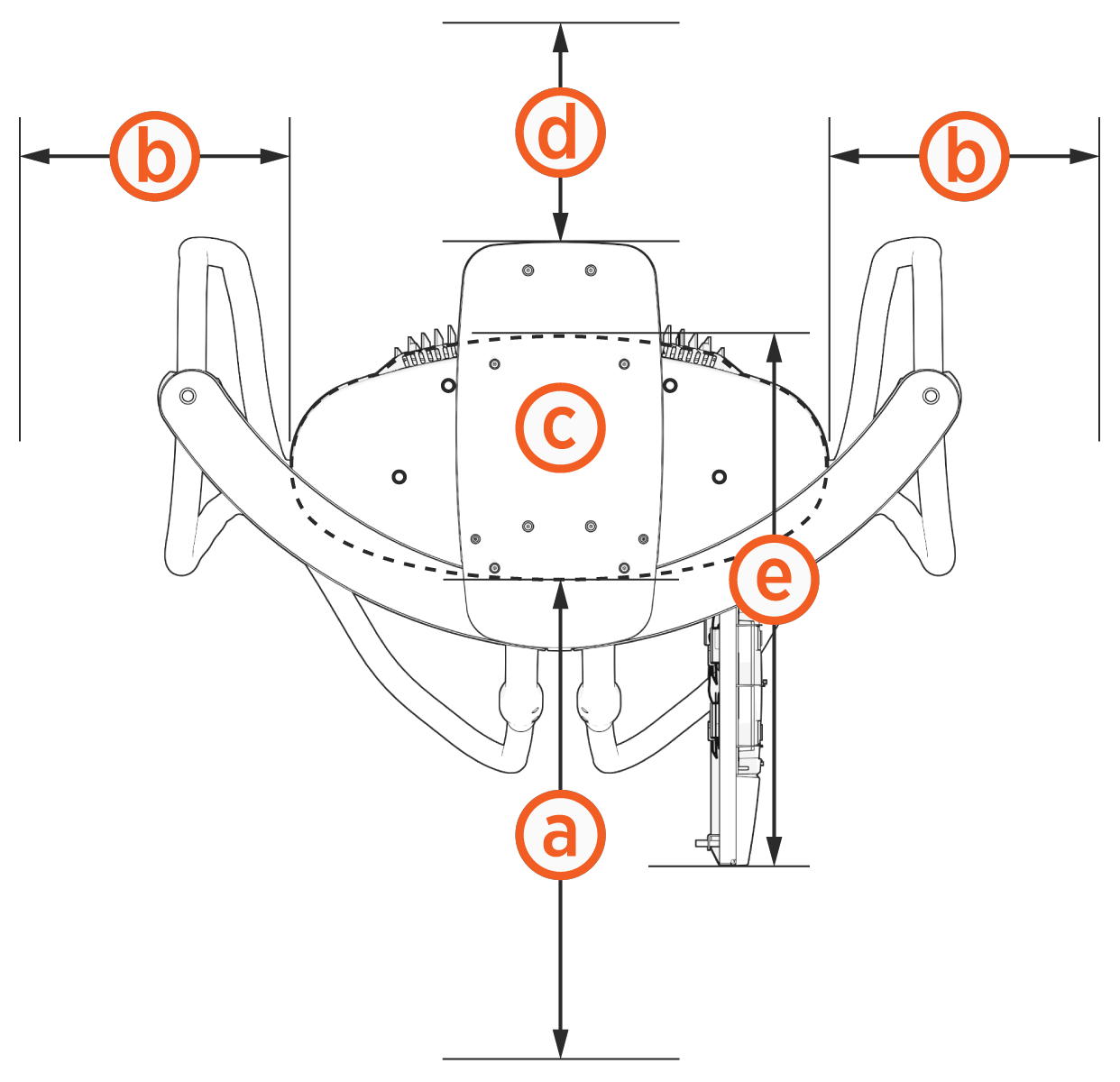
|
Power Link 1000 |
Clearance |
|
|---|---|---|
|
Minimum open space |
610 mm (2 ft) |
|
305 mm (12 in) at grade, minimum NOTE: 610 mm (24 in) recommended for user service and this 610 mm (24 in) can be shared between Power Link 2000s. |
|
|
Pedestal or wall-mount |
26 mm (1 in) from top of CMK |
|
Overhead-mount |
305 mm (12 in) from top of Power Link 1000 |
|
|
Pedestal-mount |
203 mm (8 in) NOTE: At least 610 mm (2 ft) of clearance is required for surface conduit entry. In the case of back-to-back Power Link 2000s, each with surface conduit entry, the clearance can be shared. |
|
730 mm (2 ft 4.75 in) |
|
Wheel Stops and Bollards
Bollards and wheel stops are not explicitly required by ChargePoint. However, ChargePoint recommends these best practices and considerations when designing the site:
-
Permanent bollards or wheel stops must not encroach upon the clearances listed in the clearance diagrams in this section. Removable bollards are allowed if service personnel have the ability to move them as needed.
-
Where permitted by code, wheel stops are preferred over bollards for head-in or back-in spaces.
Wheel Stops
-
When using wheel stops, consider the average vehicle overhang distance for the largest type of vehicle (passenger, bus, etc.), as well as leaving space for the driver to walk up and access the station.
-
Position wheel stops to actively block at least one wheel, without presenting a trip hazard to pedestrians walking between vehicles.
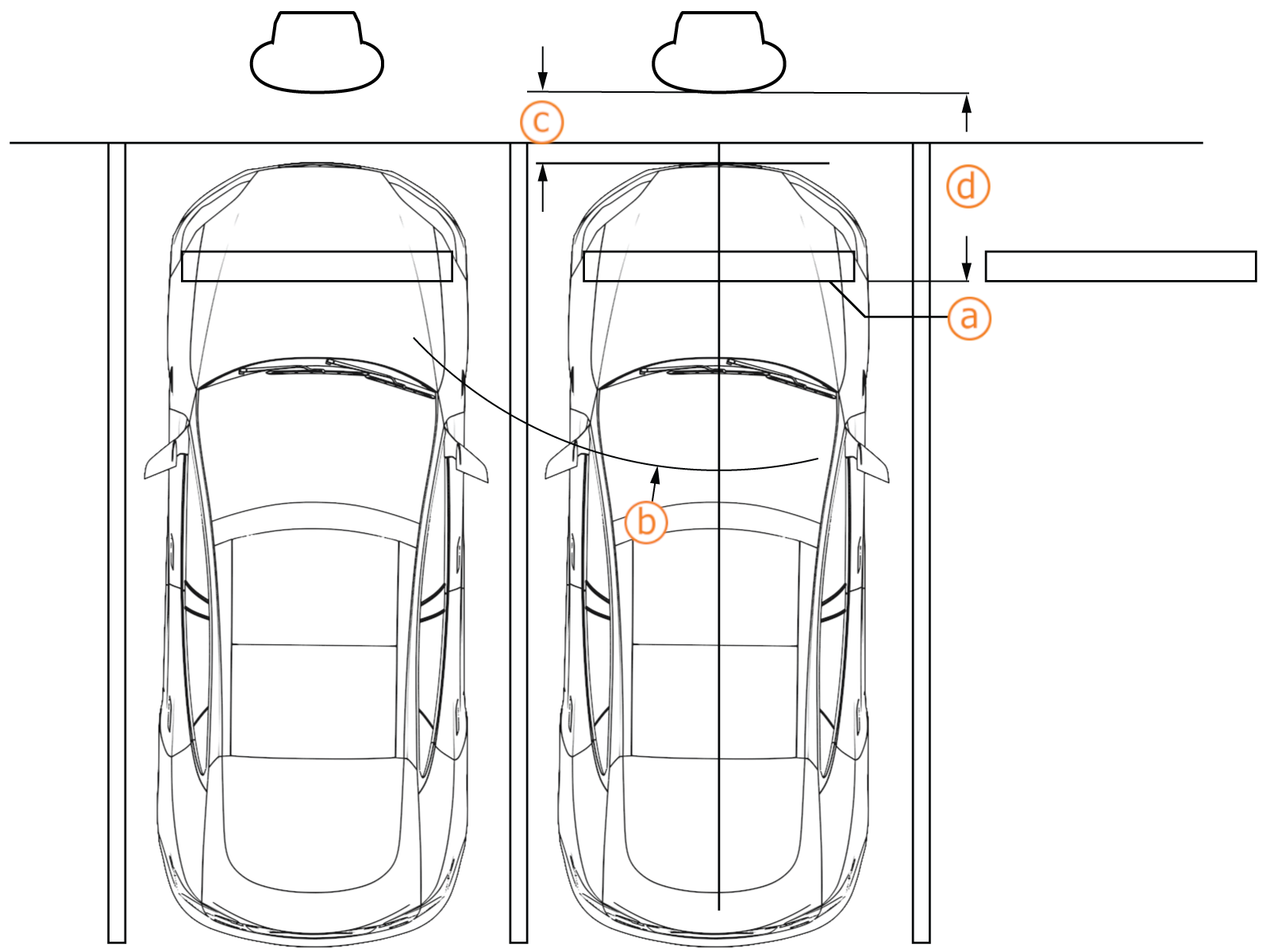
-
Wheel stop, positioned to actively block at least one wheel
-
Cable reach radius: 3.76 m (148 in)
-
Recommended distance for walk-up access: 609 mm (24 in)
-
Recommended distance between wheel stop and station: 1371 mm (54 in) for passenger vehicles
Bollards
-
When bollards are required by code, needed for snowy areas, or needed for curbside spaces, ensure bollard placement does not interfere with removing and replacing charge cables in the station’s holsters.
-
Try to minimize bollard interference with the movement of charge cables between the station and the vehicle. Bollard height is recommended to be no higher than 914 mm (36 in) where needed.
-
Follow the measurements listed for bollards placement:
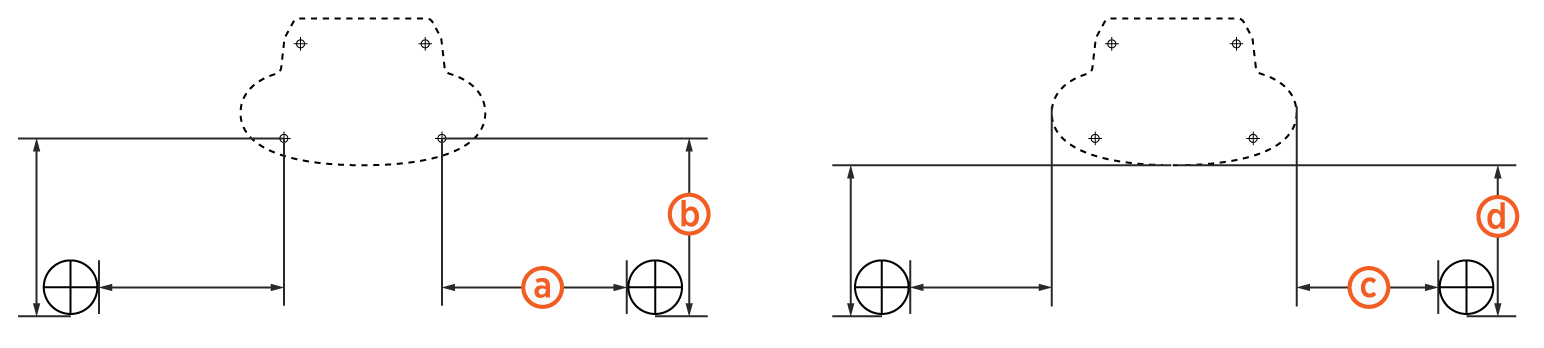
-
Anchor bolt to bollard inside edge: 254 mm (10 in)
-
Anchor bolt to bollard front edge: 424 mm (16.7 in)
-
Power Link 1000 side to bollard inside edge: 122 mm (4.8 in)
-
Power Link 1000 front to bollard front edge: 305 mm (12 in)
Ventilation
Ventilation requirements for Power Block and Power Link 1000 are given below.
Power Block
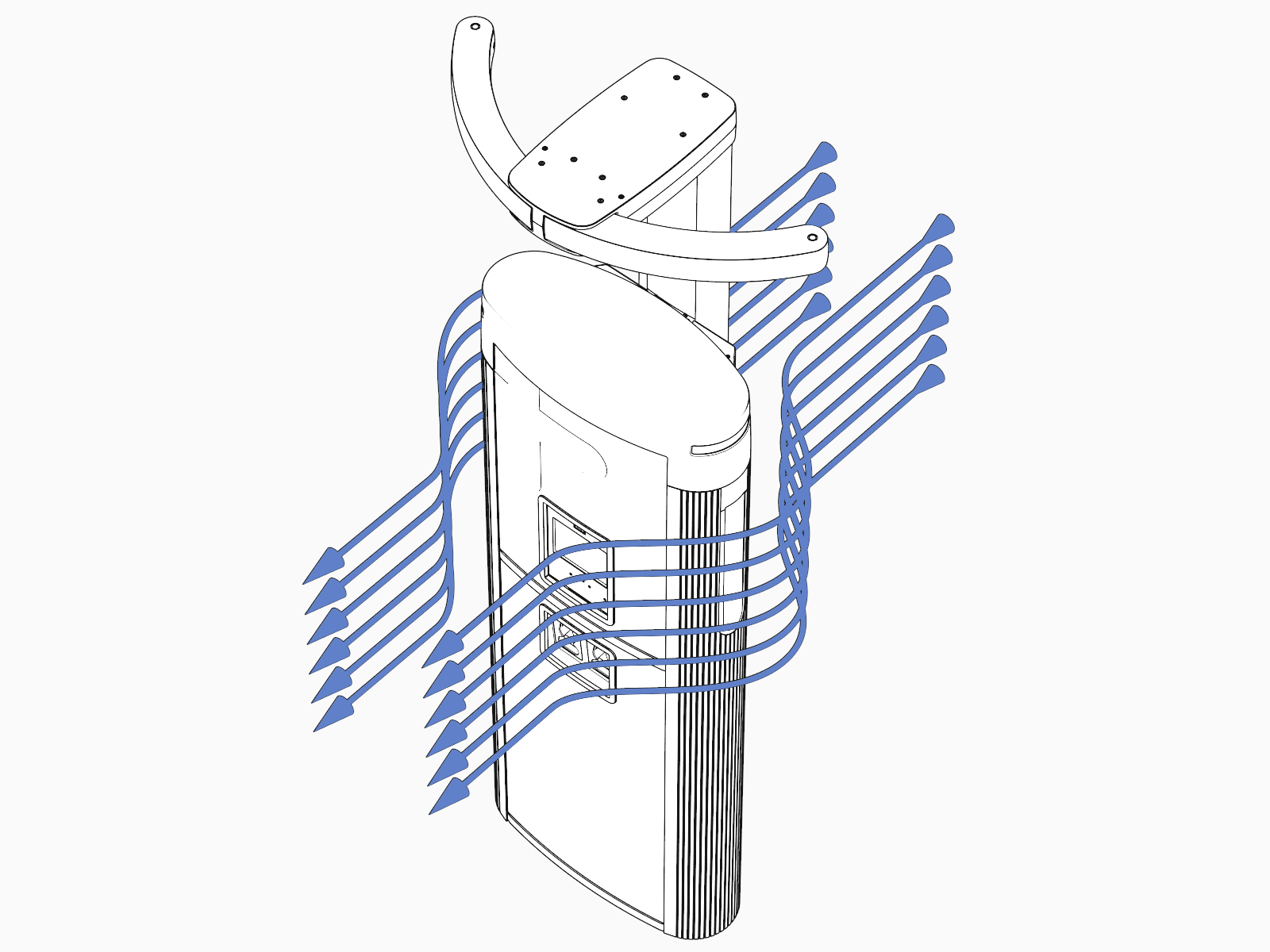
Intake vents are positioned at the front of the Power Block (blue arrows) and exhaust vents are at the rear (orange arrows). When positioning multiple Power Blocks, orient intake and exhaust to avoid recirculation.
Power Block requires 10 kW (34,000 BTU/hr) of heat rejection.

Power Link 1000
Ensure that any installation, especially an indoor installation, has adequate airflow to dissipate heat at maximum operation. The station location must allow fresh ambient airflow and must be free of any objects that might restrict airflow to the station. A station experiencing temperatures in excess of the maximum allowed operating temperature may deliver reduced maximum performance.
Power Link 1000s without liquid cooled cables require 500 W (1,700 BTU/hr) of heat rejection. Power Link 1000s with liquid cooled cables require 5.3 kW (18,000 BTU/hr).
Accessibility
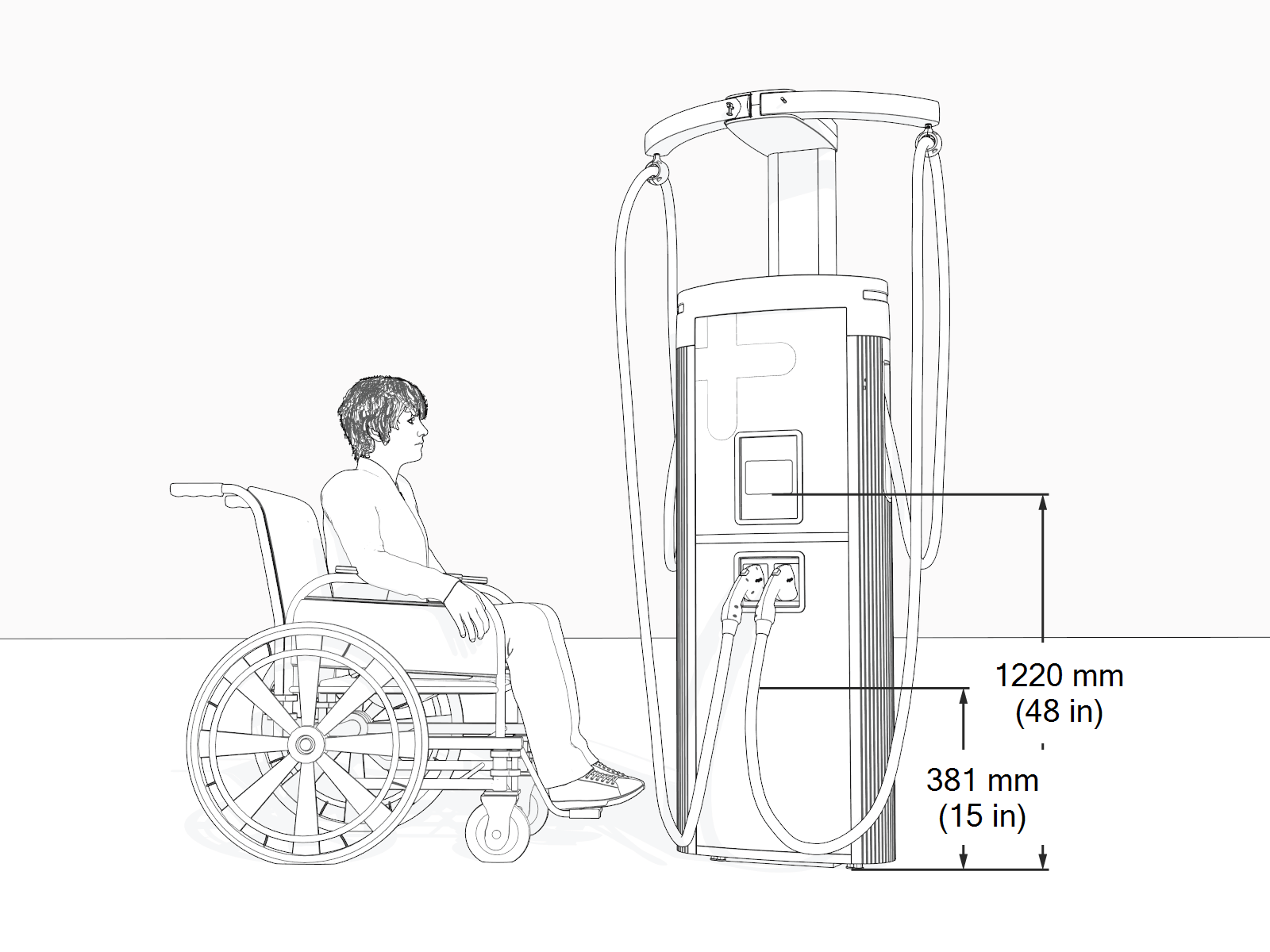
Comply with regional accessibility laws, regulations, and ordinances. The Power Link 1000 charging station must not block ramps or pathways and the height of the interactive display cannot exceed the maximum height as dictated by local laws.
Do not install Power Link 1000 on a raised concrete pad for parking spaces reserved for people with limited mobility. Power Link 1000 meets ADA height requirements when measured from a finished floor or ground plane (i.e., Power Link 1000's all operable parts, such as cable connectors and display, are no higher than 1220 mm or 48 in and no lower than 381 mm or 15 in from a finished floor or ground plane).
Signage
Refer to local and regional code to design the following elements for the site:
-
Any required re-striping of parking spaces
-
EV
Electric Vehicle or Accessible EV Electric Vehicle signs -
EV
Electric Vehicle or Accessible EV Electric Vehicle paint markings on and around the parking spaces
