Civil and Mechanical Design
Use the guidance below to design the civil and mechanical aspects of the site.
Component Dimensions and Weight
The Express 250 is a vertical enclosure with the dimensions shown here.

|
Component |
Weight |
|---|---|
|
Each Power Module |
44 kg (97 lb) |
|
Crated Power Module as shipped |
49.9 kg (110 lbs) |
|
Express 250 with two Power Modules, installed |
339 kg (746 lb) |
|
Express 250 with one Power Module, installed |
295 kg (650 lb) |
|
Crated Express 250 as shipped |
494 kg (1089 lb) |
Pad
The station can be installed on either a newly poured pad or an existing concrete surface. The mounting surface must be smooth and cannot exceed a slope of 6.35 mm per 304.8 mm (0.25 inches per foot).
The concrete pad must either be designed to be site-specific, or must meet these specifications:
-
At least 305 mm (12 in) deep (or deep enough to be 305 mm (12 in) below the frost line)
-
At least 1296 mm (51 in) on each side
-
Contains #4 rebar or larger, top and bottom, 305 mm (12 in) on center
-
Concrete 2500 PSI minimum
The above pad specifications are designed to meet these conditions:
-
170 mph wind speed
-
Wind Risk Category I
-
Wind Exposure D
-
Seismic Importance Factor 1.0
-
Hayward Fault with mapped spectral response accelerations Ss=2.45 S1=1.019
-
Seismic Design Category E
-
Foundation of Sandy Soil with allowable stress = 1500 psf, Cd = 1.33
In some extreme conditions, a larger pad would be required. For sites with less stringent seismic, soil, or wind conditions, a smaller pad might be possible.
If the existing pad does not meet the specifications above, it must be inspected and approved by a structural engineer for the station's dimensions and weight. If needed, give these structural design specifications to the structural engineer for verification:
|
Components |
Value |
|---|---|
|
Product Weight |
340 kg (750 lbs) |
|
Product Height from Ground |
2.230 m (7.317 ft) |
|
Product Width |
0.71 m (2.33 ft) |
|
Product Frontal Area |
Height * Width |
|
CG Height |
1.12 m (3.66 ft) |
|
Number of Anchor Bolts |
4 |
|
Bolt Pattern |
See dimensioned images in this section |
|
Anchor Bolt Size |
M16 (5/8 in) |
|
Anchor Bolt Embedment |
229 mm (9 in) |
Drainage
Ensure any site slopes, walls, or fencing do not trap water around the charging station installation site. The system is only built to withstand 457.2 mm (18 in) of standing water.
Mounting Specifications
The Express 250 is installed on a concrete pad. Details on how to prepare this pad are described later in this guide.
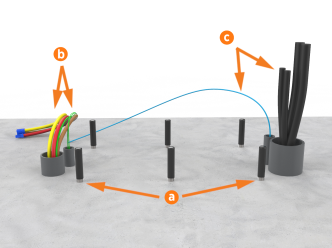
All installations require anchor bolts (a). Standalone installations only require the two conduit stub-ups on the left side, for AC wiring and shunt trip wiring (b). Paired installations also require the wiring shown on the right: DC wiring and Ethernet communication (c).
Clearances
The Express 250 requires minimum functional and service clearances as listed in the table below:
|
Clearance |
Value |
|---|---|
|
Front Clearance |
330.2 mm (13 in) at grade; 609.6mm (24 in) minimum open space |
|
Side Clearance |
711.2 mm (28 in) required; 863.6 mm (34 in) recommended** |
|
Rear Clearance |
304.8 mm (12 in) required; 609.6 mm (24 in) recommended |
|
Top Clearance |
304.8 mm (12 in) |
* Side clearance is measured from extrusion to extrusion.
** Side clearance can be shared between two charging stations. However, if the charge handles of both stations are facing each other, add an extra 254 mm (10 in).
Measurements are provided in millimeters (inches).

-
Service clearance of open space (not necessarily at system grade)
-
Power Moduleservice clearance at grade from the front right anchor, extending 1700 mm (67 in) to the left, without any permanent obstructions (fencing, bollards, wheel stops, etc.)
Rear clearance, and the front and side clearance for Power Module service, must be at grade level +/- 25 mm (1 in).
Refer to the Ventilation section, and check local and regional code, for any additional clearance requirements.
Ventilation
Ensure that any installation, especially an indoor installation, has adequate airflow to dissipate the station’s heat at maximum operation. Each charging station emits approximately 3.3 kW of waste heat at maximum operation.
The station location must allow fresh ambient airflow. Restriction of airflow might result in reduced maximum performance. Do not install a station where it is exposed to air that is heated above ambient temperatures.
In addition to the service clearances listed in the Clearances section, consider these figures for site layout:
-
If a charging station will have a wall directly behind it, minimum rear clearance is 305 mm (12 in).
-
If two charging stations will be positioned back to back, increase the rear clearance to a shared 610 mm (24 in) for both stations to reduce exhaust recirculation.
Wheel Stops
Bollards and wheel stops are not explicitly required by ChargePoint. However, ChargePoint recommends these best practices and considerations when designing the site:
-
Permanent bollards or wheel stops must not encroach upon the Power Module clearance listed in the clearance diagram above. Removable bollards are allowed if service personnel have the ability to move them as needed.
-
Where permitted by code, wheel stops are preferred over bollards for head-in or back-in spaces.
-
When using wheel stops, consider the average vehicle overhang distance from tire to bumper (passenger, bus, etc.), as well as leaving space for the driver to walk up and access the touchscreen. General recommended distances are shown in the wheel stop image below.
-
Position wheel stops to actively block at least one wheel, without presenting a trip hazard to pedestrians walking between vehicles.

-
Wheel stop, positioned to actively block at least one wheel
-
Cable reach radius: 3.76 m (148 in)
-
Recommended distance for walk-up access: 609 mm (24 in)
-
Recommended distance between wheel stop and : 1371 mm (54 in) for passenger vehicles
Bollards
Bollards and wheel stops are not explicitly required by ChargePoint. However, ChargePoint recommends these best practices and considerations when designing the site:
-
Permanent bollards or wheel stops must not encroach upon the Power Module clearance listed in the clearance diagram above. Removable bollards are allowed if service personnel have the ability to move them as needed.
-
Where permitted by code, wheel stops are preferred over bollards for head-in or back-in spaces.
-
When bollards are required by code, needed for snowy areas, or needed for curbside spaces, ensure bollard placement does not interfere with removing and replacing charge cables in the station’s side holsters. General recommended distances are shown in the bollard images below.
-
Try to minimize bollard interference with the movement of charge cables between the station and the vehicle. Bollards are recommended to be no taller than 914 mm (36 in) where needed.
-
No bollard can be placed within 457 mm (18 in) of the station, as measured on-center.
Curbside Bollard Installation

-
Use and service clearance of open space (not necessarily at grade)
-
Unobstructed front service clearance at grade
Head-in or Back-in Space Bollard Installation

-
Use and service clearance of open space (not necessarily at grade)
-
Unobstructed front service clearance at grade
Pairing Previously Installed Charging Stations
If all site construction for paired charging is completed in advance, Express 250 stations can be initially installed as Standalone and paired at a later date. In that case, follow these additional steps:
-
During initial site construction, install DC and communication conduit or ducting (as applicable by region) in advance.
-
Extend side clearance at both DC conduit stub-up locations to 1.2 m (4 ft) to allow space for cable pulling equipment.
-
Run a pull rope through the larger DC conduit before landing the charging stations. Do not pull DC cable in advance, as it is too thick to hide inside the cover panels without risking damage or unwanted electrical contact.
-
Install a fishing tape in the smaller communication conduit to assist with routing the Ethernet cable later. If Ethernet is pulled in advance, leave 317.5 cm (125 in) of wire above grade at each end.
-
Use duct seal compound to seal the ends of the DC and communications conduit stub-ups. Seal the ends of the fishing tape to hang outside the conduit.
-
Install the cover panels and extrusions on the Express 250 stations over the stub-ups as normal.
By only connecting AC wiring (and shunt trip if applicable), each station can perform as a Standalone station until the station owner is ready to pair them. At a later time, the stations can be paired by installing DC conductors, connecting Ethernet communication, and performing a firmware update if required. Refer to the Express 250 Installation Guide for further details.
Once two Express 250 are correctly paired, operation of both stations is inhibited if Ethernet connectivity is lost or one station loses power. This is a safety feature to prevent one Paired station from accidentally powering the other during maintenance.
Accessibility
To meet the accessibility requirements, the Express 250 charging cables are no more than 1220 mm (48 in) above ground and no more than 254 mm (10 in) away.
This complies with American Disability Act (ADA) requirements if the station is installed at grade. If your installation must comply with ADA standards, or the disability access regulations for other regions, consider this when designing the height of the pad or when planning a wall-mounted installation.
This complies with European disability requirements if the station is installed at grade. If your installation must comply with disability access regulations, consider this when designing the height of the pad or when planning a wall-mounted installation.
Also consider site design factors such as placement of bollards, wheel stops, or other vehicle obstacles when planning charging station access for disabled parking stalls. Check disability access regulations for guidance on the clearances needed for wheelchair access to charging cables and user interfaces.
Signage
Refer to local and regional code to design the following elements for the site:
-
Any required re-striping of parking spaces
-
EV
 Electric Vehicle or Accessible EV Electric Vehicle signs
 -
EV
Electric Vehicle or Accessible EV Electric Vehicle paint markings on and around the parking spaces
