Schedule Power Sharing
Scheduled Power Sharing allows you to vary the Circuit, Panel or Site Power Sharing Time of Use (time of day and day of the week) on a recurring basis. For example, the limit could be set to 1 MW on nights and weekends, but to 500 kW during weekdays to avoid demand charges. You can also use scheduled power sharing to override the fixed or Time of Use-varying power limit for a one-time event in the future.
Scheduled charging can be used to simply enable or disable charging at certain hours on an individual station.
This feature is available only in the Enterprise power plan or the Load Management Add-On to the Power or Commercial power plan.
You can configuring scheduled power sharing using the following schedule types:
Time of Use
Time of Use (ToU) is a repeating weekly schedule.
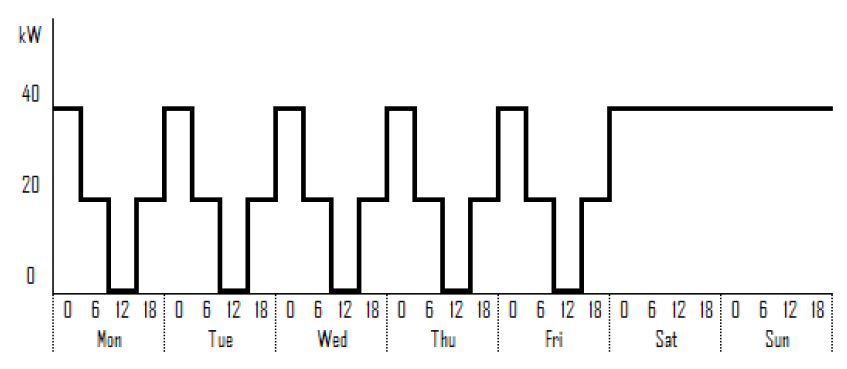
For example, an office wants to limit the amount of power available as follows:
Figure 1: Time of Use
|
Days |
Time |
Power |
|
Monday - Friday |
00:00 – 06:00 |
max 40 kW |
|
Monday - Friday |
06:00 – 12:00 |
max 20 kW |
|
Monday - Friday |
12:00 – 18:00 |
max 0 kW |
|
Monday - Friday |
18:00 – 00:00 |
max 20 kW |
|
Saturday - Sunday |
All day long |
max 40 kW |
One-Time Events
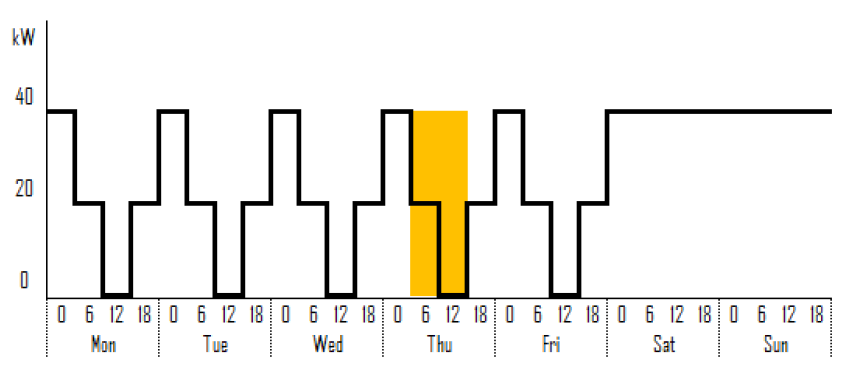
You can override the weekly schedule by scheduling one-time events.
For example, in addition to the previous example, VIP customers will visit this Thursday and will need faster charging for a single day during business hours.
Figure 2: One-Time Events
|
Day |
Time |
Power |
|
Thursday |
06:00 – 18:00 |
max 40 kW |
