Create Admin Roles
To create admin roles, complete the following steps:
-
Log in to ChargePoint Platform.
-
Navigate to Organizations > Admins > New Admin.
-
Enter the following information:
-
Organization: Enter the name of the organization. This option is only applicable is the Administrator type is Organisation admin.
-
First Name: Enter a first name for the admin.
-
Last Name: Enter a last name for the admin.
-
E-mail: Enter an email address for the admin.
-
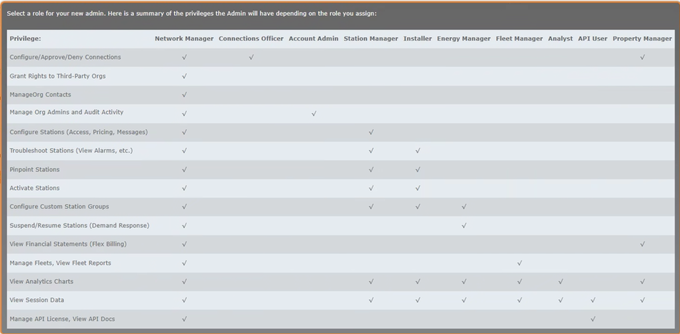
Role: Select a role for the admin in the drop-down list. Hover over the ? icon to view the privileges for each roles.
-
-
Select the Everything Present & Future check-box under Assign Station Group Permissions to allow access to all the station groups present in the organization selected.
-
Select the Everything Present & Future check-box under Assign Driver Group Permissions to allow access to all the driver groups present in the organization selected.
-
Click Add New Admin to apply the changes.
-
Click Cancel to discard the changes and close the window.
Once an admin role is created for a user in the ChargePoint Platform, the user will receive an email from notifications@chargepoint.com prompting them to set up their account and create a new login. For more information, see Set up an Account for the New Admin.
