Grant Objects
Station owners might want to provide other organizations access to their stations to. For instance, tenants in a building that they own, the employees of a different business unit within the parent company, or a fleet of vehicles belonging to a different business will need access the respective stations.
ChargePoint Platform enables object-granting as a way to simplify and streamline the process of setting up station access in third-party situations. In this context, an object is a driver group or a fleet—or even a video ad.
To access the Grant Objects tab, log in to ChargePoint Platform and navigate to Organizations > Grant Objects.
Examples:
Refer to the examples below to understand the process of granting objects in the following scenarios:
-
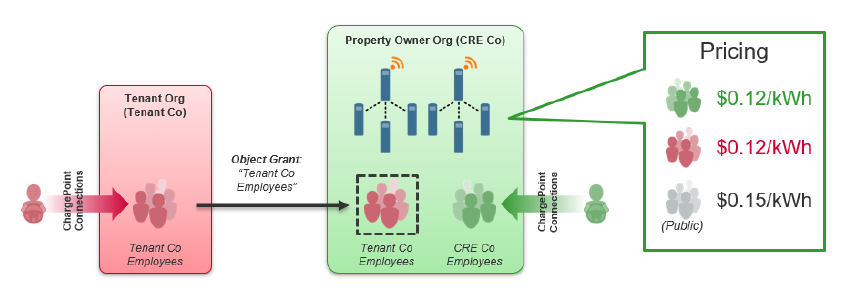
Tenant: CRE Tenant’s Employees get discounted charging while the property owner retains ownership of the stations. Tenants manage their own employee connections.
Figure 1: Grant Objects: Tenants
-
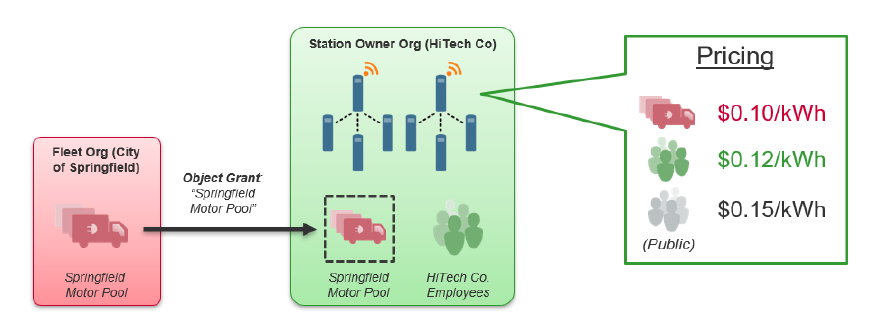
Fleet: Springfield Motor Pool allows fleet and station owners to negotiate special pricing for the fleet while retaining the management of the fleet and stations to their respective owners.
Figure 2: Grant Objects: Fleets
Before You Begin
The granting organization will need one of the following information from the station owner:
-
ChargePoint Organization ID
You can obtain the organization ID from the station owner’s network manager or ChargePoint Platform administrator.
-
ChargePoint Organization Name
Only applicable if the organization you are granting objects to has already granted rights to you first.
You cannot grant objects to a company if it is not already set up as an organization in the ChargePoint Platform.
The granting organization will need the name of the driver group(s), fleet(s), and/or video ad(s) that are to be granted.
