Overview
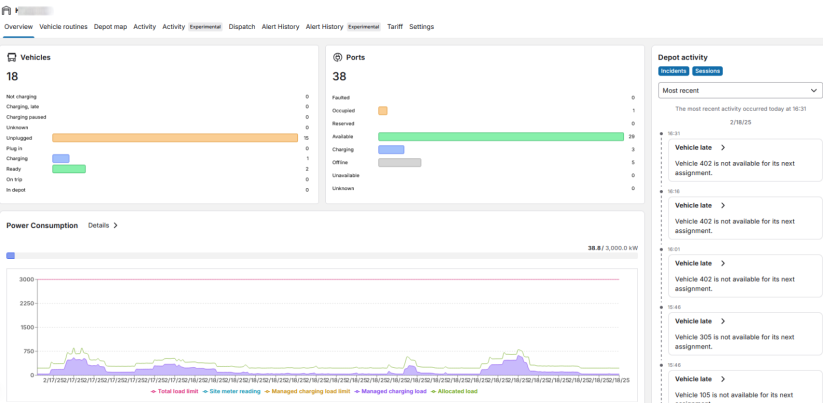
When selecting a desired depot, the overview page will appear showing the key information of the depot on the widgets.
-
Vehicles: Total number of vehicle present in depot as well as their current status:
-
Not charging: The vehicle is fully charged hence the vehicle is not charging.
-
Charging, paused: The charging is paused.
-
Charging, late: The vehicle has insufficient time to be sufficiently charged by departure time.
-
Unknown: Status of the vehicle is unknown maybe the vehicle is offline.
-
Unplugged: The vehicle was unplugged from the charging station.
-
Charging: The vehicle is charging.
-
Ready: The vehicle has finished charging and is ready for operation.
-
-
Ports: Total number of charging ports and its current status:
-
Faulted: The charging session was interrupted due to a charging station fault.
-
Occupied: Station is occupied because the vehicle is charging.
-
Reserved: The station is reserved for usage.
-
Available: Station is available for charging.
-
Charging: Vehicle is charging and station is occupied.
-
Offline: Station might be powered off or unreachable.
-
Unavailable: Station is currently not available.
-
Unknown: Status of the port is unknown.
-
Unreachable: The port is unreachable.
-
-
Power Consumption: The consumption analysis of the depot, including:
-
Total load limit: Maximum recommended load limit for this particular Depot.
-
Managed charging load limit: Limit has been set for the charging stations present in the Depot, not suppose to exceed the set charging limit.
-
Allocated load: Distributing electricity from one source to multiple charging station present in the Depot.
-
Depot Activity: Live incidents and sessions. Vehicle status will be viewed in detailed when the vehicle is plugged into charger or when the vehicle is fully charged. If the Charging station faulted will be viewed in depot activity with the charger name so it is easy to identify.
-
