ChargePoint Platform
Access data and diagnostics, create reports, and manage many features of charging stations in the ChargePoint Platform Dashboard. This applies to all Flex Plus stations (non-Eichrecht-compliant and Eichrecht-compliant). This section describes how to find reporting and diagnostic information about your charging stations.
To explore all the features, log in to the ChargePoint dashboard: eu.chargepoint.com using the login credentials that were created when setting up the station network manager account.
Charging Schedule
You can configure the Flex Plus charging station to charge at different hours to optimize power consumption times using the ChargePoint app.
-
Open the ChargePoint app and click Home.
-
Click Schedule.
-
Enter start and end times.
Your charging station charges during the hours indicated. To withdraw from the charging schedule, slide the Schedule button to Off.
Charging Limit Current
Complete the following steps to set the amount of charging power being delivered to your vehicle.
-
Open the ChargePoint app and click Home.
-
Click Charge Current Limit.
-
Select the desired charge limit.
The maximum amount of energy will be limited to 32 A by design. Other limitations, such us upstream breaker capacity, backplate configuration, upstream energy consumption, request from EV Electric Vehicle, or maximum current limited through the ChargePoint app, might apply.
Generate a Report
-
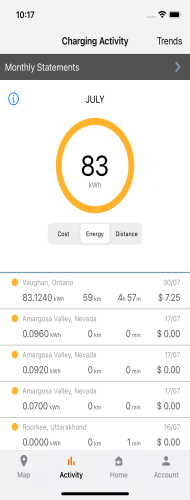
Open the ChargePoint app and click Activity.
-
Select Monthly Statements.