Conformity - Metering and Calibration Law (Eichrecht)
Electric Metering Data
This Flex Plus electric vehicle charging system conforms with German regulations regarding metering and calibration (MessEG, MessEV).
Hardware and software are certified according to the type examination process (Module B and Module D). The Legally Relevant Software (LRS) versions, along with their checksums, are found in the type examination certificate. The checksum of the software installed on the charger can be retrieved from the Info menu. The certificate can be provided under request to ChargePoint.
The LRS version of the charging station is also included in each digitally signed data set for a charging session (OCMF).
Obligations and Notifications
The operator of the charging device is the user of the measuring device within the meaning of Section 31 of the German Measurement and Verification Act (Mess- und Eichgesetz).
The owner of this product must ensure that the calibration validity period for the components in the charging device and for the charging device itself has not been exceeded.
In accordance with §32 Mess- und Eichgesetz (MessEG), the installation and use of a new or renewed measuring instrument must be notified to the competent authority no later than six weeks after commissioning the measuring instrument.
According to the Measurement and Calibration Ordinance - Mess EV Electric Vehicle - Section 34 and Annex 7, the calibration period of an Electric Vehicle Supply system is eight years. Every Calibration authority is responsible for performing the evaluation.
ChargePoint Operators (CPOs) must notify the relevant Calibration Authority within six weeks of commissioning a new or refurbished charging station.
Click on this link for the contact point of the competent authority for each region within Germany: German authorities.
AFIR Requirements
If the measuring instrument is located in a public area and accessible to the general public, use the following link to notify the Bundesnetzagentur (BNetzA): BNetzA.
The ChargePoint operator must notify the BNetzA during the following time frames:
-
No later than two weeks after the commissioning of the measuring device
-
Immediately after the measuring instrument is decommissioned
Charging Data Record
The station stores the signed Charging Data Record (CDR Charging Detail Records), the public key, and its metrological logbook locally and uploads it to the CPO ChargePoint Operator backend.
-
When a charging session starts, the CDR
Charging Detail Records is created and saved on the station by the legally relevant software. Upon completion of the charging session, this CDR Charging Detail Records is digitally signed by the legally relevant software and the data is transmitted to the backend of the CPO ChargePoint Operator. -
The CPO
ChargePoint Operator transmits the signed CDR Charging Detail Records to the e-Mobility Service Provider (eMSP e-Mobility Service Provider). -
The eMSP
e-Mobility Service Provider makes the signed CDR Charging Detail Records available to the driver. -
The driver downloads the signed CDR
Charging Detail Records. -
The driver can check the data by examination using the industry standard transparency software from the SAFE Initiative (www.safe-ev.de). The driver can also ask the Market Supervision office (Eichbehörde) to investigate the invoice.
-
The Market Supervision office requests the logbook and CDR
Charging Detail Records from the CPO ChargePoint Operator. -
The CPO
ChargePoint Operator contacts ChargePoint for the logbooks. -
The Market Supervision office reviews the logbook and CDR
Charging Detail Records. ChargePoint retrieves and gives logbook to CPO ChargePoint Operator. -
CPO
ChargePoint Operator provides data to the Market Supervision office.
The logbook is available on the charging station display in the Settings menu. Visit Check the Logbook for more information.
Flex Plus Station Display
This section lists the display information that contains legally relevant data. Legally relevant data is always rendered on a white paper-like background and is easily identifiable from other non-legally relevant data items.
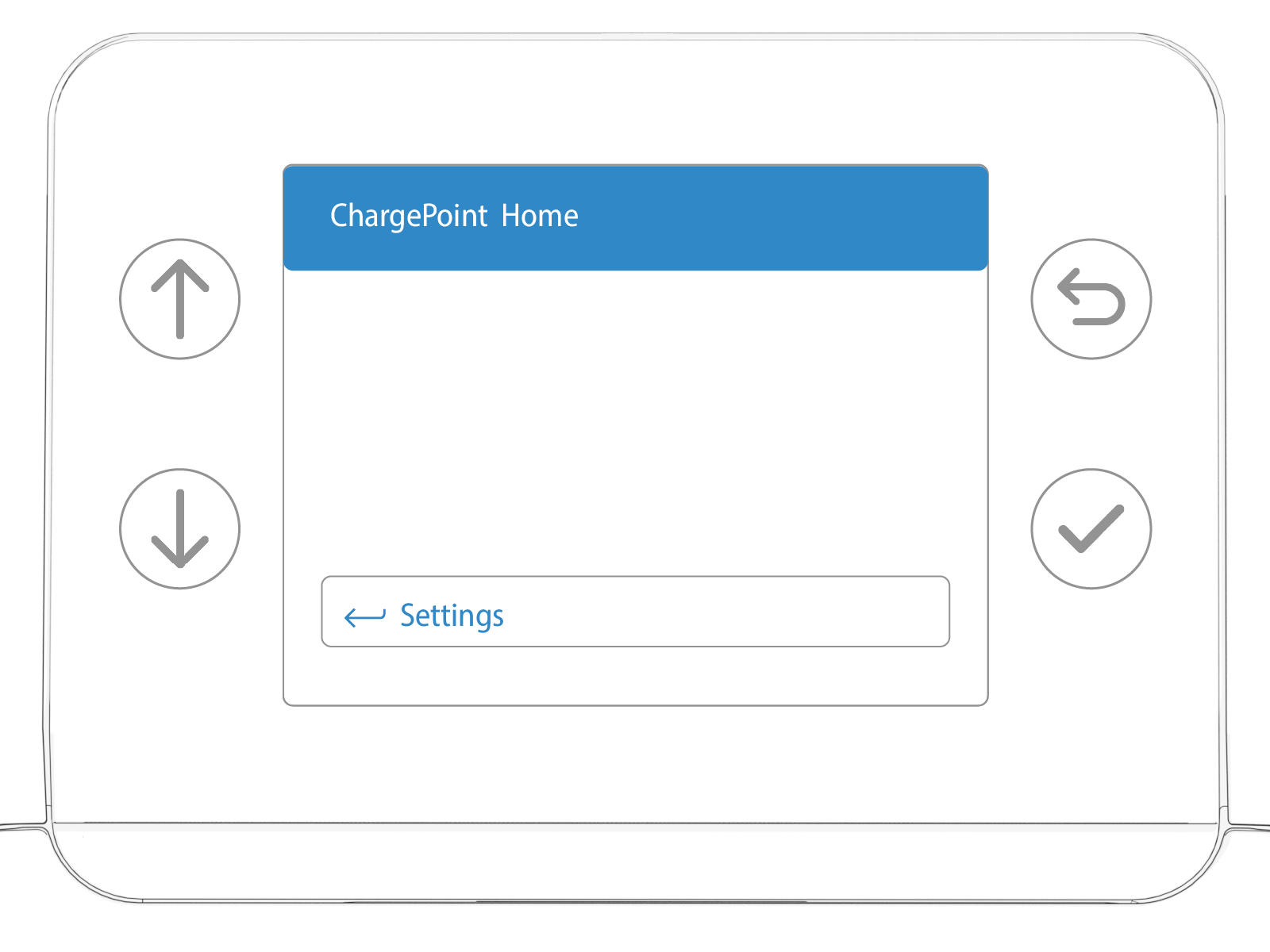
In the front area of the charger you will find 4 touch buttons. Use the up/down arrows to navigate through the menu.
Press the curved arrow to access the menu.
Display During the Charging Process
The electrical energy transferred to your vehicle can be monitored live on the display during an active charging process. All timestamps during and after the charging process appear in local time.
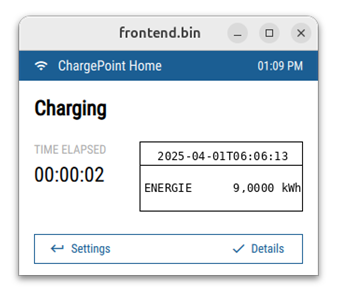
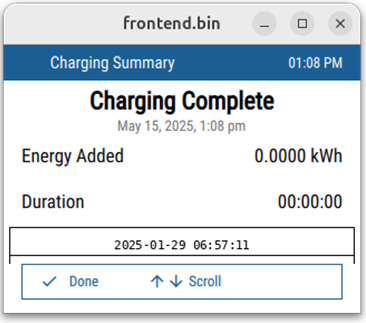
At the end of every charging session you can check the details of the energy transferred, the compensation factor for the cable losses (if any), and the time:
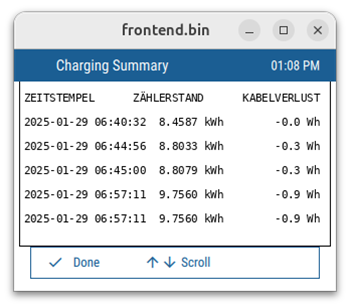
Once the charging session is completed, this information is not be displayed again.
Software Digest
Complete the following steps to obtain the legally relevant software version of the Flex Plus charging station:
-
Log in to ChargePoint and click Energy Meter.
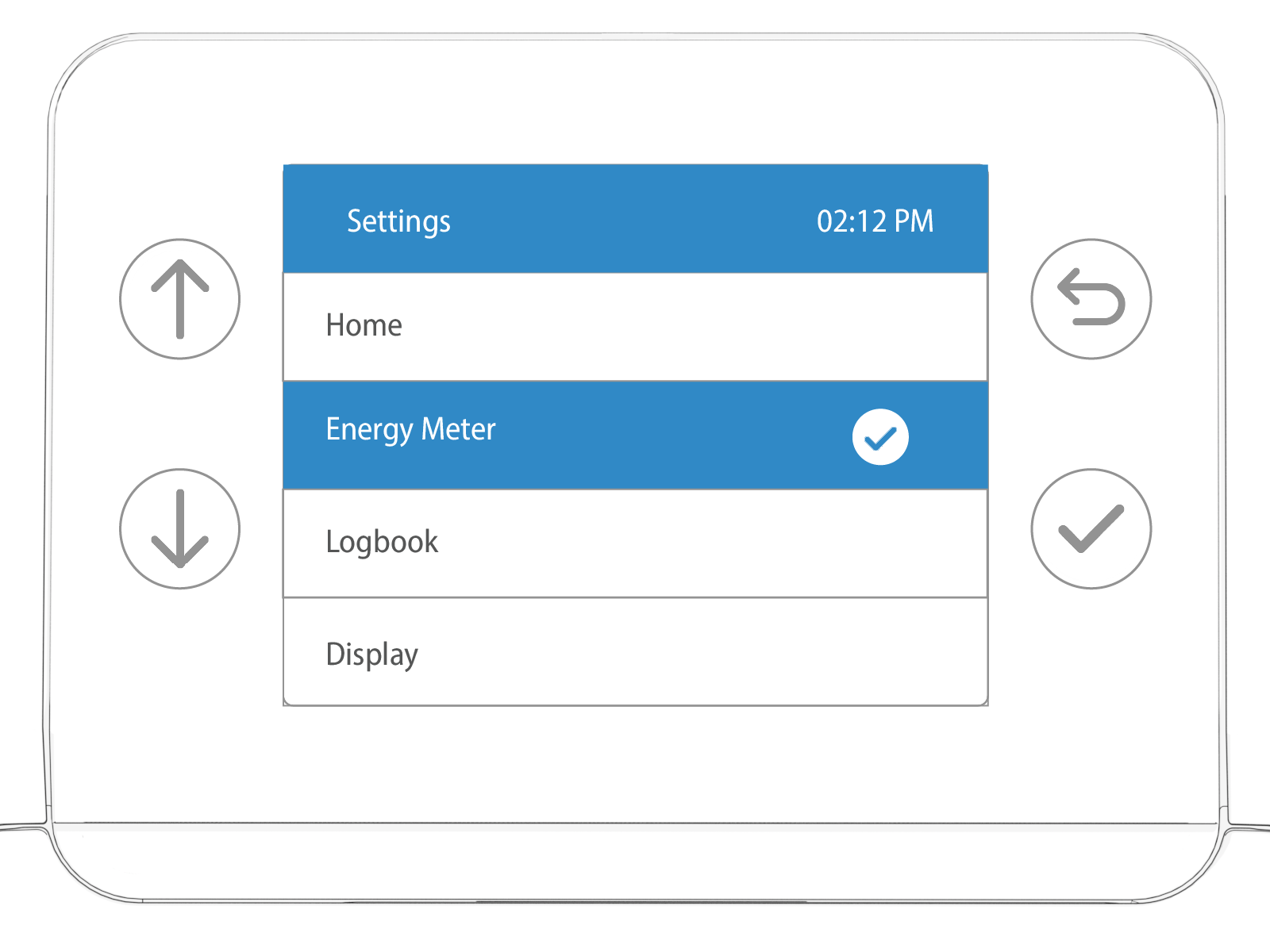
-
Use of the up/down arrows to navigate to Software Digest.
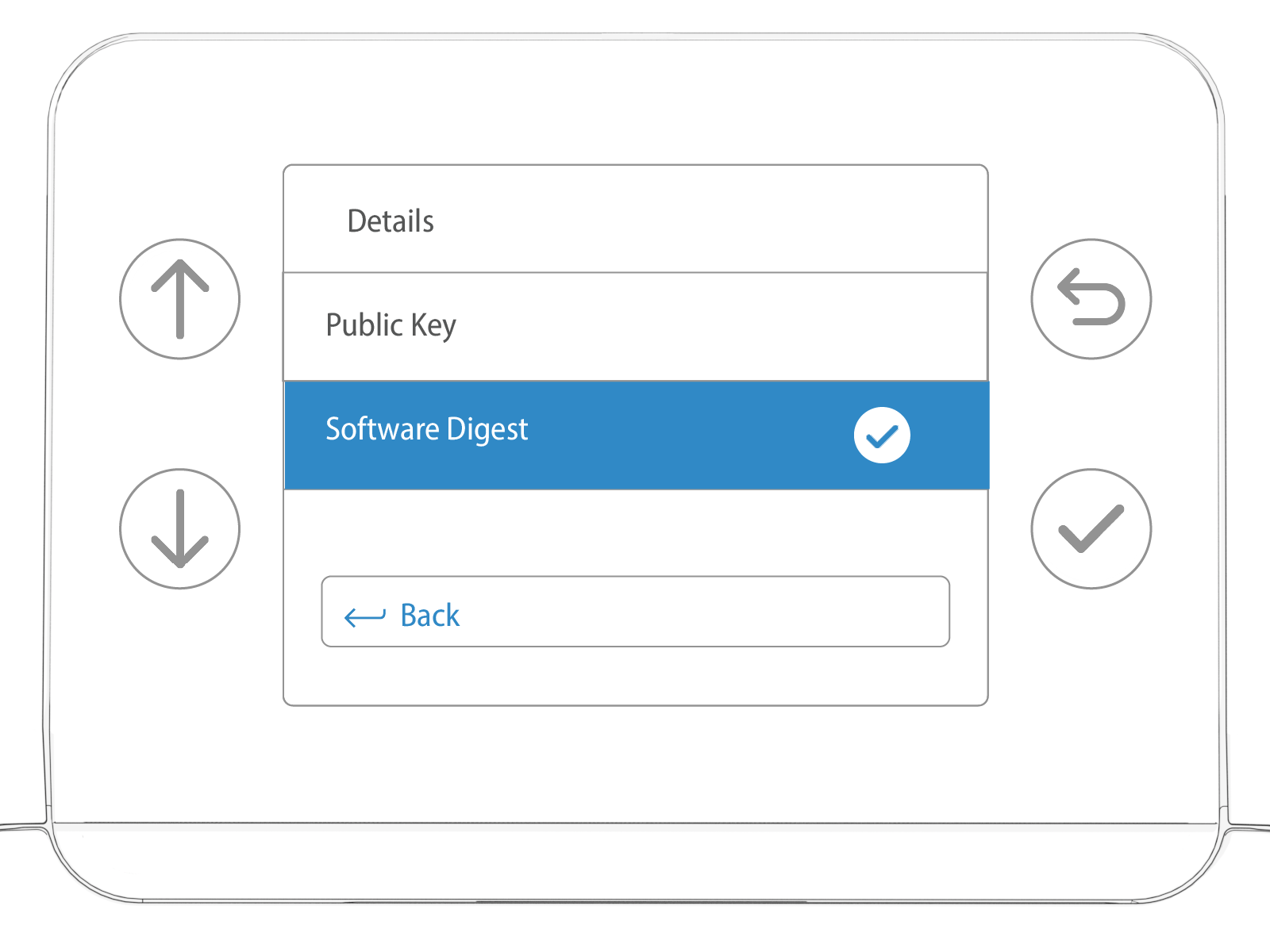
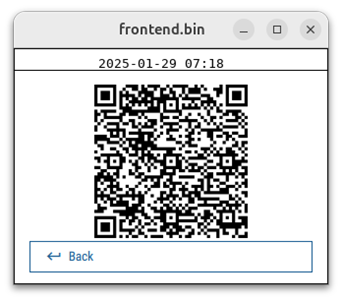
The following QR Quick Response appears. Use your smartphone or a QR Quick Response reader to see the full software digest version of the charging station.
Check the Public Key
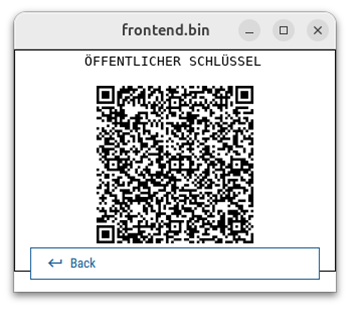
Each charging station has a unique public key which appears as a QR Quick Response code. Complete the steps below to view the public key.
-
Log in to ChargePoint and click Energy Meter.
-
Navigate to Public Key.
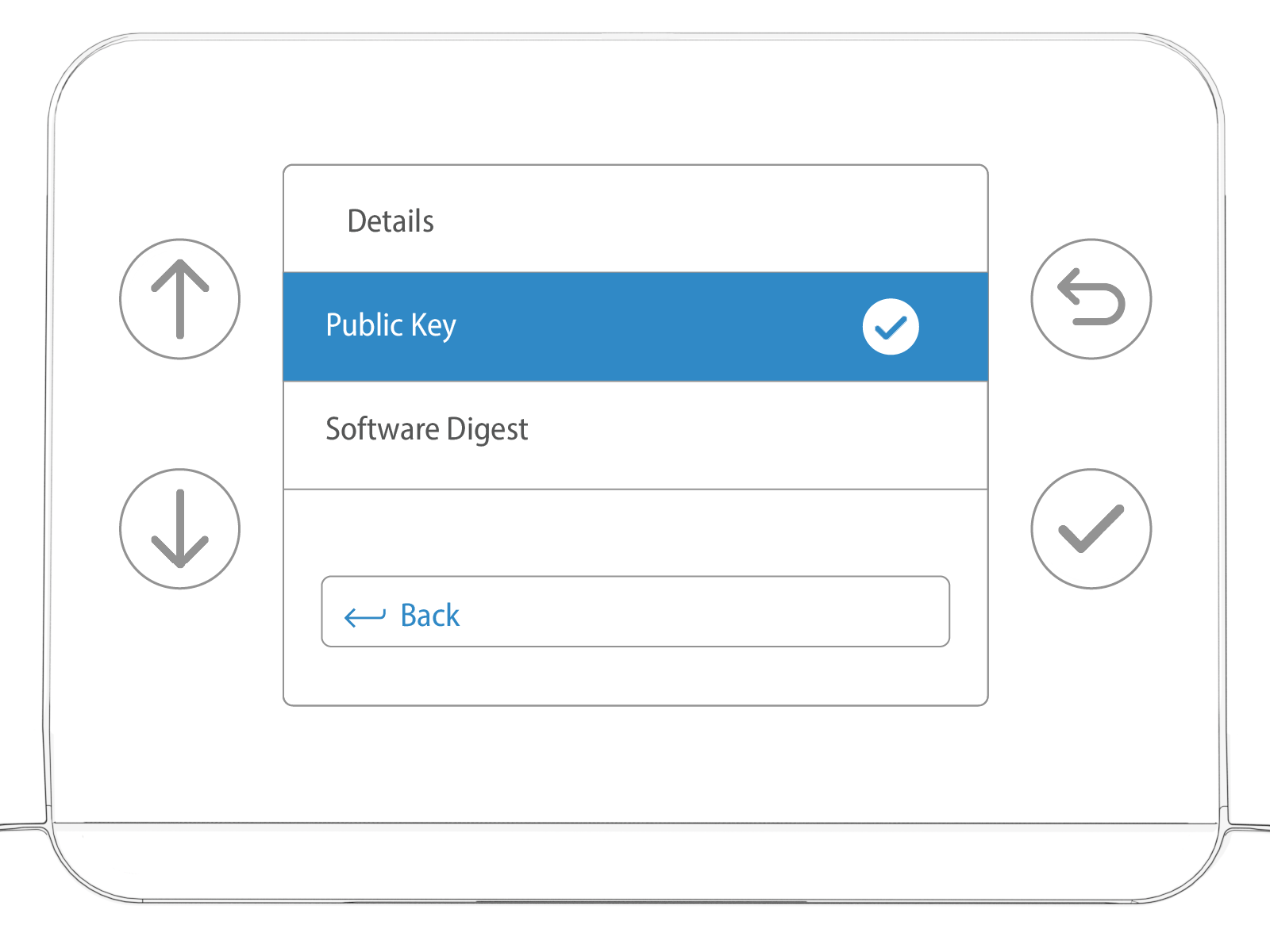
The following QR Quick Response will be displayed. Use your smartphone or QR Quick Response reader to see the full public key of the charging station.
Check the Logbook
The metrological logbook records all events that could affect the accuracy of the measurement. This includes commissioning, parameter changes, and software updates on the station.
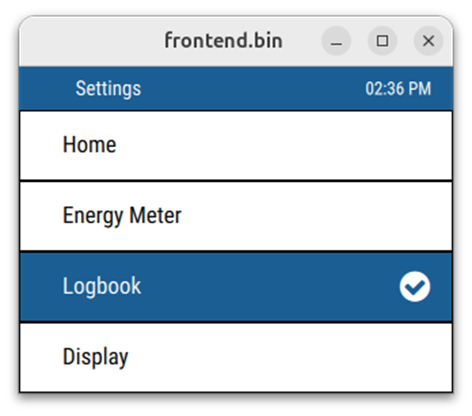
To view the logbook, complete the following steps.
-
Log in to ChargePoint and click Logbook.
-
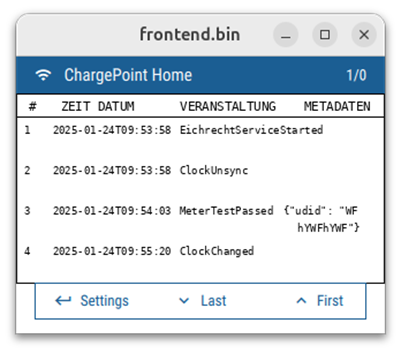
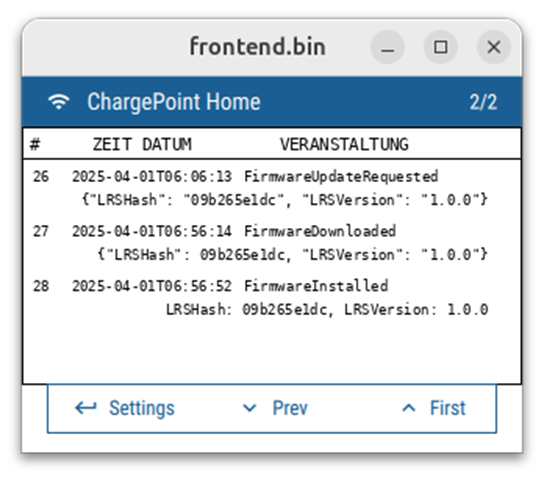
Press the Up and Down arrows to navigate through the logbook pages.
The Eichrecht logbook displays entries with a timestamp in UTC
Coordinated Universal Time format according to ISO 8601.Entries on UDID and LRS hash are truncated in the UI of the Eichrecht logbook. Only the first 4 characters are displayed. The full UDID or LRS hash can be identified via the truncated.
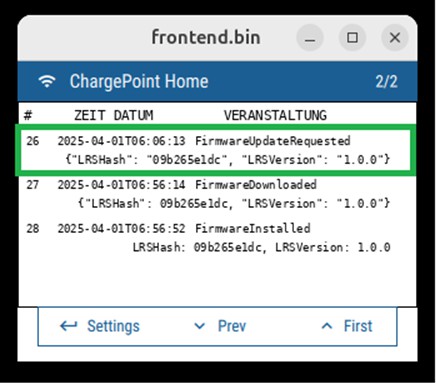
Possible logbook entries
|
Event |
Description |
Data |
|---|---|---|
|
EichrechtServiceStarted |
Eichrecht Service started |
– |
|
EichrechtServiceStopped |
Eichrecht Service Stopped |
– |
|
MeterTestPassed |
Meter is detected by the Chassis-server and has reported signed energy values |
Meter (CPKM3000) UDID |
|
MeterTestFailed |
Meter is not detected |
– |
|
MeterDataCorrupt |
Signed Meter Data authentication fails when received by UCB |
Meter (CPKM3000) UDID |
|
ClockSync |
NTP |
– |
|
ClockUnsync |
NTP |
– |
|
ClockChanged |
Time changed on running system |
– |
|
FirmwareUpdateRequested |
OTA on station started |
Current LRS version New LRS version |
|
FirmwareDownloaded |
The Firmware package is successfully downloaded |
Current LRS version |
|
FirmwareDownloadFailed |
Happens in cases of network outage) |
Current LRS version |
|
FirmwareInstalled |
OTA Completed on station |
Previous LRS version |
|
FirmwareInstallFailed |
OTA Failed |
Current LRS version |
|
ChargingStarted |
Charging Session Started |
Outlet Number Session ID |
|
ChargingSuspended |
Session is suspended |
Outlet Number Session ID |
|
ChargingResumed |
Session is Resumed |
Outlet Number Session ID |
|
ChargingStopped |
Session End |
Outlet Number Session ID |
|
SigningKeyInvalid |
Private is lost or invalid when opened for signing logbook or OCMF Charge Record |
– |
|
MeterReplaced |
Logs the change of the cable correction parameter (update: cable) |
Old parameter New parameter |
|
StationActivated |
Station has been activated |
Eichrecht Activation State. True/False |
Time Sync Display
Each Legally Relevant Display (LRD) bitmap includes a time stamp at the top. On loss of time sync status, a new message “Time Out Of Sync” appears in place of the ISO-formatted time stamp. See the following example.
-
Log in to ChargePoint and click Energy Meter.
-
Navigate to Software Digest.
Time-Synced
Time - Unsynced
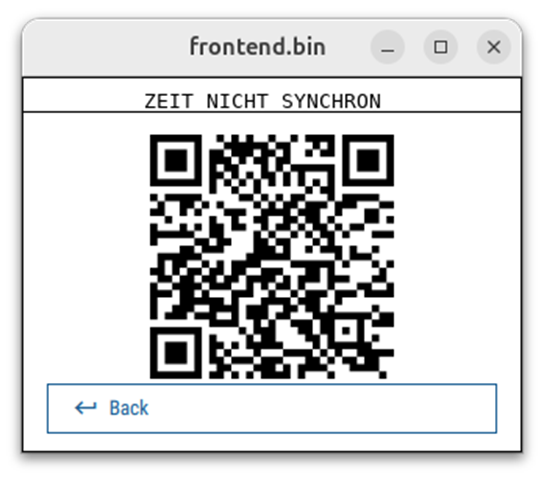
The change in the time synchronization is also recorded in the logbook of the charging station
Energy Meter Details
-
Log in to ChargePoint and click Energy Meter.
-
Navigate to Details.
The information displayed includes the meter energy register, the meter ID, and the serial number, as well as the legally relevant software version of the meter. This data is calibrated and recorded in the factory before the product is shipped, in order to ensure properly digital sealing between the embedded MID Measuring Instruments Directive meter and the full EV Electric Vehicle charging station.
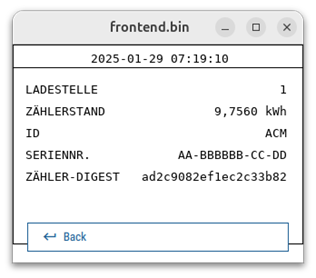
Eichrecht Parameter List
These parameters cannot be observed from the main menu of the charger. Only through the OCMF file.
|
Name |
Event/Usage |
Rights |
Authorized |
Location |
Interface |
|---|---|---|---|---|---|
|
Kabelkorrektur |
Cable replacement |
Read and Write |
Manufacturer (CharePoint) |
Production and field |
Remote |
|
Software Hash |
Firmware update Requested |
Read and Write |
Manufacturer (CharePoint) |
Production and field |
Remote |
|
Energy |
OCMF Dataset |
Read |
Manufacturer, CPO |
Production and field |
Remote, Display |
|
TiemeStamp, Duration |
OCMF Dataset |
Read |
Manufacturer, CPO |
Production and field |
Remote, Display |
The parameter “Kabelkorrektur” defines the cable correction factor applied ot the energy of the charging session.
This parameter has the following values:
-
0 µΩ for the socketed stations.
-
23000 µΩ for the cable attached version (both 5m and 7.5 meters)
Verify Signed Charge Data Records
Flex Plus charging stations produce signed charge data records in the industry-standard OCMF format for permanent storage in the CPO ChargePoint Operator backend. Users can verify a record’s signature using the transparency software 1.3 by the SAFE Initiative. Visit Download Transparency Software for more information.
An example of the OCMF file:
<values>
<value context="Transaction.End" transactionId="4193206880799101095">
<publicKey>MHYwEAYHKoZIzj0CAQYFK4EEACIDYgAE1MkN7mkLvNDpIlh7wPB2+aWsRM8xHNcCi5SlnnCL3g2+JgFOksicI3rQKZA2iOvgItXDUIiO1ogGbH3bEc3Y+QCDXZm+KiPujEz4mjoTyPtHIGGKm8XqwZtauo3EEmjd</publicKey>
<signedData>OCMF|{"FV":"1.0","GI":"CP0001","PG":"T15-4193206880799101095","GV":"lrs_ver: 1.0.0, sw_rel: 2024.05.00.423-alpha","MV":"Chargepoint Inc.","MM":"CPKM3000","MS":"MjUxMzYyQjAwMDAxAAAAAHwzMS0wMDI3MDAtMDQtMDE=","MF":"scfkm+3e8g/pmv+JLwhg+NUpXpW7+JXaVoTw3gGP2oQ=","IS":true,"ID":"0000000000000005","CI
</value></values>
Measurement Dataset
Pagination is ensured via an increasing counter for each measurement. In the OCMF dataset, the counter is placed in the field labeled as “PG” (pagination), following the "T" and preceding the dash, such as “PG”:T5-5333490790308772492. In this example, the number 5 represents the counting number, indicating that this is the fifth session on that station. The port used for that measurement can be identified via the “CI ChargePoint Identification” field in the OCMF dataset. When it equals the integer 1, it signifies the right port (as seen from the front), and if it equals 2, it indicates the left port (as seen from the front).
Time and Clock
The station uses the standard time (legally relevant). The station clock is periodically synchronized with a trusted NTS endpoint. The endpoint is hosted by a cluster of chrony servers which upstream to PTB's public NTS endpoints. The standard time on the station clock is used whenever legally relevant time is required (timestamps on signed CDRs, for example).
Charging Station Logic
After authorization via ChargePoint permitted authorization means, which will be processed on the Flex Plus Control and Communication Module (CPCM), the session start is triggered and executed. The CPKM3000 MID Measuring Instruments Directive meter measures energy and sends this data to the CPCM of the station periodically and at certain events, such as the end of the session. From there on, additional information, such as timestamps and user ID will be added to the data set and sent to the ChargePoint backend. Cable losses are also designated in the CPCM. During and after the charging session, the Eichrecht relevant info appears both on the station display and in the driver portal.
Charging Session Invoices / Receipts
ChargePoint offers EV Electric Vehicle drivers different ways to retrieve an invoice/receipt.
If you have a ChargePoint account and/or the ChargePoint app, you can get view receipts, including the amount billed, for every charging session in Charging Activity.
Complete the following steps to see charging activity invoices or receipts :
-
Log in to ChargePoint and click Charging Session.
-
Click on the finished charging session.
-
Click Receipt.
If you used a credit or debit card, or your ChargePoint account is linked to a credit or debit card, you can also retrieve the receipt by clicking on this link: Request a Receipt. For more information, visit ChargePoint receipts.
Tamper Proof Labels
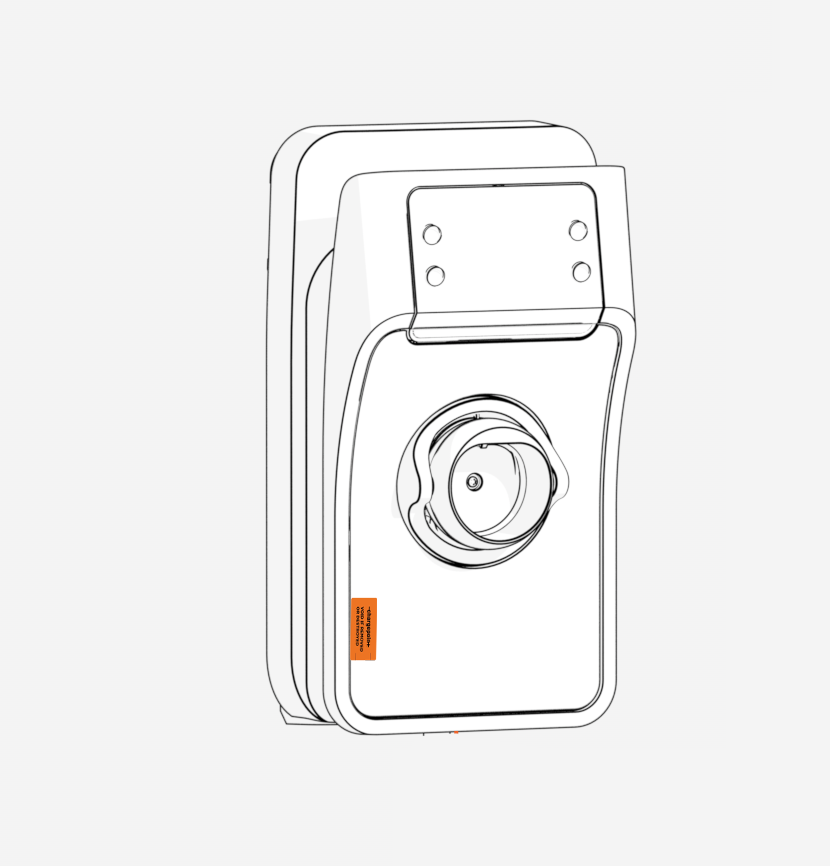
Components of Flex Plus charging stations have self destructive tamper proof labels. Tamper proof labels are applied by the manufacturer. The following message remains if the label is removed: * VOID IF REMOVED OR DESTROYED.
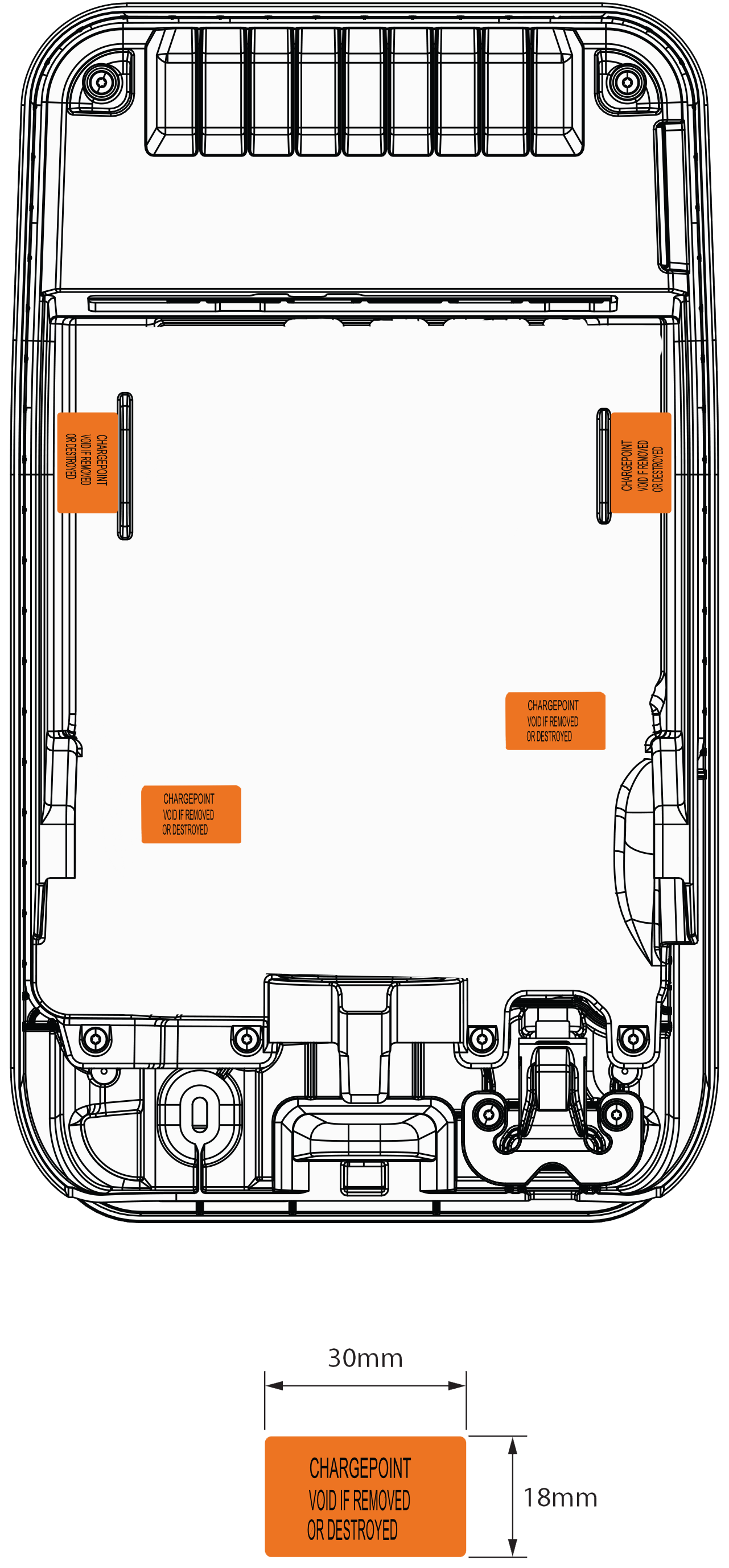
RFID
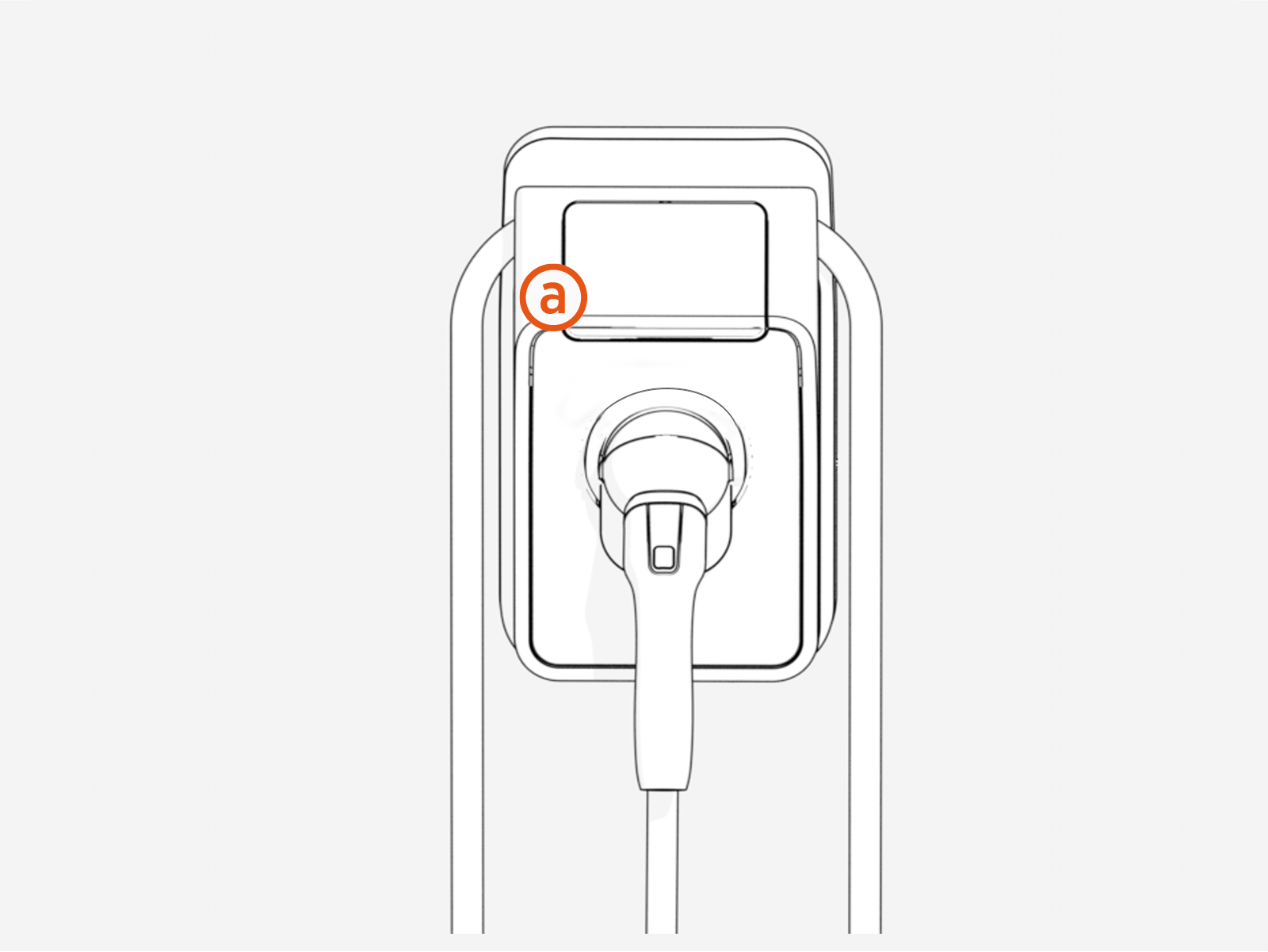
The RFID Radio Frequency IDentification interface is located on the front of the charging station (a), surrounding the display. The below picture indicates the area to swap the RFID Radio Frequency IDentification card. Place a RFID Radio Frequency IDentification card in this field for the charging station to read the card.
Identifier
| Details |
Type plate |
Display |
OCMF data package |
Logbook |
|---|---|---|---|---|
|
Serial number of the charging device (=counter) |
Complete and in plain text |
Complete and coded |
|
Only the first 10 characters of the coded form. |
|
Version of the LRS hash software relevant for calibration.
|
|
Complete via QR |
Complete and in plain text |
|
|
Version of the charge controller software.
|
|
|
Complete and in plain text |
|
Download Transparency Software
The charging data you receive from Flex Plus or your mobility provider is verified using transparency software, which is developed and distributed by the industry association SAFE e.V. For Flex Plus charging stations, you will need transparency software version 1.3.0 . This is the only version that has been conformity-assessed in connection with the Flex Plus and the only one that can provide legally valid verification results. As a ChargePoint customer, you can find the download link directly in the charging receipt.
SAFE-Transparency software 1.3 (Flex Plus)
All Versions of the Transparency Software Require Java
All versions of the SAFE transparency software require a current Java Development Kit (JDK), which you can download for free from Oracle:
https://www.oracle.com/java/technologies/downloads/.
For all versions of the SAFE transparency software, you will find the checksums (to verify the authenticity of the software) as well as live images at:
https://www.safe-ev.de/de/transparenzsoftware_versionen.php
Using and Displaying Data in the SAFE Transparency Software 1.3 (Flex Plus)
A general guide for using the transparency software can be found via the link provided in the previous section.
The data records from the Flex Plus can be checked using the standard workflow described in the manual. This manual also provides detailed explanations of all displayed data and fields. Since the transparency software is neither developed nor maintained by ChargePoint, ChargePoint has no influence over the user interface or the presentation.
Device-Specific Notes on the Transparency Software:
-
All displayed values (start, intermediate and end) are compensated values. The “CL” value is subtracted at that point with the actual meter The start value CL is always 0.0 and that coincides with actual reading. For all other values, CL contains the difference between the compensated and uncompensated reading.
-
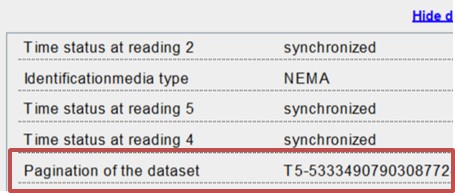
Pagination is ensured by an ascending counter for each measurement. In the OCMF data record, this counter is found in the field with the key "PG" after the letter T and before the hyphen, for example:
"PG":T5-5333490790308772492
where the number 5 is the count number, indicating that this is the fifth session at this charging station.
-
The field "CI
ChargePoint Identification" in the OCMF data record indicates which connector was used for a measurement. If the value is 1, it refers to the right connector (when viewed from the front), and if the value is 2, it refers to the left connector (when viewed from the front). -
In case of an error reading the meter value or timestamp, an additional “E” (Energy Error) or “t” (Time Error) is displayed next to the respective meter reading or timestamp.
Test Instructions for Eichrecht Tests in Field Devices
This section outlines the procedures and requirements for conducting Eichrecht compliance tests on field devices.
Testing of Operational Equipment
This section describes the tests to be carried out in the context of testing operational equipment. All tests are to be carried out for each charging point.
The tests described represent only one permissible procedure. Similar alternatives are permitted at the discretion of the person carrying out the tests. The tests essentially cover the following categories:
-
Quality checks.
-
Functional tests including accuracy testing.
Quality Testing
The following list needs to be available before and during the evaluation of the charger on site:
-
Physical structure of the charging device
-
Address/location of the charger
-
Charger Serial number and software version
-
MID
Measuring Instruments Directive meter serial number and software version -
Type plate inscriptions (Product specifications)
-
Tamper proof sealings.
Furthermore, testing in accordance with the BMP* documents listed in section 1.6, the necessary manufacturer's documents and GMP-P-6-1 or PTB test rules volume 6 (third edition, parts B and D) are to be used. Among others, this applies to:
-
Compensation factor (when using the type 2 connected charging cables)
-
Comparing the crypto module public key with the public key displayed on the Flex Plus display
-
Comparing the legal time with the NTS server used
-
Checking functionality of the statutory log book
-
Checking that the MID
Measuring Instruments Directive meter serial number on the meter menu information matches the MID Measuring Instruments Directive meter serial number in the OCMF data packet (coded) -
Checking the energy register on the charger matches the signed OCMF data record
-
Checking that the accuracy of the MID
Measuring Instruments Directive meter and/or the EV Electric Vehicle Charger matches the Type Certification. The EC-type examination certificate and relevant documents can be provided to government or state recognized bodies by ChargePoint upon request.
Functional tests including accuracy testing
As part of the functional tests, at least one complete charging process is to be carried out per charging point with the charging device. At least one means of identification must be used to perform functional and accuracy testing.
The charging device can be connected to the back-end portal for remote display via mobile radio. The type of connection is specified on the hardware side.
Accuracy testing and functional testing can be carried out as follows:
-
Start the charging process by connecting a vehicle or a vehicle simulator and authenticating the customer (tester) at the charging station using a means of identification.
-
Monitor the energy output via the live display. The counter reading increases when current flows
-
End the charging process, either by stopping the charging session by the user or the charger.
The measurement deviation of the charging device is determined by comparing the energy measured by the charging device with a standard calibrated power meter within the same time interval. ChargePoint recommends for the charging session to be at least 1 minute long or a total energy of 0.3 kWh. The inspector can decide to change these parameters.
The measurement error of the charging device must not exceed the value specified for Class A meters in MID Measuring Instruments Directive (Annex V, Table 2,) which is 2%.
Measuring Instruments Directive electric meter, the error shall not exceed the values specified for Class B meters in MID Measuring Instruments Directive (Annex V, Table 2,) which is 1%.
Complete these steps to check data authenticity:
-
Obtain the OCMF data record which the EMSP provides to the customer via the EMSP web portal together with the invoice.
-
Retrieve data packets from the e-mail or the portal labelled with the charging device signature.
-
Check the signature using the transparency and display software.
More information is available in Section 5 of the Type Approval Certificate (BMP).
Special test equipment or test software
The following equipment is necessary to test the equipment:
-
An electrical test load simulating an electric vehicle and that can be used to draw energy from the charging device with at least two different current intensity levels under a three-phase symmetrical load and under a single-phase load with a symmetrical multiphase voltage.
-
A cable adapter simulating an electric vehicle that is plugged into the charging station drop-off point.
-
A standard power measuring device which is connected between the electrical vehicle charging station and the electric emulator or electric vehicle. The standard power measuring device has a traceable metrology in accordance with Section 47 MessEG.
-
A computer connected to the Internet for accessing the portal which the EMSP uses to provide the signed data packets for testing (remote display). In the case of testing devices before they are placed on the market (module D or F), a charging device operator and an EMSP may have to be emulated. The computer must have a Windows operating system that allows the transparency and display software to be used to check the signature of the data packets. It must be ensured that the computer is free of malware and that the operating system is not compromised. This can be done, for example, by booting the test computer with a "live operating system" from a USB
Universal Serial Bus stick, the memory content of which can be reliably assumed to be uncompromised due to its known origins and history. -
The transparency and display or signature check software to visually check the authenticity of transmitted data.
-
Means of identification to be able to initiate a charging process on the charging device.
-
The logbook can be reliably read on the Falcon display. To make it easier to read the log book entries, the manufacturer can additionally make the signed log book entries available via the ChargePoint Cloud.
Calibration and Adjustment Procedures
Calibrations and adjustments are not provided in the context of monitoring operational devices.
Measurement Accuracy Information According to Type Examination Certificate
The operator of the charging device is the user of the measuring device within the meaning of Section 31
of the Measurement and Calibration Act.
-
The charging device is only considered to be used for its intended purpose in accordance with calibration regulations if the meter installed in it are not exposed to environmental conditions other than those for which their EC-type examination certificate was issued.
-
The user of this product must also register the public key specified on the charging device for the charging points with the Federal Network Agency in its registration form! Without this declaration, it is not possible to operate the column in accordance with calibration regulations. Web link: https://www.bundesnetzagentur.de/DE/Sachgebiete/ElektrizitaetundGas/Unternehmen_Institutionen/E-Mobilitaet/start.html
-
The user of this product must ensure that the calibration periods for the components in the charging device and for the charging device itself are not exceeded.
-
The user of this product must ensure that the charging devices are taken out of service in a timely manner if it is no longer possible to operate them in accordance with calibration regulations due to errors or faults displayed on the human-machine interface relevant to calibration regulations. The catalogue of error and fault messages in these operating instructions must be observed.
-
The user must (also) permanently store any signed data packets read from the charging device in accordance with pagination and without any gaps that they have in their possession. They must be stored in hardware dedicated to this purpose or in the EMSP or back-end system through corresponding agreements ("dedicated storage"), and these must be kept available for authorized third parties (operating obligation of the store). Permanent means that the data must not only be stored until the business transaction is completed, but at least until the expiry of possible legal redress periods for the business transaction. No substitute values may be generated for accounting purposes for data that does not exist.
-
The user of this product must provide an operating manual approved by the CSA in electronic format for users of measured values who obtain the measured values from this product from them who and use them in business transactions. In particular, the user of this product must provide information regarding No. II "Requirements for the user of the measured values from the charging device".
-
Users of this product have a duty of disclosure in accordance with Section 32 MessEG (excerpt): Section 32 Duty of disclosure (1) Anyone using new or upgraded measuring devices must inform the competent authority under state law no later than six weeks after commissioning.
-
If deemed necessary by authorized authorities, the measuring device user must be able to provide the complete content of the dedicated local or memory in the EMSP or back-end system including all data packages from the billing period.
Requirements for those using measured values from the charging device (EMSP) Those using the measured values must comply with Section 33 of the MessEG:
-
Section 33 MessEG (quote)
-
Section 33 Requirements for the use of measured values
-
Values for measured quantities may only be stated or used in commercial or business dealings or for measurements in public interest if a measuring instrument has been used to determine them in accordance with their intended purpose and the values are attributable to the respective measurement result, unless otherwise specified in the ordinance pursuant to Section 41 number 2. Other provisions under federal law that serve comparable protective purposes continue to apply.
-
Anyone using measured values must, as far as they are able, ensure that the measuring device meets the legal requirements and must have the person using the measuring device confirm that they meet these obligations.
-
Anyone using measured values must ensure that invoices, insofar as they are based on measured values, can be reproduced in a simple manner by the person for whom the invoices are intended, in order to verify stated measured values and, if necessary, provide suitable aids for the purposes referred to in number 1.
This provision gives rise to the following specific obligations for those using the measured values in accordance with calibration regulations:
-
The contract between the EMSP and the customer must unequivocally stipulate that the contract only covers the supply of electrical energy and not the duration of the charging service.
-
The time stamps on the measured values come from a watch in the charging device that is not certified in accordance with measurement and calibration regulations. They must therefore not be used to classify the measured values.
-
The EMSP must ensure that the customer is automatically provided with proof of the measurement and the information identifying the business transaction after completion of the measurement and at the latest by the time of billing, unless the customer expressly waives this. The following information can be used to identify the business transaction:
-
Name of the EMSP
-
Start and end times of the charging process
-
Charged energy in kWh
-
Credit card number
-
-
If the customer requests proof that the measurement results from the charging device have been correctly transferred to the invoice, the person responsible for the measurement values is obligated to provide this in accordance with Section 33 (3) of the European Union (MessEG). If the customer requests reliable proof in permanent format in accordance with Appendix 2 10.2 MessEV, the person using the measured values is obligated to provide these. The EMSP must inform its customers about these obligations in an appropriate form.
This can be done in the following ways, for example, and depending on the authentication method:-
When charging with a continuing obligation in the form of a textual contract
-
When using one-off charging (ad-hoc charging) via an APP or mobile website, together with proof via e-mail or SMS
-
When using one-off charging (ad-hoc charging) using a (contactless) credit card together with proof of the account statement
-
-
The EMSP must automatically provide the customer with the data packages, including a signature, that are relevant for accounting after the measurement has been completed, and no later than when the billing takes place. This must be issued in a way that the documents can be checked for authenticity using the transparency and display software. The data packets can be made available via channels that have not been tested in accordance with calibration regulations in the following ways and depending on the authentication method:
-
When charging with a continuing obligation, an e-mail or access to a back-end system
-
When using one-off charging via APP or mobile website via e-mail or SMS
-
When using one-off charging using a (contactless) credit card, the bank statement and the associated access to a back-end system
In addition, the EMSP must provide the customer with transparency and display software associated with the charging device in order to be able to provide information that the data packets are accurate using the transparency and display software. This can be done by referring to the supply source in the customer's operating instructions or via the channels mentioned above.
-
-
The EMSP must be able to show, in a verifiable manner, which means of identification were used to initiate the charging process associated with a specific measured value. This means that they must be able to prove that they have correctly assigned the personal identification data to each individual business transaction and billed measured value. The EMSP must inform its customers about this obligation in an appropriate form.
-
The EMSP may only use values for billing purposes for which data packets are available in a dedicated memory, if applicable, that is either in the charging device and/or in the memory of the EMSP or back-end system. Surrogate values must not be generated for billing purposes.
-
The EMSP must conclude appropriate agreements with the operator of the charging device to ensure that the operator stores the data packets used for billing purposes for a sufficient period of time to be able to complete the associated business transactions.
-
In the event of a justified purchase requisition querying the purposes of carrying out these calibrations, performing diagnostic tests and implementing usage monitoring measures, the EMSP must facilitate authentication of product copies associated with these operating instructions by providing suitable means of identification.
-
All of the aforementioned obligations also apply to the EMSP as a user of measured within the meaning of Section 33 MessEG if they obtain the measured values from the charging devices via a roaming service provider.
