Prepare for Installation
This section describes how to prepare for the installation.
- If the charging station is not installed, commissioned, or serviced by a ChargePoint certified technician using a ChargePoint-approved method, it is excluded from all ChargePoint and other warranties and ChargePoint is not responsible.
- You must be a licensed electrician and complete training at https://www.chargepoint.com/partners/training-certification to become ChargePoint certified and to access ChargePoint's web-based installer tools or ChargePoint Installer app.
Check Site Readiness
The Power Link 1000 can be installed on either a newly poured pad or an existing concrete surface. The Power Link 1000 also supports wiring run above ground for locations where no underground wiring access exists (such as parking garages) or where underground junction boxes are not permitted.
If not installed correctly, the ChargePoint charging station may pose a fall hazard, leading to death, personal injury, or property damage. Always use the provided Concrete Mounting Template or a ChargePoint approved surface mounting solution, to install the ChargePoint charging station. Always install in accordance with applicable codes and standards using licensed professionals. Non approved installation methods are performed at the risk of the contractor and void the Limited One-Year Parts Exchange Warranty.
Before beginning work, check that the site meets these civil and mechanical requirements:
|
Express Plus Power Link 1000 Pre-Installation Checklist |
|||||
|---|---|---|---|---|---|
|
The concrete pad for each station must be fully cured and smooth, and must not exceed a slope of approximately 20 mm per meter (0.25 in per ft). Remove any concrete that is not level with the rest of the surface so you can level the components. Use a grinder or a hammer and chisel to remove any bumps in the concrete. |
☐ | |||
|
The concrete pad for each station either has a site drawing approved by a structural engineer for this specific site, or is an existing pad that has been approved by a structural engineer for the dimensions and weight of the station. | ☐ | |||
|
The concrete pad for each station must conform to the design requirements listed in the Power Link 1000 Site Design Guide. |
☐ | |||
|
Walls, fences, or slopes must not prevent water from draining from the pad. |
☐ | |||
|
You have sufficient space around the installation pad to use a forklift and other lifting equipment, unpack crates, remove packing materials, and allow two people to freely move throughout the area. |
☐ | |||
Power Link 1000 Readiness
Ensure that the Power Link 1000 is ready for installation. Refer to the following topics for more information:
Concrete Mounting Template (CMT)
If the Power Link 1000 is pedestal-mounted and using stub-up wiring, ensure the Power Link 1000 Concrete Mounting Template (CMT) is already embedded in the concrete pad.

|
Space For |
Max. Size |
Max. Quantity |
|---|---|---|
|
(a) DC input conductors' conduit entry |
Each up to 91 mm (3.5 in) trade size conduit |
2 |
|
(b) 48 V DC wires' and Cat6 Shielded Twisted Pair (STP |
21 mm (3/4 in) trade size conduit Note: Check site drawings. |
3 |
|
(c) M16 anchor bolts entry |
76 mm (3 in) above concrete for mounting Power Link 1000 |
4 |
Clearances
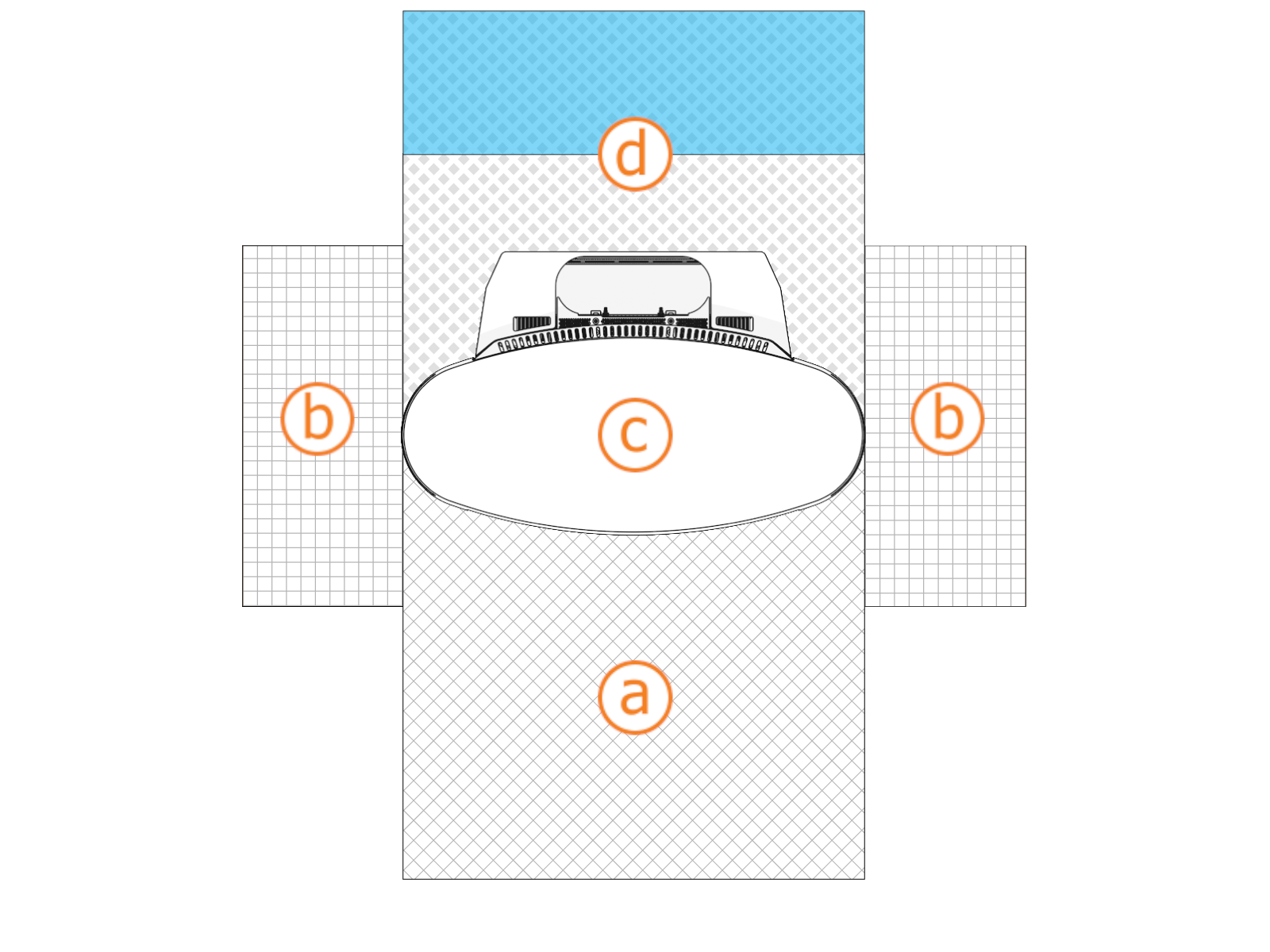
Image not to scale.
|
Power Link 1000 |
Clearance | |
|---|---|---|
|
(a) Front |
Minimum open space |
610 mm (24 in) |
|
Door swing + width of unit |
730 mm (28 3/4 in) |
|
|
(b) Side |
305 mm (12 in) from top corner to top corner Two Power Link 1000 units can share side clearance provided adequate clearance is allowed for Cable Management Kit (CMK Note: CMK |
|
| (c) Top |
Pedestal mounted: |
26 mm (1 in) from top of Cable Management Kit (CMK |
|
Overhead mounted: |
305 mm (12 in) from top of Power Link 1000 |
|
|
(d) Rear |
Note: If two Power Link 1000 are positioned back-to-back, there must be at least 610 mm (24 in) of shared clearance. |
|
You will need greater clearance for special methods and accessories.
| Special Method | Clearance | |
|---|---|---|
|
Surface conduit entry |
|
You must meet additional site requirements for special methods and accessories. See the Power Link 1000 Site Design Guide.
General Estimates for Lifting
|
Power Link 1000 Configuration |
Power Link 1000
|
Charging Cable Weight |
Cable Management Kit (includes swingarms) |
|---|---|---|---|
|
Standard |
208 kg (459 lbs) |
~3.2–3.5 kg/m (7 - 8 lbs) longer lengths vary |
20 kg (44 lbs) |
|
Overhead Mounted
|
120 kg (265 lbs) |
— |
Electrical Readiness
If the site does not meet these basic requirements, contact ChargePoint before continuing.
-
The appropriate circuit protection and metering is in place at the installation site.
-
A grounding conductor that complies with local codes is properly grounded to earth at the service equipment or, when supplied by a separate system, at the supply transformer.
-
Wi-Fi
 Wireless Fidelity and cellular signal strength meet the requirements stated in the Power Link 1000 Site Design Guide.
For questions about site specifications, refer to the Power Link 1000 Datasheet and Power Link 1000 Site Design Guide.
Required Tools and Materials
Installing the station requires at least two people. Additionally, the installer must bring the following tools and materials. These are not provided by ChargePoint.
|
Tools |
|||
|
|
Forklift
|
||
|
|
Stepladder |
|
Lock out/tag out equipment |
|
|
Hard hat |
|
Cut-resistant gloves |
|
|
Safety glasses |
|
Head lamp |
|
|
Measuring tape or other tool to measure height, length, and distance |
|
Level |
|
|
Use hand to tighten |
|
Box cutter |
|
|
Phillips screwdriver set
|
|
Flat head screwdriver |
|
|
Torx wrench set
|
|
Torx security wrench
|
|
|
Torque wrenches for 4 to 95 Nm (3 to 70 ft-lb) NOTE: Only for Overhead CMK |
|
Adjustable wrench |
|
|
Socket wrench set including deep sockets, up to 25 mm |
|
Cable puller or fish tape |
|
|
Hydraulic hole punch tool (to cut 4 inch holes in gland plate) |
|
Conduit cutters (to cut up to 4 inch conduits) |
|
|
Multimeter with Cat III 1000 V ratings, such as Fluke 87V or similar |
|
Ethernet tester such as a Klein Tools VDV526-052 VDV LAN |
|
|
Wire strippers, including Ethernet (Cat6 STP |
|
Ethernet (RJ45) connector crimping tool |
|
|
Wire cutters, including Ethernet (Cat6 STP |
|
Lug crimping tool |
|
|
Dieelectric grease |
|
Torque paint pen |
|
|
Cable ties |
|
Permanent marker |
|
|
Isopropyl wipes and towel roll |
|
Duct seal compound |
|
|
Coolant funnel Two gallon coolant |
|
Padlock provided by station owner if required (for security panel on Power Block) |
|
|
Wire brush (to remove concrete from bolts) |
|
Broom and vacuum |
|
|
Smartphone with: Internet connectivity |
|
ChargePoint installer login credentials |
|
|
QR |
|
Exact location of stations or units, including parking space |
|
|
Ferrule crimp tool (for 16 mm2 or 6 AWG |
|
|










































Tightening Torque
The tables below provides tightening torque values for installing Power Link 1000.
|
Component (xFasteners) |
Component Material |
Tool |
Torque |
|
Plastic |
T25 Security |
1 Nm (10 in-lb) |
|
Plastic |
7 mm socket T20 Torx T25 Security |
1.7 Nm (15 in-lb) |
|
|
13 mm socket |
11 Nm (97 in-lb) |
|
Metal |
8 mm hex |
4.5 Nm (40 in-lb) |
|
Metal |
T20 Torx T25 Security |
2.8 Nm (25 in-lb) |
|
Plastic |
T25 Security |
|
|
Metal |
4.5 Nm (40 in-lb) |
|
|
10 mm socket |
5.6 Nm (50 in-lb) |
|
|
T25 Security |
||
|
17 mm socket |
19 Nm (14 ft-lb) |
|
|
24 mm deep socket |
54.2 Nm (40 ft-lb) |
|
|
94.9 Nm (70 ft-lb) |
||
|
Metal |
6 mm hex |
13.5 Nm (120 in-lb) |
|
- |
Flathead screwdriver |
4 Nm (36 in-lb) |
|
Per site plan |
||
Materials
You will need the following materials for installation:
-
Ground conductors as required by site drawings
-
DC conductors as required by site drawings
-
48 V DC wiring as required by site drawings
-
Power Link 1000 DC lugs:
-
Copper plated compression lugs (not mechanical)
-
Must fit M12 stud size
-
Must fit 44.5 mm (1.75 in) hole spacing
-
2-hole specified for North America
-
Maximum tongue width:
-
≤ 48 mm if 2 conductors per line
or
-
≤ 24.5 mm if 3 conductors per line
Check site drawings for quantity of lugs.
-
-
-
Cat6 Shielded Twisted Pair (STP
Shielded Twisted Pair) Ethernet wiringFTP
File Transport Protocol, UTP, and lesser grades of cable do not have the required noise immunity -
RJ45 shielded connectors
-
Type LB conduit body (for overhead installation only) - maximum 3 inch
Check Shipping Crates
Each Power Link 1000 ships in the packages listed below. Ensure you have all components at the installation site.
Always transport and store the charging components in their original packaging. Use appropriate lifting equipment (forklift or crane, lifting straps, and any corresponding attachments and accessories). Ensure the load rating of all lifting equipment is adequate for the weight of the crated components.
Leave components in the shipping crate until needed. When removing, protect them from damage (such as scratches) by placing them flat on a blanket or tarp, face up. Do not stand up cover panels, as they may be knocked or blown over. Cover charging connectors to prevent damage or ingress.
|
Power Link 1000 |
|
|
Installation Kit |
|
Express Plus Guides
Access ChargePoint documents at ChargePoint Product Reference Documentation.
|
Document |
Content |
Primary Audiences |
|
Datasheet |
Full station specifications |
Site designer, installer, and station owner |
|
Site Design Guide |
Civil, mechanical, and electrical guidelines to scope and construct the site |
Site designer or engineer of record |
|
Concrete Mounting Template Guide |
Instructions to embed the charging station template in a concrete pad with anchor bolts and conduit placement (these may also be included in the Site Design Guide) |
Site construction contractor |
|
Surface Conduit Entry Kit Guide |
Instructions for sites where conduit cannot be run underground |
Installer |
|
Construction Signoff Form |
Checklists used by contractors to ensure the site is correctly completed and ready for product installation |
Site construction contractor |
|
Installation Guide |
Anchoring, wiring, and powering on |
Installer |
|
Operation and Maintenance Guide |
Operation and preventive maintenance information |
Station owner, facility manager, and technician |
|
Service Guide |
Component replacement procedures, including optional components |
Service technician |
|
Declaration of Conformity |
Statement of conformity with directives |
Purchasers and public |
