Pair Express 280 Charging Stations
This section describes the steps needed to connect the DC conductors, connect Ethernet communication, and install labels.
If the Express 280 is being installed as a Standalone station, skip this section and continue to Install Side Panels, Power Modules, and the Touchscreen.
Route DC Conductors
The wiring on the DC side (the right side of the charging station) is only connected for Paired installations. Do not connect this wiring for Standalone installations. To route DC conductors, configure the following steps:
RISK OF SHOCK. Leave the power disconnected at the service panel to BOTH Express 280 charging stations to be paired. Keep power off for both circuits until all cover panels are correctly installed and the work scope is completed. FAILURE TO FOLLOW THESE INSTRUCTIONS CAN RESULT IN SERIOUS INJURY OR LOSS OF LIFE.
DC terminal blocks on the Express 280 can accept a maximum wire size of 300 kcmil. Check site plans and local code for site-specific requirements.
-
Label each end of each DC conductor to aid installation as follows:
-
Station 1 A+ (output) on one end and Station 2 B1+ (input) on the other end
-
Station 1 A- (output) on one end and Station 2 B1- (input) on the other end
-
Station 1 B1+ (input) on one end and Station 2 A+ (output) on the other end
-
Station 1 B1- (input) on one end and Station 2 A- (output) on the other end
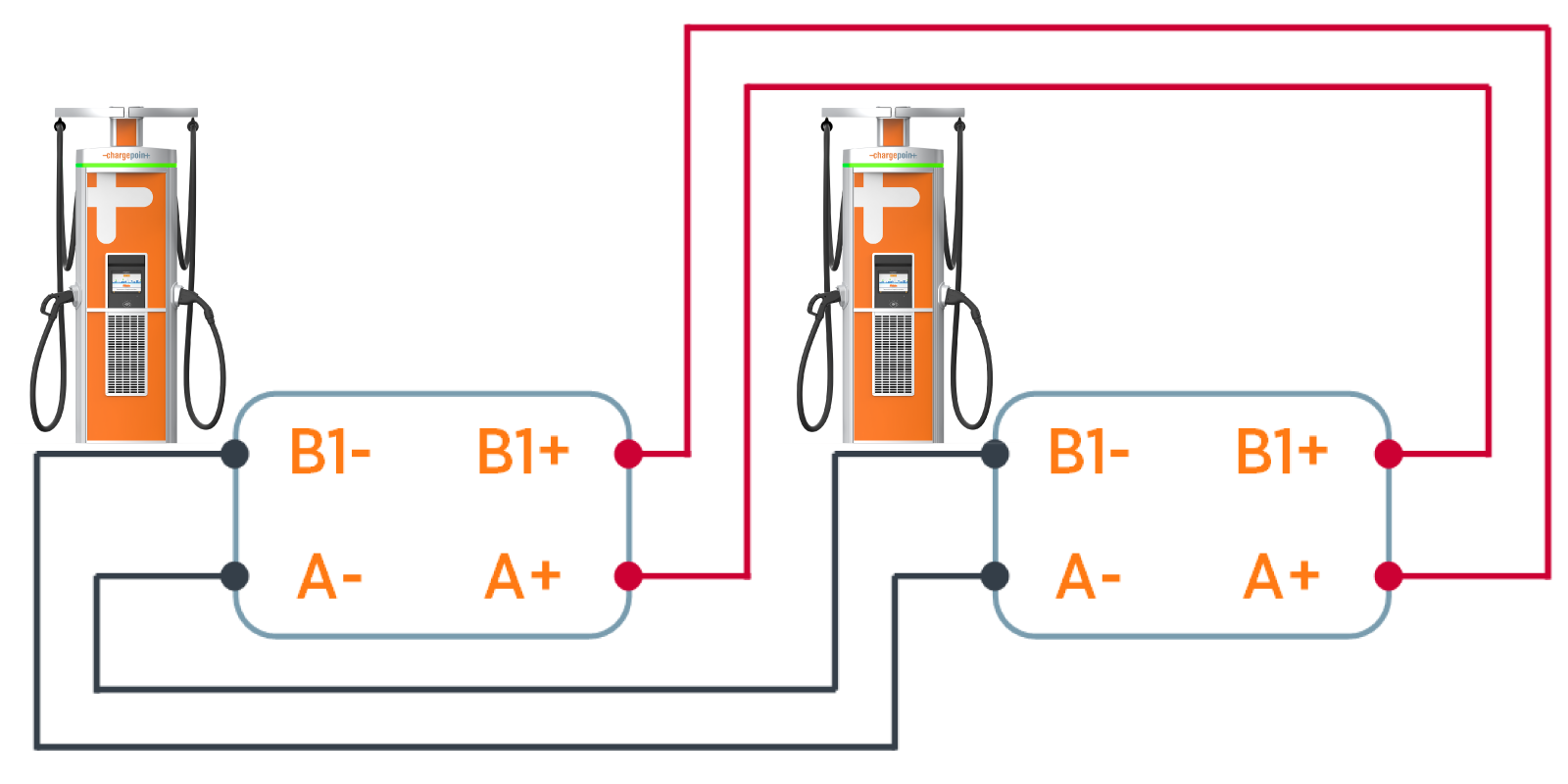
Be sure to connect positive to positive, and negative to negative, on the same wire. Do not reverse the polarity.
-
-
Use the multimeter and toner attachment to test each DC conductor for continuity. If any errors are found, adjust the conductor labels.
If the installation requires above-ground conduit, visit Surface Conduit Entry Box for steps to install a Surface Conduit Entry (SCE
 Surface Conduit Entry) kit.
 -
Remove the installed nuts from the DC A and B terminal blocks.

-
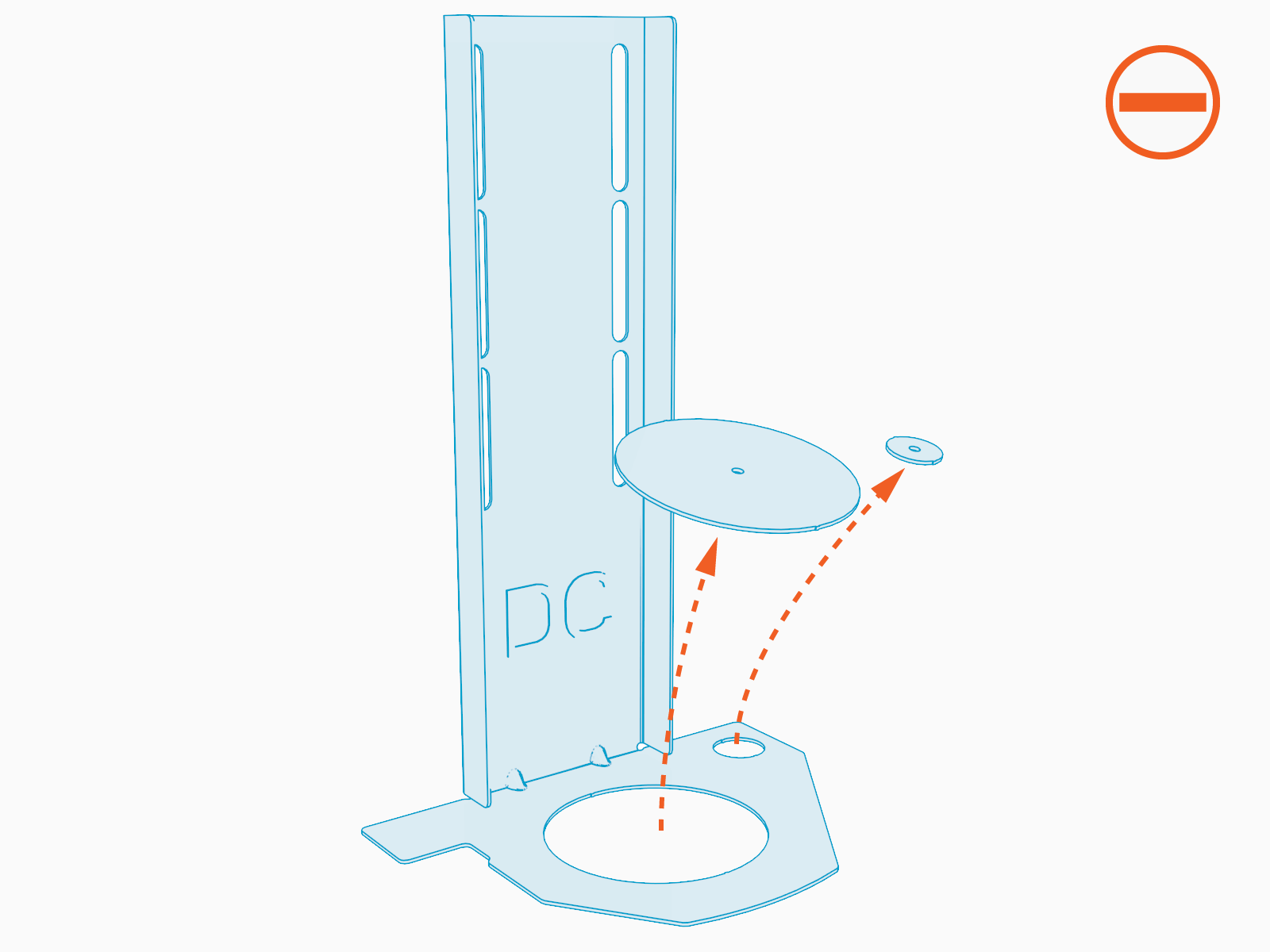
Use a flat head screwdriver to push out both punch-out discs in each DC rodent guard bracket.
-
Install the grommets (included) into both bracket holes. Grommets protect wiring from the edges of the metal bracket.

-
Route the DC wiring bundle through the larger rodent bracket grommet.

-
Route the Ethernet wire through the smaller rodent bracket grommet.
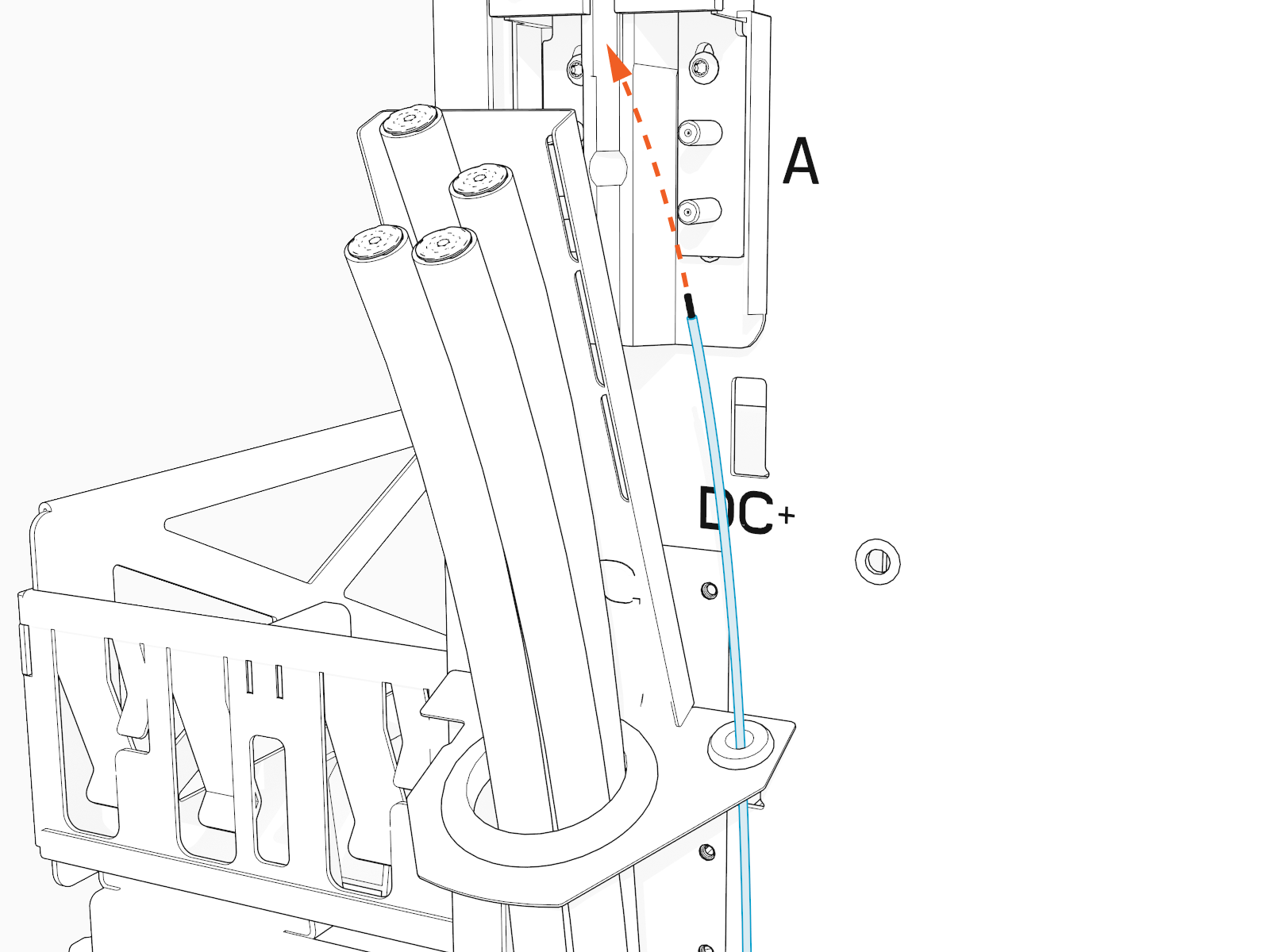
Begin cutting, crimping lugs, and landing the DC conductors on one station only as described below, then cut and crimp lugs for the other station. Trimming and crimping for lugs on both sides at once can create misalignment from wire movement within the conduit.
-
Align the rodent guard bracket to ensure it rests on the conduit opening.
Use a T25 Torx screwdriver and two screws to secure the rodent guard bracket. Torque screws to 4.5 Nm (40 in lbs).

Connect the DC Conductors
To connect the DC conductors, configure the following steps:
-
Measure the height of the A (output) and B1 (input) terminals.

-
Trim the corresponding conductors to length.

-
Mark the barrel height of the lug on the end of the each conductor.

-
Use appropriate tools to remove insulation from each marked large conductor.

-
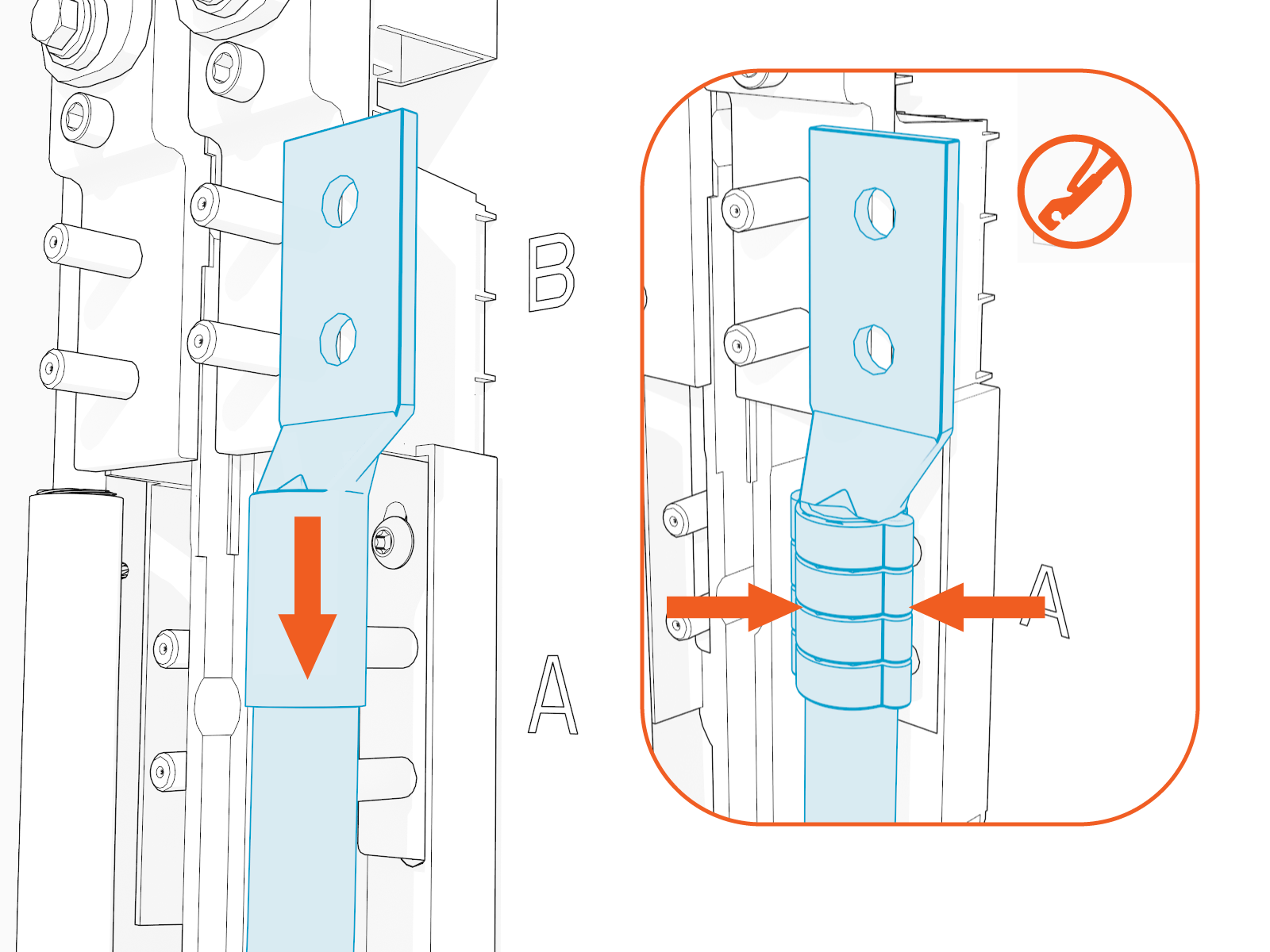
Insert the stripped end of the DC conductor into the compression lug barrel and crimp it.
Ensure the lug specifications meet the requirements noted in Bring Tools and Materials. Use the directions found with the crimp tool.
-
If recommended by the wire manufacturer or local code, apply an anti-oxidant joint compound to the stripped wire material to make a gas-tight joint with the lug.
-
Apply a thin coating of the specified dielectric grease on each lug.

-
Use a 13 mm (3/8 in) socket wrench to mount and secure the A lugs on the lower terminal blocks. Torque to 6.8 Nm (60 in-lb).
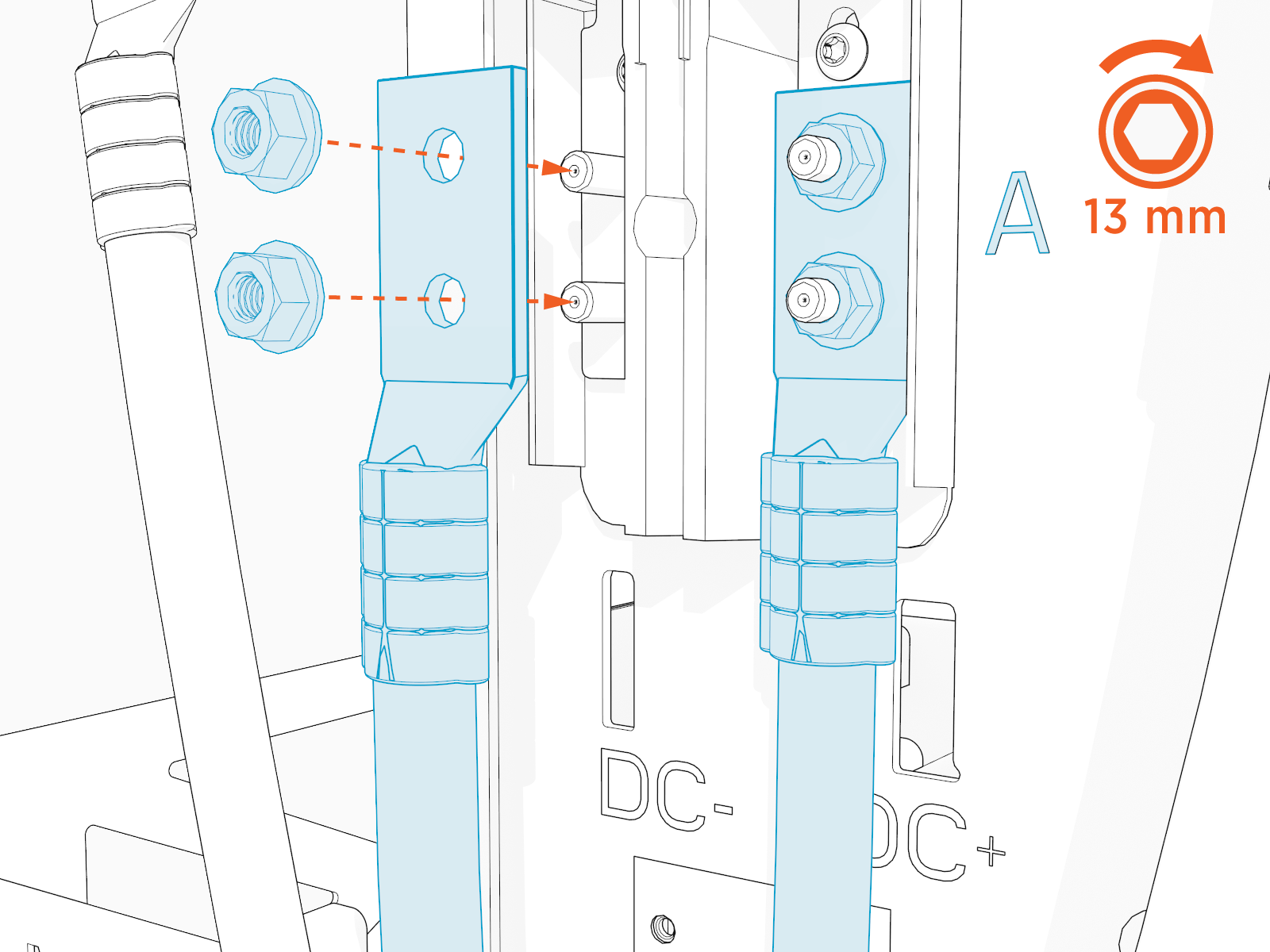
Do not under- OR over-torque the DC fasteners. Excess torque, even with hand tools, can damage the terminal blocks.
-
Mark all torqued conductor connections.

-
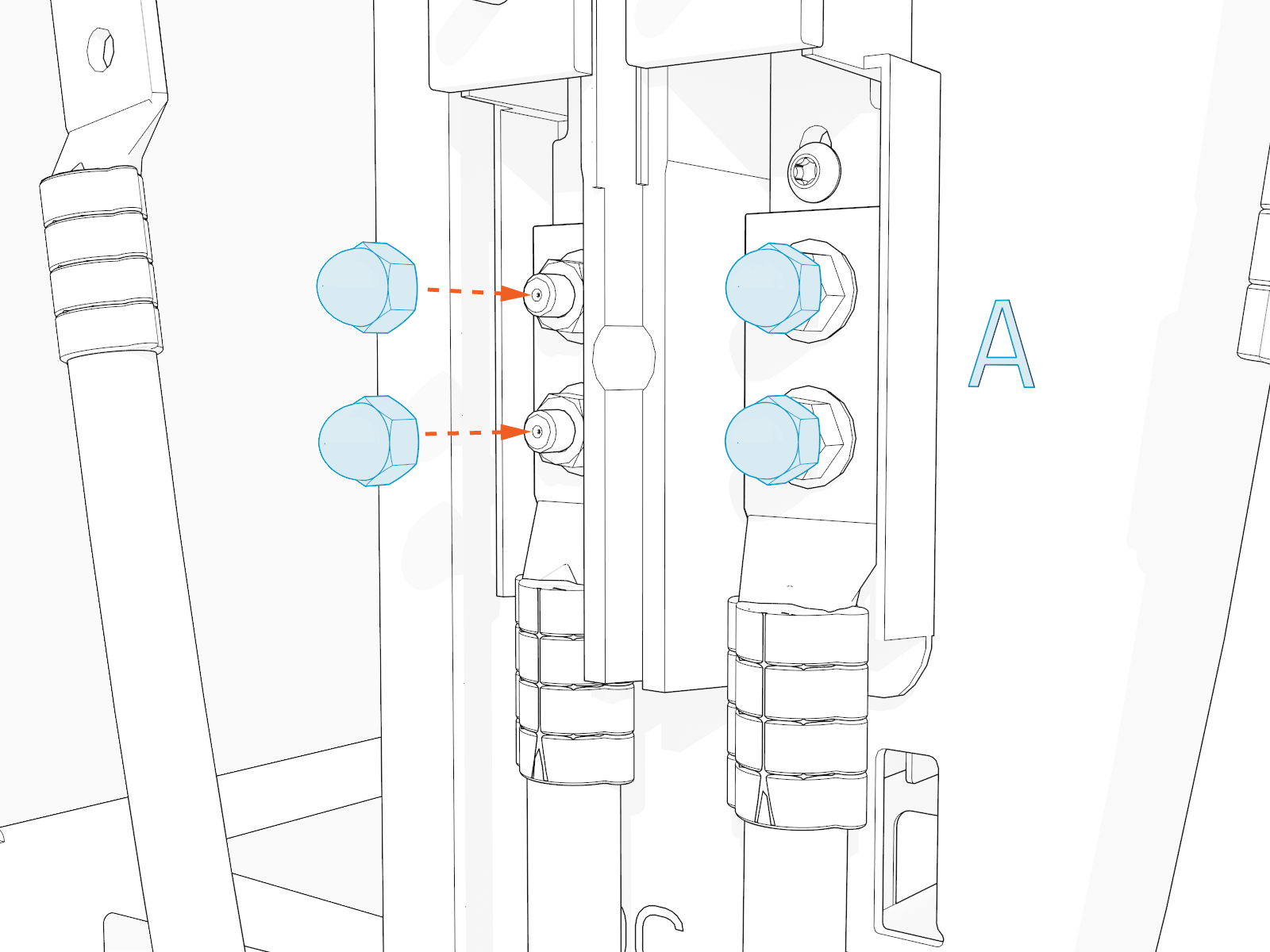
Screw an acorn (cap) nut onto each A terminal block. Hand tighten.
-
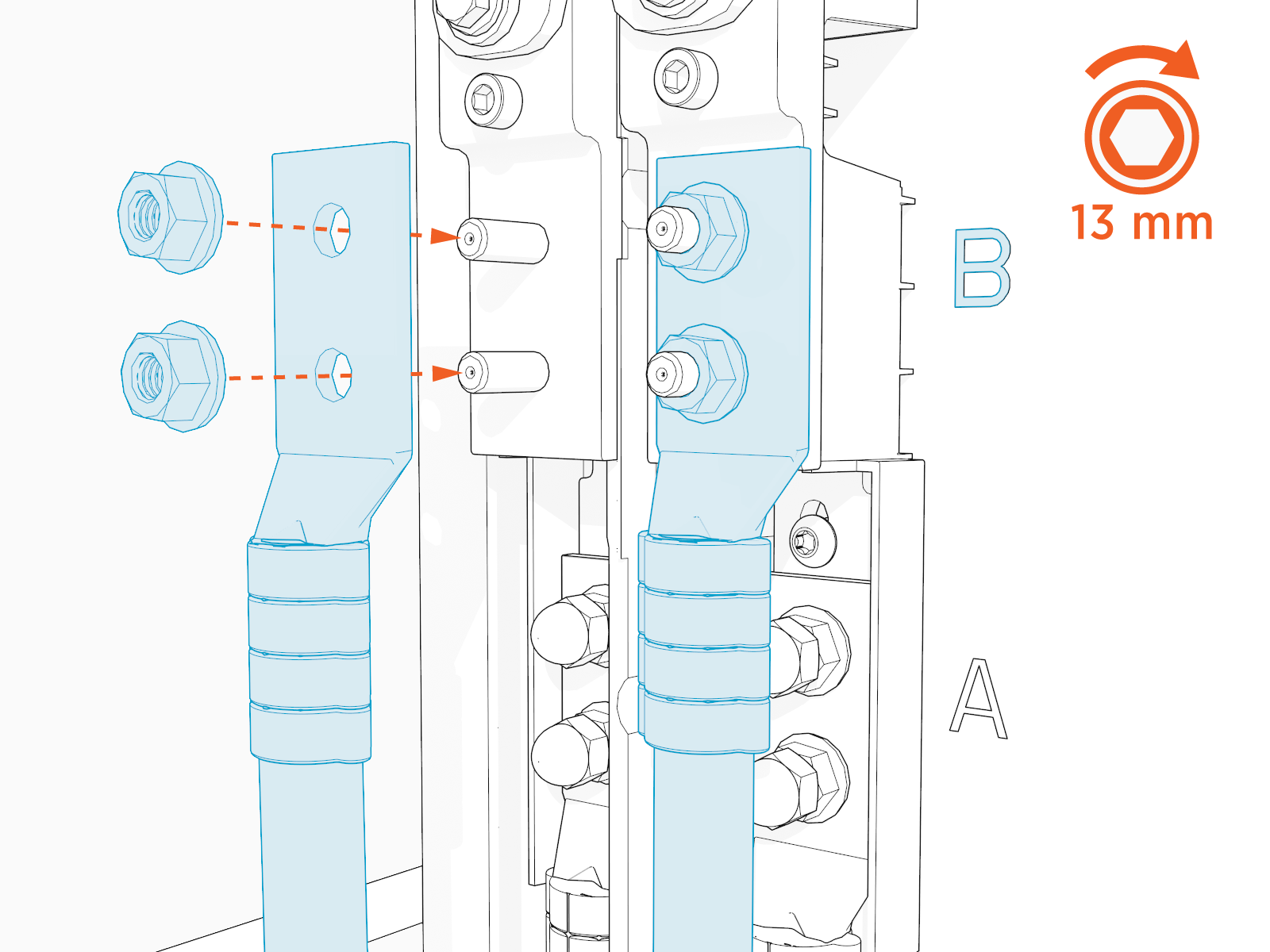
Remove the installed nuts from the DC B terminal blocks.
-
Use a 13 mm (3/8 in) socket wrench to mount and secure the B lugs on the upper terminal blocks. Torque to 6.8 Nm (60 in-lb).
-
Mark all torqued conductor connections.

-
Complete the above steps for Station 2.
Do not under- OR over-torque the DC fasteners. Excess torque, even with hand tools, can damage the terminal blocks.
Double check that all conductor nuts are torqued correctly.
Connect Ethernet Wiring
Ethernet wiring is only connected for Paired installations. Do not connect Ethernet wiring for Standalone installations.
To connect Ethernet wiring, configure the following steps:
-
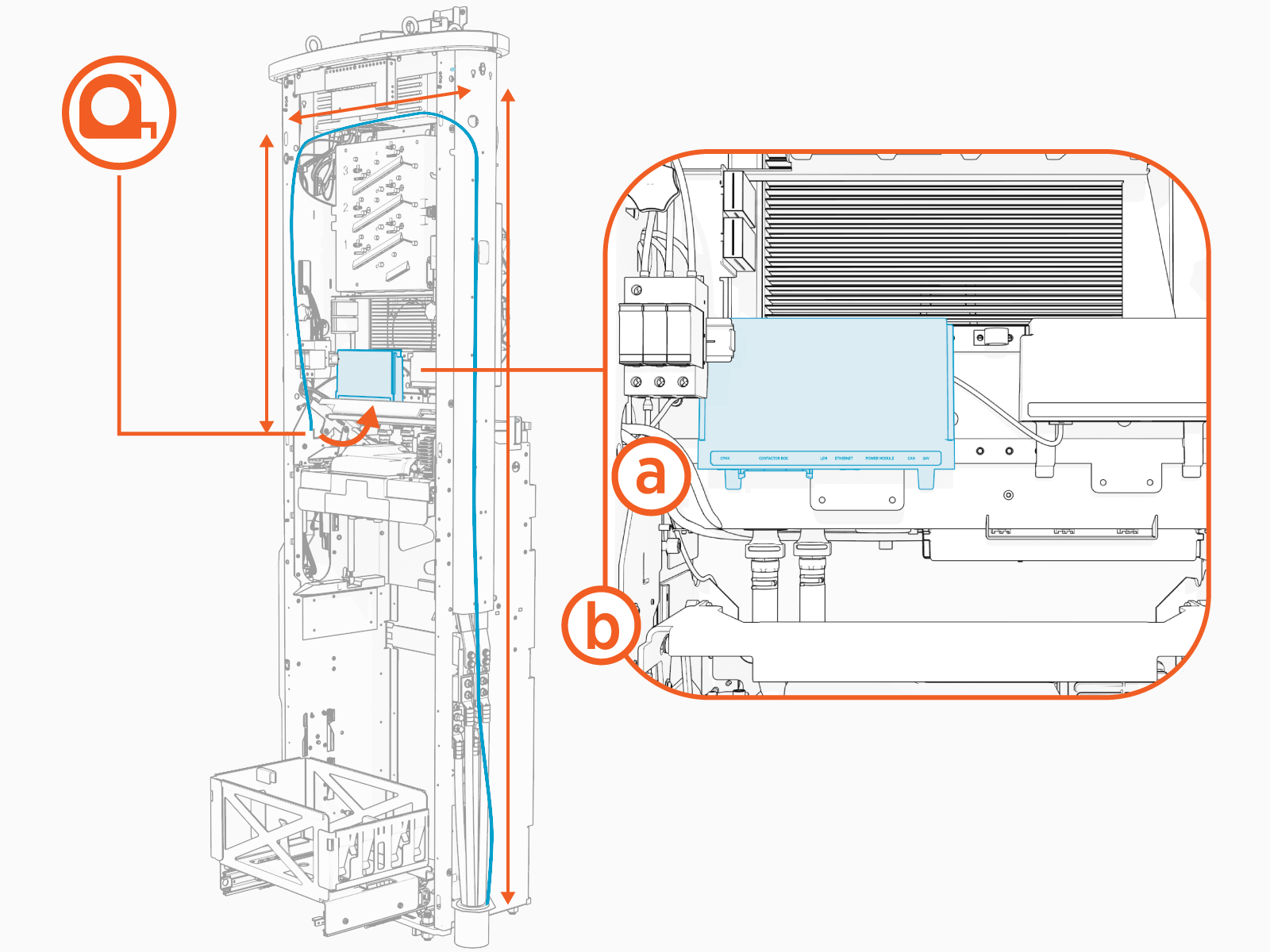
Measure the length needed to extend the Ethernet wiring from the conduit opening, up the side of the frame, and into the Express 280’s Station Management Unit (a), located above the Power Module mechanism (b).
Trim the excess wire.
-
Route the Ethernet wire up the rear side of the frame, through the plastic P-clip and into the top wiring hole.

-
Route the Ethernet wire across the charging station from right to left between the auxiliary power supply and the contactor assembly.
Secure the Ethernet wire to the existing cable bundle at each corner.

-
Crimp the Ethernet wire in a straight-through T-568B style into RJ45 connectors at both ends. Note the location of Pin 1 relative to the clip in the image and the order of the orange, blue, green, and brown wires in the pattern.

-
Test the Ethernet wire for functionality.

-
Plug the Ethernet wire into the Ethernet port of the Station Management Unit.

-
Use the duct seal compound included in the crate to completely seal all DC openings against pest ingress:
-
The inside of the conduit opening
-
Within the rodent guard bracket openings for wiring, to pad any sharp edges and block ingress
-
Around the edges of the rodent guard bracket where it will meet the side panel

The conduit opening must be sealed to protect the wiring from the environment.
-
-
Install the DC wiring cover on the right side of the Express 280 by pressing on its sides and pushing it inward and upward.

Install AC Disconnect Labels
To install AC disconnect labels, configure the following steps:
-
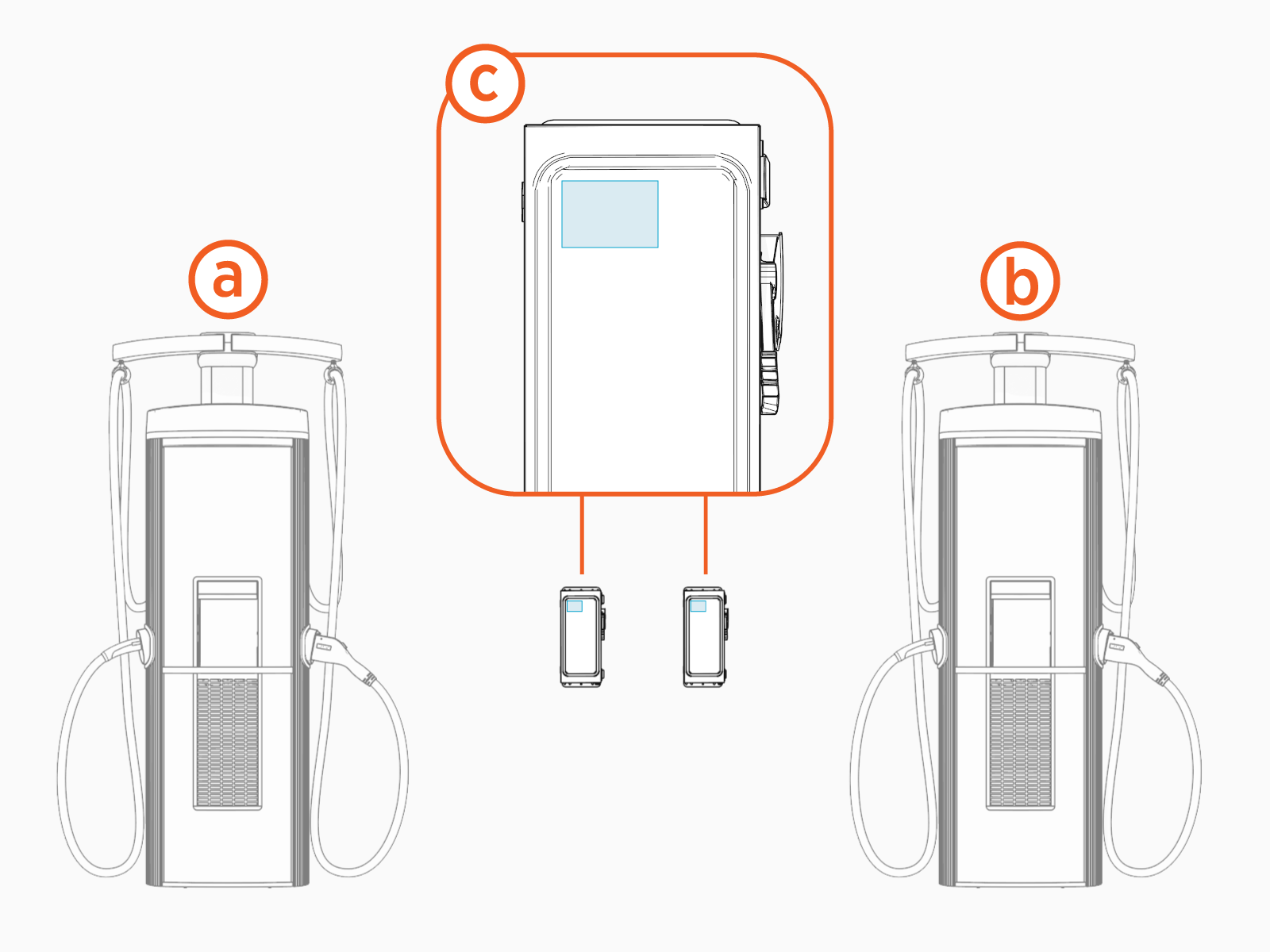
Identify the two charging stations to be paired. For each pair, check site plans to see which charging station is designated station 1 (a) and which is station 2 (b). If the plans do not define it, designate them now.
-
Affix the AC disconnect labels to the disconnect (c) responsible for AC power to this charging station and to the disconnect for its Paired partner.
-
Using permanent marker, write the last three numbers of both Paired stations’ serial number (found on the Express 280 nameplate label) on each disconnect label, so that future technicians know which disconnect to power off for service.
This is especially important for sites with multiple pairs of charging stations.
Disconnect numbers must be written in permanent marker. Normal ballpoint pen ink does not stay legible on the label.
