Introduction
This topic describes how to install a ChargePoint® Express 280 DC fast charging station. An Express 280 can be installed to operate by itself (called Standalone) or to share power with one other Express 280 for higher throughput (called Paired).
- If the charging station is not installed, commissioned, or serviced by a ChargePoint certified technician using a ChargePoint-approved method, it is excluded from all ChargePoint and other warranties and ChargePoint is not responsible.
- You must be a licensed electrician and complete training at https://www.chargepoint.com/partners/training-certification to become ChargePoint certified and to access ChargePoint's web-based installer tools or ChargePoint Installer app.
ChargePoint Documentation
Access documents at ChargePoint Product Reference Documentation.
|
Document |
Content |
Primary Audiences |
|
Datasheet |
Full station specifications |
Site designer, installer, and station owner |
|
Site Design Guide |
Civil, mechanical, and electrical guidelines to scope and construct the site |
Site designer or engineer of record |
|
Concrete Mounting Template Guide |
Instructions to embed the charging station template in a concrete pad with anchor bolts and conduit placement (these may also be included in the Site Design Guide) |
Site construction contractor |
|
Surface Conduit Entry Kit Guide |
Instructions for sites where conduit cannot be run underground |
Installer |
|
Construction Signoff Form |
Checklists used by contractors to ensure the site is correctly completed and ready for product installation |
Site construction contractor |
|
Installation Guide |
Anchoring, wiring, and powering on |
Installer |
|
Operation and Maintenance Guide |
Operation and preventive maintenance information |
Station owner, facility manager, and technician |
|
Service Guide |
Component replacement procedures, including optional components |
Service technician |
|
Declaration of Conformity |
Statement of conformity with directives |
Purchasers and public |
Installing the Express 280 requires two people and takes approximately 3-4 hours. This time estimate does not include the time needed to pull DC and Ethernet cable for a Paired installation if it is not already done. Paired installation also requires contacting a ChargePoint support technician to perform any required software updates and configuration.
Check Site Readiness
The Express 280 is installed on a concrete pad. For details on how to prepare this pad, see Site Design Guidelines.
Before beginning work, check that the site meets the following civil and mechanical requirements:
-
The concrete pad is ready and the concrete is fully cured and level.
-
The concrete pad either has a site drawing approved by a structural engineer for this specific site, OR conforms to these specifications:
-
At least 305 mm (12 in) deep (or deep enough to be 305 mm (12 in) below the frost line)
-
At least 1296 mm (51 in) on each side
-
-
Walls, fences, or slopes do not prevent water from draining from the pad.
-
Charging station sites are positioned so that each station is centered on a parking space (unless curbside), with the front of the station facing the vehicle.
-
Enough space is available around the installation pad to use a forklift and other lifting equipment, unpack crates, remove packing materials, and allow two people to freely move throughout the area.
If the site does not meet these basic requirements, contact ChargePoint before continuing.
Confirm Anchor Bolt and Conduit Placement
Ensure the following:
-
Standalone installations require two conduit stub-ups on the left side for AC wiring and shunt trip wiring.
-
Paired installations also require conduit stub-ups on the right side for DC wiring and Ethernet connection.
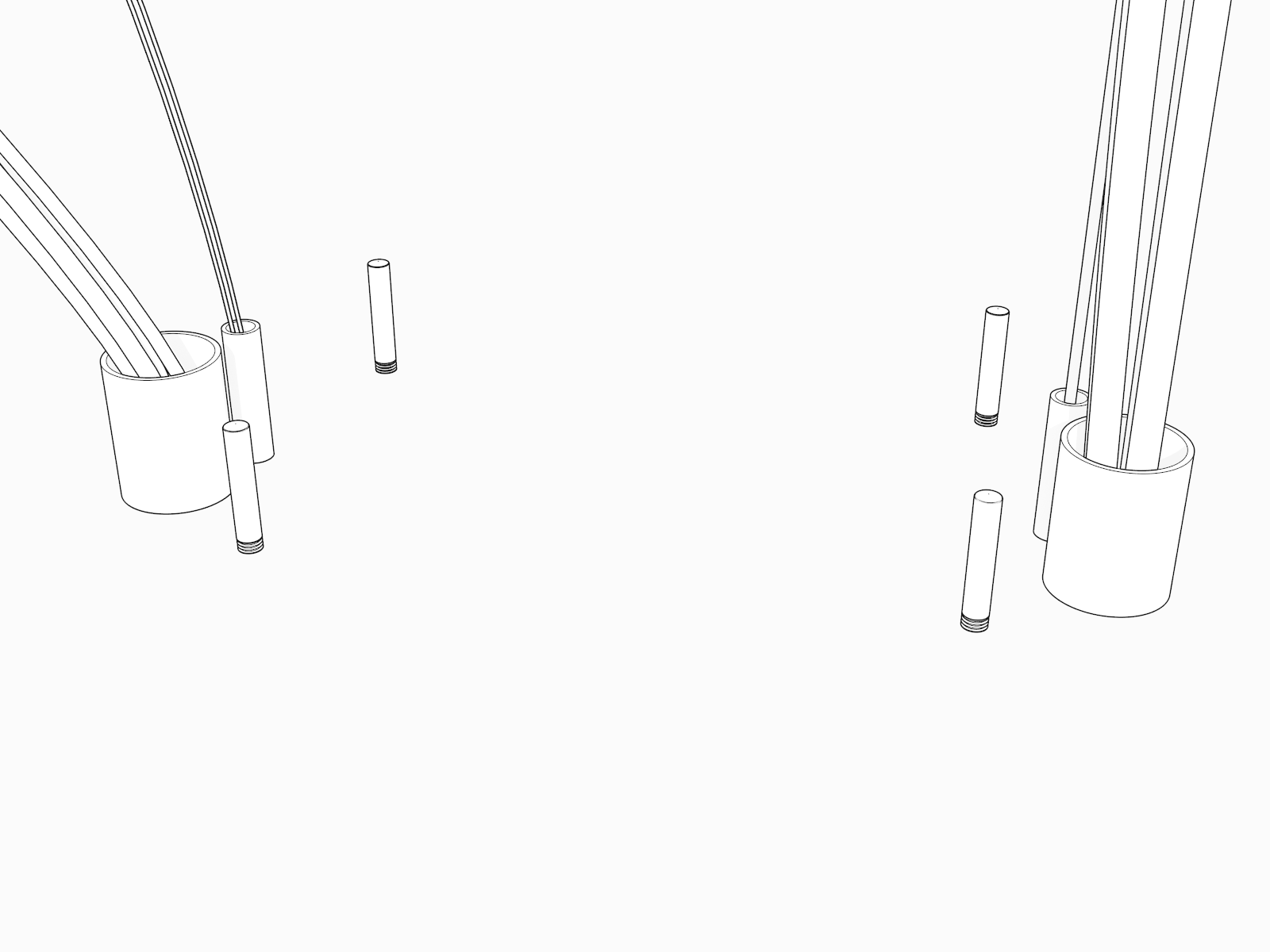
For information about the Concrete Mounting Template, refer to the Express 280 Site Design Guide.
Check Clearances
The Express 280 requires the following minimum functional and service clearances:
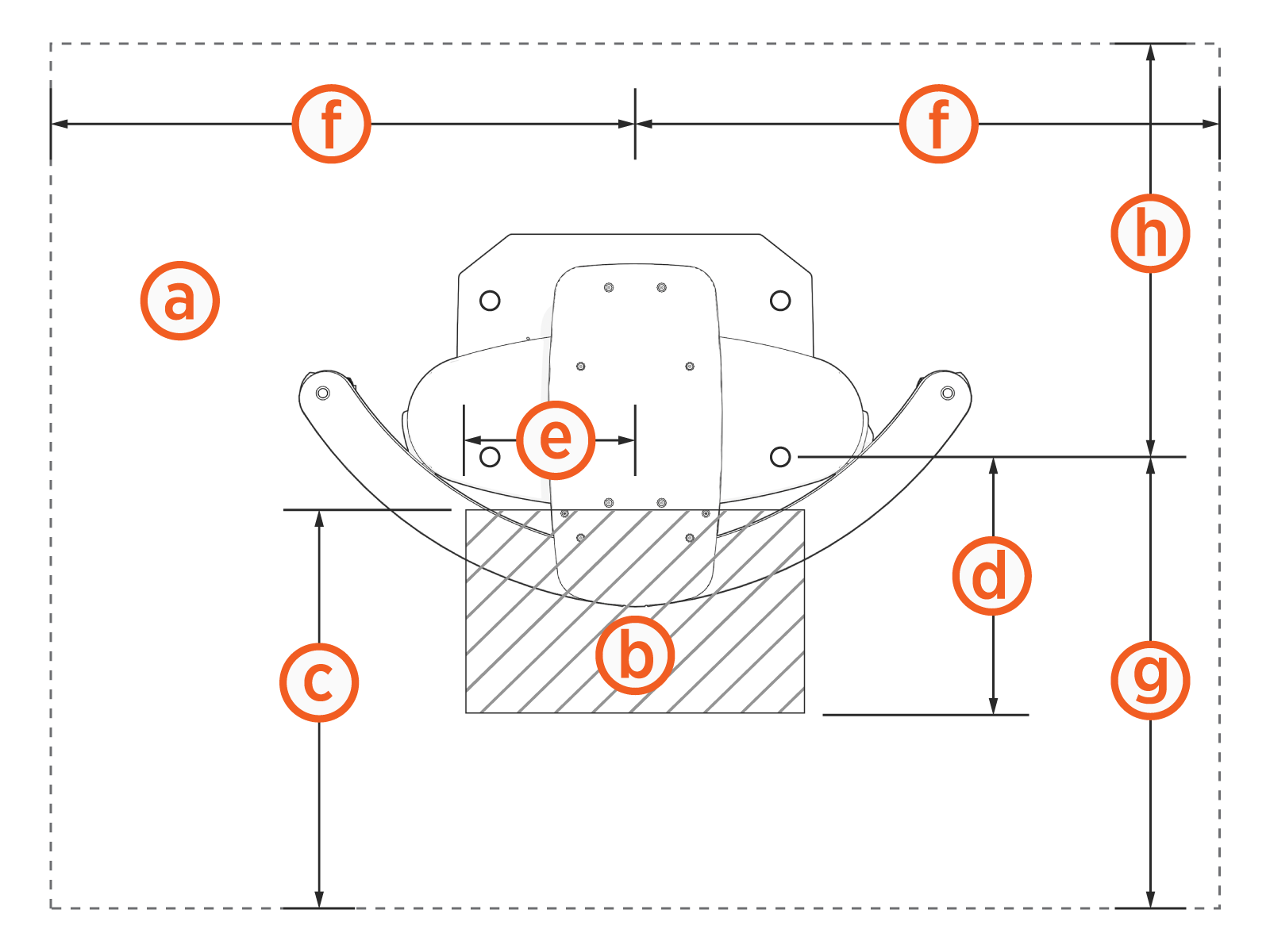
(a) Service clearance of open space (not necessarily at system grade)
(b) Power Module service clearance (at grade, measured from station front): 330.2 mm (1 ft 1 in)
(c) Front service clearance (measured from station front): 609.6 mm (2 ft)
(d) Power Module service clearance (measured from front anchor bolt): 383 mm (1 ft 3.1 in)
(e) Power Module service clearance (measured from station center): 290 mm (11.4 in)
(f) Side service clearance (measured from station center): 1072 mm (3 ft 6 in)
(g) Front service clearance (measured from front anchor bolt): 510 mm (1 ft 8.1 in)
(h) Rear service clearance (measured from front anchor bolt): 663 mm (2 ft 2.1 in)
Allow 26 mm (1 in) clearance above the station if installing a Cable Management Kit (CMK Cable Management Kit).
Rear clearance must be at grade level +/- 25 mm (1 in).
Remove any concrete that is not level with the rest of the surface so you can level the components. Use a grinder or a hammer and chisel to remove any bumps in the concrete.
Confirm Electrical Requirements
Ensure these electrical requirements are in place at the installation site:
-
Appropriate circuit protection and metering.
-
A grounding conductor that complies with local codes is properly grounded to earth at the service equipment or, when supplied by a separate system, at the supply transformer.
-
A correctly rated, dedicated breaker is installed for each station, per this table:
|
Nominal Voltage |
Max AC Current |
Circuit Breaker Size |
|---|---|---|
|
480 VAC |
100 A |
125 A (125% continuous load required by National Electrical Code NEC |
-
Breakers have shunt trip capability if the site drawing calls for shunt trip wiring.
-
All necessary electrical infrastructure has been completed per local codes and ChargePoint specifications for 3-phase WYE power plus ground with properly sized wire at the station. Neutral is not required for system operation; however, neutral-to-ground bonding is required at the Main Distribution Panel (MDP) supplying the charging station.
This requirement applies to Canadian installations. Whether using a step-up or step-down autotransformer, refer to the "Hydro-Québec bulletin - Choosing the right one 600/480 V transformer" for specific guidance.
|
|
Voltage Rating |
Temperature Rating |
Maximum Conductor Size for Terminals |
|---|---|---|---|
|
Phase conductors |
600 V |
90 °C |
|
|
AC ground conductor |
600 V |
90 °C |
-
Cellular signal strength is consistently strong to allow installation and station operation. Use a cellular signal detection device (such as a Snyper, Octopus, or similar) to ensure the signal is -85 dBm or better. (Note that these numbers are negative, so -70 dBm is stronger than -85 dBm, and -90 dBm is weaker.) If the signal is below -85 dBm, install multi-carrier, multi-band repeaters to boost signal strength. Repeaters are often required for installations in underground garages or enclosed parking structures.
-
Paired only: All four DC copper conductors are installed between stations as follows:
|
|
Voltage Rating |
Temperature Rating |
Maximum Conductor Size for Terminals |
Insulation Type |
|---|---|---|---|---|
|
DC power conductors |
1000 V |
90 °C |
300 Kcmil, 1x per pole |
XHHW-2 |
-
Paired only:Outdoor rated Ethernet Cat5e or Cat6 cable, without terminations, is pulled between the two stations with 3 m (10 ft) of service loop at each end.
Refer to the Express 280 Datasheet and Express 280 Site Design for more information about site specifications.
The Express 280 charging station is tested to IEC 61000-4-5, Level 5 (6 kV @ 3000 A) standards. In geographic areas that experience frequent thunderstorms, supplemental surge protection must be installed at the service panel.
Check Express 280 Shipping Crates
Each Express 280 ships in between five and seven crates. Ensure you have all crates at the installation site.
|
Contents |
Max. Shipped Dimensions |
Max. Shipped Weight* |
|---|---|---|
|
Express 280 charging station |
2387.6 x 1054.1 x 806.45 mm (94 x 41-1/2 x 31-3/4 in) |
310 kg (685 lbs) |
|
Power module crate with 1 power module |
901.7 x 571.5 x 368.3 mm (35-1/2 x 22-1/2 x 14-1/2 in) |
50 kg (110 lbs) |
|
Power module crate with 2 power modules |
901.7 x 571.5 x 676.40 mm (35-1/2 x 22-1/2 x 26-1/2 in) |
98 kg (215 lbs) |
|
Cable Management Kit (standard) |
1121 x 654 x 241-1/3.3 mm |
25 kg (55 lbs) |
|
Cable Management Kit (tall, optional)
|
1372 x 381 x 407 mm (54 x 15 x 16 in) |
45 kg (100 lbs) |
|
Holster and cable 6 m |
600 x 600 x 150 mm |
24 kg (53 lbs) |
|
Holster and cable 9 m |
600 x 600 x 150 mm |
33 kg (73 lbs) |
|
Concrete Mounting Template |
1117.6 x 838.2 x 914.4 mm (44 x 33 x 36 in) |
9.5 kg (21 lbs) |
|
*Includes the weight of the crate; see the Express 280 Datasheet for the weight of the component. |
||
Always transport and store the Express 280 in its original packaging. Use appropriate lifting equipment (forklift, crane and lifting straps, etc). Ensure the load rating of all lifting equipment is adequate for the weight of the crated Express 280 as shown above.
Express 280 Charging Station Box Contents
Leave components in the shipping crate until needed. When removing, protect them from damage (such as scratches) by placing them flat on a blanket or tarp, face up. Do not stand up cover panels, as they may be knocked or blown over. Cover charging connectors to prevent damage or ingress.
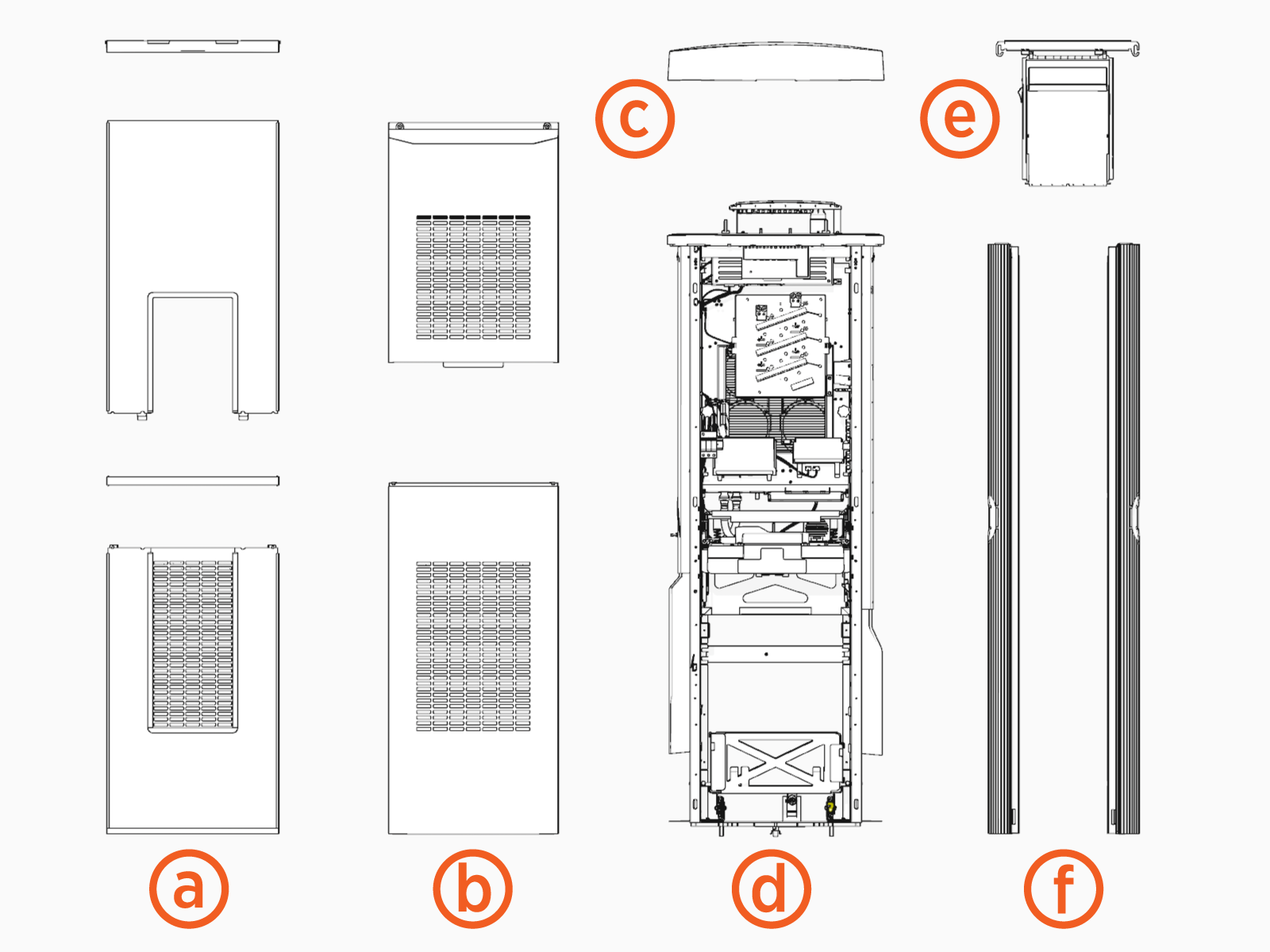
(a) Front panels and light bar
(b) Rear panels
(c) Top cap
(d) Main body
(e) Touchscreen
(f) Side panels
ChargePoint also provides the following (not shown):
-
Coolant funnel
-
2.5 cm x 183 cm (1 in x 6 ft) lifting straps
Power Module Box Contents
Power Module crates can hold one or two Power Modules.
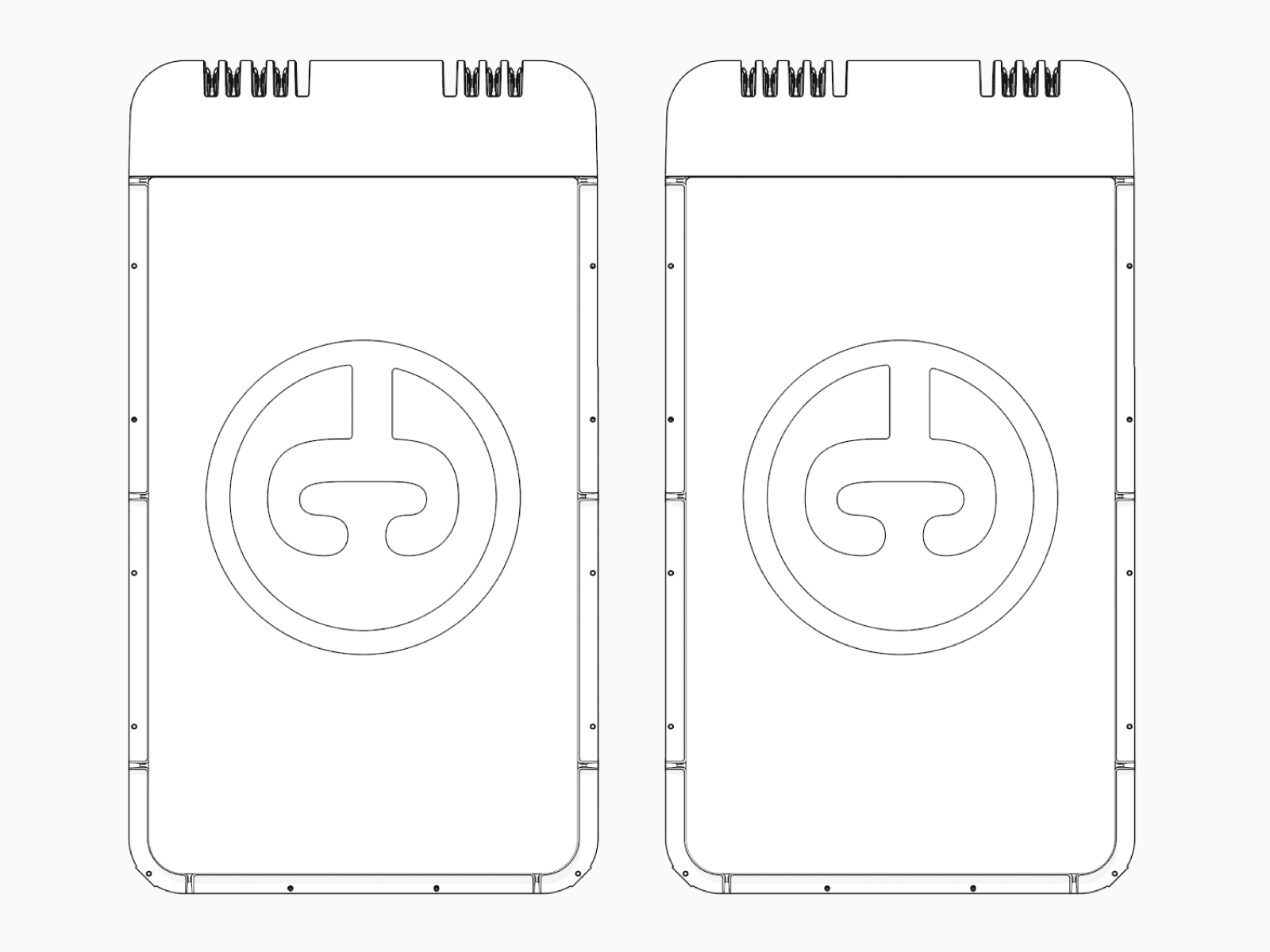
Always rest a Power Module flat on the ground until it is being installed. Power Modules are not stable in any other position. Images of Power Modules standing with the handles on top only illustrate the proper installation position.
Standard Cable Management Kit (CMK) Box Contents
Check the standard CMK Cable Management Kit package for the following components:
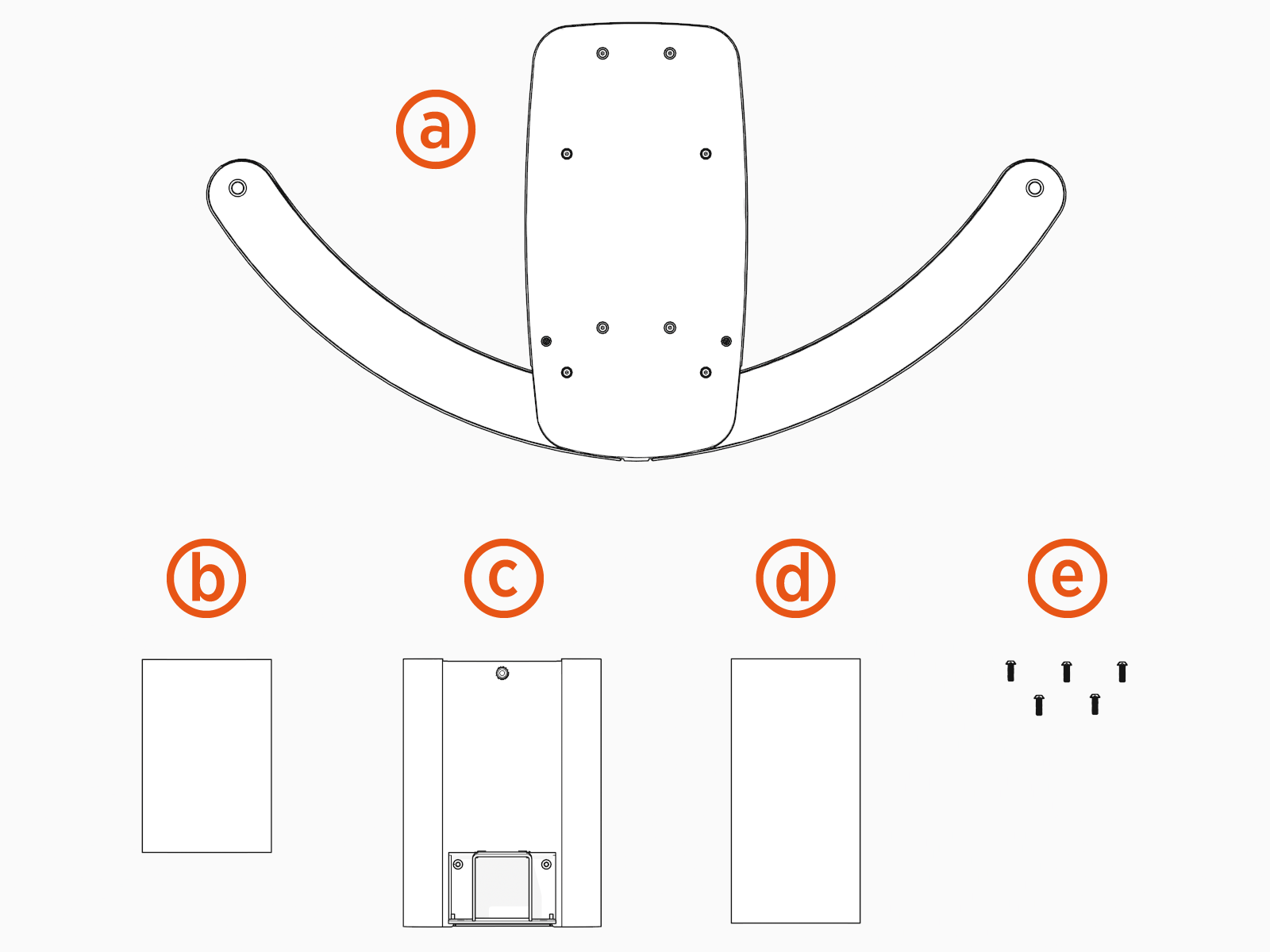
-
Swingarm assembly
-
CMK
Cable Management Kit front cover -
Mast
-
CMK
Cable Management Kit rear cover -
M6 hex screws (5)
Tall Cable Management Kit (CMK) Box Contents (Optional)
Check the tall CMK Cable Management Kit package for the following components:
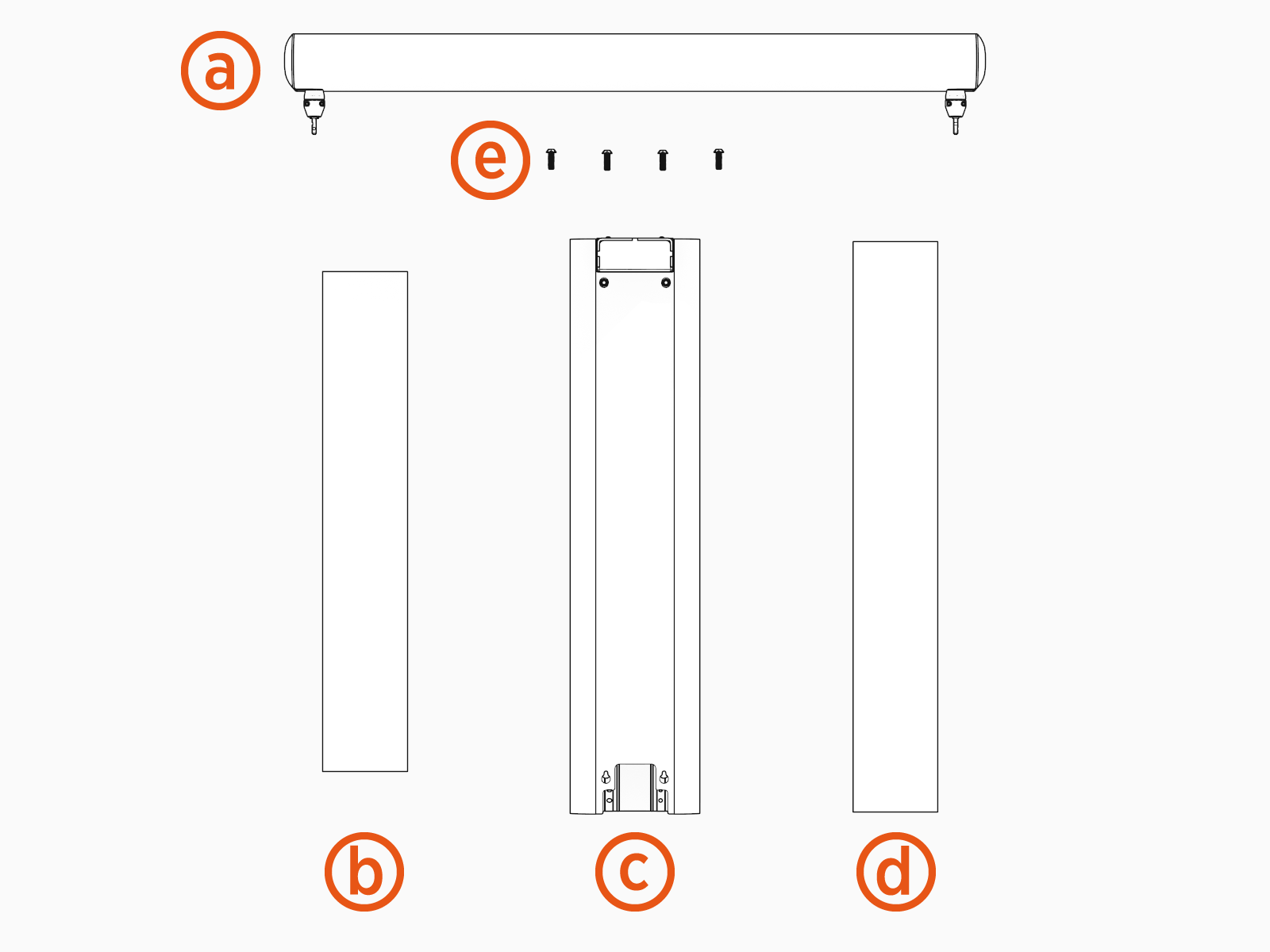
-
Tool balancer assembly
-
Front cover
-
Mast
-
Rear cover
-
M10 hex screws (x4)
Holster and Cable Box Contents
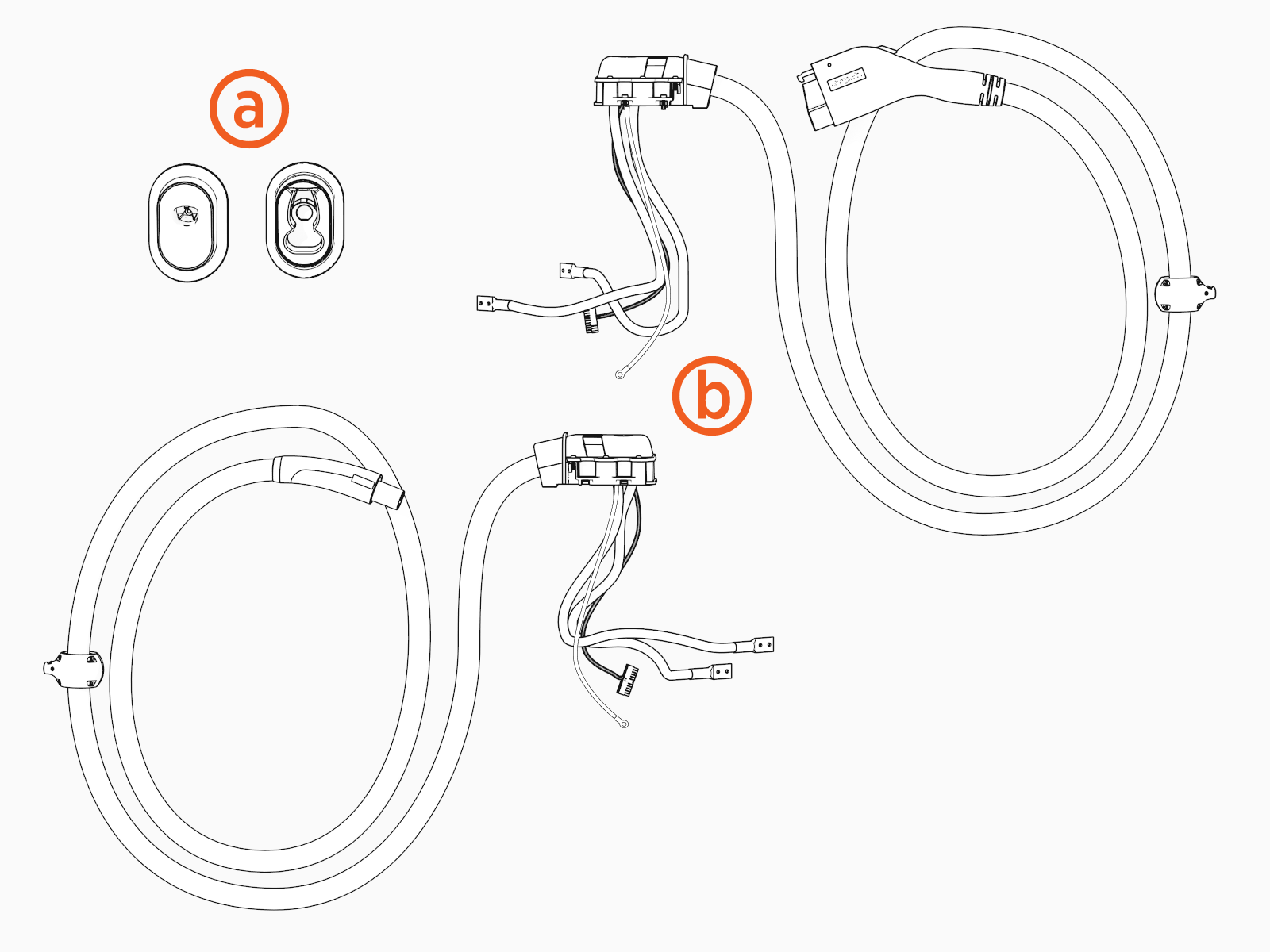
-
Holsters
-
Smart cables
Required Tools and Materials
Installing the Express 280 requires at least two people . Additionally, the certified installer must bring the following tools and materials. These are not provided by ChargePoint.
- Use tools suitable to torque metric fasteners. All fasteners used are in metric sizes.
- Use the given torque values to tighten the fasteners.
- Ensure that the tools such as torque tool, multimeter, and Ethernet tester are calibrated.
|
|
Forklift
|
||
|
|
Stepladder |
|
Lock out/tag out equipment |
|
|
Hard hat |
|
Cut-resistant gloves |
|
|
Safety glasses |
|
Head lamp |
|
|
Measuring tape or other tool to measure height, length, and distance |
|
Level |
|
|
Torx wrench set
|
|
Torx security wrench
|
|
|
Torque wrenches for 4 to 95 Nm (3 to 70 ft-lb) |
|
Adjustable wrench |
|
|
Socket wrench set including deep sockets, up to 25 mm |
|
Cable puller or fish tape |
|
|
Socket extension, 4 in |
|
Screwdriver, flat blade SL4 |
|
|
Multimeter with Cat III 1000 V ratings, such as Fluke 87V or similar |
|
Paired stations only - Ethernet tester such as a Klein Tools VDV526-052 VDV LAN |
|
|
Wire strippers, including Ethernet (Cat6 STP |
|
Paired stations only - Ethernet (RJ45) connector crimping tool |
|
|
Wire cutters, including Ethernet (Cat6 STP |
|
Lug crimping tool |
|
|
Isopropyl wipes and towel roll |
|
Duct seal compound |
|
|
Wire brush (to remove concrete from bolts) |
|
Broom and vacuum |
|
|
Conduit cutters (to cut up to 4 inch conduits) |
|
Cable ties |
|
|
Smartphone with Internet connectivity |
|
ChargePoint installer login credentials |
|
|
QR |
|
Exact location of stations or units, including parking space |

































-
AC lugs (x3):
-
All lugs must be nickel, tin, or silver plated copper compression (not mechanical) lugs
-
Holes for an M6 (1/4 in) stud at 19 mm (3/4 in) stud hole spacing
-
Maximum width 30 mm (1.18 in)
-
AC grounding lug, crimp or mechanical
-
If not already installed for this site, and if applicable for local code requirements, shunt trip wiring: size 0.08 to 2.5 mm² (28 to 14 AWG
American Wire Gauge), fine stranded or solid -
If not already installed for this site, AC and ground conductors with these specifications:
AC and Ground Conductor Specifications Voltage Rating
Temperature Rating
Maximum Conductor Size for Terminals
Phase conductors - 600 V
90° C
Ground conductor- 600 V
90° C
If this is a Paired installation, the certified installer also needs these tools and materials:
-
Cable puller or fish tape
-
DC conductors (x4):
-
2 positive and 2 negative conductors; 1 positive and 1 negative in each direction
-
Copper only, minimum current carrying capacity 200 A and 1000 V rated
-
DC cable run must be continuous. Do not splice DC cables
-
Consult site drawings for site-specific conductor size and length
-
Leave 61 cm (2 ft) of each conductor above grade at each end
-
DC lugs (x4):
-
All lugs must be nickel, tin, or silver plated copper compression (not mechanical) lugs
-
2-hole lugs, 1 in spacing, 3/8 in hole size, and 1.23 in max tongue width
|
Voltage Rating |
Temperature Rating |
Maximum Conductor Size for Terminals |
Insulation Type |
|---|---|---|---|
|
Phase conductors - 1000 V |
90° C |
300 kcmil, 1x per pole |
XHHW-2 |
-
DC cable lug crimper and die that is compatible with lug size and brand
-
Multimeter with toner attachment, such as Fluke 117 or similar
-
Permanent marker
-
Torque paint pen
-
Ethernet wiring for DC (paired stations only):
-
Minimum of CAT5e or better
-
Outdoor or plenum rated wiring
-
Maximum run length of 100 m (328 ft)
-
Leave 3.2 m (10.5 ft) of wire above grade at each end
-
Field crimp using straight-through pattern T-568B
-
-
Ethernet crimp tester capable of testing for correct T-568B (split pair) pattern, such as a Klein Tools VDV526-052 VDV LAN
Local Area Network Scout Jr. Tester or similar
Torque Values
|
Component |
Fastener |
Qty |
Tool |
Torque |
|---|---|---|---|---|
|
Enclosure Body Anchor top nuts |
Nut, M16x2.0, 13 mmTHK, Hex, Grade DH, HDG |
12 |
24 mm (15/16 in) socket wrench |
94.9 Nm (70 ft-lb) |
|
Rodent Guard Bracket |
Screw, M5x0.8, 8 mm length, But Hd, Torx, T-25, SS, Patch |
4 (2 per side) |
T25 Torx screwdriver |
4.5 Nm (40 in-lb) |
|
AC Conductors (L1, L2, L3) Lugs |
Nut, KEPS, M6x1.0, 7.5mm thick, Conical Washer, Steel, Zinc |
6 |
10 mm (3/8 in) socket wrench |
5.6 Nm (50 in-lb) |
|
DC Conductors |
NUT, M8x1.25, 8.8mm thick, KEPS, CONICAL WASHER, Steel, Zinc |
8 |
13 mm (1/2 in) socket wrench |
6.8 Nm (60 in-lb) |
|
Holsters |
Screw, M6x1.0, 8 mm length, PanHd, Torx, T-25,EXT SEMS 2, SS, Patch |
2 |
T25 Torx screwdriver |
2.8 Nm (25 in-lb) |
|
Side Panels |
[Use captive screws in Frame] |
6 |
T25 Torx screwdriver |
2.8 Nm (25 in-lb) |
|
CMK |
Screw, M6x1.0, 10 mm length, ButWasHd, Torx, T-25, STL, Zinc |
2 |
T25 Torx screwdriver |
5.6 Nm (50 in-lb) |
|
CMK |
Screw, M6x1.0, 22 mm length, ButHd, Torx, T-30, SS, Patch |
4 |
T30 Torx screwdriver |
5.6 Nm (50 in-lb) |
|
CMK |
Screw, M6x1.0, 10 mm length, ButWasHd, Torx, T-25, STL, Zinc |
5 |
T25 Torx screwdriver |
5.6 Nm (50 in-lb) |
|
Charge Cable Housing |
Screw, M6x1.0, 20 mm length, LowCap, Torx, T-25, SS |
4 per charge cable |
T25 Torx screwdriver |
4.5 Nm (40 in-lb) |
|
Charge Cable Nuts |
Nut, KEPS, M6x1.0, 7.5mm thick, Conical Washer, Steel, Zinc |
4 per charge cable |
10 mm (3/8 in) socket wrench |
5.6 Nm (50 in-lb) |
|
Charging Cable |
[Use captive screw in tetherball] |
1 |
T25 Torx screwdriver |
2.8 Nm (25 in-lb) |
|
Top Cap |
M5x0.8, 16mm length, PanHd, Torx, T-25, SS, Patch |
4 |
T25 Torx screwdriver |
2.8 Nm (25 in-lb) |
|
Front Lower Panel Screw |
M5x0.8, 10 mm length, PanHd, Torx, T-25, SS, Patch |
2 |
T25 Torx screwdriver |
2.8 Nm (25 in-lb) |
|
Rear Lower Panel Screw |
M5x.08, 14 mm length, PanHd, Torx, T-25, SS, Patch |
2 |
T25 Torx screwdriver |
2.8 Nm (25 in-lb) |
|
Front & Rear Upper Panels |
Captive screw in sheet metal panel |
2 |
T25 Security Torx Screwdriver |
2.8 Nm (25 in-lb) |
|
Area Light Bar |
2 Screws, captured (Screw, M4x0.7, 12 length, Captive, TR-Torx, T-25,SS, Patch) |
2 |
T25 Security screwdriver |
2.8 Nm (25 in-lb) |
