Replace the Contactor Box
To replace the contactor box, complete the following steps:
Required Tools and Materials
|
|
T25 Security screwdriver |
|
Headlamp |
|
|
10 mm socket hex wrench |



Power Off the Station
Power off at the breaker panel and lock out/tag out before continuing work.
-
Before any procedure, disconnect the power. If station is paired, disconnect the power to both paired charging stations.
-
Follow local code and site lockout/tagout procedure to de-energize the station.
-
Wait for energy to dissipate (approximately five minutes).
-
Keep power off until all covers and panels are reinstalled and the work is complete.
Failure to follow these instructions can result in serious injury, loss of life, or property damage.
Remove the Area Light Bar
To remove the area light bar, complete the following steps:
-
Use a T25 Security screwdriver to loosen the two captive screws on the bottom edge of the area light bar.
When reinstalling the area light bar, route the cable through the notch in the center of the area light bar. Ensure the cable does not get caught between the area light bar and the secondary display controller. Torque to 2.8 Nm (25 in-lb).
-
While holding the area light bar near the opening at the top of the Express 280, disconnect the 4-pin power cable from the area light bar.
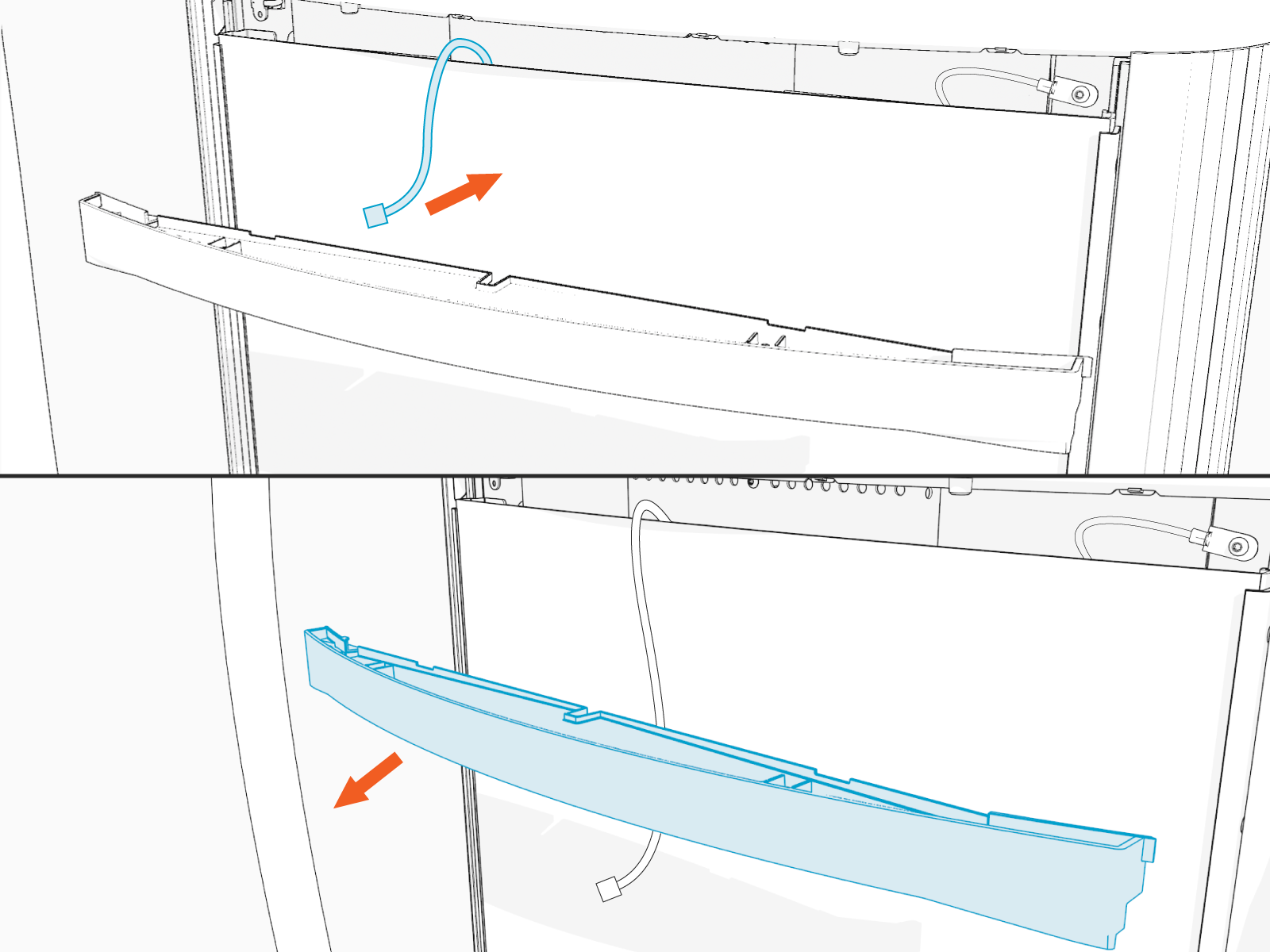
-
Set the area light bar gently on a padded surface.
Remove the Upper Panels and Top Cap
To remove the upper panels and top cap, complete the following steps:
-
Gently pull the middle section of the trim panel out until the tabs clear the side trim. Remove the trim panel.

-
Use both hands to carefully pull the panel away from the station body and lift upward to remove it.

-
Place a protective cover, such as a lint-free cloth, over the touchscreen to prevent damage during service.
Remove Data and DC Cables
To remove data and DC cables, complete the following steps:
-
Disconnect the data cable extension (a) from the port.

-
Use a 10 mm socket hex driver to disconnect the positive and negative conductors from the front tabs of the connector box.
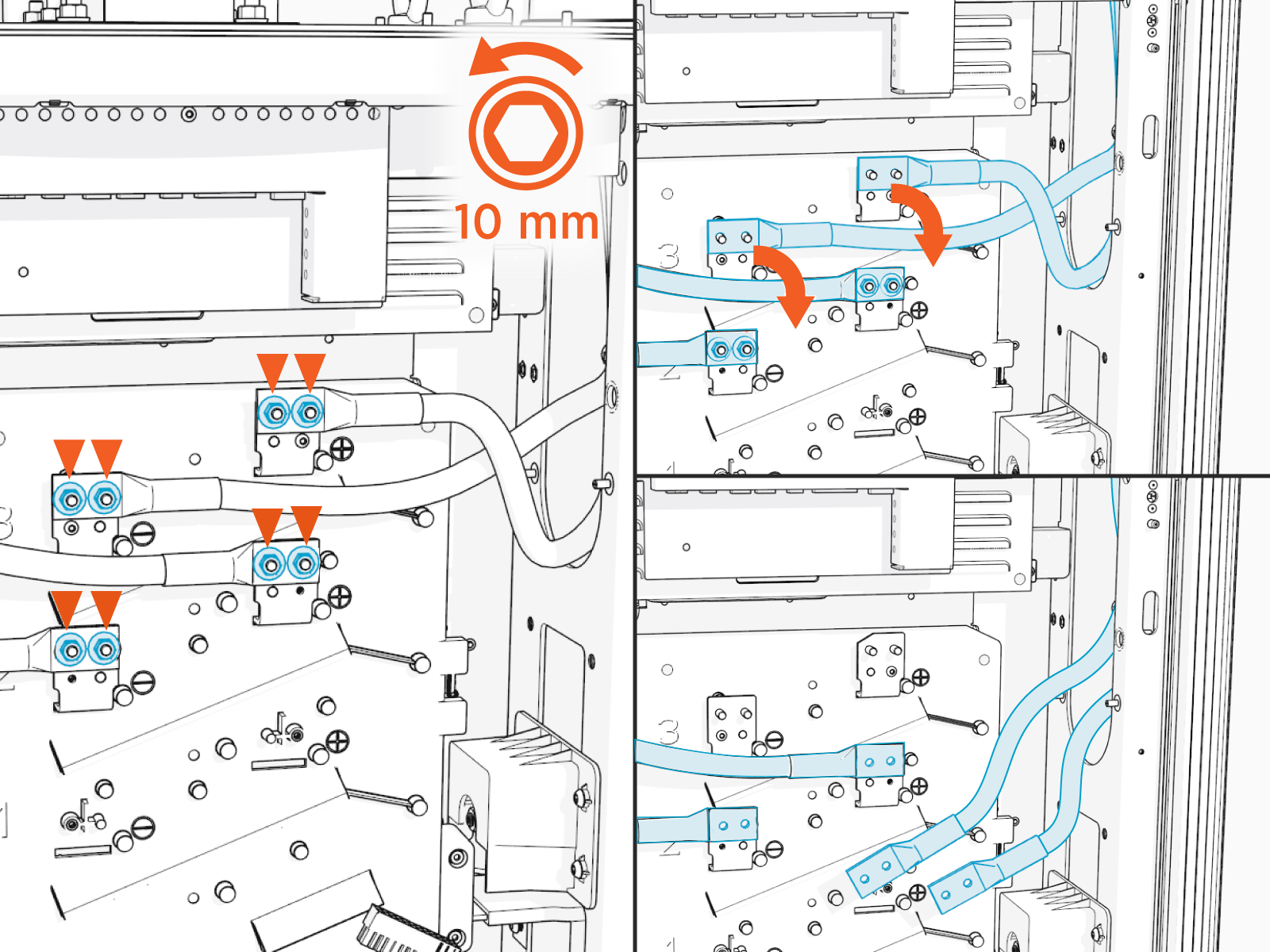
-
Release the latches on the side of the contactor box.

-
Gently pull the contactor box from the mount and remove it.

Install the Contactor Box
-
Place the contactor box in its position and lock the latches.

-
Apply a thin coat of dielectric grease on each lug.

-
When you are connecting a charging cable on the right side of the station, use a 10 mm socket hex driver to connect the positive and negative DC conductors from the front tabs of the connector box to the upper set of connectors.

Use the middle set of DC connectors for charging cables on the left side of the station.
 Ensure that the cables have the proper polarity and they are connected to the correct set of terminals in the correct row.
Connect the Data Cable
-
If two CCS
 Combined Charging System cables are installed or single CCS Combined Charging System cable (a) on the right side
 -
Connect a data cable extension to the main data cable.
-
Route the extension behind the contactor box.
-
Connect the CCS
Combined Charging System charging cable and the upper data connector.

-
If a single CCS
Combined Charging System cable (a) Is installed on the left side-
A data cable extension is not required.
-
Connect the main data cable directly to the CCS
Combined Charging System charging cable and the lower data connector.

-
