Replace the Cooling Controller
To replace the cooling controller, complete the following steps.
Required Tools and Materials
|
|
T25 Security screwdriver |
|
Torx screwdriver (T25, T20) |
|
|
Stepladder |
|
Headlamp |




Power Off the Station
Power off at the breaker panel and lock out/tag out before continuing work.
-
Before any procedure, disconnect the power. If station is paired, disconnect the power to both paired charging stations.
-
Follow local code and site lockout/tagout procedure to de-energize the station.
-
Wait for energy to dissipate (approximately five minutes).
-
Keep power off until all covers and panels are reinstalled and the work is complete.
Failure to follow these instructions can result in serious injury, loss of life, or property damage.
Remove the Upper and Lower Rear Panels
To remove the upper and lower rear panels, complete the following steps:
-
Use a T25 security screwdriver to loosen the two screws that secure the top of the upper rear panel to the enclosure frame.
When replacing this panel, torque to 4.5 Nm (40 in-lb).
-
Use two hands to pull the upper rear panel away from the station and lift up and off the keyholes to remove it.

-
Use a T25 Torx screwdriver to loosen the two screws securing the top of the lower rear panel to the enclosure frame.
When replacing this panel, torque to 4.5 Nm (40 in-lb).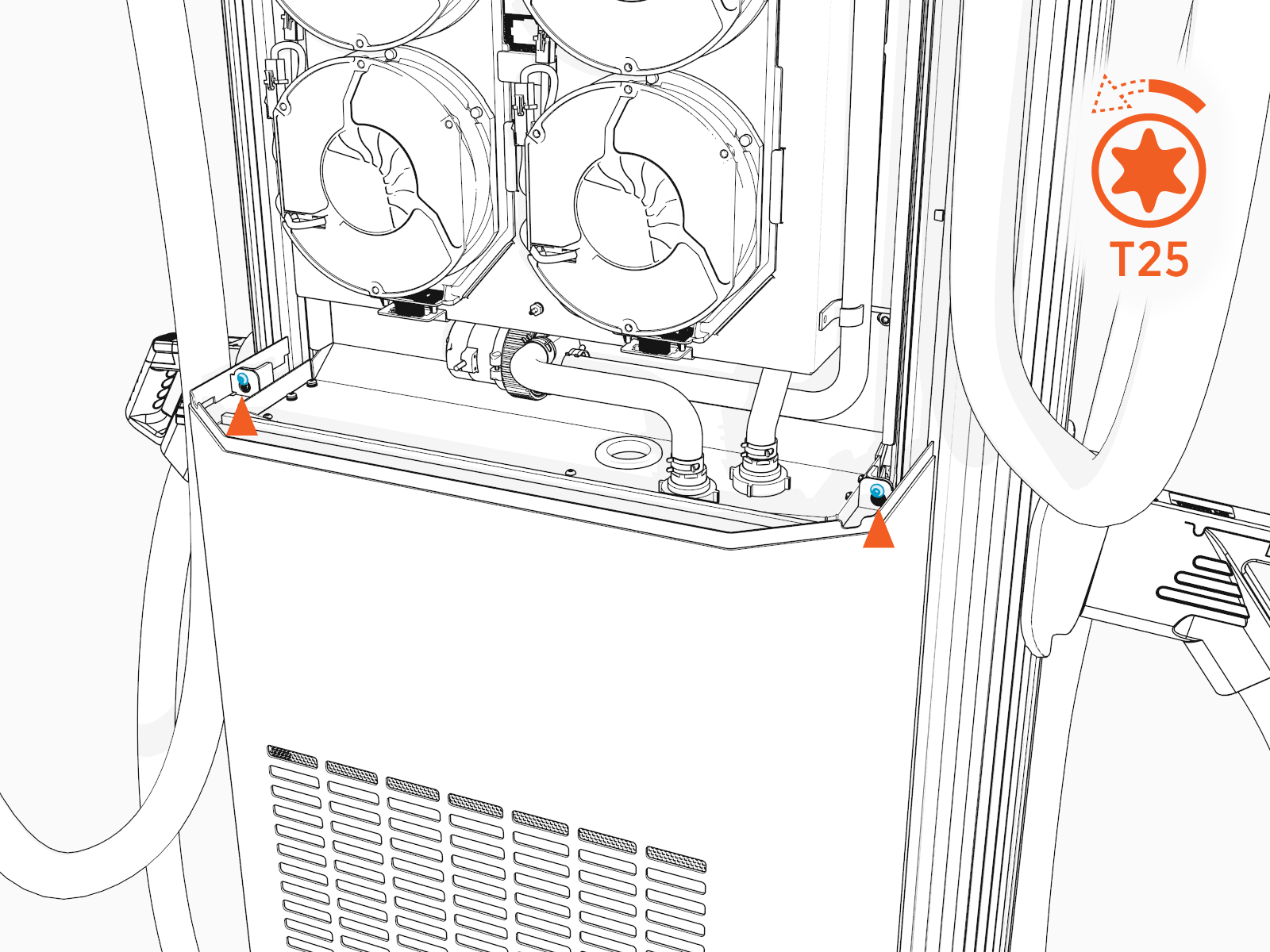
-
Use both hands to pull the upper rear panel away from the station and lift up to remove it.

Remove the Cooling Controller
To remove the cooling controller, complete the following steps:
-
Identify the cooling controller, located near the center of the station.

-
Remove each cable attached to the front of the cooling controller by pressing in on its tab and pulling out by hand.

-
Use a T20 Torx screwdriver to remove the two screws attaching the controller to the frame shelf. Save the screws for reuse.

-
Remove the cooling controller.

Install the New Cooling Controller
To install the new cooling controller, complete the following steps:
-
Align the back edge of the new cooling controller with the bracket in the station.

-
Use a T20 Torx screwdriver to replace the two screws attaching the controller to the frame. Fasten hand-tight.

-
Reattach all cables to the front of the cooling controller.
-
Route the slack of all cooling controller cables gently back through the grommet in the frame shelf.
Ensure the cables are clear of the Power Modules.

REVERSE THE ABOVE STEPS TO REPLACE THE REAR PANELS.
Power On the Station
Ensure all panels are installed before powering station on.
Once all parts are installed, power on the Express 280. The Express 280 runs a self test to verify that it can operate properly.
