MDS Faults Board Location
The illustrations below show the Power Link metering, distribution, and safety (MDS) board location, key cable connections, and cable connector pin maps used during troubleshooting.
Top View
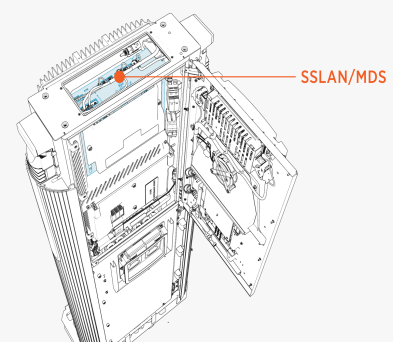
Side View
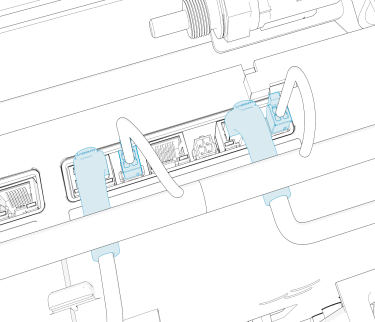
Other Side View
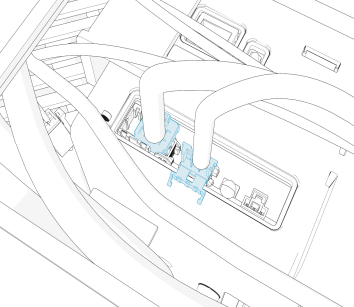
P223-07
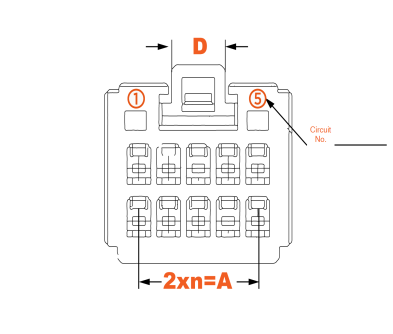
P223-02
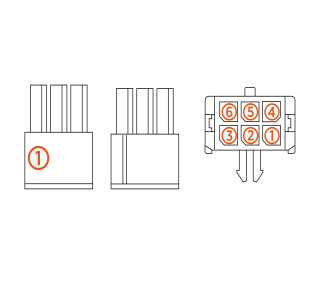
MDS Faults
This section provides information on MDS faults, including fault characteristics, possible causes, and recommended troubleshooting steps.
urn:fault:ucb:isomon-comms-failure
|
Category |
Fault Source |
Fault Type |
Criticality |
|
Isomon board |
MDS |
Hardware |
Critical |
Fault Description
Fault is described if UCB Universal Controller Board loses CAN Comms with MDS box for more than 10 seconds. If a session is active, then it is stopped and system is not available until the fault is cleared. If the fault is seen thrice in 24 hours, then the unit is locked for service.
Possible Causes
-
Issue with CAN harness
-
Isomon board (MDS box)
Troubleshooting
-
Confirm if the harness carrying CAN communication between MDS and UCB
Universal Controller Board is seated correctly on both ends. P223-07 on MDS and P197-08 on UCB Universal Controller Board. -
If both are seated correctly, then measure if there is a break in the CANH and CANL wire. Measure continuity on the following pins:
-
Pin 6 (CANH) on P223-07 (going to MDS)
-
Pin 2 on P197-08 (going to UCB
Universal Controller Board) -
Pin 7 (CANL) on P223-07
-
Pin 3 on P197-08
This checks if there is a break in CAN harness going from MDS to UCB
Universal Controller Board. -
-
Check if there is short between CANH and CANL. Measure resistance between Pin 6 and Pin 7 of P223-07 going to MDS.
-
If no harness issues are found, then replace the MDS box to resolve the issue.
-
If the issue persists after MDS replacement, then contact ChargePoint for further debugging.
urn:fault:ucb:isomon-fw/checksum-failure
|
Category |
Fault Source |
Fault Type |
Criticality |
|
Isomon board FW |
MDS |
Critical |
Fault Description
This fault is declared if ISOMON Isolation Monitor (MDS) firmware version and checksum does not match expected version after 2 attempts to reflash.
Ideally seen during new install or when software is updated on the system. However if this is seen during an ongoing session, then session is immediately terminated and Power Link 1000 is locked out of service.
Possible Causes
-
Bad FDC firmware flash at factory
-
Interruption during software update
-
Board firmware getting corrupted
Troubleshooting
-
If the UCB
Universal Controller Board board had an issue during Finalizer step, then it is possible it is pushing a bad isomon firmware, so login to chassis-shell and confirm if isomon is reading correct firmware version. -
If above is true, then try to flash the UCB
Universal Controller Board again to see if it pushes isomon firmware to recover. -
If this happened during software update in the field, try to power cycle and see if it recovers.
-
If power cycle does not help, then replace the MDS.
urn:fault:isomon:board-temperature-warning
|
Category |
Fault Source |
Fault Type |
Criticality |
|
Isomon board |
MDS |
Hardware/Software |
Major |
Fault Description
MDS declared this fault when isomon board temperature is reported >100 °C for 10 s.
The fault clears if temperature is below the threshold for more than 60 s.
Possible Causes
-
MDS board in unexpected state
-
Failure on the board
Troubleshooting
-
No action needed on over temperature warning.
urn:fault:isomonboard-overtemperature-shutdown
|
Category |
Fault Source |
Fault Type |
Criticality |
|
Isomon board |
MDS |
Hardware/Software |
Critical |
Fault Description
MDS declared this fault when isomon board temperature is reported >115 °C for 10 s.
The fault clears if temperature is below the threshold for more than 60 s.
Possible Causes
-
MDS board in unexpected state
-
Failure on the board
Troubleshooting
-
Power cycle the system to clear any stuck faults on the board. Confirm if the temperature readings go to normal.
-
If not, replace the MDS box to resolve the issue.
-
Contact ChargePoint if the issue persists after MDS replacement.
urn:fault:loss-of-isolation
|
Category |
Fault Source |
Fault Type |
Criticality |
|
Isolation Loss |
MDS |
Hardware |
Emergency |
Fault Description
Isolation fault is triggered when isolation resistance between DC+/DC- and GND Ground goes below 100 kΩ for more than 8 seconds (sampling time 2 seconds).
The fault clears if isolation resistance goes above the threshold value for 10 seconds.
If fault during ongoing session, then the session is stopped immediately and MDS & DC contactors are opened.
Unit locked out if this fault is seen thrice in 24 hours. If the controller shutdown does not happen within
10 seconds, then MDS relays are forced open and PL is locked out for investigation.
Snapshot of critical parameters are saved on PBC Power Block Controller for debugging.
Possible Causes
-
Loss of isolation
-
Isomon board failure
Troubleshooting
-
Confirm if there is any short between bus bars and GND
Ground. Measure resistance between DC+ to GND Ground and DC- to GND Ground. If short is located, then take appropriate actions to fix the issue. -
If there is no short located between various points, then it could be a failed isomon board. Replace MDS box to fix the issue.
-
Contact ChargePoint for further debugging.
urn:fault:mds-relay-abnormal-open
|
Category |
Fault Source |
Fault Type |
Criticality |
|
Relay |
MDS |
Hardware |
Critical |
Fault Description
This fault is triggered when MDS relays open under higher load current (>200 A and <300 A).
Isomon board clears the fault if there is no welded relays detected at the start of next session.
If there are 100 of these abnormal openings noted in a unit, then the system is locked out for service for futher investigation.
Snapshot of critical parameters are saved on PBC Power Block Controller for debugging.
Possible Causes
-
Vehicle side issue
-
MDS contactor failure
-
Isomon failure
Troubleshooting
-
Check if this happened in the middle of the session or at the end of the session.
-
If at the end of the session, then it could be the EV
Electric Vehicle opening its contactor under load after it reached max. SOC. Reach out to engineering with logs and pcap files. -
If this happened at the middle of the session, the issue could be either EV
Electric Vehicle or EVSE Electric Vehicle Supply Equipment. Reach out to ChargePoint with logs and pcaps for further debugging.
urn:fault:mds-relay-critical-open
|
Category |
Fault Source |
Fault Type |
Criticality |
|
Relay |
MDS |
Hardware |
Critical |
Fault Description
This fault is triggered when MDS relays open under higher load current (>300 A).
Isomon board clears the fault if there is no welded relays detected at the start of next session.
If welded relay is detected, then Power Link 1000 is locked out for service.
Snapshot of critical parameters are saved on PBC Power Block Controller for debugging.
Possible Causes
-
Vehicle side issue
-
MDS contactor failure
-
Isomon failure
Troubleshooting
-
Confirm if the EV
Electric Vehicle being charged is opening its contactor under load triggering MDS contactor to open at high current. Check if it is an issue with EV Electric Vehicle by trying sessions on other Power Link 1000 and other EVs on this Power Link 1000. -
If issue is seen with multiple vehicles, then issue might be with MDS contactors or isomon board. Replace MDS box to fix the issue.
-
Contact ChargePoint if the issue persists.
urn:fault:mds-relay-welded
|
Category |
Fault Source |
Fault Type |
Criticality |
|
Relay |
MDS |
Hardware |
Critical |
Fault Description
This fault is triggered when MDS relays are welded stuck. The isomon board is monitoring the auxilliary contacts in the MDS contactor to determine if the contactors are welded.
Isomon board tries to clear the fault, but if it cannot then the system is locked out for service.
Possible Causes
-
Vehicle side issue
-
MDS contactor failure
-
Isomon failure
Troubleshooting
-
Check if the contactor is indeed welded shut. Measure resistance across the MDS contactor on the bus bars (on the MDS).
-
If a short is detected when they are supposed to be open, then replace the MDS box to replace the issue.
-
Contact ChargePoint if the issue persists.
urn:fault:mds-thermal-switch-open
|
Category |
Fault Source |
Fault Type |
Criticality |
|
Thermal Switch |
MDS |
Hardware |
Emergency |
Fault Description
This fault is triggered when thermal switch inside MDS reads OPEN for 100 ms. The fault clears if the switch reads good reading for 10 seconds.
If a session is going on at the time of this fault, then the session is stopped normally. The system is derated to 50% of max. available power for the next session.
If the fault is seen thrice in 24 hours, then the unit is locked out for service.
Possible Causes
-
Actual thermal event
-
MDS thermal switch failure
Troubleshooting
-
Replace MDS to resolve the issue.
-
Contact ChargePoint if the issue persists after MDS replacement.
