SEVB Faults Board Location
The illustrations below show the Power Link SEVB Smart Ethernet Vehicle Board board location, key cable connections, and cable connector pin maps used during troubleshooting.
Top View
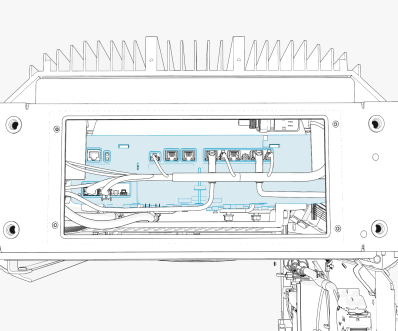
P223-07
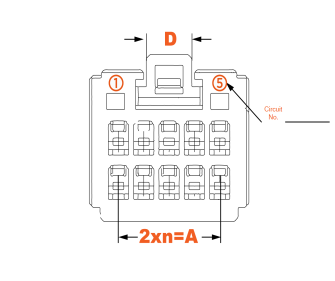
P223-02
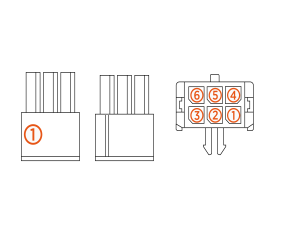
SEVB Faults
urn:fault:sevb:comms-failure
|
Category |
Fault Source |
Fault Type |
Criticality |
|
SEVB |
Hardware/Software |
Critical |
Fault Description
This fault is declared when UCB Universal Controller Board loses communication with SEVB Smart Ethernet Vehicle Board for 5 s.
Any ongoing session is stopped on encountering this fault. Power Link is allowed to operate once communication is reestablished.
3 such events in 24 hours will disable and lock the station.
Possible Causes
-
Software issue
-
Incorrect connection on SEVB
Smart Ethernet Vehicle Board/SSLAN Smart Switch Local Area Network -
Ethernet cable damage
Troubleshooting
-
Confirm if the issue started happening after a software update. If yes, revert back to old software and confirm if the issue is resolved. If not, continue with next steps.
-
If this is a new install, confirm the connections between SSLAN
Smart Switch Local Area Network and SEVB Smart Ethernet Vehicle Board are correct. Check if the connectors P238-17 along with its ethernet cable are seated on the right most slot on the SSLAN Smart Switch Local Area Network. Check if the P238-18 and its ethernet cable are seated to the left most slot. Confirm that the middle slot is left empty and that the above two are not swapped with each other. Photo added for reference. -
If the issue persists after the above checks, check if the Ethernet port is damaged on the cable or on the connector. Look for crimping inside the connector, broken locking mechanism, broken connector tab for any damage.
-
Check if the SEVB
Smart Ethernet Vehicle Board is losing power occasionally leading to SEVB Smart Ethernet Vehicle Board comms loss. This could be issue with SSLAN Smart Switch Local Area Network board and could use MDS replacement if confirmed. Check logs to confirm the same and reach out to engineering prior to replacement. -
Replace SEVC
Smart Electric Vehicle Cable if SEVB Smart Ethernet Vehicle Board comms issue continues after the above steps. -
Replace UCB
Universal Controller Board if comms failure persists after SEVC Smart Electric Vehicle Cable replacement. -
Contact ChargePoint if the issue is seen after the UCB
Universal Controller Board replacement.
urn:fault:sevb:invalid-cable-detected
|
Category |
Fault Source |
Fault Type |
Criticality |
|
Charging cable |
Hardware/Software |
Critical |
Fault Description
This fault is declared when SEVB Smart Ethernet Vehicle Board is unable to be detected after a replacement or during new install.
The system won't be able to get into useful state with this fault being active.
Possible Causes
-
Software Issue
Troubleshooting
-
Confirm if the issue started after a recent Cable Swap or during activation of a newly installed unit. If yes, confirm through chassis-shell if we are able to correctly read SEVB
Smart Ethernet Vehicle Board information (in SEVC Smart Electric Vehicle Cable node). If not, it is possible that provisioning of the SEVB Smart Ethernet Vehicle Board was done correctly. Re-provision SEVB Smart Ethernet Vehicle Board. Contact Engineering for steps. -
Confirm if the issue started after a software update. If yes, then possibly the configuration files might not have loaded correctly, reflash the software and see if it resolves the issue.
-
If both steps do not resolve the issue, then replace the SEVC
Smart Electric Vehicle Cable. -
Contact ChargePoint if issue persists after SEVC
Smart Electric Vehicle Cable swap.
urn:fault:sevb:plug-out-detected
|
Category |
Fault Source |
Fault Type |
Criticality |
|
Charging cable |
Hardware |
Critical |
Fault Description
This fault is seen when a plug out is detected in the middle of an ongoing session.
Possible Causes
-
Software/Firmware change
-
EV
Electric Vehicle side issue -
Damage on the connector latch
Troubleshooting
-
Confirm if this fault is seen on every session end. Check if the fault started occurring after a recent software update or hardware change on the system. Reach out to ChargePoint for further debugging.
-
Confirm if this fault started occurring without changes on our system. If yes, then this could be an interop issue. Reach out to ChargePoint for further debugging.
urn:fault:sevb:plc-not-responding
|
Category |
Fault Source |
Fault Type |
Criticality |
|
Hardware/Software |
Critical |
Fault Description
The fault is seen when PLC chip on the SEVB Smart Ethernet Vehicle Board board stops responding. The system will be operational if there is more than one cable in the system. The port with issue will be nonoperational till resolution.
System will be locked out if this fault is seen 3 times within 24 hours.
Possible Causes
-
Software or Firmware issue
Troubleshooting
-
Confirm if the issue occurred after a recent bootup, software update, or a hardware change. Power cycle the system to clear any stuck configuration or incomplete software update.
-
Replace SEVC
Smart Electric Vehicle Cable to resolve the issue. -
Contact ChargePoint if the issue persists after SEVC
Smart Electric Vehicle Cable replacement.
