SSLAN Faults Board Location
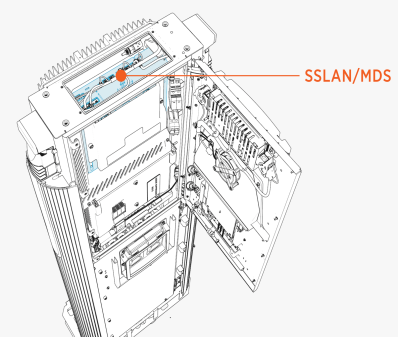
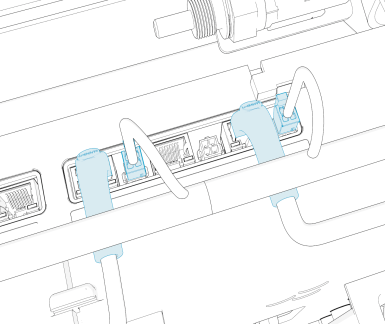
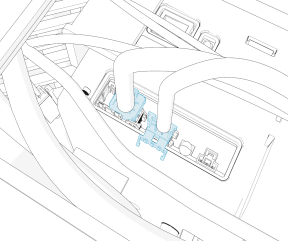
The illustrations below show the Power Link Ethernet switch (SSLAN Smart Switch Local Area Network) board location, key cable connections, and cable connector pin maps used during troubleshooting.
Top View
Side View
Other Side View
P223-07
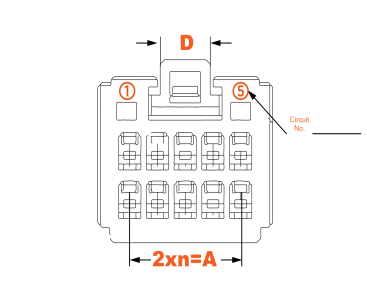
P223-02
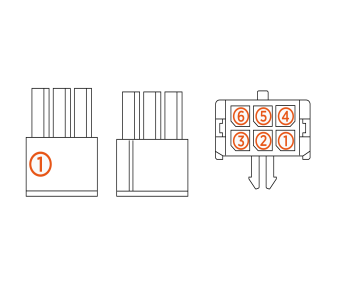
SSLAN Faults
This section provides information on SSLAN Smart Switch Local Area Network faults, including fault characteristics, possible causes, and recommended troubleshooting steps.
SSLAN: SEVB_SUPPLY_1_FAULT
|
Category |
Fault Source |
Fault Type |
Criticality |
|
Hardware |
Critical |
Fault Description
This fault is declared when the load switch 1 on SSLAN Smart Switch Local Area Network detects an overcurrent event. This load switch is feeding the SEVB Smart Ethernet Vehicle Board, so the SEVB Smart Ethernet Vehicle Board/output cable will be locked out upon this fault.
Possible Causes
-
Short in the harness
Troubleshooting
-
Measure continuity between:
-
Pin 3 on P238-17 (upper side of MDS) to Pin 3 on P232B-06 (right SEVB
Smart Ethernet Vehicle Board). -
Pin 4 on P238-17 (upper side of MDS) to Pin 4 on P232B-06 (right SEVB
Smart Ethernet Vehicle Board).
-
-
If the continuity tests fail, then the issue is with the harness and needs replacement. If the harness looks good then SSLAN
Smart Switch Local Area Network circuitry failure is possible. Replace MDS box. -
If the issue persists, then reach out to ChargePoint.
SSLAN: SEVB_SUPPLY_2_FAULT
|
Category |
Fault Source |
Fault Type |
Criticality |
|
Hardware |
Critical |
Fault Description
This fault is declared when load switch 1 on SSLAN Smart Switch Local Area Network detects an overcurrent event. This load switch is feeding the SEVB Smart Ethernet Vehicle Board, so the SEVB Smart Ethernet Vehicle Board/output cable will be locked out upon this fault.
Possible Causes
-
Short in the harness
Troubleshooting
-
Measure continuity between:
-
Pin 3 on P238-18 (upper side of MDS) to Pin 3 on P232A-06 (left SEVB
Smart Ethernet Vehicle Board). -
Pin 4 on P238-18 (upper side of MDS) to Pin 4 on P232A-06 (left SEVB
Smart Ethernet Vehicle Board).
-
-
If the continuity tests fail, then issue is with the harness and needs replacement. If harness looks good then, see Step 3.
-
SSLAN
Smart Switch Local Area Network circuitry failure is possible. Replace MDS box. -
If the issue persists, then reach out to ChargePoint.
SSLAN: BOARD_TEMPERATURE_WARNING
|
Category |
Fault Source |
Fault Type |
Criticality |
|
Hardware |
Minor |
Fault Description
This fault is declared when temperature sensors on SSLAN Smart Switch Local Area Network board goes over 90 °C. The fault clears once the temperature goes below 90 °C.
Troubleshooting
-
No action needs to be taken on this failure. Fault is generated and if temperature goes above 100 °C, then the SSLAN
Smart Switch Local Area Network_BOARD_TEMPERATURE_FAULT is generated.
SSLAN:BOARD_TEMPERATURE FAULT
|
Category |
Fault Source |
Fault Type |
Criticality |
|
Hardware |
Critical |
Fault Description
This fault is declared when temperature sensors on SSLAN Smart Switch Local Area Network board goes over 100 °C.
Possible Causes
Troubleshooting
-
Replace MDS to resolve the issue.
-
Contact ChargePoint if the issue persists..
UCB: SSLAN_COMMS_FAILURE
|
Category |
Fault Source |
Fault Type |
Criticality |
|
SSLAN |
Hardware/Software |
Critical |
Fault Description
The fault is generated when we lose communication with SSLAN Smart Switch Local Area Network over ethernet.
Session is ended normally.
If the self-test passes, then Power Link 1000 is allowed to operate normally. If the fault is seen thrice within 24 hours, then the system is locked for a service.
Possible Causes
-
Board stuck in unknown boot/SW state
Troubleshooting
-
Try power cycle of the Power Link 1000 - can be a 48 V EXT cycling.
-
If the issue persists after power cycle, the issue could be with SSLAN
Smart Switch Local Area Network board. Replace the MDS box to fix the issue. -
Contact ChargePoint for further debugging on the issue persisting over MDS replacement.
UCB:SSLAN_FW/CHECKSUM_FAILURE
|
Category |
Fault Source |
Fault Type |
Criticality |
|
Hardware/Software |
Critical |
Fault Description
This fault is shown if SSLAN Smart Switch Local Area Network has an unexpected firmware on it and the fault persists until board swap or firmware update.
Power Link 1000 is locked out if the issue is seen after power cycle and calls for service.
Possible Causes
-
Software not updated on system
-
Bad FRU
Field Replaceable Unit if seen on replacement -
Board failure
Troubleshooting
-
Check the software on the system and confirm if it is the latest released version.
-
If software) is correct, check if the fault is seen after a recent FRU
Field Replaceable Unit replacement (MDS). It is possible the SSLAN Smart Switch Local Area Network/MDS FRU Field Replaceable Unit did not pass the Factory test and somehow got released to the field. Reach out to ChargePoint/Factory team to confirm this. -
If none of the above is true, then try power cycle and clear any unknown state the board is stuck in. If there were disruptions noted during software update, maybe the board froze.
-
Contact ChargePoint for further debugging on the issue and possible MDS replacement and other software) debugging, if any.
UCB: SSLAN_SELFTEST_FAILURE
|
Category |
Fault Source |
Fault Type |
Criticality |
|
Hardware/Software |
Critical |
Fault Description
This fault is shown when SSLAN Smart Switch Local Area Network fails the self-test. Power Link 1000 is locked out and needs service/tech visit to bring it back to operation.
Possible Causes
-
Software not updated on system
-
Bad FRU
Field Replaceable Unit if seen on replacement -
Board failure
Troubleshooting
-
Check the software on the system and confirm if it is the latest released version.
-
If software is correct, check if the fault is seen after a recent FRU
Field Replaceable Unit replacement (MDS). It is possible the SSLAN Smart Switch Local Area Network/MDS FRU Field Replaceable Unit did not pass the factory test and somehow got released to the field. Reach out to ChargePoint/Factory team to confirm this. -
If none of the above is true, then try power cycle and clear any unknown state the board is stuck in. If there were disruptions noted during the software update, maybe the board froze.
-
Check the connections if the fault shown during self-test is hardware related. Reach out to ChargePoint for further assistance.
