UCB Faults Board Location
The illustrations below show the Power Link Control and Communication Module (UCB Universal Controller Board) board location, key cable connections, and cable connector pin maps used during troubleshooting.
Front View
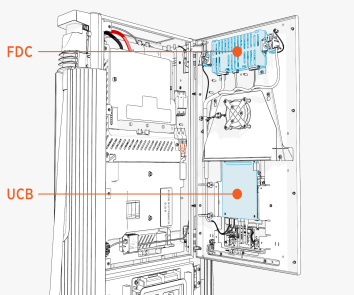
Inside View
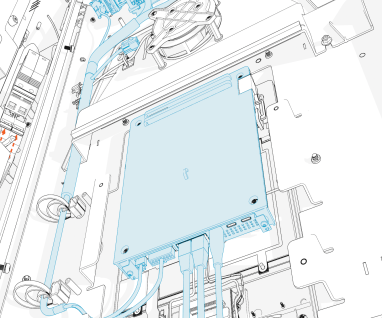
UCB-P197-02
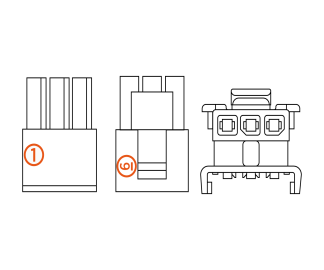
UCB Faults
This section provides information on UCB Universal Controller Board faults, including fault characteristics, possible causes, and recommended troubleshooting steps.
urn:fault:ucb:48 V_logic_supply_out_of_range
|
Category |
Fault Source |
Fault Type |
Criticality |
|
Hardware/Software |
Critical |
Fault Description
Incoming 48 V to UCB Universal Controller Board is not within acceptable range (+ or -5 V). The system is locked out until service and only an advanced user can enable it.
Possible Causes
-
UCB
Universal Controller Board in unexpected state -
Harness issue
-
UCB
Universal Controller Board failure -
Incoming 480 V fluctuation
-
AUXPS failure
Troubleshooting
-
Power cycle the system to clear UCB
Universal Controller Board of any unexpected states. -
Confirm if 48 V is coming on Pin 3 and Pin 1 on P197-02 connector going to UCB
Universal Controller Board. If yes, then the issue might be with UCB Universal Controller Board. Replace UCB Universal Controller Board to resolve the issue. If 48 V is not seen, then proceed to the next step: -
Confirm if there is no intermittent shorts or breaks in the harness. Disconnect the connector P249-02 on FDC prior to this test.
-
Measure continuity between Pin 3 and Pin 1 on connector P197-02 going to UCB
Universal Controller Board. If there is a short detected between these pins, then harness replacement is needed. -
Measure continuity between Pin 3 on P197-02 (on UCB
Universal Controller Board) connector and Pin A1 on P249-02 connector (on FDC). Also, between Pin 1 on P197-02 connector (on UCB Universal Controller Board) and Pin B1 on P249-02 connector (on FDC). If there is a break in the harness, then harness replacement is needed.
-
-
Possible incoming power issue causing AUXPS 48 V to fluctuate. Confirm if 48 V incoming power is in the correct range. If not, then fix the incoming power source. If not, then there might be some AUXPS circuitry failure or a component is not within the tolerance range. Replace AUXPS if this fault is constantly seen.
urn:fault:ucb:holster-comms-failure
|
Category |
Fault Source |
Fault Type |
Criticality |
|
Holster |
Hardware/Software |
Warning |
Fault Description
This fault is declared if locking holster loses CAN communication. Warning message is sent to UCB Universal Controller Board and system is allowed to operate normally.
Possible Causes
-
CAN harness issue
-
Intermittent noise/packet loss
Troubleshooting
-
Power cycle if issue persists.
-
Contact ChargePoint if unable to resolve with power cycle.
urn:fault:ucb:holster-fw/checksum-failure
|
Category |
Fault Source |
Fault Type |
Criticality |
|
Holster |
Software |
Warning |
Fault Description
This fault is declared if Power Link 1000 holster firmware version and checksum does not match expected version after 2 attempts to reflash.
Ideally seen during new install or when software is updated on the system.
Possible Causes
-
Bad FDC firmware flash at factory
-
Interruption during software update
-
Board firmware getting corrupted
Troubleshooting
-
If the UCB
Universal Controller Board board had an issue during Finalizer step, then it is possible it is pushing a bad image on holster board, so login to chassis-shell and confirm if holster is reading correct firmware version. -
If above is true, then try to flash the UCB
Universal Controller Board again and push firmware manually. -
If this happened during software update in the field, try to power cycle and see if it recovers.
-
If power cycle does not help, then replace the holster board.
urn:fault:ucb:self-test-failed
|
Category |
Fault Source |
Fault Type |
Criticality |
|
Hardware, Software |
Critical |
Fault Description
This fault is shown when UCB Universal Controller Board fails the self-test. Power Link 1000 is locked out and needs service/tech visit to bring it back to operation.
Possible Causes
-
Software not updated on system
-
Bad FRU
Field Replaceable Unit (if seen on replacement) -
Board failure
Troubleshooting
-
Check the software on the system and confirm if it is the latest released version.
-
If the software is correct, check if the fault is seen after a recent FRU
Field Replaceable Unit replacement (MDS). It is possible the UCB Universal Controller Board FRU Field Replaceable Unit did not pass Factory test and somehow got released to the field. Reach out to ChargePoint to confirm this. -
If none of the above is true, then try power cycle and clear any unknown state the board is stuck in. If there were disruptions noted during software update, maybe the board froze.
-
Check the connections if the fault shown during self-test is hardware related. Reach out to ChargePoint for further assistance.
urn:fault:ucb:board-temperature-warning
|
Category |
Fault Source |
Fault Type |
Criticality |
|
Hardware |
Warning |
Fault Description
This warning is shown when UCB Universal Controller Board board temperature is higher than 80 °C for 10 seconds. The fault is cleared when board temperature goes below 80 °C for 10 seconds.
The system is allowed to operate normally and no action is taken.
Possible Causes
None
Troubleshooting
-
No action needed.
urn:fault:ucb:cpu-temperature-warning
|
Category |
Fault Source |
Fault Type |
Criticality |
|
Hardware |
Critical |
Fault Description
This fault is shown when UCB Universal Controller Board board temperature is higher than 90 °C for 10 seconds. The fault is cleared when board temperature goes below 90 °C for 10 seconds.
Any ongoing session is stopped normally and system enters 30 minutes cool down period. Power Link 1000 will remain unavailable until cool down period and passing self-test after that. If this repeats 3 times in 24 hours, then Power Link 1000 is locked out for service.
Possible Causes
-
Temperature sensor failure on the board
Troubleshooting
-
Possible failure on the board. Replace the UCB
Universal Controller Board and resolve the issue. -
Contact ChargePoint if the issue persists after UCB
Universal Controller Board swap.
