Proton Location
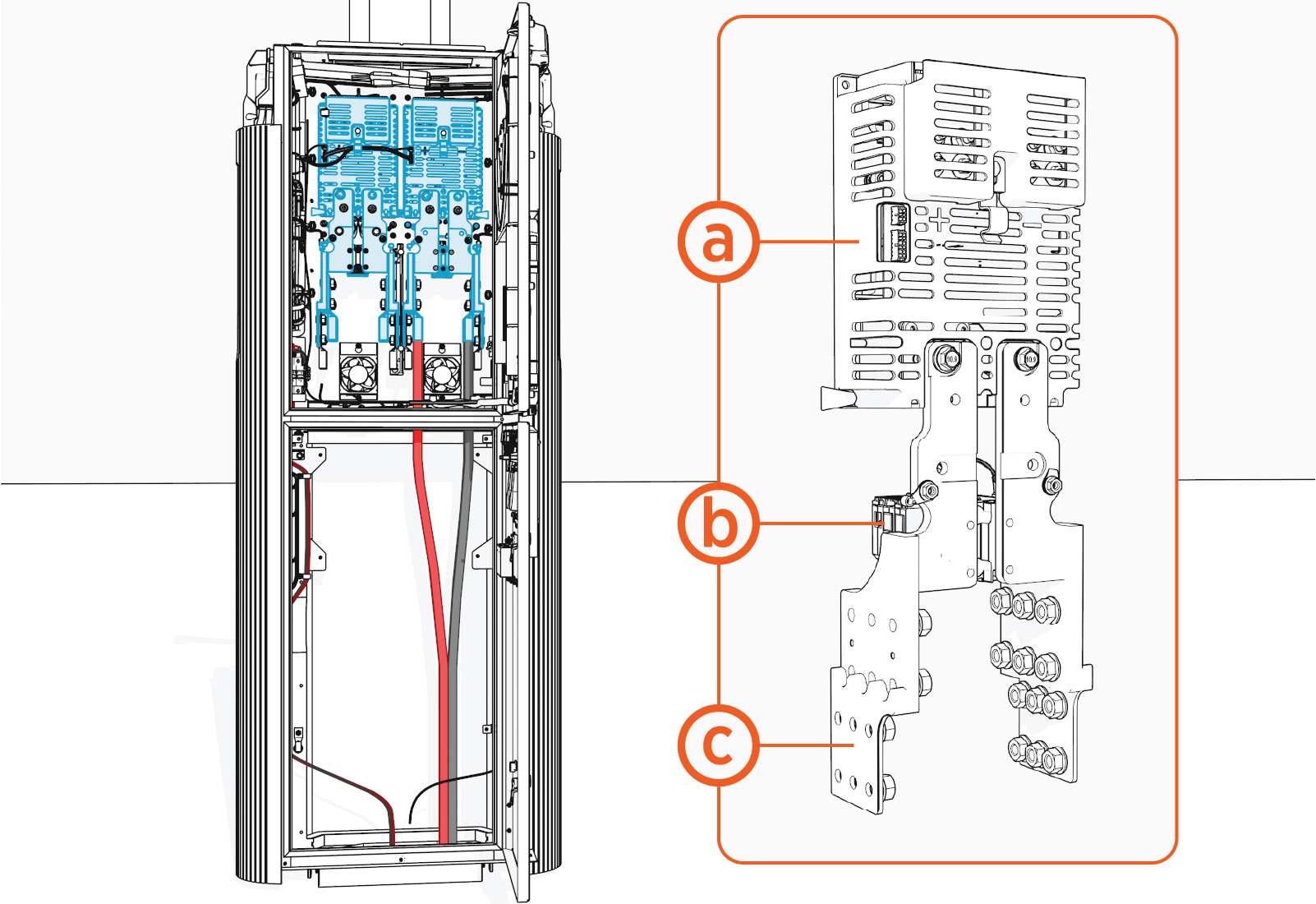
The illustration below shows the Power Link Proton (contactor switch) location.
|
|
|
Proton Faults
This section provides information on Proton faults, including fault characteristics, possible causes, and recommended troubleshooting steps.
urn:fault:proton:primary-proton-isolation-fault
or
urn:fault:proton:optional-proton-isolation-fault
|
Category |
Fault Source |
Fault Type |
Criticality |
|
Isolation |
proton board |
Hardware/Software |
Emergency |
Fault Description
The Proton board monitors the isolation resistance from DC+ to ground and DC- to ground and triggers an isolation fault if the isolation resistance drops below 100 kΩ for 8s. Any ongoing session stops. The fault clears if the isolation resistance goes above 100 kΩ for 10s. If this fault is seen three times in 24 hours, the Power Link 2000 will be disabled and locked out for further investigation.
Possible Causes
-
Real Isolation issue.
-
Proton board failure.
-
Software bug.
Troubleshooting
-
Check if the issue started occurring after a software change on the Power Link 2000. Contact the ChargePoint software team for debugging and troubleshooting steps.
-
Check if this happened after a hardware swap and contact the ChargePoint hardware team for debugging and troubleshooting steps.
-
If the isolation fault was noted without any of the above, follow the steps below:
-
Check if it happened in the middle of the session. If yes, retry the session and see if the issue is resolved. This could be an EV
 Electric Vehicle side issue.
 -
If the issue persists over multiple session attempts and is independent of the EV
Electric Vehicle, then replace the Proton FRU Field Replaceable Unit to resolve the issue. -
If the issue persists, contact ChargePoint support for further debugging.
urn:fault:proton:primary-proton-contactor-opening
or
urn:fault:proton:optional-proton-contactor-opening
|
Category |
Fault Source |
Fault Type |
Criticality |
|
Output Contactor |
Contactor |
Hardware/Software |
Critical |
Fault Description
The Proton board monitors the DC current as well as Aux witness contact feedback from Proton relays and triggers the fault if the current is >400 A and <450 A. The Proton board clears the fault if, during the start of the next charge session, the relays are not detected to be welded.
Possible Causes
-
EV
Electric Vehicle side issue. -
Proton issue.
-
Software bug.
Troubleshooting
-
Check if this fault happened at the end of a session. Check the SOC and see if it is near 100%. If yes, then this could be due to the EV
Electric Vehicle opening the output contactor at the end of the session, prior to ramping down the current. Monitor whether this occurs across multiple sessions, and if so, escalate to Engineering for further action and for coordination with the EV Electric Vehicle manufacturer. -
If it is happening randomly at various points in the charge cycle, then check if this event started happening after a hardware or software swap. Report to engineering for further steps.
-
If neither, replace the Proton and check if the issue is resolved.
-
Contact engineering if the issue persists after the Proton replacement.
urn:fault:proton:primary-proton-abnormal-opening
or
urn:fault:proton:optional-proton-abnormal-opening
|
Category |
Fault Source |
Fault Type |
Criticality |
|
Output Contactor |
Contactor |
Hardware/Software |
Critical |
Fault Description
The Proton board monitors the DC current as well as Aux witness contact feedback from Proton relays and triggers the fault if the current is >480 A. Power Link 2000 locks out for troubleshooting. The Proton board clears the fault if, during the start of the next charge session, the relays are not detected to be welded.
Possible Causes
-
EV
Electric Vehicle side issue. -
Proton issue.
-
Software bug.
Troubleshooting
-
Check if this fault happened at the end of a session. Check the SOC and see if it is near 100%. If yes, then this could be due to the EV
Electric Vehicle opening the output contactor at the end of the session, prior to ramping down the current. Observe if this happens on multiple sessions and contact engineering for further steps and to contact the EV Electric Vehicle manufacturer. -
If it is happening randomly at various points in the charge cycle, then check if this event started happening after a hardware or software swap. Report to engineering for further steps.
-
If neither, replace the Proton and check if the issue resolves.
-
Contact engineering if the issue persists after the Proton replacement.
urn:fault:proton:primary-proton-welded-contactor
or
urn:fault:proton:optional-proton-welded-contactor
|
Category |
Fault Source |
Fault Type |
Criticality |
|
Output Contactor |
Contactor |
Hardware/Software |
Critical |
Fault Description
This fault triggers when the auxiliary contacts are stuck due to an overcurrent event. Power Link 2000 locks out until the Proton is replaced.
Possible Causes
-
EV
Electric Vehicle side issue. -
Proton issue.
-
Software bug.
Troubleshooting
-
Replace the Proton to fix the issue.
-
Pull logs and contact engineering if the issue is due to an EV
Electric Vehicle, hardware, or software issue.
urn:fault:proton:primary-proton-ucb-comms-failure
or
urn:fault:proton:optional-proton-ucb-comms-failure
|
Category |
Fault Source |
Fault Type |
Criticality |
|
CAN Comms |
Proton-UCB |
Hardware/Software |
Critical |
Fault Description
This fault triggers when UCB Universal Controller Board loses CAN communication with Proton for 10s. The fault clears when CAN communication is reestablished for 10s. Any ongoing session stops, and Power Link 2000 locks out if the fault is seen three times in 24 hours.
Possible Causes
-
Hardware issue.
-
Software issue.
Troubleshooting
-
Check if you are able to establish communication with Proton (from UCB
Universal Controller Board) through chassis-shell. If you are able to do so, reboot the cluster and confirm if the issue resolves. -
If the issue persists, then check if all the connectors are seated on the Proton side. Check for connector P306-15 going to MDS and make sure it is seated correctly. Disconnect the connector and perform a pull test to confirm if the wires are properly sitting in the connector.
-
Locate connector P312-08 on the UCB
Universal Controller Board and make sure it is seated correctly. Also, perform a pull test. Perform continuity tests to make sure there is no break in the harness: -
Measure continuity between Pin 2 (CAN_H) on P312-08 and Pin 7 on P306-15.
-
Measure continuity between Pin 3 (CAN_L) on P312-08 and Pin 8 on P306-15.
-
Measure continuity between Pin 4 (CAN_GND
Ground) on P312-08 and Pin 10 on P306-15. -
If any break in continuity is located, then reach out to engineering for a harness replacement. If the issue persists after the above continuity tests, then reach out to engineering for further debugging steps.
urn:fault:proton:primary-proton-fw-checksum-failure
or
urn:fault:proton:optional-proton-fw-checksum-failure
|
Category |
Fault Source |
Fault Type |
Criticality |
|
Board firmware issue |
Proton |
Hardware/Software |
critical |
Fault Description
This fault triggers when Proton's firmware version and checksum don’t match the expected version after two attempts to reflash. Proton reboots to force a firmware flash.
Possible Causes
-
Hardware issue.
-
Software issue.
Troubleshooting
-
Check if this fault happened after a software update. If yes, then try reflashing the software to resolve the issue. If the issue persists, contact engineering for resolution.
-
If the fault randomly shows up and persists after two reboots that are already part of the software, replace the Proton to resolve the issue.
-
Contact engineering if the issue persists after the Proton swap.
urn:fault:proton:primary-proton-board-temp-fault
or
urn:fault:proton:optional-proton-board-temp-fault
|
Category |
Fault Source |
Fault Type |
Criticality |
|
Board hardware/firmware issue |
Proton |
Hardware/Software |
Critical |
Fault Description
This fault triggers when the Proton board temperature exceeds 115 °C for 1s. The fault clears when the temperature drops below 115 °C for 60s. A 30 minute cool-down period is required. Power Link 2000 is allowed to operate after the fault clears and the self-test passes.
Possible Causes
-
Hardware issue.
-
Software issue.
Troubleshooting
-
Try to cycle power to Proton. Restart chassis-server and check if the fault clears.
-
Check if this fault happened after a software update. If yes, then try reflashing the software to resolve the issue. If the issue persists, replace the Proton to resolve the issue.
-
If the issue persists, contact engineering for further steps.
urn:fault:proton:primary-proton-thermal-switch-fault
or
urn:fault:proton:optional-proton-thermal-switch-fault
|
Category |
Fault Source |
Fault Type |
Criticality |
|
Thermal switch |
Switch or feedback |
H |
Critical |
Fault Description
A thermal switch fault triggers when the proton switch on Proton is reported to be open.
Possible Causes
-
Hardware issue.
Troubleshooting
-
Check if there is a break in the feedback wire. Measure the continuity between Pins 9 and 10 on connector P306-14. If there is an optional proton present that is showing the fault, then measure continuity between Pins 11 and 12 on connector P306-14. If it measures open, the thermal switch might have failed. Replace the thermal switch to fix the problem.
-
If it measures a short, contact engineering for further troubleshooting.
urn:fault:proton:primary-proton-charging-voltage-measurement-failure
or
urn:fault:proton:optional-proton-charging-voltage-measurement-failure
|
Category |
Fault Source |
Fault Type |
Criticality |
|
Proton board |
Proton |
Hardware/Software |
Critical |
Fault Description
High voltage DC measurement failure (due to voltage being out of range, or measurement circuit error).
Possible Causes
-
Hardware issue.
-
Software issue.
Troubleshooting
-
Restart the chassis server and see if the issue resolves. If not, swap the Proton to resolve the issue.
-
If the problem still persists, contact engineering for further steps.
urn:fault:proton:primary-proton-charging-current-measurement-failure
or
urn:fault:proton:optional-proton-charging-current-measurement-failure
|
Category |
Fault Source |
Fault Type |
Criticality |
|
Proton board |
Proton |
Hardware/Software |
Critical |
Fault Description
Charging current measurement failure (due to loss of CAN with LEM or measurement circuit error).
Possible Causes
-
Hardware issue.
-
Software issue.
Troubleshooting
-
Restart the chassis server and see if the issue resolves. If not, swap the Proton to resolve the issue.
-
If the problem still persists, contact engineering for further steps.
