Override Scheduled Charging
For a CPF model station, when a vehicle is plugged in during a scheduled time of no power dispensing, the LED ring on the station becomes solid blue, indicating that the vehicle is not (yet) charging. You can override the scheduled charging locally (at the station) or remotely (away from the station), allowing the vehicle to begin charging immediately.
Overriding at the Station
To override the scheduled charging policy at the station (to begin charging immediately), the following must be done at the time the session is started:
-
Tap the vehicle’s ChargePoint card on the station’s card reader. The station beeps a single time if the card tap was successful.
-
Plug the connector into the vehicle, wait a few seconds, unplug the vehicle, then plug it back in.
This double-pump automatically overrides scheduled charging for this specific charging session only and allows the vehicle to charge immediately.
The LED ring on the station pulses blue to show that the vehicle is charging.
Overriding away from the Station
A fleet manager can override Scheduled Charging remotely by following the steps listed below:
-
Log in to ChargePoint Platform.
-
Navigate to Fleets > Overview.
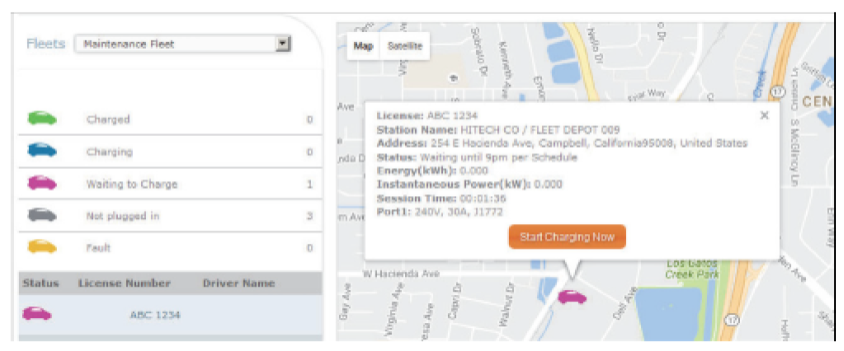
This page shows vehicles that are plugged into a station with a scheduled charging policy but, are not yet charging. The purple icon indicates that the vehicle is waiting to charge.
-
Locate the vehicle icon you want to charge immediately by clicking its purple icon on the map to display the message.
-
Click Start Charging Now to override the scheduled charging policy and begin charging immediately.
The vehicle’s icon turns blue indicating that the vehicle is charging.
Figure 1: Overriding away from the Station