Attach the New Rope to the Charge Cable
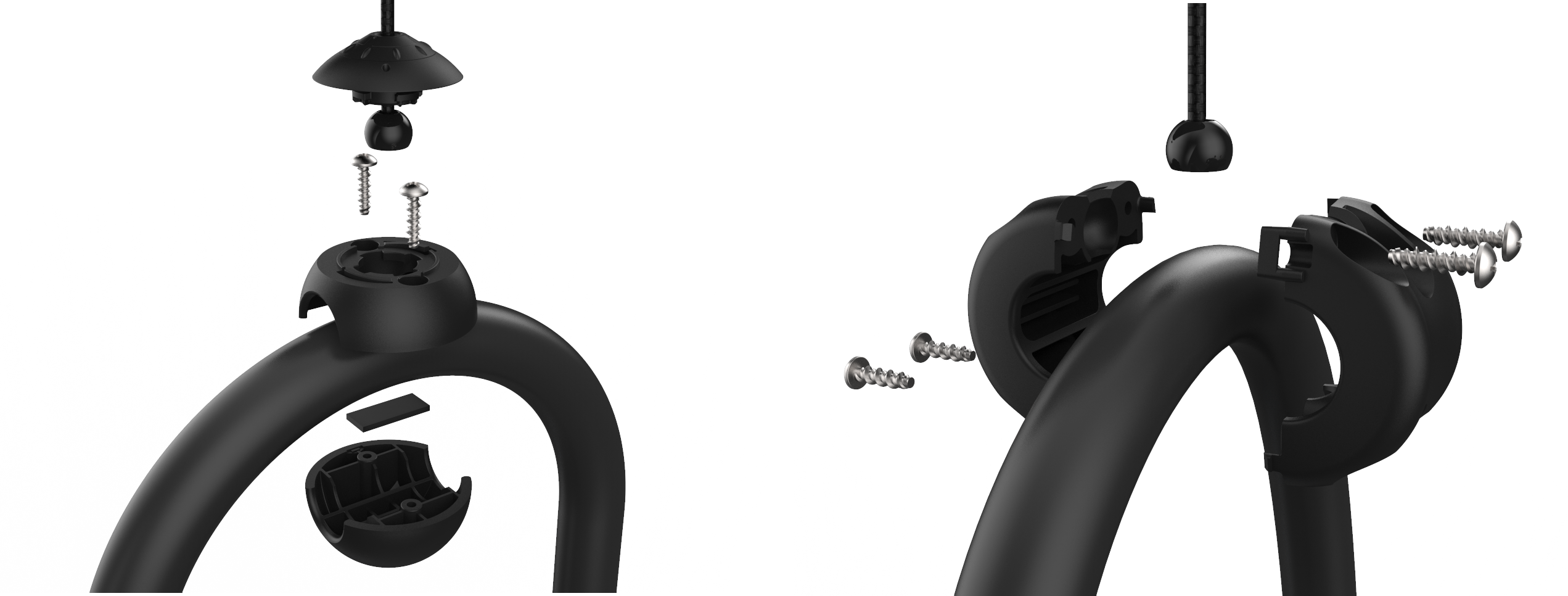 First, identify the cable clamp style.
-
For stations with the classic four-screw cable clamp, proceed to Replace the Classic Cable Clamp.
-
For stations with the new cable clamp, check the cable clamp for damage. If the cable clamp is damaged, proceed to Replace the New Cable Clamp.
-
For stations with the new cable clamp with no damage, proceed to Replace the Rope at the Charging Cable.
Replace the Classic Cable Clamp
To replace the classic cable clamp, follow the steps below:
-
Position the existing cable clamps near the base of the station.
-
Use a Phillips screwdriver to remove the screws that hold the two sides of the clamps together.
-
Place the rubber shim into the bottom portion of the new cable clamp.
-
Place the new bottom of the cable clamps on the cable on the underside of the cable in the same place as the old cable clamp.
-
Place the new top of the cable clamp on the top side of the cable to mate with the bottom of the cable clamp.
-
Verify the top of the cable clamp (the flat portion) is correctly oriented to the top of the charging cable.
-
Use two of the #6 self-tapping screws to fasten the top and bottom portion of the new cable clamp together.
-
Unwrap the new ropes.
-
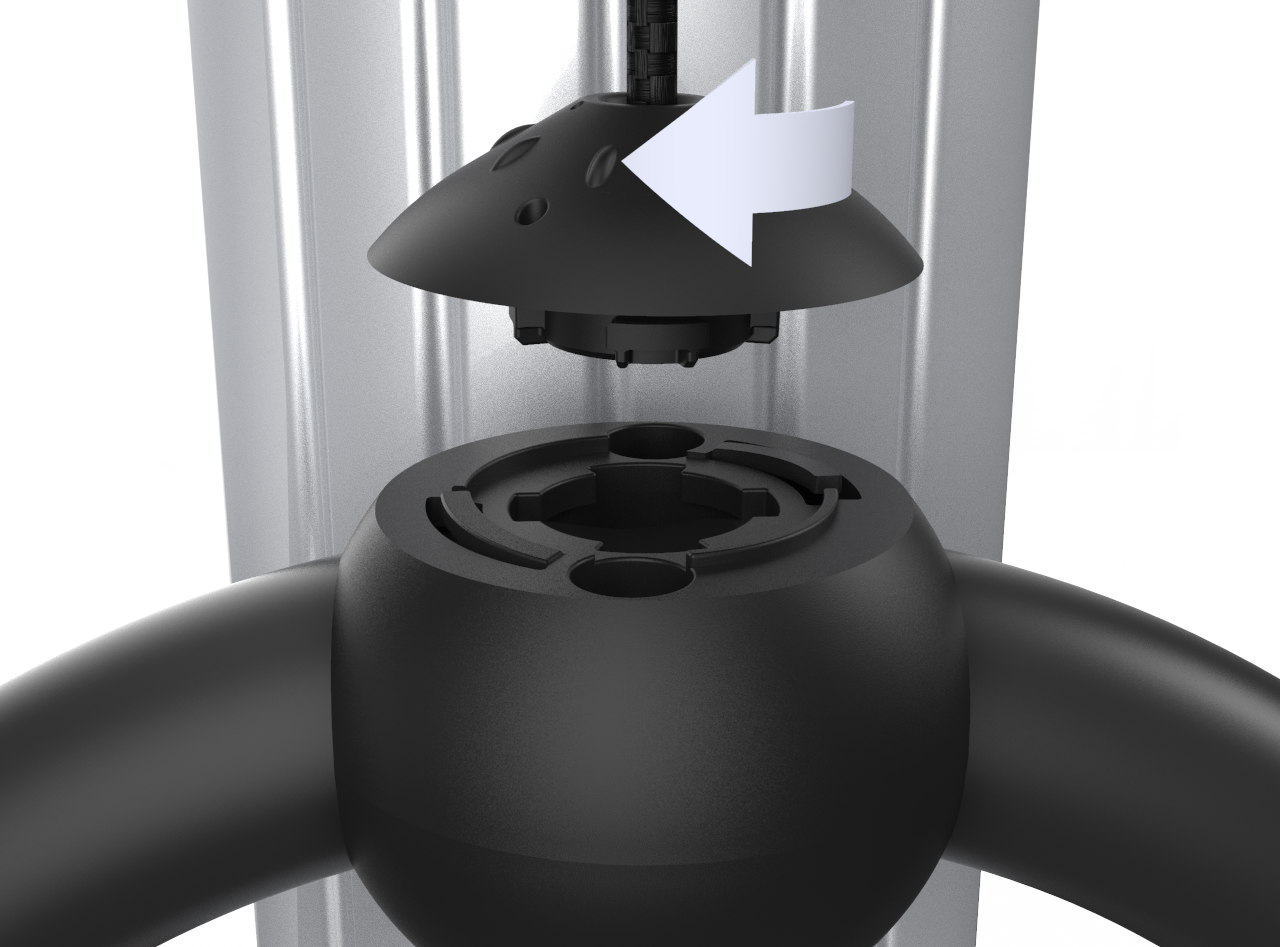
Match the knot bearing on each rope to the corresponding mating feature on the cable clamps.
-
Turn the knot bearing one-quarter turn clockwise while pushing down gently until the knot bearing locks into place.
-
Position the completed cable clamp at the front of the station.
-
Discard the old rope and cable clamps.
Replace the New Cable Clamp
To replace the new cable clamp, follow the steps below:
-
Insert the service tool teeth into the two holes in the knot bearing.
-
Turn the knot bearing one-quarter turn counter-clockwise to remove the knot bearing from the cable clamp.
-
Use a Phillips screwdriver to remove the screws that holds the top to the bottom of the cable clamp.
-
Place the rubber shim into the bottom portion of the new cable clamp.
-
Place the new bottom of the cable clamps on the cable on the underside of the cable in the same place as the old cable clamp.
-
Place the new top of the cable clamp on the top side of the cable to mate with the bottom of the cable clamp.
-
Verify the top of the cable clamp (the flat portion) is correctly oriented to the top of the charging cable.
-
Use two of the #6 self-tapping screws to fasten the top and bottom portion of the new cable clamp together.
-
Unwrap the new ropes.
-
Match the knot bearing on each rope to the corresponding mating feature on the cable clamps.
-
Turn the knot bearing one-quarter turn clockwise while pushing down gently until the knot bearing locks into place.
-
Position the completed cable clamp at the front of the station.
-
Discard the old rope and cable clamps.
Replace the Rope at the Charging Cable
To replace the rope at the charging cable, follow the steps below:
-
Insert the service tool teeth into the two holes in the knot bearing.
-
Turn the knot bearing one-quarter turn counter-clockwise to remove the knot bearing from the cable clamp.
-
Unwrap the new ropes.
-
Match the knot bearing on each rope to the corresponding mating feature on the cable clamps.
-
Turn the knot bearing one-quarter turn clockwise while pushing down gently until the knot bearing locks into place.
-
Position the completed cable clamp at the front of the station.
-
Discard the old rope and cable clamps.
