Manage a Shipped Work Order
Managing a shipped work order in the Partner Portal application involves reviewing task details, verifying shipping information, and scheduling service dates based on delivery timelines.
To manage a shipped work order, perform the following steps:
-
Access the Work Order page, review the task details (for example, replacing a charging cable), and record any specific requirements such as uploading images or returning old parts.
-
Verify the shipping information in the Related RMA / FSO tab, to monitor the shipment and confirm the expected delivery date.
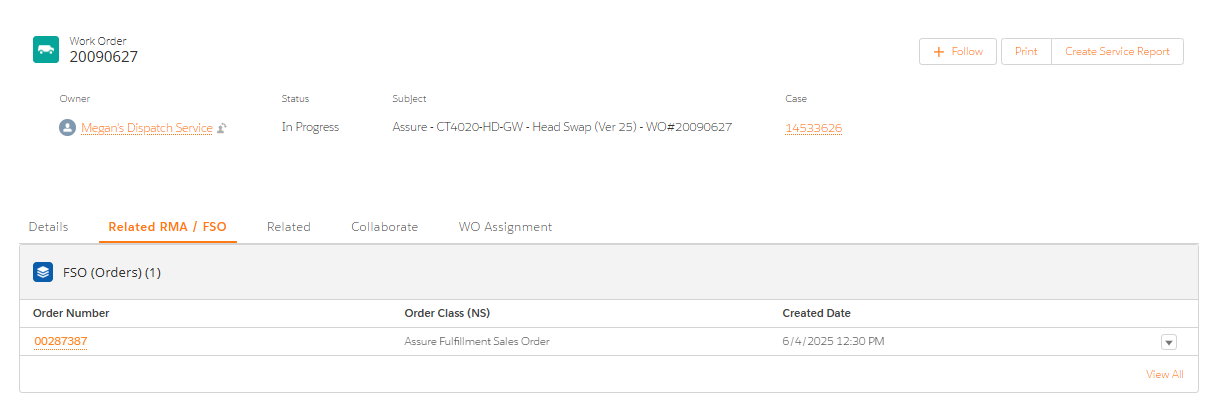 Depending on the delivery date, schedule a service date to the customer.
 -
Navigate to the Details tab and access the Customer Information section.
-
Enter the Appointment Date, Technician Name, and Contact Details into the work order.
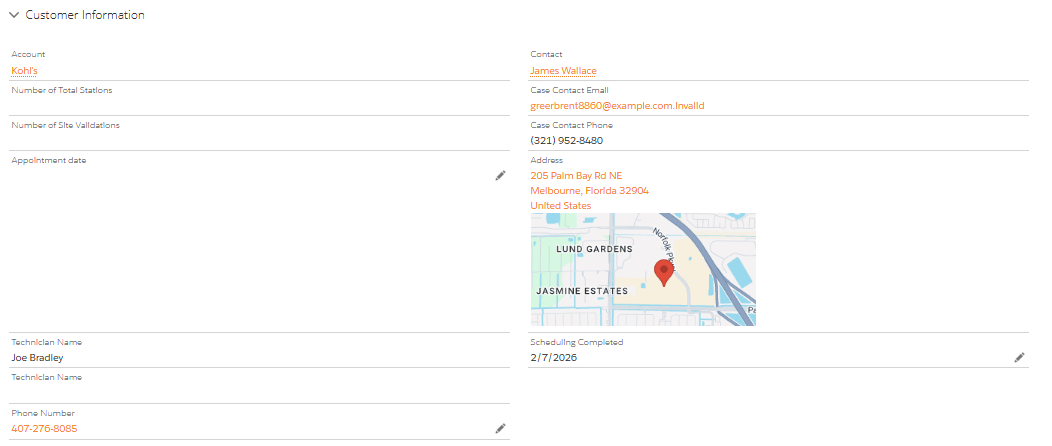
Once the partner accepts the work order and provides shipping details, the parts are ordered. The carrier then picks up the order on the scheduled date, and the estimated delivery date is determined from the shipping information. Based on the work order entitlement and service level attributes, the Target SLA is set. For example, if the estimated delivery date is March 1st, the SLA is calculated as one business day after delivery, making the Target SLA as March 2nd.
-
-
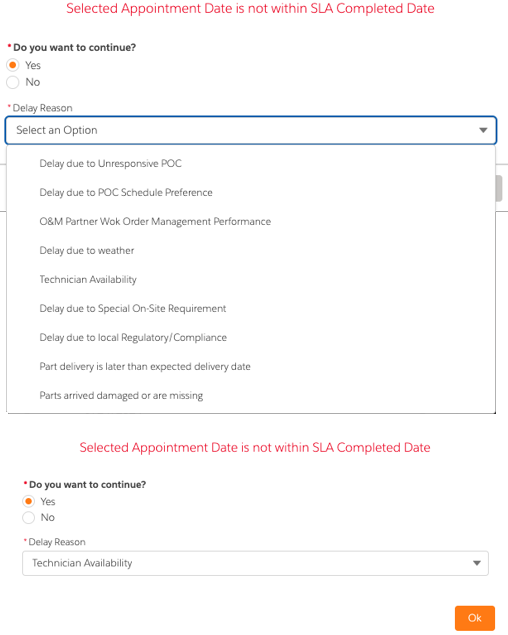
If the appointment date provided exceeds the Target SLA, you will be prompted to decide if you want to continue with the missed SLA appointment date.
-
If you select Yes, provide a reason for delay as to why you are unable to meet the Target SLA Date and then click Ok. The Appointment Date field is updated with the date you submitted and the missed SLA reason is shared with ChargePoint.
The following tables lists the detailed descriptions for the reason for delay.
Reason for Delay Description Delay due to Unresponsive POC If you are unable to connect with the POC to schedule and meet the SLA, do not wait until after the SLA date to inform ChargePoint that the POC is unresponsive. We will assist in identifying an alternate POC. Delay due to POC Schedule Preference If the POC proposes a date that falls beyond the SLA deadline. O&M Partner Work Order Management Performance If ChargePoint has not provided the necessary information in the WO to enable completion of the repair by the SLA date (see examples below), such as:
-
O&M being asked to delay scheduling,
-
Clarification needed on WO details (For example: POC providing a different station address than the one listed), then the issue should be flagged promptly.
Delay due to weather If the forecast indicates that the repair cannot be completed by the Target SLA date, report the issue using this option. Technician Availability If O&M does not have technicians available to perform the service work by the Target SLA date. Delay due to Special On-Site Requirement If there are special site-access requirements that have delayed the appointment such as:
-
Safety glasses required
-
Paperwork O&M must complete and provide (for example, COI, JHA Form, and so on.)
Delay due to local Regulatory/Compliance If the work requires permits or paperwork to comply with local or state codes (for example, prevailing wage requirements) Part delivery is later than expected delivery date If the part does not arrive on its scheduled delivery date. Parts arrived damaged or are missing If the part arrives damaged during shipping, or if not all parts are received. -
-
If you select NO, you return to the main page of the WO and the Appointment Date field is enabled to make the necessary changes.
-
