Work Orders Overview
The Work Orders page provides a comprehensive list of all work orders assigned. Each entry contains essential information, including the work order number, subject, current status, and the date of assignment, ensuring clear visibility and effective tracking of responsibilities.
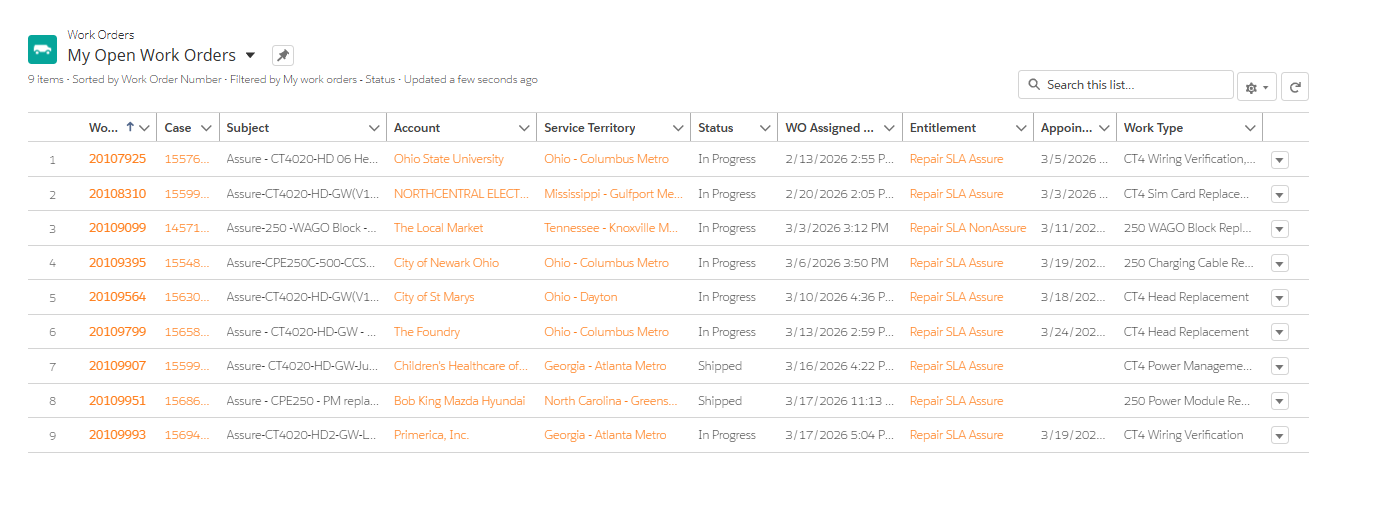
The key columns for a Work Order tracking system are as follows:
| Column Name | Description |
|---|---|
| Work Order Number | Unique identifier for each work order. Needed when contacting support. |
| Case | Case number used for communication between ChargePoint and the customer. |
| Subject | Brief description including type of work and station model. |
| Account | Name of the account. |
| Service Territory | Location where the service needs to be performed. |
| Status | Current status of the work order. |
| WO Assigned Date | Date when the work order was assigned. |
| Entitlement | Type of service or warranty associated with the work order. |
| Appointment Date | Scheduled date and time for the service or task. |
| Work Type | Nature of the task (repair, installation, commissioning). This allows technicians to identify the type of job at a glance, helping with preparation and planning |
