Onboard and Offboard a Technician
Onboarding and offboarding technicians in the Partner Portal application ensures technicians are properly added or removed while maintaining accurate certification and organizational records.
Onboard a Technician
To onboard a technician to the organization, perform the following steps:
-
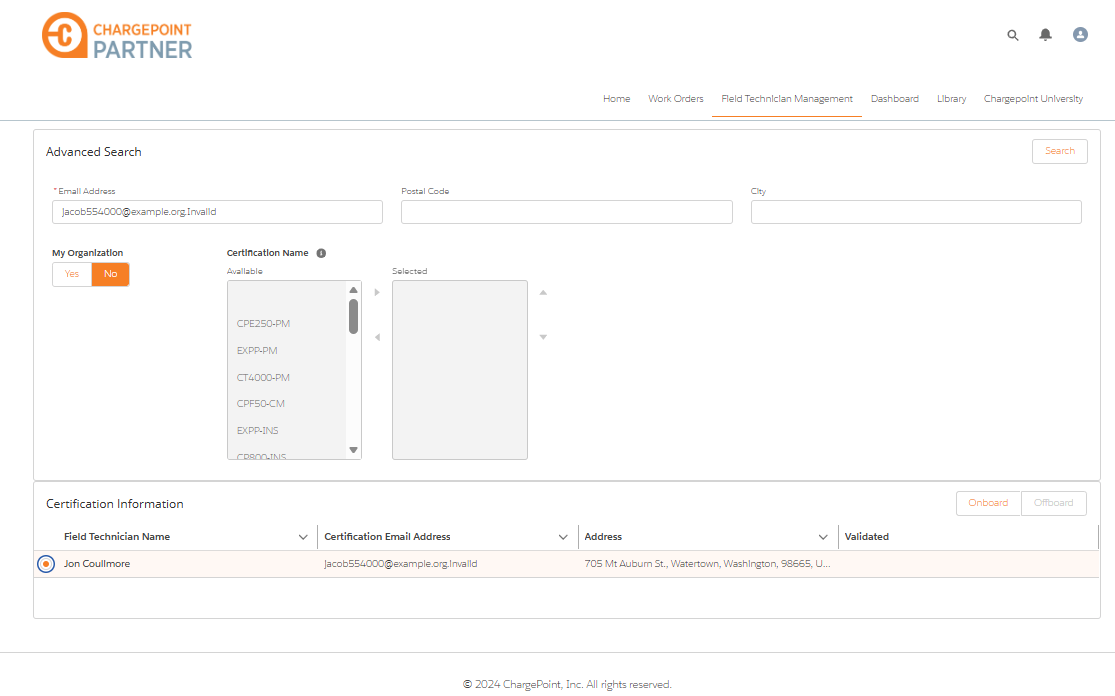
On the ChargePoint Partner Portal Home page, click Field Technician Management tab.
-
In My Organization, select No.
-
Enter the technician's Email Address and click Search to find a matching personnel.
-
In Certification Information, select the technician for on-boarding and click Onboard.
-
Enter the technician's Corporate Email Address. Ensure to provide the same email address as the organization's domain.
-
Click Onboard to add this technician to the organization.
-
In My Organization, select Yes.
-
Click Search to verify the technician’s certification records and confirm successful onboarding.
Offboard a Technician
To offboard a technician from the organization, perform the following steps:
-
On the ChargePoint Partner Portal Home page, click Field Technician Management tab.
-
Select the technician from the Certification Information list.
-
Enter the technician's Email Address to isolate the technicians available in the technician list.
-
Click Search to isolate the technician and proceed with off boarding.
-
In Certification Information, select the technician you wish to off board and click Offboard to begin the removal process.
A success message is displayed confirming that the you have successfully off boarded the technician.
To better understand how to onboard and offboard a technician, view the following video.
