Using the Collaborate Tab
The Collaborate tab in the Partner Portal application is designed for seamless communication with the team, allowing users to share updates, ask questions, and attach files or pictures related to a work order.
To add comments, perform the following steps:
-
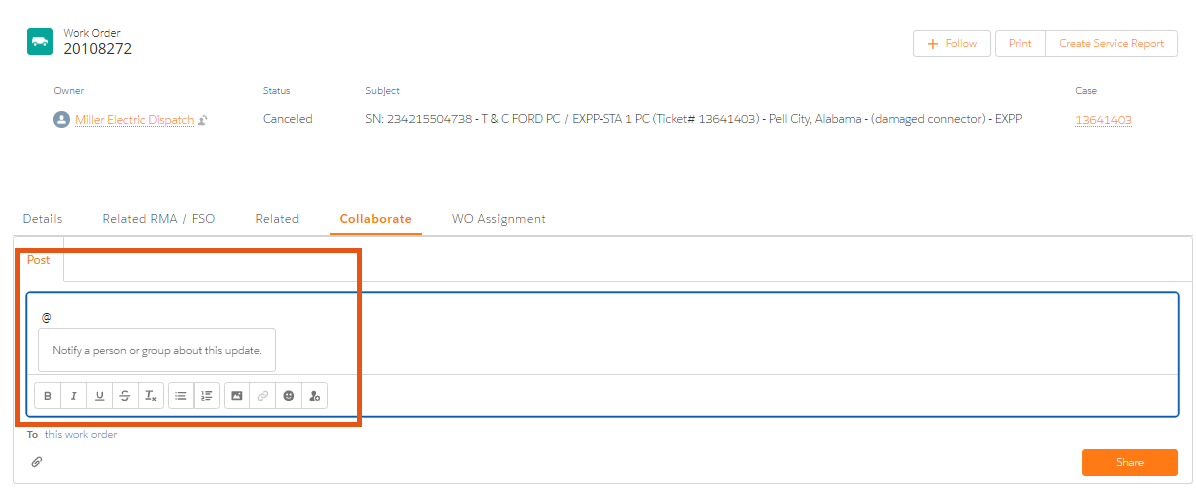
Navigate to the Collaborate tab and click Share an update.
-
Type @ followed by their name, to Tag the Customer Service Executive . This notifies someone in ChargePoint directly.
For example: To request travel outside of the agreed upon rates for the assigned work order, post to @“NA Field Service Team.” Tagging this team will notify them immediately, ensuring a faster response.
-
You can also use this tab to add notes and ask questions about the work order. You can also attach files and upload pictures.
