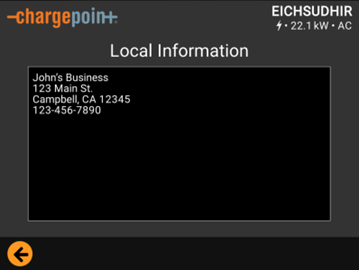
Local Information Message
The Local Information feature allows station owners to display custom text on station screens which aids in adhering to regulatory requirements.
Many states now require station owners who charge fees to display certain information on charging station screens. The information includes the following:
-
Contact information of the station owner or the operator sometimes also referred to as the “local responsible party”. The NIST Handbook 44 (User Requirements.2.5.), requires that unattended Electric Vehicle Supply Equipment (EVSE) display the name, address, and telephone number of the local responsible party.
and/or
-
Other state-specific regulatory information.
Users can navigate to Local Info> About page of the charging station screen, making this information relatively easy for regulatory agencies to find, but not immediately visible to drivers. If you want to display a custom message that will easily be seen by drivers, please see refer to Create a Station Message.
To display regulatory information on charging station screens, complete the following steps:
Step 1: Create Local Information Message
-
Log in to ChargePoint Platform.
-
Navigate to Stations > Station Messages.
-
Click + New Message.
-
Select Local Information from the Message Type drop-down list.
-
Enter the following information:
-
Local Information Name: Enter a name for your message.
-
Org Name: Enter the name of your organization.
-
Local Information Text: Enter the message you want displayed on the charging station. You can enter a maximum of 500 characters (including spaces and returns).
Characters not allowed: /\~"<>| -
Release of personal information: Approve the release of personal information to allow text entered in local information box to be displayed in the Local Info > About page on the charger screen. By clicking Save, you are certifying that you have the authority to publish this information including personal contact information.
-
-
Click Save to confirm the changes and Cancel to discard the changes.
After adding the new message, proceed to applying the message onto a charging station screen.
Step 2: Apply Local Information Message
After you create a Local Information message, you must apply it to your station(s). You can apply a Local Information message to an individual station or to all the stations under an organization.
Apply Local Information Message to Individual Stations
To apply a local information message on a charging station screen, configure the following steps:
-
Log in to ChargePoint Platform.
-
Navigate to Stations > Station Messages > Apply Station Messages.
-
Use filters to navigate to the newly created message. Enter the MAC Address in the Filters section to narrow down the search for an individual station.
You can get the MAC address for your station from the Stations Overview > Stations tab. Click Show/Hide Columns to ensure that the MAC Address information is displayed in the overview. Copy the address and paste it in the Filters section in the Apply Station Messages tab.
-
Select the Local Information message from the New Station Message drop-down list that is to be displayed. You can make this selection at the station level.
-
Click Apply.
To better understand how to create and apply a local information message for an individual station, view the following video.
Apply Local Information Message to Organizations
To apply a local information message to all the stations part of an organization, configure the following steps:
-
Log in to ChargePoint Platform.
-
Navigate to Stations > Station Messages > Apply Station Messages.
-
Navigate to the row containing the organization you would like to apply the Local Information message to.
-
Select the Local Information message from the New Station Message drop-down list that is to be displayed. You can make this selection at the organization level.
-
Click Apply.
To better understand how to create and apply a local information message, view the following video.
Step 3: Verify Local Information Message
To verify that a station screen is displaying your Local Information message, complete the following steps:
-
Tap the ? icon on the screen to access support.
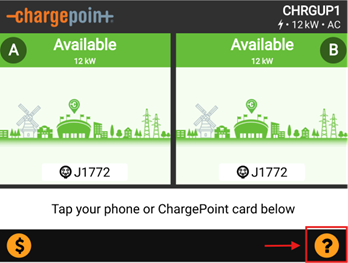
-
Tap the
 icon to open Settings.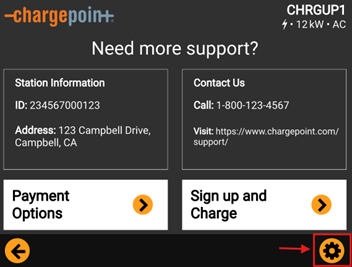
-
Tab About.
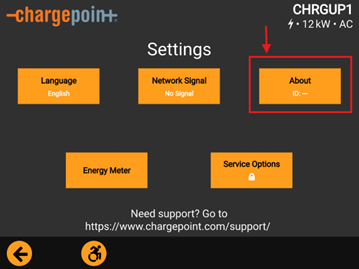
-
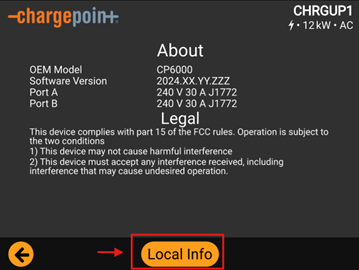
Tap Local Info.
-
Make sure that the local information is applied and displayed on the station screen.