Replace a Power Module

To replace a power module, complete the following steps:

This document describes the complete removal and replacement procedure for a Power Module field replacement. To install a Power Module into a new Express 250 charging station, refer to the Express 250 Installation Guide instead.

Required Tools and Materials

  • ChargePoint replacement part #System-PM

  • #2 Phillips screwdriver

  • T25 Security Torx driver

  • 8 mm (5/16 in) nut drivers

  • Step ladder

  • Headlamp

The Express 250 supports one or two Power Modules.

Power Modules are 45 kg (98.5 lbs) each. Installing or replacing Power Modules requires two people.

Always rest a Power Module flat on the ground until it is being installed. Power Modules are not stable in any other position. Images of Power Modules standing up with the handles on top are only to illustrate the proper installation position.

About Panels

All panels have guide tabs that align with corresponding slots on the product’s frame. When removing a panel, lift the panel upward to release these tabs from their slots.

When installing a panel, align these tabs above their corresponding slots and press the panel downward.

Power Off the Station

Power off at the breaker panel and lock out/tag out before continuing work.

RISK OF SHOCK. Before performing this procedure, disconnect the power to the station at the service panel. Keep power off for this circuit until all cover panels are correctly reinstalled and the work scope is completed. FAILURE TO FOLLOW THESE INSTRUCTIONS CAN RESULT IN SERIOUS INJURY OR LOSS OF LIFE.

Remove the Area Light Bar

  1. Using a T25 Security screwdriver, loosen the two captive screws on the area light bar.

    Technical illustration depicts the procedural step.

  2. Disconnect the power cable that connects the area light bar to the LED display assembly. Remove the area light bar.

    When reinstalling, ensure the gasket on each end of the area light bar is properly seated around the plastic tab.

    Technical illustration depicts the procedural step.

Remove the LED Display

  1. Push the LED display upward to release its guide tabs from their corresponding slots on the Express 250’s frame.

    Technical illustration depicts the procedural step.

  2. When the LED display assembly is released, disconnect the five cables from the back.

    When reinstalling, connect the five cables to their corresponding connectors on the back of the display. Leave the area light bar cable (e) loose.

    Technical illustration depicts the procedural step.

    (a) Communications cable (USBClosed Universal Serial Bus-A)

    (b) Holster light cable

    (c) Area light cable x 2 (interchangeable)

    (d) Power cable (24 V)

    Do not allow the LED display to hang from its cables.

Remove the Top Front Panel

Technical illustration depicts the procedural step.

  1. Using two hands, pull the top panel upward to release its guide tabs from their corresponding slots on the Express 250’s frame.

  2. Place a protective cover, such as a lint-free cloth, over the touchscreen to prevent damage during service.

  3. If you are replacing a charging cable, be sure to visit Replace a Holster for information on replacing the holster BEFORE reinstalling the panels.
    When reinstalling, push the bottom edge inward to position it inside the groove in the middle vent panel and engage the edge of the sign. Carefully push the panel down until it is firmly seated.
    When reinstalling, ensure all five cables at the top of the panel are not captured by the front upper panel, and are easily accessible for reinstalling the LED display.

Remove the Middle Vent Panel

  1. Use a T25 Torx driver to remove the M5 screw and washer attaching each touchscreen ground strap to the frame. Keep the screws and washers for reuse.

  2. Loosen both retention knobs (a), allowing the touchscreen beam (b) to slide up vertically and the touchscreen’s bottom edge to clear the middle vent panel’s slot (c).

  3. With hand pressure, tilt the touchscreen upward at a 45-degree angle.

  4. Allow the touchscreen to return to its lowest position vertically. Rotate the retention knobs clockwise to re-tighten.

    The bottom edge and corners of the touchscreen are sharp. Take care when moving underneath the raised screen.
  1. Disconnect the two proximity sensor wires from the connectors on the bottom of the touchscreen and the wire management ring. Move the proximity wires to hang in front of the middle vent panel.

    When reinstalling, connect the proximity sensor wires to their corresponding connectors: left wire to left port and right wire to right port. Route any excess wiring through the right-side wire management ring under the touchscreen, to prevent it being pinched in the panels.

  2. Using two hands, remove the panel by firmly pulling it upward to release the guide tabs from the corresponding slots on the product frame.

    When reinstalling, route both proximity wires under the sheet metal edge, to hang in front of the panel on the right side (as you face the front of the charging station).

    The fins on the back surface of the middle vent panel are sharp. Take care when handling the panel.

Remove the Bottom Front Panel

  1. Remove the bottom front panel by lifting upward from the bottom of the panel to release the guide tabs from their corresponding slots on the Express 250’s frame.

  2. When reinstalling, ensure the panel installation does not tear or break the gaskets on the inner edges of the side extrusions.

  3. Determine whether the station has ground straps (a) or EMIClosed Electromagnetic Interference shields (b). An Express 250 only needs one of these protection methods. If you’re servicing a station with ground straps, skip to "Remove the Cooling Controller".

Remove the Top Rear Panel

  1. Using a T25 Torx (or a Phillips #2 screwdriver for early charging stations), loosen the two hidden captive screws located in the top rear panel’s vents, inset from each bottom corner.

  2. Using a T25 Torx driver, loosen the two captive screws located at the top of the top rear panel. Using two hands, hold the top rear cover at an angle to remove, leading with the bottom edge.

    When reinstalling, squeeze the sides of the panel inward to fit the tabs into place in the C-channel, inside the watertight gasket.

Remove the Middle Rear Panel

Using two hands, lift the middle rear panel straight up and out to disengage the guide tabs.

When reinstalling, squeeze the sides of the panel inward to fit the tabs into place in the C-channel, inside the watertight gasket. For older stations, ensure the lower panel’s sign is correctly captured under the middle panel’s edge as you carefully push the panel down.

Small gauge wiring routed on the sides of the frame could be sheared if caught by panel tabs. Ensure wiring is cleared from guide holes when installing bottom and middle rear panels.

Remove the Bottom Rear Panel

Using two hands, carefully pull the panel upward to release the panel’s guide tabs from their corresponding slots on the product’s frame.

When reinstalling, squeeze the sides of the panel inward to fit the tabs into place in the C-channel, inside the watertight gasket. Carefully push the panel down.

Open the Power Module Holders (Ground Straps)

If the station has EMIClosed Electromagnetic Interference shields instead of ground straps, refer to Open the Power Module Holders (EMI Shields) instead.
  1. Use a T25 Torx to remove the front and rear M5 screws and washers attaching the Power Module holder (a) and Power Module (b) ground straps to the Express 250 frame (eight screws total). Keep the screws and washers for use in a later step.

  2. Using two hands, squeeze the Power Module mechanism’s release bar against the flange. Raise the bar to fully rotate the Power Module mechanism upward to the lock position. This ensures enough clearance for the Power Modules to slide under the mechanism.

  3. At the bottom right of the Express 250, press and hold the yellow release latch while pulling the Power Module tray out of the station completely.

Open the Power Module Holders (EMI Shields)

If the station has ground straps instead of EMIClosed Electromagnetic Interference shields, refer to "Open the Power Module Holders (Ground Straps)" instead.

  1. Use a T25 Torx to remove the six T25 screws and washers from the front EMIClosed Electromagnetic Interference shield (d).

  2. When reinstalling, position the bottom cut-out over the yellow release latch (e).

  3. Using two hands, squeeze the Power Module mechanism’s release bar against the flange. Raise the bar to fully rotate the Power Module mechanism upward to the lock position. This ensures enough clearance for the Power Modules to slide under the mechanism.

  4. At the bottom right of the Express 280, press and hold the yellow release latch while pulling the Power Module tray out of the station completely.


Remove the Power Module

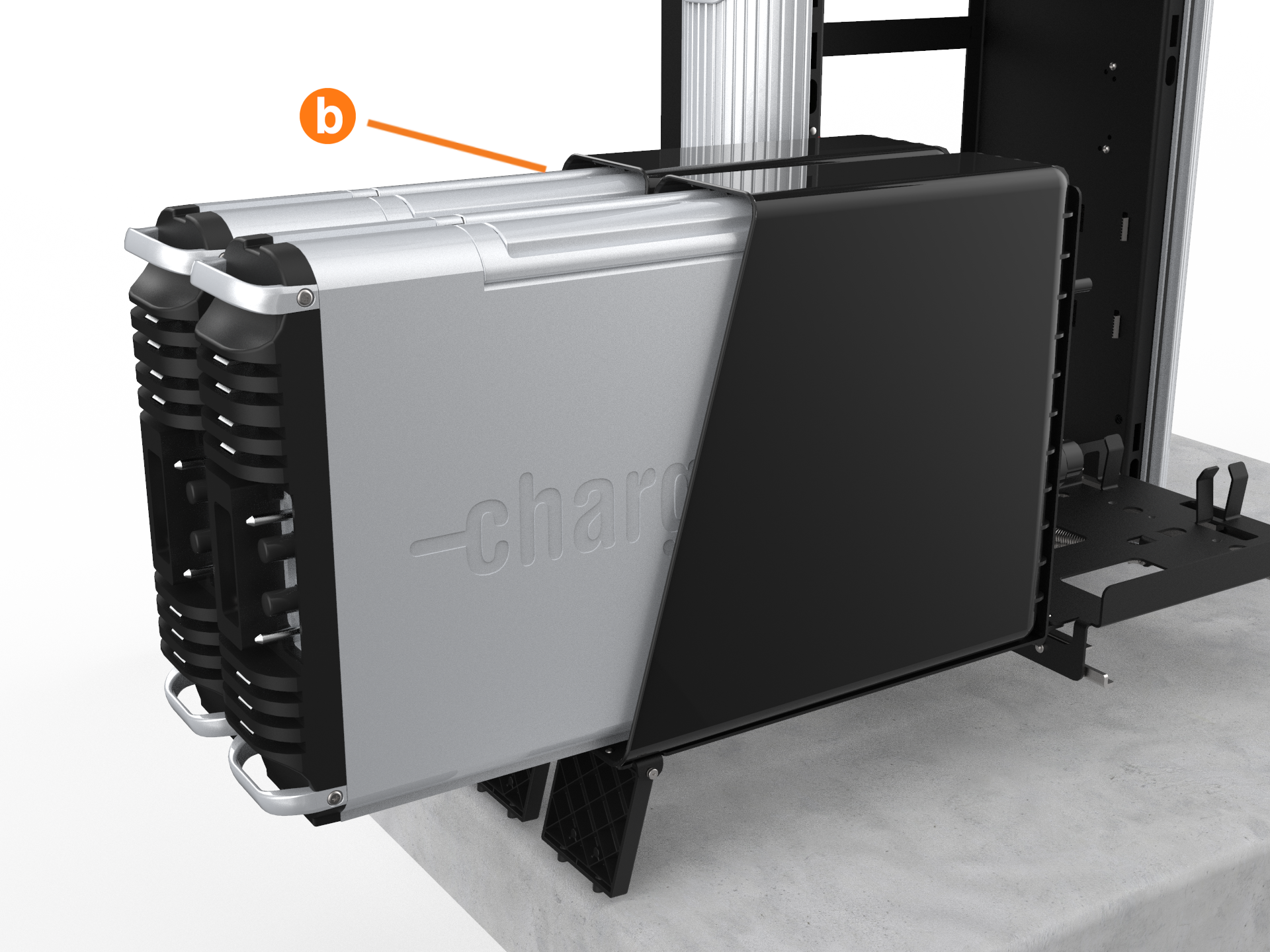
  1. Tilt both Power Module holders down to the ground and rest them on their kickstands (highlighted).

  2. The kickstands must rest on a surface that is level with the bottom of the station.
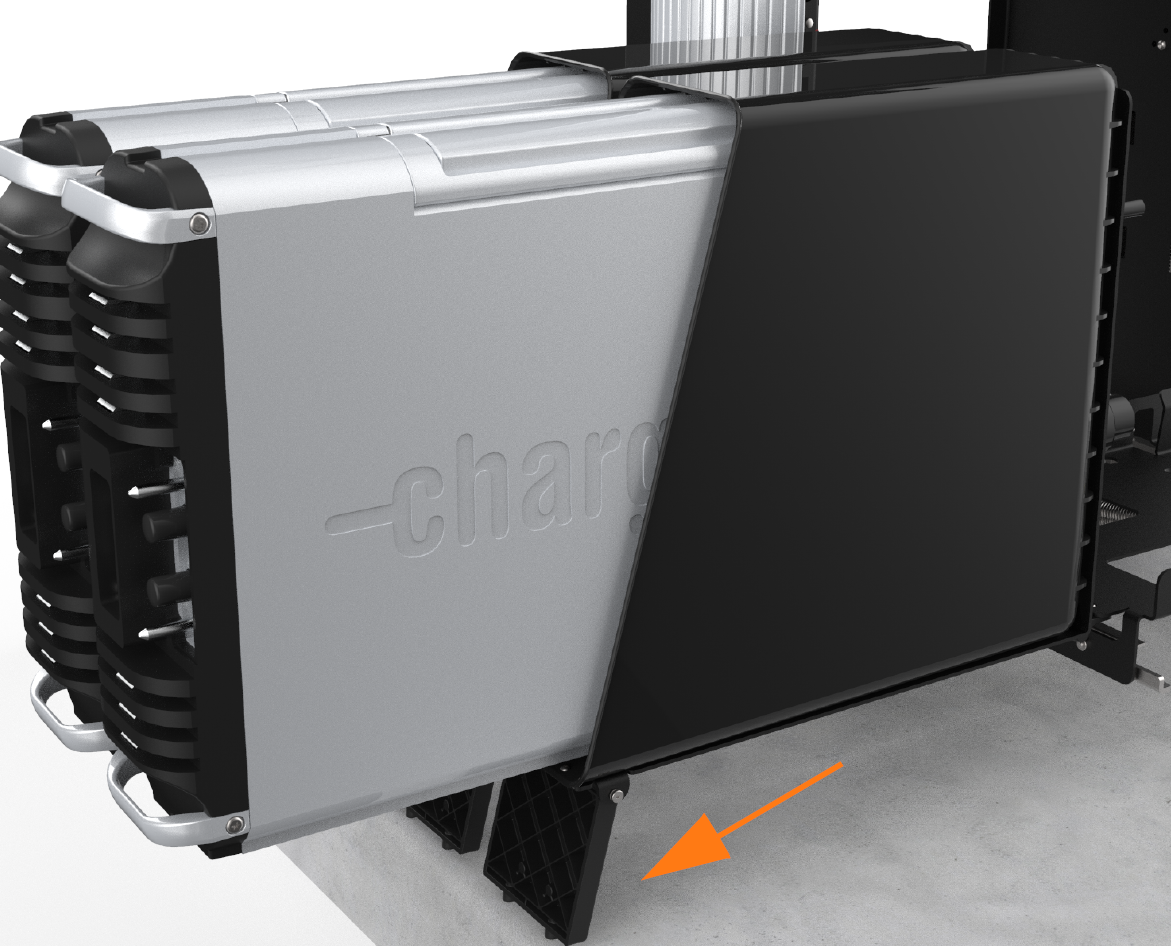
  3. To remove a Power Module, slide it partially out of its holder until the handles can be lifted to remove it completely.

Install the Power Module

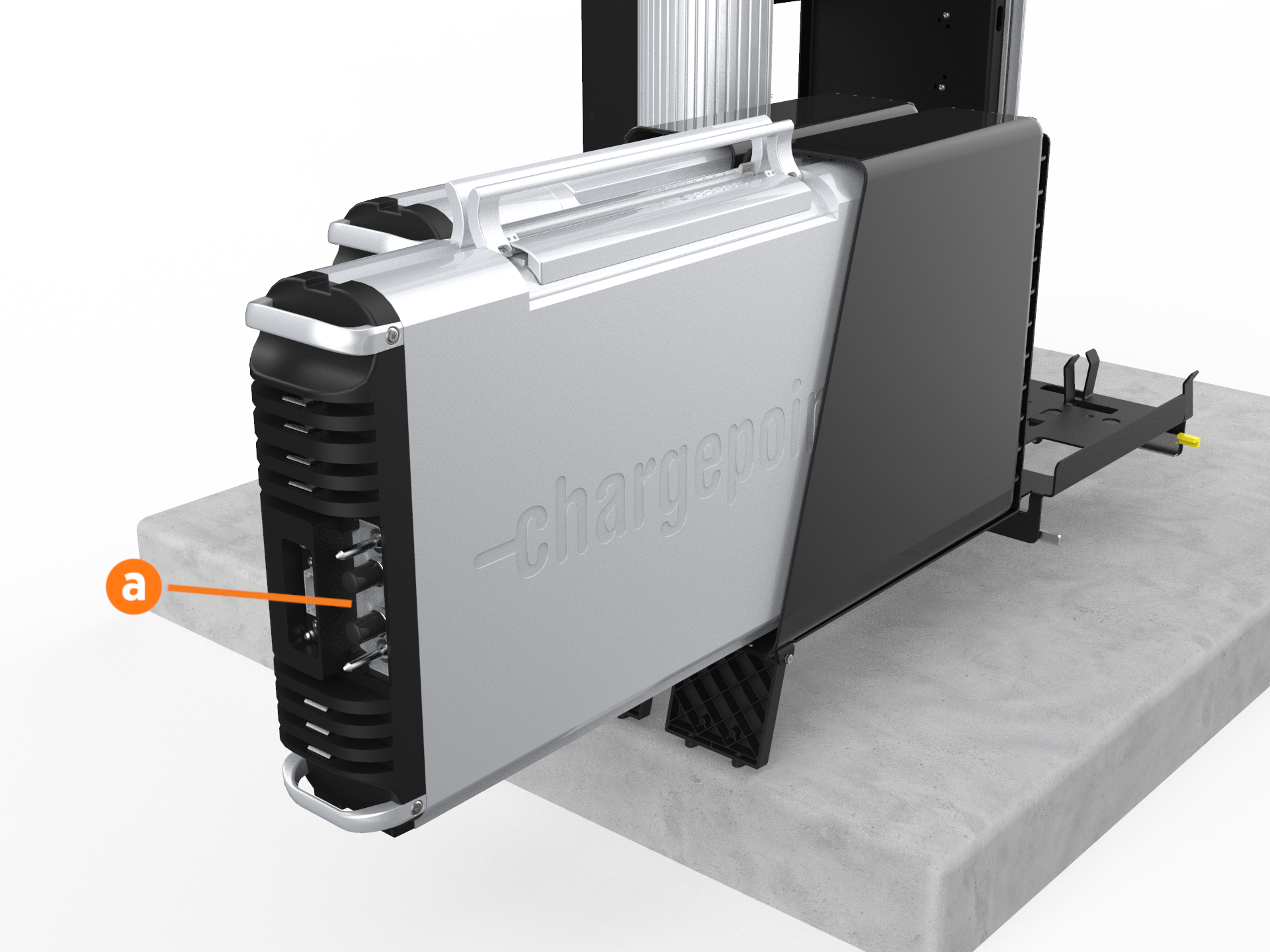
  1. Install the rear Power Module first. Using two people, lift the Power Module by its top handles and gently slide it into its holder with its connections facing outward (a).

  2. If only one Power Module is being installed, it must be installed in the rear holder (b).

  3. Once the Power Module is positioned partially inside its holder, fold the handles down to slide it in completely.

  4. Repeat the step for the second Power Module if applicable.

  5. Lift each Power Module to the upright position one at a time.

  6. If ground straps are present:

    1. Use a T25 Torx and four M5 screws to attach a ground stud bracket to each side of each Power Module (two brackets and eight screws per Power Module).

    2. Use an 8 mm (5/16 in) nut driver, two M5 nuts, and two M5 washers to reattach each ground strap to the ground studs on the sides of both Power Modules.

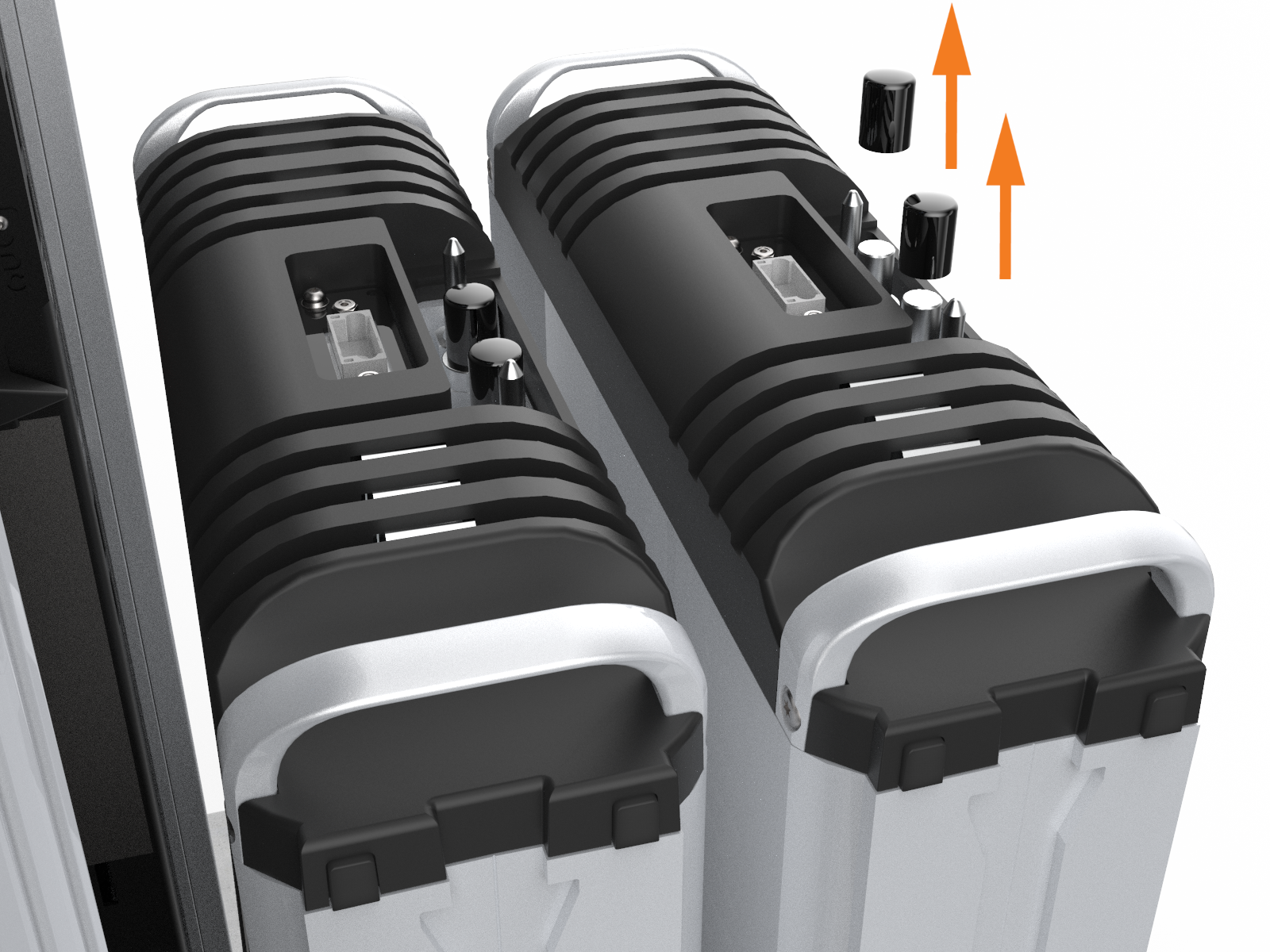
  7. If not already done, remove the safety caps from the coolant ports.

  8. At the bottom right of the Express 250, press and hold the yellow release latch while pushing the Power Module tray into the station until it locks into place.

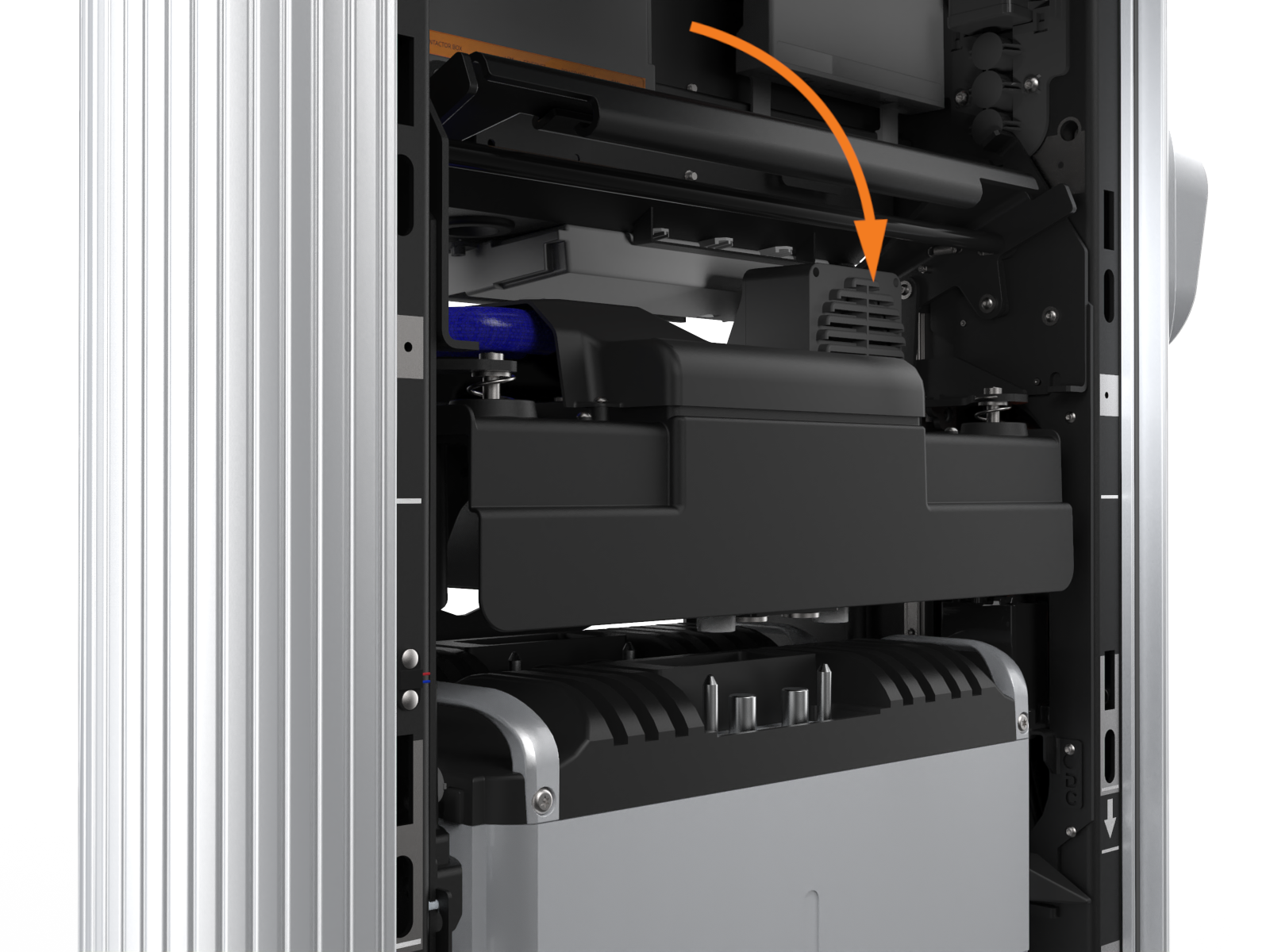
  9. Using two hands, squeeze the Power Module mechanism’s release bar and lower it halfway to check alignment with the ports and guide posts.

  10. Lower the Power Module mechanism until you hear a click as the mechanism locks into place. Ensure the mechanism is fully engaged with all Power Module connectors. The Power Module mechanism should fully cover the ridges on the Power Module’s top edge.

  11. If the mechanism does not engage, raise it again and push the Power Modules to the back of the station to realign, then try again. Do not apply excessive force.

REVERSE THE ABOVE STEPS TO REPLACE THE EMIClosed Electromagnetic Interference SHIELD (IF APPLICABLE), REAR PANELS, FRONT PANELS, LED DISPLAY, AND AREA LIGHT BAR.

Power On the Station

Once all cover panels are installed, power on the station. The on-screen Installation Wizard steps you through any required tasks to set up the station and verify that it can operate properly.

An Installation Wizard test checks that all cover panels are correctly installed and fully seated. Check the lower right corner of the screen for any error messages. If panel errors appear, match the panel letters to this illustration.

Labeled diagram of product, tools or parts.

(a) Front bottom panel

(b) Middle vent panel

(c) Front top panel

(d) LED display

(e) Area light bar

(f) Rear bottom panel

(g) Rear middle panel

(h) Rear top panel

(i) Left extrusion

(j) Right extrusion

RISK OF SHOCK. If a fault exists, turn the power off at the service panel to BOTH product paired charging stations during work and keep it off until all panels are reinstalled. Internal components can present a shock hazard. FAILURE TO FOLLOW THESE INSTRUCTIONS CAN RESULT IN SERIOUS INJURY OR LOSS OF LIFE.

If any panel needs re-installation, review the procedures above to double-check that all panels are fully seated and that the edges of all signs are captured fully by the panels around them. For further details, refer to Introduction.